Community listing page, reviews here may not be monitored by the author.
Sync Client Server (SCS)


No reviews yet
A mod that simplifies server management by keeping client mods and configs in sync with one in-game update button.
Community voices
Reviews
No reviews yet. Be the first to review this project!
Get it on
Available Platforms
Compatibility
Supported Environments
Must be installed on both the client and the server.
About
Project Details
For authors
Embed Badge
If you're the author of this project, you can embed a live badge anywhere that supports HTML or Markdown. It updates automatically whenever ratings change.
Use HTML for any page that supports it, or Markdown for README files and Markdown-based descriptions.
Identifiers
Platform IDs
About
Description
Sync Client Server (SCS)
Sync Client Server (SCS) is a mod designed to keep client mods and configurations synchronized with a server-provided modpack, reducing version mismatches and manual mod management.
With a single in-game Update button directly in the multiplayer server list, players can download the mods and configs required by the server in a simple and reliable way.
📸 Preview

🎯 Goal
SCS aims to simplify server administration and improve player experience by making modpack updates clear, predictable, and user-friendly, without requiring external launchers or manual file management.
✨ What SCS Can Do
- In-game Update button in the multiplayer server list
- Confirmation screen with update summary and Clear cache option
- modId-based synchronization to prevent duplicated or outdated mods
- Optional synchronization of
/configalongside/mods - Optional mirror mode for
/modsand/config - Server-enforced removal of specific client mods
- Per-server isolated cache
- Built-in lightweight file server to host
mods.zipandconfig.zip
⚠️ Important:
- Mod updates require a game restart to take effect
- Config updates do NOT require a restart and are applied immediately
🎮 Client Usage (Simple & Automatic)
The client workflow is intentionally minimal.
1️⃣ Add the server
- Add the server normally in the Multiplayer screen
- The Download URL field is automatically filled using the server address and port
- You may override it manually if needed
Example:
http://myserver.com:255662️⃣ Update the client
- Select the server in the list
- Click Update
- Review the summary and confirm
That’s it.
Restart the game only if mods were updated.
🧹 Clear Cache
Use Clear cache from the confirmation screen if:
- A download fails
- The client becomes out of sync
- ZIP contents changed but no update is triggered
- Other unexpected behaviors
Cache is isolated per server and safe to clear.
🖥️ Server Usage (Admin Guide)
1️⃣ Install and start
- Install SCS on the server
- Start the server once to generate the config file
2️⃣ Common Configuration
Config file:
config/scs-common.tomlDefault values:
fileServerPort = 25566
updateConfig = true
mirrorMods = false
mirrorConfig = false
Explanation:
fileServerPort
Port used by the built-in file server (default:25566)updateConfig
Enables client config updates (enabled by default)mirrorMods/mirrorConfig
Disabled by default. When enabled, client folders are forced to exactly match the ZIP files
Because updateConfig is enabled by default, server admins can push new configuration changes to clients, such as enabling or disabling mirror options.
3️⃣ Creating the update packages
Option A: Using in-game commands
On the server, run:
/scs save-mods
/scs save-config
This generates:
mods.zipconfig.zip
Option B: Manual ZIP creation (advanced / recommended for control)
Admins may manually create or edit:
mods.zipconfig.zip
This allows:
- Shipping only specific mods or configs
- Full control over update contents
Both methods are fully supported.
4️⃣ Removing client mods (server-enforced)
To force the removal of specific client mods:
- Create a file named:
modsToRemoveFromTheClient.json- Place it inside
mods.zip - List the
.jarfilenames to remove
Example:
[
  "examplemod1.jar",
  "examplemod2.jar"
]
These mods will be deleted from the client during the update.
5️⃣ Built-in File Server
When the server is running, SCS automatically hosts:
mods.zipconfig.zip
On:
<server-ip>:fileServerPortDefault:
<server-ip>:25566No external web server is required.
📦 Modpack Usage
Feel free to include this mod in your modpack — credits are appreciated but not required.
❤️ Credits & Fork Notice
This project is a fork of the mod MMMMM by Place-Boy.
Original project: https://www.curseforge.com/minecraft/mc-mods/mmmmm
All credit for the original concept and foundation goes to the original author.
Sync Client Server (SCS)
Sync Client Server (SCS) is a mod designed to keep client mods and configurations synchronized with a server-provided modpack, reducing version mismatches and manual mod management.
With a single in-game Update button directly in the multiplayer server list, players can download the mods and configs required by the server in a simple and reliable way.
📸 Preview
🎯 Goal
SCS aims to simplify server administration and improve player experience by making modpack updates clear, predictable, and user-friendly, without requiring external launchers or manual file management.
✨ What SCS Can Do
- In-game Update button in the multiplayer server list
- Confirmation screen with update summary and Clear cache option
- modId-based synchronization to prevent duplicated or outdated mods
- Optional synchronization of
/configalongside/mods - Optional mirror mode for
/modsand/config - Server-enforced removal of specific client mods
- Per-server isolated cache
- Built-in lightweight file server to host
mods.zipandconfig.zip
⚠️ Important:
- Mod updates require a game restart to take effect
- Config updates do NOT require a restart and are applied immediately
🎮 Client Usage (Simple & Automatic)
The client workflow is intentionally minimal.
1️⃣ Add the server
- Add the server normally in the Multiplayer screen
- The Download URL field is automatically filled using the server address and port
- You may override it manually if needed
Example:
http://myserver.com:25566
2️⃣ Update the client
- Select the server in the list
- Click Update
- Review the summary and confirm
That’s it.
Restart the game only if mods were updated.
🧹 Clear Cache
Use Clear cache from the confirmation screen if:
- A download fails
- The client becomes out of sync
- ZIP contents changed but no update is triggered
- Other unexpected behaviors
Cache is isolated per server and safe to clear.
🖥️ Server Usage (Admin Guide)
1️⃣ Install and start
- Install SCS on the server
- Start the server once to generate the config file
2️⃣ Common Configuration
Config file:
config/scs-common.toml
Default values:
fileServerPort = 25566
updateConfig = true
mirrorMods = false
mirrorConfig = false
Explanation:
fileServerPort
Port used by the built-in file server (default:25566)updateConfig
Enables client config updates (enabled by default)mirrorMods/mirrorConfig
Disabled by default. When enabled, client folders are forced to exactly match the ZIP files
Because updateConfig is enabled by default, server admins can push new configuration changes to clients, such as enabling or disabling mirror options.
3️⃣ Creating the update packages
Option A: Using in-game commands
On the server, run:
/scs save-mods
/scs save-config
This generates:
mods.zipconfig.zip
Option B: Manual ZIP creation (advanced / recommended for control)
Admins may manually create or edit:
mods.zipconfig.zip
This allows:
- Shipping only specific mods or configs
- Full control over update contents
Both methods are fully supported.
4️⃣ Removing client mods (server-enforced)
To force the removal of specific client mods:
- Create a file named:
modsToRemoveFromTheClient.json
- Place it inside
mods.zip - List the
.jarfilenames to remove
Example:
[
  "examplemod1.jar",
  "examplemod2.jar"
]
These mods will be deleted from the client during the update.
5️⃣ Built-in File Server
When the server is running, SCS automatically hosts:
mods.zipconfig.zip
On:
<server-ip>:fileServerPort
Default:
<server-ip>:25566
No external web server is required.
📦 Modpack Usage
Feel free to include this mod in your modpack — credits are appreciated but not required.
❤️ Credits & Fork Notice
This project is a fork of the mod MMMMM by Place-Boy.
Original project: https://www.curseforge.com/minecraft/mc-mods/mmmmm
All credit for the original concept and foundation goes to the original author.
Screenshots
Gallery
-
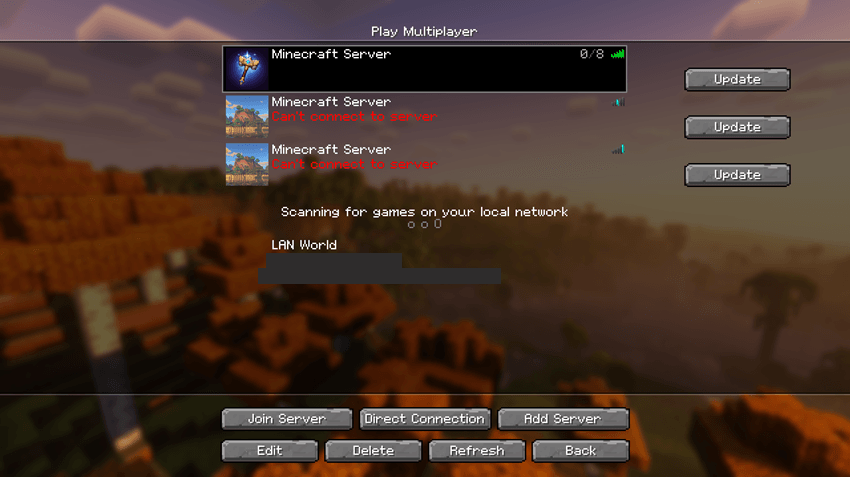 In-game printscreen
Versions
Files
Relations
Project Relations
More like this
Similar Mods
Suggestions use data such as tags, dependencies, dependents, descriptions, titles, and more to rank how much they overlap with this mod.
On ModDex
Community snapshot
By the numbers
Statistics
Want to reach Minecraft players?
We're looking for a server hosting partner to feature here and other parts of the site. Interested? Send us a message!
Get in touchGet it on
Available Platforms
On ModDex
Community snapshot
By the numbers