Community listing page, reviews here may not be monitored by the author.
Tab Gamemodes


No reviews yet
Shows player gamemodes in tablist.
Community voices
Reviews
No reviews yet. Be the first to review this project!
Get it on
Available Platforms
Compatibility
Supported Environments
Runs entirely on the client. Works on vanilla servers.
About
Project Details
For authors
Embed Badge
If you're the author of this project, you can embed a live badge anywhere that supports HTML or Markdown. It updates automatically whenever ratings change.
Use HTML for any page that supports it, or Markdown for README files and Markdown-based descriptions.
Identifiers
Platform IDs
Resources
External Links
About
Description
✨ Tab Gamemode
Have you ever suspected that your friends are sneaking into Creative mode on your SMP? Or maybe you want to expose a shady server admin? Then this mod is exactly what you need!
Introducing: TAB Gamemodes!
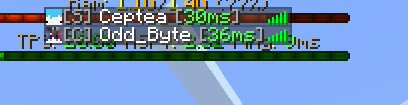
With this mod, you can instantly see every player’s gamemode directly in the tab list.
For example, here’s how a player in Survival would appear:
-
[A]for Adventure -
[C]for Creative -
[S]for Survival -
[Sp]for Spectator
⚠️ Important: Using this mod will remove all rank prefixes and color formatting from player names. That means ranks won’t be visible while the mod is active. You can toggle it on or off with the middle mouse button, and the keybind can be changed in Minecraft’s control settings.
By Leboss1200
TabGamemode
Have you ever had the suspicion that your friends are going into creative in your SMP? Want to bust a corrupt server admin? Well, do I got the mod for you!
Introducing: TAB Gamemodes!
This mod allows you to see all player's gamemodes in the tablist!
Here is an example of someone in survival:

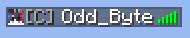
The gamemodes are: [A] for adventure, [C] For creative, [S] for survival, and [Sp] for spectator!
IMPORTANT:
This WILL delete all rank prefixes / color applied to the player. This means you will not be able to see any ranks with this mod enabled. This mod can be toggled by clicking the middle mouse button. You can rebind this in minecraft's controls menu.
Made by oddbyte
Screenshots
Gallery
Versions
Files
Relations
Project Relations
More like this
Similar Mods
Suggestions use data such as tags, dependencies, dependents, descriptions, titles, and more to rank how much they overlap with this mod.
On ModDex
Community snapshot
By the numbers
Statistics
Want to reach Minecraft players?
We're looking for a server hosting partner to feature here and other parts of the site. Interested? Send us a message!
Get in touchGet it on
Available Platforms
On ModDex
Community snapshot
By the numbers
Statistics
Resources