Community listing page, reviews may not be monitored by the author.
Target HUD (by finnikks)

No reviews yet
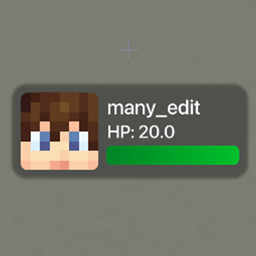
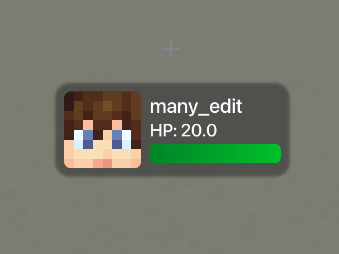
Modern frosted-glass TargetHUD with GLSL shaders, halo shadow, dual gradient health bars, and Hit/Aim modes.

Community voices
Reviews
No reviews yet. Be the first to review this project!
Get it on
Available Platforms
About
Project Details
For authors
Embed Badge
If you're the author of this project, you can embed a live badge anywhere that supports HTML or Markdown. It updates automatically whenever ratings change.
Use HTML for any page that supports it, or Markdown for README files and Markdown-based descriptions.
Identifiers
Platform IDs
Resources
External Links
About
Description
# 🌟 Target HUD (by finnikks)
**Target HUD** is a modern, high-performance TargetHUD mod for Minecraft Fabric 1.21.11. Designed with custom **GLSL hardware shaders**, it brings an aesthetic frosted dark-glass card, ambient halo drop shadows, smooth spring animations, dual gradient health bars, and an in-game drag-and-drop editor.
---
## ✨ Features
- 💎 **Frosted Dark-Glass Aesthetic**: Real-time multi-pass Gaussian background blur powered by custom GLSL post-processing shaders and soft SDF ambient halo drop shadows.
- 🎯 **Dual Trigger Modes (Hit & Aim)**:
- **Hit Mode (On Attack)**: Automatically displays upon striking **Players**, **Animals / Passive Mobs**, or **Monsters / Hostiles** (defaults to 3.0 seconds after last hit).
- **Aim Mode (On Hover)**: TargetHUD displays smoothly when looking/aiming your crosshair at an entity without needing to hit it!
- **Both Mode**: Combines instant aim detection with persistent on-hit tracking.
- 💚 **Dual Emerald & Gold Health Bar**:
- Emerald green gradient for base health (0 -> 20 HP).
- Warm golden overlay gradient for absorption hearts (Golden Apples, Absorption potions).
- Accurate numerical HP display (HP: 20.0).
- 👤 **Rounded Entity Head & Avatars**:
- Dynamic rounded avatar with damage hurt-tint effect.
- Automatically renders player skin layers (base head + outer hat overlay).
- Custom fallback icon for animals and hostile mobs.
- ⚙️ **In-Game Drag & Drop GUI**:
- Press **H** (customizable in Controls) or type `/finnikkshud` to open the configuration screen.
- Simply **click and drag** the TargetHUD anywhere on your screen.
- Switch trigger modes (`Hit`, `Aim`, `Both`) with a single click.
- Live preview with real-time scaling and toggle controls.
- ⚡ **Zero Lag & Maximum FPS**:
- Submits single batched quads directly to Minecraft's GPU Render Pipeline.
- High-precision 4x supersampled font rasterization with zero bilinear halos.
---
## 🎮 Controls & Commands
- **Open Config GUI**: Press **H** (rebindable in Options -> Controls -> Key Binds)
- **Reposition HUD**: Left-click and drag the HUD card inside the config screen
### Chat Commands:
- `/finnikkshud` or `/fhud` — Opens the interactive settings GUI.
- `/finnikkshud mode hit` — Enables Hit-only trigger mode.
- `/finnikkshud mode aim` — Enables Aim-only (crosshair hover) trigger mode.
- `/finnikkshud mode both` — Enables both Hit and Aim triggers.
- `/finnikkshud duration <seconds>` — Sets the display timeout (e.g. `/finnikkshud duration 4.5`).
- `/finnikkshud toggle` — Toggles the TargetHUD on or off.
---
## 📋 Requirements
- **Minecraft Version**: `1.21.11`
- **Mod Loader**: `Fabric Loader 0.20.1+` (or 0.16+)
- **Fabric API**: Required
- **Java**: `Java 21`
Screenshot:
Screenshots
Gallery
Versions
Files
Relations
Project Relations
More like this
Similar Mods
Suggestions use data such as tags, dependencies, dependents, descriptions, titles, and more to rank how much they overlap with this mod.
On ModDex
Community snapshot
By the numbers
Statistics

Get it on
Available Platforms
On ModDex
Community snapshot
By the numbers
Statistics
Resources