Community listing page, reviews here may not be monitored by the author.
TeamPins - FTB Teams Map Integration

No reviews yet
Sync FTB Teams pins and claims instantly across JourneyMap and Xaero's maps, with owner and claim-age details.
Community voices
Reviews
No reviews yet. Be the first to review this project!
Get it on
Available Platforms
About
Project Details
For authors
Embed Badge
If you're the author of this project, you can embed a live badge anywhere that supports HTML or Markdown. It updates automatically whenever ratings change.
Use HTML for any page that supports it, or Markdown for README files and Markdown-based descriptions.
Identifiers
Platform IDs
Resources
External Links
About
Description
TeamPins
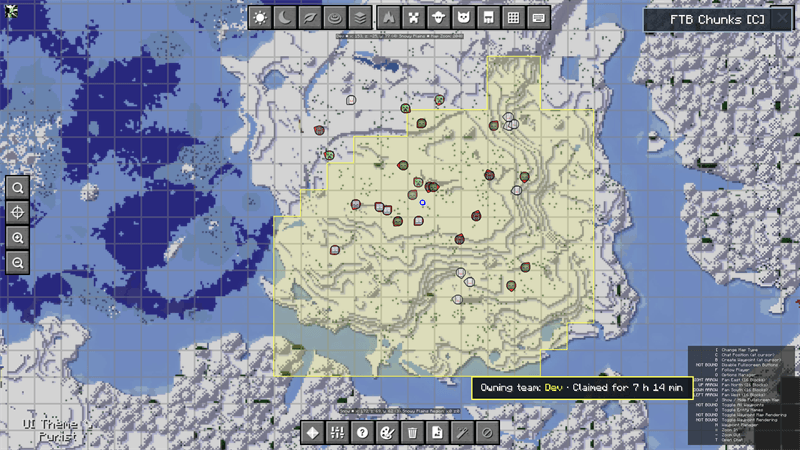
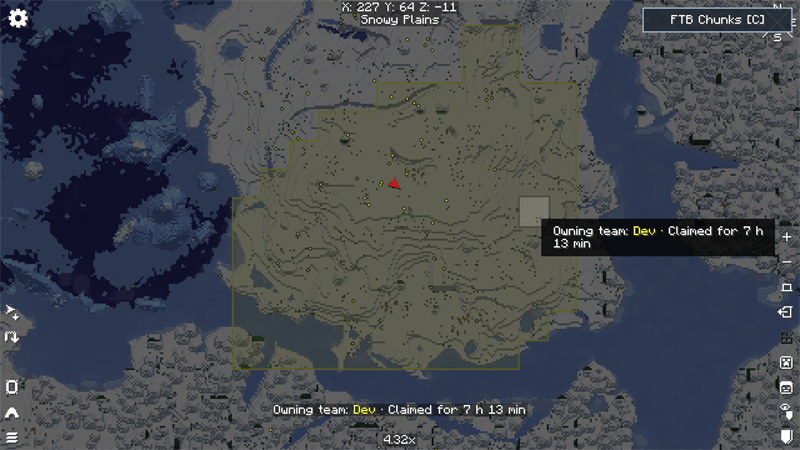
TeamPins connects FTB Teams and FTB Chunks with JourneyMap and Xaero's maps.
Share persistent pins with your entire FTB team, display claimed territories directly on your preferred map, and keep team colors and claim changes synchronized instantly.
Screenshots
JourneyMap
Xaero's World Map
Features
- Shared and persistent map pins for every member of an FTB team
- Full support for both JourneyMap and Xaero's maps
- FTB Chunks territories displayed as clean, continuous areas
- Instant claim, unclaim, and team-color updates
- Claim information showing the owning team and claim age
- Force-loaded chunks displayed with a stronger overlay
- Live teammates and mutual allies on JourneyMap
- Direct FTB Chunks button on the JourneyMap and Xaero fullscreen maps
- Press C from either supported map to open the FTB Chunks claim manager
- Server-side team permissions for creating and removing pins
- Lightweight integration with no custom blocks, items, models, or textures
Supported Maps
TeamPins supports:
- JourneyMap 6.0.x
- Xaero's Minimap
- Xaero's World Map
Players only need to install the map integration they want to use.
Commands
/teampins add <name>— Create a team pin at your current position/teampins list— List every pin owned by your team/teampins remove <uuid>— Remove one pin/teampins clear— Remove every pin owned by your team/teampins sync— Request an immediate synchronization
Pin creation and removal permissions are validated by the server. Team owners and officers can manage their team's shared pins.
Requirements
- Minecraft 1.21.1
- NeoForge
- FTB Teams
- FTB Library
- Architectury API
Optional Integrations
- FTB Chunks — Required for claim and force-loaded chunk overlays
- JourneyMap — JourneyMap integration
- Xaero's Minimap — Shared pins and player tracking
- Xaero's World Map — Fullscreen Xaero map integration
TeamPins can be installed on a server without JourneyMap or Xaero. Each player can use their preferred supported map.
Compatibility
TeamPins automatically prevents duplicate claim overlays or player markers when compatible integration mods are already installed.
Claim privacy is inherited from FTB Chunks. TeamPins only displays information that FTB Chunks has already synchronized with the player.
Installation
- Install NeoForge for Minecraft 1.21.1.
- Install TeamPins and its required dependencies.
- Install JourneyMap or Xaero's maps.
- Install FTB Chunks if you want claimed territories to appear on the maps.
- Install TeamPins on both the server and participating clients.
License
TeamPins is released under the MIT License.
TeamPins is an unofficial community addon and is not affiliated with Feed The Beast, TeamJM, or Xaero.
Screenshots
Gallery
Versions
Files
Relations
Project Relations
More like this
Similar Mods
Suggestions use data such as tags, dependencies, dependents, descriptions, titles, and more to rank how much they overlap with this mod.
On ModDex
Community snapshot
By the numbers
Statistics
Want to reach Minecraft players?
We're looking for a server hosting partner to feature here and other parts of the site. Interested? Send us a message!
Get in touchGet it on
Available Platforms
On ModDex
Community snapshot
By the numbers
Statistics
Resources