
Community listing page, reviews here may not be monitored by the author.
Teleporters!

No reviews yet
This mod adds Teleporters that you can use to get around places faster.
Community voices
Reviews
No reviews yet. Be the first to review this project!
Get it on
Available Platforms
Compatibility
Supported Environments
Must be installed on both the client and the server.
About
Project Details
For authors
Embed Badge
If you're the author of this project, you can embed a live badge anywhere that supports HTML or Markdown. It updates automatically whenever ratings change.
Use HTML for any page that supports it, or Markdown for README files and Markdown-based descriptions.
Identifiers
Platform IDs
Resources
External Links
About
Description
This mod adds Teleporters that you can use to get around places way faster, and Telegems that you can use to link Teleporters.
You can link them by SHIFT + Right clicking a Teleporter using a Telegem, and putting the telegem in a different Teleporter by right-clicking the Teleporter to open up its UI and putting the Telegem in it.
You can teleport using a Teleporter by standing on a (linked) Teleporter for 4 seconds, and there are also 4 achievements to get.
You can also see the distance between the Teleporter that the Telegem is in and the Teleporter it's linked to in the UI of the Teleporter, and you can see the destination above the Teleporter if the Telegem inside of it is linked to another Teleporter. It also shows a custom name if you rename the Telegem in an anvil.
You can change the color of the text above the Teleporter by going into the Teleporter's UI and clicking the brush icon and choosing between any of the 10 colors. You can also enable / disable the Teleporter by toggling the checkbox in the top left corner of the UI, and it will also show if it's enabled / disabled in the text above the Teleporter.
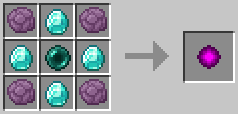
To craft a Telegem, you must arrange these items in a crafting table like this:
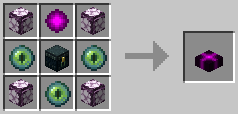
And to craft a Teleporter, you must arrange these items in a crafting table like this:
Here's a tutorial for the Teleporters mod if you need more details.
I am not planning on making this mod for any other versions of Minecraft, it will most likely stay for 1.20.1 forge.
There might still be bugs in this mod, and if there are or you have ideas for the mod, please tell me on Discord. (@mikan_gaming)
Screenshots
Gallery
-
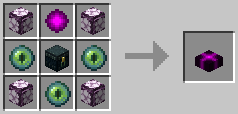 Teleporter crafting recipe
 -
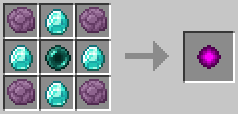 Telegem crafting recipe
 -
 Teleporter item
 -
 Telegem item
 -
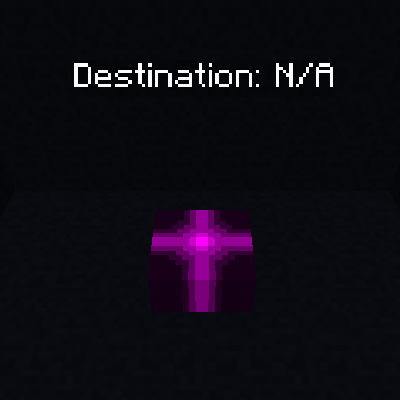 Teleporter
 -
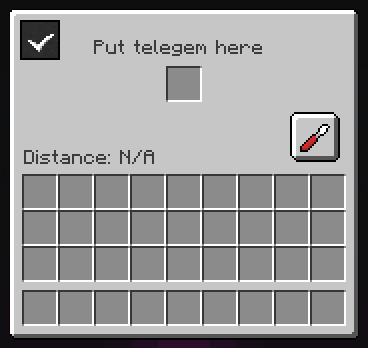 Teleporter UI
 -
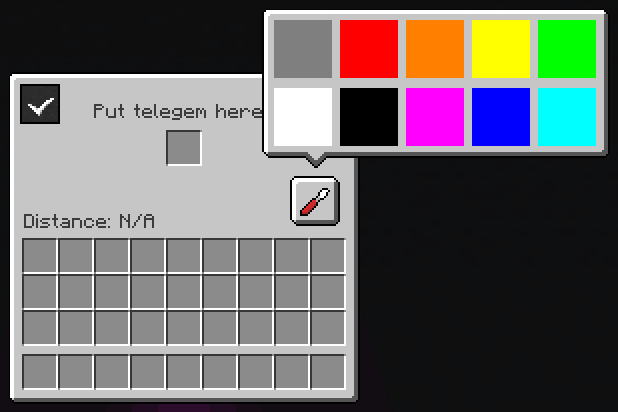 Teleporter UI with color picker open
Versions
Files
Relations
Project Relations
More like this
Similar Mods
Suggestions use data such as tags, dependencies, dependents, descriptions, titles, and more to rank how much they overlap with this mod.
On ModDex
Community snapshot
By the numbers
Statistics

Want to reach Minecraft players?
We're looking for a server hosting partner to feature here and other parts of the site. Interested? Send us a message!
Get in touchGet it on
Available Platforms
On ModDex
Community snapshot
By the numbers
Statistics
Resources