
Community listing page, reviews here may not be monitored by the author.
Tester Mod


No reviews yet
A damage testing tool for mod developers - spawn configurable tester entities to track and analyze damage output in real-time.
Community voices
Reviews
No reviews yet. Be the first to review this project!
Get it on
Available Platforms
Compatibility
Supported Environments
Must be installed on both the client and the server.
About
Project Details
For authors
Embed Badge
If you're the author of this project, you can embed a live badge anywhere that supports HTML or Markdown. It updates automatically whenever ratings change.
Use HTML for any page that supports it, or Markdown for README files and Markdown-based descriptions.
Identifiers
Platform IDs
Resources
External Links
About
Description
Tester Mod - Damage Testing Tool for Minecraft
Tester Mod provides configurable damage testing entities for Minecraft NeoForge 1.21.1, perfect for mod developers and players who want to analyze damage mechanics.
Key Features:
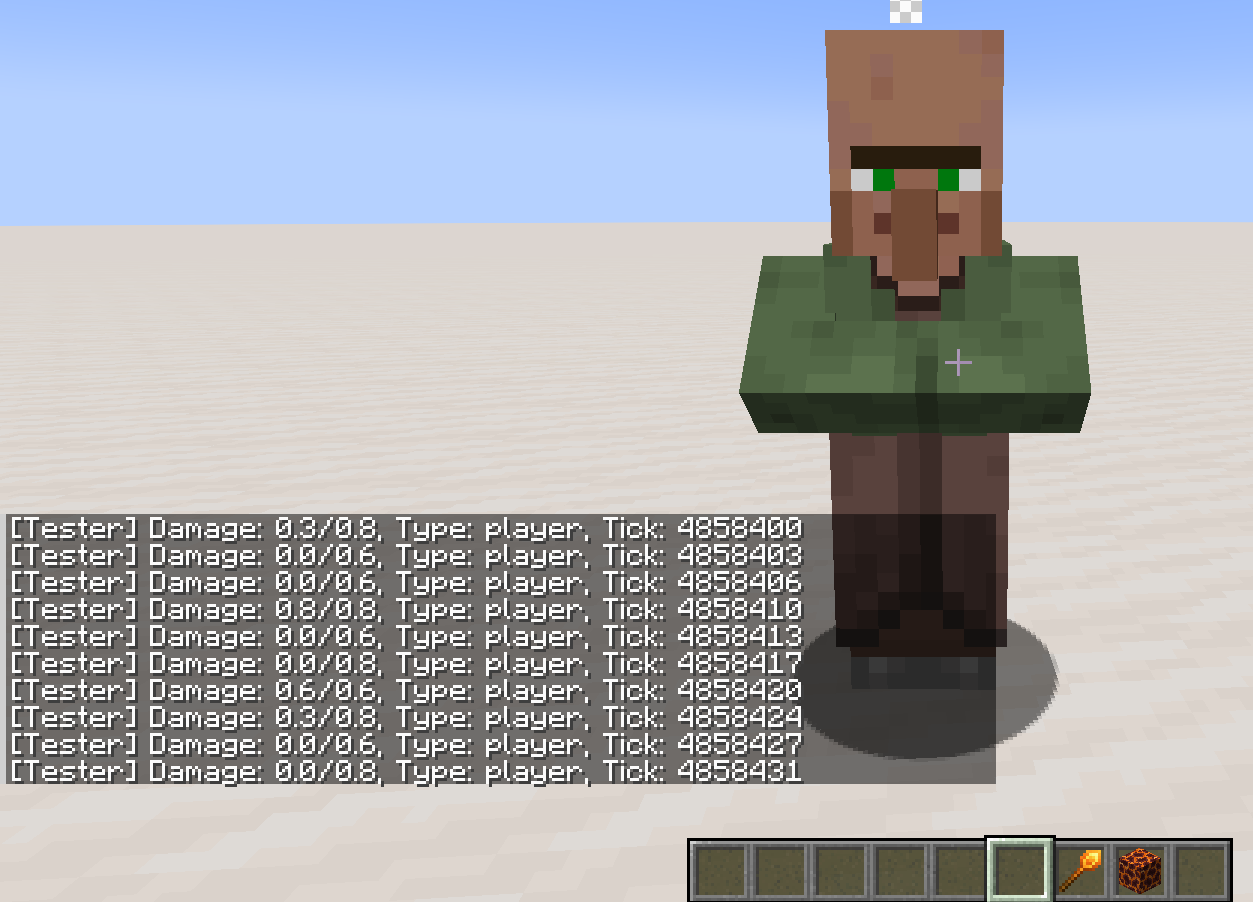
- Advanced Damage Tracking: Spawn stationary tester entities that output detailed damage information in real-time, including raw damage, post-armor/resistance damage, and post-invulnerability damage.
- Player Tester Mode: Players can now act as testers by right-clicking air with the Tester Setter to output damage they receive.
- New Damage Output Format:
[Entity Name] Damage: [Post-Mitigation Damage]/[Post-Invulnerability Damage]/[Raw Damage], Type: [Damage Type], Tick: [Game Tick] - Full Tester Configuration: Right-click a tester with the Tester Setter to open a GUI for configuring armor value, toughness, max health, knockback toggle, and whether to show zero-damage entries.
- Player Tester Settings: Shift + right-click to configure invincibility toggle and zero-damage display.
- Multi-Tester Support: Each tester displays its name prefix in damage output, allowing easy identification when testing with multiple entities.
- Fire Resistance Integration: Testers with Fire Resistance effect automatically ignore fire-type damage.
- Clean UI: Damage information appears as system messages, keeping the chat clean and focused.
How to Use:
- Obtain the Tester Setter from the Tools creative tab or with
/give @s tester_mod:tester_setter - Right-click a block to spawn a tester entity
- Attack the tester to see damage output
- Right-click the tester to open configuration GUI
- Right-click air with the Tester Setter to enable Player Tester mode
- Shift + Right-click air to configure Player Tester settings
Commands:
/removetester- Remove your testers/removetester all- Remove all testers
Damage Output Format:
[Tester]: 2.0/2.5/8.0, Type: player, Tick: 54321Perfect for:
- Testing custom weapon damage
- Debugging combat systems
- Balancing modded content
Usage Notes:
- Optimized for NeoForge 1.21.1
- Open source with MIT license
Tester Mod - Damage Testing Tool for Minecraft
Tester Mod provides configurable damage testing entities for Minecraft NeoForge 1.21.1, perfect for mod developers and players who want to analyze damage mechanics.
Key Features:
- Advanced Damage Tracking: Spawn stationary tester entities that output detailed damage information in real-time, including raw damage, post-armor/resistance damage, and post-invulnerability damage.
- Player Tester Mode: Players can now act as testers by right-clicking air with the Tester Setter to output damage they receive.
- New Damage Output Format:
[Entity Name] Damage: [Post-Mitigation Damage]/[Post-Invulnerability Damage]/[Raw Damage], Type: [Damage Type], Tick: [Game Tick] - Full Tester Configuration: Right-click a tester with the Tester Setter to open a GUI for configuring armor value, toughness, max health, knockback toggle, and whether to show zero-damage entries.
- Player Tester Settings: Shift + right-click to configure invincibility toggle and zero-damage display.
- Multi-Tester Support: Each tester displays its name prefix in damage output, allowing easy identification when testing with multiple entities.
- Fire Resistance Integration: Testers with Fire Resistance effect automatically ignore fire-type damage.
- Clean UI: Damage information appears as system messages, keeping the chat clean and focused.
How to Use:
- Obtain the Tester Setter from the Tools creative tab or with
/give @s tester_mod:tester_setter - Right-click a block to spawn a tester entity
- Attack the tester to see damage output
- Right-click the tester to open configuration GUI
- Right-click air with the Tester Setter to enable Player Tester mode
- Shift + Right-click air to configure Player Tester settings
Commands:
/removetester- Remove your testers/removetester all- Remove all testers
Damage Output Format:
[Tester]: 2.0/2.5/8.0, Type: player, Tick: 54321
Perfect for:
- Testing custom weapon damage
- Debugging combat systems
- Balancing modded content
Usage Notes:
- Optimized for NeoForge 1.21.1
- Open source with MIT license
Screenshots
Gallery
Versions
Files
Relations
Project Relations
More like this
Similar Mods
Suggestions use data such as tags, dependencies, dependents, descriptions, titles, and more to rank how much they overlap with this mod.
On ModDex
Community snapshot
By the numbers
Statistics
Want to reach Minecraft players?
We're looking for a server hosting partner to feature here and other parts of the site. Interested? Send us a message!
Get in touchGet it on
Available Platforms
On ModDex
Community snapshot
By the numbers
Statistics
Resources