Community listing page, reviews may not be monitored by the author.
Thaumaturge Tweaks

No reviews yet
A quality-of-life addon mod for Thaumaturge.

Community voices
Reviews
No reviews yet. Be the first to review this project!
Get it on
Available Platforms
About
Project Details
For authors
Embed Badge
If you're the author of this project, you can embed a live badge anywhere that supports HTML or Markdown. It updates automatically whenever ratings change.
Use HTML for any page that supports it, or Markdown for README files and Markdown-based descriptions.
Identifiers
Platform IDs
Resources
External Links
About
Description
A quality-of-life addon mod for Thaumaturge.
It adds REI recipe/information support for Thaumaturge's crafting systems, container block scanning, Trinkets support for Thaumaturge accessories, and enhanced controls for the Research Table and Thaumatorium screens.
Features
REI Integration (Requires REI)
Adds full support for Thaumaturge content in Roughly Enough Items:
Container Scanning
- Use the Thaumometer on a container block to scan the block and every item inside it.
- Unlike the base mod, this also works when the container block has already been scanned, so items placed inside later can still be scanned.
- Requires the mod to be installed on both the client and the server.
Trinkets Support (Requires Trinkets)
Thaumaturge accessories now work when equipped in a Trinkets slot, not only in Curios — both accessory mods are checked, so you can keep using either one.
Research Table Controls
Quality-of-life enhancements for the Research Table:
- Scroll the aspect palette with the mouse wheel (hover over the palette) or the PageUp / PageDown / arrow keys.
- Drag-and-drop combining — drop one palette aspect onto another to combine them instantly; hold Shift to batch-combine up to 10 times (as many as your available materials allow).
- The aspect combination helper panel can be paged with the mouse wheel and closed with Backspace or the right mouse button.
- Right-click a placed aspect on the research hex grid to erase it (same as left-click erase).
Thaumatorium Controls
Quality-of-life controls for the Thaumatorium (automatic alchemy) screen:
- Mouse wheel over the recipe grid — previous/next page (same as clicking the up/down arrows)
- PageUp / PageDown or Up/Down arrow keys — previous/next page
Aspect Icons on Shift (Essentia Phial & Crystal Shards)
Hold Shift to see the actual aspect icon on certain aspect-carrying items (inspired by Thaumcraft Aspect Annotations; the render also borrows the material-preview style of Avaritia's singularity items):
- While Shift is held, Essentia Phials and Essentia Crystal Shards render as their contained aspect icon (including the aspect's color) instead of the phial/shard texture — in GUIs, in hand, as dropped items, and in REI entry panels.
- Releasing Shift restores the default item texture.
- Only these two items are affected; other items keep their normal rendering.
Credits
- Thaumaturge by Leclowndu93150 — the parent mod this addon extends.
- Thaumcraft Aspect Annotations by Aedial — the aspect icon display feature is inspired by and references this mod.
Authorization
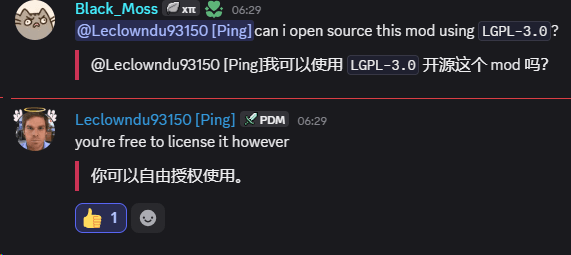
This mod is open-sourced with the author's permission.
License
Screenshots
Gallery
Versions
Files
Relations
Project Relations
More like this
Similar Mods
Suggestions use data such as tags, dependencies, dependents, descriptions, titles, and more to rank how much they overlap with this mod.
On ModDex
Community snapshot
By the numbers
Statistics
 (opens in a new tab)
Get it on
Available Platforms
On ModDex
Community snapshot
By the numbers
Statistics
Resources