Community listing page, reviews here may not be monitored by the author.
The Sequel Parrot


No reviews yet
Proudly bridging between Minecraft and Discord
Community voices
Reviews
No reviews yet. Be the first to review this project!
Get it on
Available Platforms
Compatibility
Supported Environments
Runs entirely on the server. Also works in singleplayer.
About
Project Details
For authors
Embed Badge
If you're the author of this project, you can embed a live badge anywhere that supports HTML or Markdown. It updates automatically whenever ratings change.
Use HTML for any page that supports it, or Markdown for README files and Markdown-based descriptions.
Identifiers
Platform IDs
About
Description
The Sequel Parrot
A sophisticated Minecraft server-side mod that bridges Minecraft chat and a Discord channel.
This was built for our SMP, but we decided to release it to the public.
Features
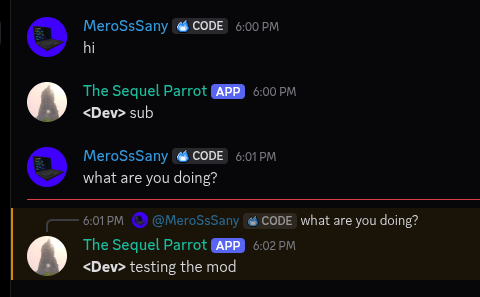
- Seamless Minecraft <-> Discord: Relays all messages smoothly between both platforms.
- Relay Deaths and Advancements: Broadcasts player deaths and earned achievements directly to Discord.
- Reply to Discord Messages: Clicking a Discord message in Minecraft chat autofills the
/replycommand. - Mention Discord Users: Use the
/mentioncommand or@discord_namedirectly in chat to ping users. - Custom Mention Messages: Trigger custom, role-specific notification templates when using
/mentionwithout a message payload. - Quark Compatibility: Seamlessly forwards shared items from Quark's Share Item feature to Discord.
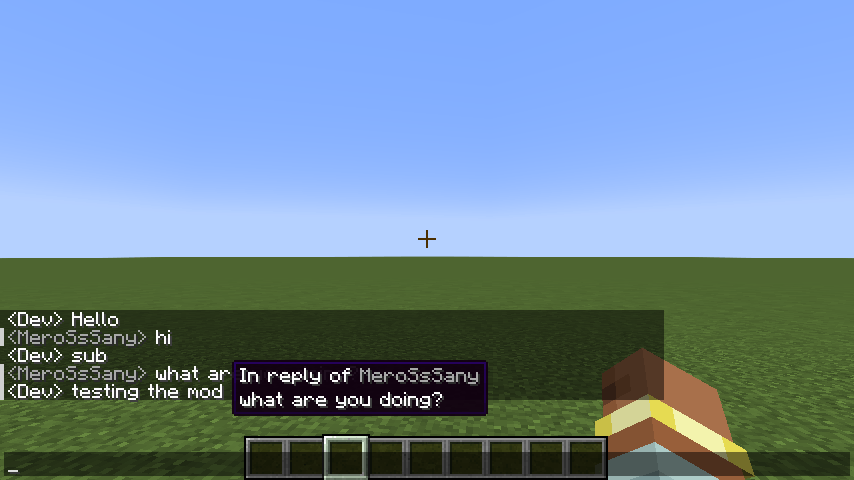
- Reply Context: Hover over mirrored Discord messages in Minecraft to see what message is being replied to.
- Anti-Mass Mention: Prevents spam by timing out and auto-kicking players who exceed configurable mention thresholds per minute.
- Anti-Clutter: Strips newlines from chat messages into single lines and prevents executed commands from leaking into the relay channel.
- Easy Mention: Click any Discord username in Minecraft chat to automatically prepare a
/mentioncommand.
Commands
Minecraft Commands
/reply <message_id> <message>- Replies to a specific Discord message by ID./mention <user_name> [message]- Pings a Discord user directly or sends a preset custom mention message.
Discord Commands
/ping- Checks bot responsiveness and latency./players- Displays a list of currently online Minecraft players./mention <role> <message>- Sets a custom mention template string for a specified role.
Custom Mention System
The default mention format is: (Minecraft) has mentioned you, (Discord).
Server admins or role holders can configure dynamic notification formats via Discord using /mention.
Placeholder Syntax
<@>- Replaced by the sender's Minecraft Username.(@)- Replaced by the recipient's Discord Display Name.
Examples
<@> has mentioned you, (@).Attention needed! <@> requests (@) for help!
Note: Custom mention templates are triggered when a player runs
/mention <user_name>without providing an extra message argument.
Setup Guide
1. Creating the Discord Bot
- Navigate to the Discord Developer Portal and create a new application.
- Customize your bot's name and avatar.
- Go to the Bot tab in the sidebar.
- Click Reset Token and copy your new bot token (keep this private).
- Scroll down to Privileged Gateway Intents and enable:
- Server Members Intent
- Message Content Intent
- Under Bot Permissions (or via the OAuth2 -> URL Generator with the
botscope), grant the following permissions:- Send Messages
- Manage Messages
- Embed Links
- Invite the bot to your Discord server.
2. Configuring the Mod
- Boot your Minecraft server once with the mod installed to generate configuration files.
- Open your server's
configfolder and locatemessager_bot-server.toml. - Open the file and paste your Bot Token into the designated field.
3. Binding the Discord Channel
- In Discord, open User Settings -> Developer.
- Enable Developer Mode.
- Right-click your desired chat relay channel in Discord and select Copy Channel ID.
- Paste the Channel ID into
messager_bot-server.toml. - Restart or reload your server.
Credits (The Sequel Team)
- MeroSsSany - Lead Developer
- Guardian - Security Tester
- Cattopy - Tester
- Sanys - Logo Design
The Sequel Parrot
A sophisticated Minecraft server-side mod that bridges Minecraft chat and a Discord channel.
This was built for our SMP, but we decided to release it to the public.
Features
- Seamless Minecraft <-> Discord: Relays all messages smoothly between both platforms.
- Relay Deaths and Advancements: Broadcasts player deaths and earned achievements directly to Discord.
- Reply to Discord Messages: Clicking a Discord message in Minecraft chat autofills the
/replycommand. - Mention Discord Users: Use the
/mentioncommand or@discord_namedirectly in chat to ping users. - Custom Mention Messages: Trigger custom, role-specific notification templates when using
/mentionwithout a message payload. - Quark Compatibility: Seamlessly forwards shared items from Quark's Share Item feature to Discord.
- Reply Context: Hover over mirrored Discord messages in Minecraft to see what message is being replied to.
- Anti-Mass Mention: Prevents spam by timing out and auto-kicking players who exceed configurable mention thresholds per minute.
- Anti-Clutter: Strips newlines from chat messages into single lines and prevents executed commands from leaking into the relay channel.
- Easy Mention: Click any Discord username in Minecraft chat to automatically prepare a
/mentioncommand.
Commands
Minecraft Commands
/reply <message_id> <message>- Replies to a specific Discord message by ID./mention <user_name> [message]- Pings a Discord user directly or sends a preset custom mention message.
Discord Commands
/ping- Checks bot responsiveness and latency./players- Displays a list of currently online Minecraft players./mention <role> <message>- Sets a custom mention template string for a specified role.
Custom Mention System
The default mention format is: (Minecraft) has mentioned you, (Discord).
Server admins or role holders can configure dynamic notification formats via Discord using /mention.
Placeholder Syntax
<@>- Replaced by the sender's Minecraft Username.(@)- Replaced by the recipient's Discord Display Name.
Examples
<@> has mentioned you, (@).Attention needed! <@> requests (@) for help!
Note: Custom mention templates are triggered when a player runs
/mention <user_name>without providing an extra message argument.
Setup Guide
1. Creating the Discord Bot
- Navigate to the Discord Developer Portal and create a new application.
- Customize your bot's name and avatar.
- Go to the Bot tab in the sidebar.
- Click Reset Token and copy your new bot token (keep this private).
- Scroll down to Privileged Gateway Intents and enable:
- Server Members Intent
- Message Content Intent
- Under Bot Permissions (or via the OAuth2 -> URL Generator with the
botscope), grant the following permissions:- Send Messages
- Manage Messages
- Embed Links
- Invite the bot to your Discord server.
2. Configuring the Mod
- Boot your Minecraft server once with the mod installed to generate configuration files.
- Open your server's
configfolder and locatemessager_bot-server.toml. - Open the file and paste your Bot Token into the designated field.
3. Binding the Discord Channel
- In Discord, open User Settings -> Developer.
- Enable Developer Mode.
- Right-click your desired chat relay channel in Discord and select Copy Channel ID.
- Paste the Channel ID into
messager_bot-server.toml. - Restart or reload your server.
Credits (The Sequel Team)
- MeroSsSany - Lead Developer
- Guardian - Security Tester
- Cattopy - Tester
- Sanys - Logo Design
Screenshots
Gallery
-
 3.png 3.png
 -
 2.png 2.png
-
 In game The chat logs in-game when hovering on a discord message
 -
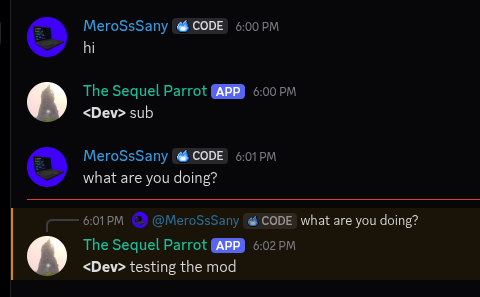 The Discord Chat
Versions
Files
Relations
Project Relations
More like this
Similar Mods
Suggestions use data such as tags, dependencies, dependents, descriptions, titles, and more to rank how much they overlap with this mod.
On ModDex
Community snapshot
By the numbers
Statistics
Want to reach Minecraft players?
We're looking for a server hosting partner to feature here and other parts of the site. Interested? Send us a message!
Get in touchGet it on
Available Platforms
On ModDex
Community snapshot
By the numbers