
Community listing page, reviews here may not be monitored by the author.
TheBOMPlugin

No reviews yet
A plugin for JEI that lists components needed to craft complex items and blocks.
Forge is a popular mod loader for versions 1.1+ of Minecraft.
Community voices
Reviews
Filters
Click once to include, again to exclude, again to clear
No reviews yet. Be the first to review this project!
Get it on
Available Platforms
About
Project Details
For authors
Embed Badge
If you're the author of this project, you can embed a live badge anywhere that supports HTML or Markdown. It updates automatically whenever ratings change.
Use HTML for any page that supports it, or Markdown for README files and Markdown-based descriptions.
Identifiers
Platform IDs
About
Description
TheBOM(bill of materials)Plugin
This mod adds a new tab to JEI's recipe screen that shows the item broken down into all the components needed to craft it.
Please submit any issues and/or ideas to the issue tracker on GitHub!


Features:
- Breaks any crafting recipe down into its basic items
- Makes use of extra outputs so that the item list is most accurate
- Tooltip shows number of stacks needed
- Toggleable GUI item tracker that shows remaining items you need
- Ability to increase the output for when you're trying to make multiple items


How to use GUI Item Tracker:
- Find the item you want to make in JEI
- Go to the Bill of Materials tab
- Click "Track"
- To scroll hold alt (Configurable in controls)
- To close open any item in the Bill of Materials tab and click "Untrack"
How to configure:
There are three configurations options right now:
- Font size (number between 0 and 1 that changes the font size of the amounts in case it's too small/to work correctly with TTFR)
- Base items (items that will not be broken down any further, such as wood planks, netherrack, or leather)
- Recipe blacklist items (my algorithm will not choose any recipes that use these items, such as uu matter, or mystical agriculture essence)
To add items to either of these lists, you must add the registry name ("minecraft:planks") to the list. This is regex, so any regex pattern will work. If you just want to add a simple item without knowing regex, just put the registry name in between a '^' and a '$' ("^minecraft:planks$").
There is also the possiblility of targeting specific items with specific damage values. To do this simply add an @ symbol followed by the damage value to the very end of the item ("^minecraft:planks$@0").
There are more examples inside the config file.
Frequently Asked Questions:
-
Will you backport to 1.X.X version?
- No, sorry, this mod is only for 1.12 and onwards. You can take a look at JustEnoughCalculation for 1.7.10 -> 1.11 or CraftingCosts for 1.7.10
Credits:
- Mezz for JEI's api
- Kienan for textures
Feel free to add this mod to any modpack you release! You don't have to ask for permission, but I'd love to hear what pack you are adding it to.
Screenshots
Gallery
-
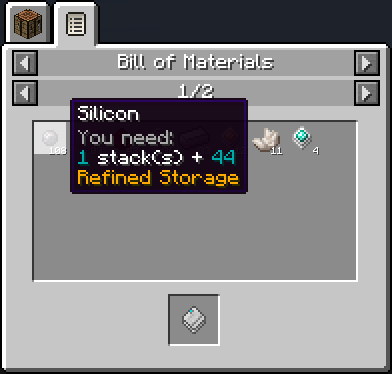 Tooltip
 -
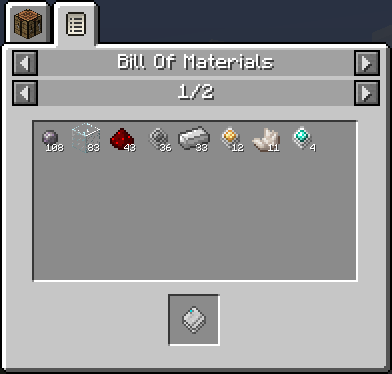 Bill of Materials
Versions
Files
Relations
Project Relations
More like this
Similar Mods
Suggestions use data such as tags, dependencies, dependents, descriptions, titles, and more to rank how much they overlap with this mod.
On ModDex
Community snapshot
By the numbers
Statistics
Want to reach Minecraft players?
We're looking for a server hosting partner to feature here and other parts of the site. Interested? Send us a message!
Get in touchGet it on
Available Platforms
On ModDex
Community snapshot
By the numbers