Community listing page, reviews may not be monitored by the author.
there is no border


No reviews yet
mod that extends the world border beyond 30 million blocks

Community voices
Reviews
No reviews yet. Be the first to review this project!
Get it on
Available Platforms
Compatibility
Supported Environments
Runs entirely on the client. Works on vanilla servers.
About
Project Details
For authors
Embed Badge
If you're the author of this project, you can embed a live badge anywhere that supports HTML or Markdown. It updates automatically whenever ratings change.
Use HTML for any page that supports it, or Markdown for README files and Markdown-based descriptions.
Identifiers
Platform IDs
Resources
External Links
About
Description
REQUIRES FABRIC API TO WORK - THESE ARE LEGACY VERSIONS, GO TO MODRINTH FOR UPDATED VERSIONS
this is a mod that removes the 30 million limit, inspired by beyond the barrier which you can find here: https://modrinth.com/mod/beyond-the-barrier
anyways welcome here :3
commands:
in 26.3 the farlands are off by default, but you can do /farlands enable to get them back, but on 26.2 and before the farlands are on with this so you can do /farlands disable to remove them
you can also do /precision <numDigits> to change the amount of decimal digits your XYZ coords show as and /wbmax to have a quick worldborder max setting
advice:
also if you plan to keep a world dont teleport too far out (don't go to 2^30 or 1,073,741,824, but to be safe don't travel beyond 2^25 or 33,554,432), you can actually fix the rendering issues beyond 2^25 or 33,554,432 by getting sodium for whatever reason but the world acts real weird
if your game does crash, it likely renders the world unloadable. you should be able to use some NBT editor to set your position back to a safe point however
the version numbers are based off beyond the barrier which is why it starts at 1.6 instead of 1.0
find source code here: https://github.com/hypernebulae/there-is-no-border
modrinth edition: https://modrinth.com/mod/there-is-no-border
RECOMMENDED TO USE WITH SODIUM IF AVAILABLE (fabric api not required)
this is a mod that removes the 30 million limit, inspired by beyond the barrier which you can find here: https://modrinth.com/mod/beyond-the-barrier
anyways welcome here :3
i have recently unified the mod versions into one file (except for the 26.4 snapshot ones) if you want to find the legacy versions go to the curseforge page for this mod
to be able to change things, press \ on your keyboard to open the custom menu with this mod (key not yet changeable)
if you're playing on 26.1, as of the moment, the GUI doesn't work so you have to type into a rudimentary command system.
to use commands in 26.1, you type in "tinb" (without a slash) and then "farlands disable" (or false or off) so you get "tinb farlands disable" in chat, and then press enter. while nothing may appear in chat, the game has parsed your command. there are two other commands, "tinb wbmax" that just maxes out the border and "tinb precision <0-100>" that sets how precise your XYZ coords in the position UI are
advice:
if you plan to keep a world dont teleport too far out (to be safe don't travel beyond 2^25 or 33,554,432), you can actually fix the rendering issues beyond 2^25 or 33,554,432 by getting sodium for whatever reason but the world acts real weird
if your game does crash, it likely renders the world unloadable. you should be able to use some NBT editor to set your position back to a safe point however
the version numbers are based off beyond the barrier which is why it starts at 1.6 instead of 1.0
find source code here: https://github.com/hypernebulae/there-is-no-border
curseforge edition: https://www.curseforge.com/minecraft/mc-mods/there-is-no-border
Screenshots
Gallery
-
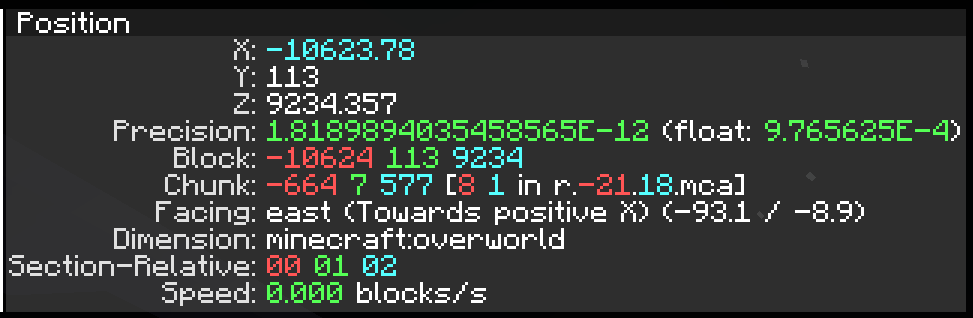 new position UI (1.8-pre-2)
-
 farlands only in 26.1 through 26.2
 -
 monolith
 -
 "where are you?" "uhh 1.8 billion blocks out" also there's 4 dappled forests
 -
 new position UI (1.8-pre-2)
Versions
Files
Relations
Project Relations
More like this
Similar Mods
Suggestions use data such as tags, dependencies, dependents, descriptions, titles, and more to rank how much they overlap with this mod.
On ModDex
Community snapshot
By the numbers
Statistics

Get it on
Available Platforms
On ModDex
Community snapshot
By the numbers
Statistics
Resources