Community listing page, reviews here may not be monitored by the author.
Third Arm

No reviews yet
Extra offhand-style slot. Hold a shield and still place torches.
Community voices
Reviews
No reviews yet. Be the first to review this project!
Get it on
Available Platforms
About
Project Details
For authors
Embed Badge
If you're the author of this project, you can embed a live badge anywhere that supports HTML or Markdown. It updates automatically whenever ratings change.
Use HTML for any page that supports it, or Markdown for README files and Markdown-based descriptions.
Identifiers
Platform IDs
Resources
External Links
About
Description
Third Arm
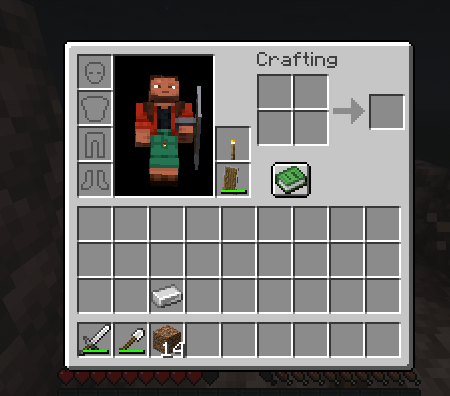
Minecraft only gives you two hands. That becomes a problem the moment you want to carry a shield and still use a torch.
Third Arm adds an extra offhand-style inventory slot to the player. Items stored there are visible on a small custom third-arm model and can act as a fallback for block placement without replacing your main hand or interfering with normal shield use.
It is designed for mining, caving, night travel, and combat situations where you want to keep your shield equipped while still having quick access to torches or other useful items.
Features
-
Adds an extra item slot beside the vanilla offhand slot
-
Works in both Survival and Creative inventories
-
Stores normal item stacks similar to the vanilla offhand
-
Third Arm inventory is saved with the player
-
Inventory state is synchronized so other players can see the equipped item
-
HUD indicator beside the hotbar shows the current Third Arm item
-
Optional LambDynamicLights integration, allowing equipped torches to produce dynamic light
-
Dedicated swap key for quickly moving items between your main hand and Third Arm
Smart Placement
Third Arm does not replace Minecraft's normal interaction system.
Vanilla interactions still take priority. Your main hand and offhand behave normally, while Third Arm acts only as an additional fallback.
The Third Arm item can place a block when:
-
You right-click a block
-
Your offhand is empty
-
Your main hand is not holding a placeable block
-
You are not currently using another item, such as raising a shield
Examples
Sword + Shield + Third Arm Torch
Your sword and shield behave normally. The torch remains stored and does not interfere with combat.
Block in Main Hand + Third Arm Torch
The main-hand block is placed normally. Third Arm does not override it.
Sword + Empty Offhand + Third Arm Torch
Right-clicking a valid surface allows the Third Arm torch to be placed as a fallback.
This keeps the system predictable and prevents accidental torch placement while fighting.
Controls
G
Swaps the item in your Third Arm slot with your main-hand item.
The key can be changed under:
Options → Controls → Third Arm
There is no separate placement button. Third Arm uses normal right-click behavior whenever its fallback conditions are met.
Compatibility
Optional integration with LambDynamicLights allows light-emitting items such as torches to illuminate the environment while equipped in the Third Arm slot.
Screenshots
Gallery
Versions
Files
Relations
Project Relations
More like this
Similar Mods
Suggestions use data such as tags, dependencies, dependents, descriptions, titles, and more to rank how much they overlap with this mod.
On ModDex
Community snapshot
By the numbers
Statistics
Want to reach Minecraft players?
We're looking for a server hosting partner to feature here and other parts of the site. Interested? Send us a message!
Get in touchGet it on
Available Platforms
On ModDex
Community snapshot
By the numbers
Statistics
Resources