Community listing page, reviews here may not be monitored by the author.


Community voices
Reviews
No reviews yet. Be the first to review this project!
Get it on
Available Platforms
Compatibility
Supported Environments
Must be installed on both the client and the server.
About
Project Details
For authors
Embed Badge
If you're the author of this project, you can embed a live badge anywhere that supports HTML or Markdown. It updates automatically whenever ratings change.
Use HTML for any page that supports it, or Markdown for README files and Markdown-based descriptions.
Identifiers
Platform IDs
Resources
External Links
About
Description
Throwable Torches!

Ever wanted to light up a cave without climbing down to place a torch? Now you can just throw one.

Throwable Torches adds throwable versions of Minecraft's torches. Aim at a surface, throw, and the torch places itself - the right block for the surface it hits, every time.

HOW IT WORKS

Throw a torch like a snowball. Where it lands decides what gets placed:

- Floor hit - places a standing torch
- Wall hit - places a wall torch, facing away from the wall
- Ceiling hit - places a ceiling torch, hanging from the block above

If the spot is blocked or nothing can support the torch, the projectile drops back as an item instead of vanishing. No wasted torches.

FIVE VARIANTS

- Throwable Torch
- Throwable Soul Torch
- Throwable Redstone Torch
- Throwable Glowstone Torch
- Throwable Copper Torch

Each one places its matching block type, so a thrown soul torch gives you a soul torch, a thrown copper torch gives you a copper torch, and so on.

CEILING TORCHES

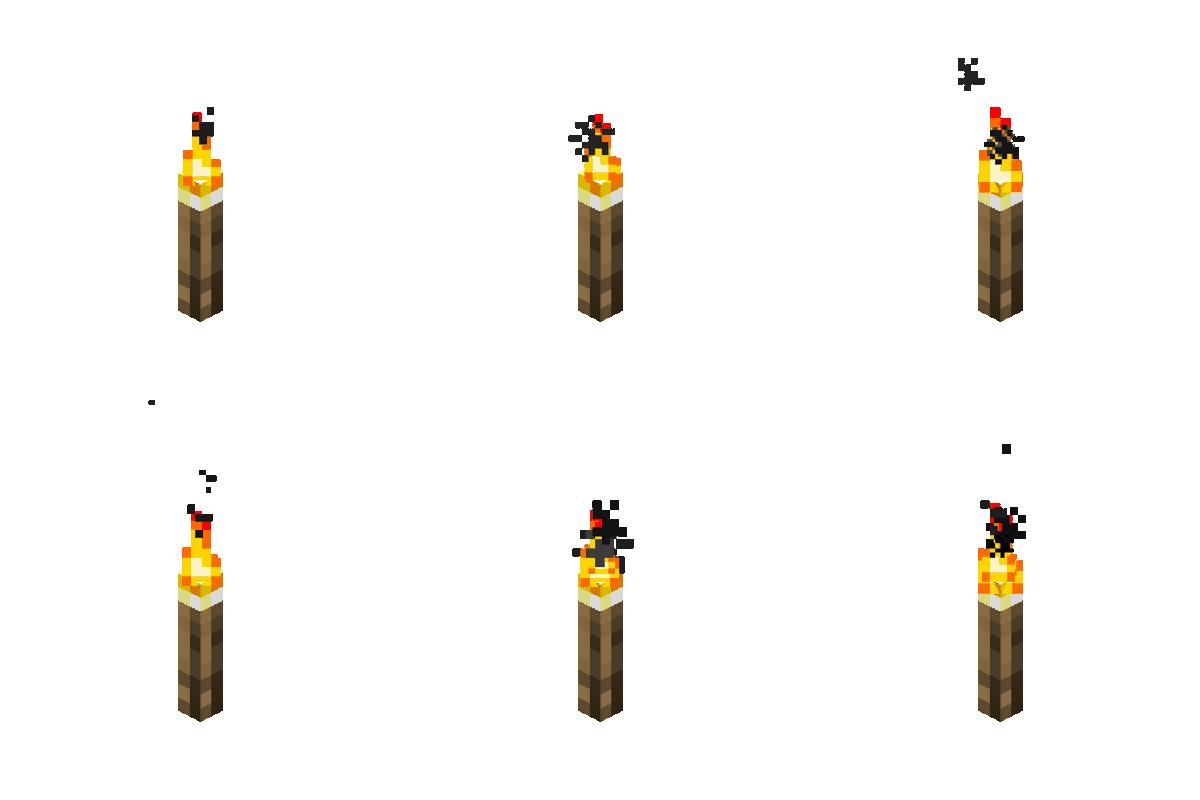
Vanilla has no ceiling torch, so this mod adds one for every variant. These are real blocks with proper shapes, support checks, and particle effects - they break and drop correctly when the block above them is removed.

CEILING TORCH LIGHT LEVELS

- Ceiling Torch - 14
- Soul Ceiling Torch - 10
- Redstone Ceiling Torch - 7
- Glowstone Ceiling Torch - 15
- Copper Ceiling Torch - 14

Glowstone and copper torches emit their own distinct particles - orange dust and copper fire flame respectively - matching their vanilla counterparts.

DISPENSER SUPPORT

Every throwable torch works in a dispenser. Point a dispenser at a wall and wire it up for automatic torch placement, or use it as a trap that lights up whatever it hits.

CRAFTING

Throwable torches are made by combining a torch with a slime ball:

- Throwable Torch - slime ball + torch
- Throwable Soul Torch - slime ball + soul torch
- Throwable Redstone Torch - slime ball + redstone torch
- Throwable Copper Torch - slime ball + copper torch
- Throwable Glowstone Torch - glowstone dust + slime ball + stick

Ceiling torches are crafted like regular torches, with the recipe flipped:

- Ceiling Torch - stick + coal or charcoal, yields 4
- Copper Ceiling Torch - copper nugget + coal or charcoal + stick, yields 4

All throwable torches stack to 64, and everything is available in its own creative tab.

REQUIREMENTS

- Minecraft 26.2
- NeoForge 26.2.0.88 or later
- Java 25

This mod is built for NeoForge. It will not work on Forge or Fabric.

NOTES

Copper torch support matches vanilla's copper torch, including its light level of 14. Light levels for every variant follow their vanilla equivalents rather than being standardized, so a thrown redstone torch lights the same as a placed one.

All Rights Reserved.

SUGGESTIONS

Got an idea for another torch variant, or found a surface where placement misbehaves? Leave a comment and let me know.
MCCams is a lightweight Forge mod that lets you stream in-game camera views to a live web dashboard. Instead of complex GUIs, the mod is fully controlled through commands, making it simple, flexible, and server-friendly.
You can register cameras, manage visibility, and stream frames directly to an external website for remote viewing.
Website Dashboard: https://minecraftcameras.onrender.com/
Features:
- Command-based camera system (no GUI required)
- Live camera streaming to a web dashboard
- Multiple camera support per world
- Public and private visibility controls
- Share-code access system for restricted viewing
- Multiplayer-friendly design
Configuration: After the first run, a config file is generated at: config/worldcameras-common.toml
Example settings:
- websiteUrl: Base URL of the web dashboard
- targetFps: Target streaming FPS
- jpegQuality: Frame compression quality
- maxUploadWidth: Maximum frame width
- autoStreamOnClients: Enable automatic streaming
Core Commands:
- /camera weburl — Override the website URL for the session
- /camera worldid — Display the world ID
- /camera list — List all cameras in the world
- /camera name <cameraId> — Rename a camera
- /camera stream start — Enable streaming
- /camera stream stop — Disable streaming
- /camera stream testframe <cameraId> — Send a test image
- /setvisibility public — Make cameras visible on the website
- /setvisibility private — Hide cameras
- /setvisibility allowed — Restrict access via share codes
- /camera allow create — Generate a share code
- /camera allow revoke <codeId> — Revoke a share code
How It Works:
- Place a camera in your world.
- Use commands to register and manage it.
- Start streaming with /camera stream start.
- View your cameras in a browser using the web dashboard.
Use Cases:
- Server monitoring and moderation
- Base and area surveillance
- Roleplay CCTV systems
- Remote observation of farms or builds
Notes:
- This mod requires the external web dashboard to view camera feeds.
- No personal data is collected by the mod itself.
- Proper server/network configuration may be required for multiplayer use.
Compatibility:
- Minecraft 1.20.4
- Forge 49.2.4
- Java 17
Screenshots
Gallery
Versions
Files
Relations
Project Relations
More like this
Similar Mods
Suggestions use data such as tags, dependencies, dependents, descriptions, titles, and more to rank how much they overlap with this mod.
On ModDex
Community snapshot
By the numbers
Statistics
Want to reach Minecraft players?
We're looking for a server hosting partner to feature here and other parts of the site. Interested? Send us a message!
Get in touchGet it on
Available Platforms
On ModDex
Community snapshot
By the numbers
Statistics
Resources