
Community listing page, reviews here may not be monitored by the author.
TidyInv

No reviews yet
Smart, fast, server-friendly inventory sorting with 7 modes, vertical sort, locked slots, profiles, chest presets, deposit/restock/dump/take buttons, in-game config GUI, and a public API. Works in your inventory and in any chest, barrel or shulker.
Community voices
Reviews
No reviews yet. Be the first to review this project!
Get it on
Available Platforms
About
Project Details
For authors
Embed Badge
If you're the author of this project, you can embed a live badge anywhere that supports HTML or Markdown. It updates automatically whenever ratings change.
Use HTML for any page that supports it, or Markdown for README files and Markdown-based descriptions.
Identifiers
Platform IDs
Resources
External Links
About
Description
TidyInv — Smart Inventory Sorting
Tired of dragging items around every time you open a chest? TidyInv sorts your inventory and any container in one click — or one keypress. Lightweight, server-friendly, and packed with quality-of-life features for Minecraft.
Overview
- 7 sort modes — Category, Name, Quantity, Rarity, By Mod, By Tag, Smart Affinity
- Vertical sort — column-first layout, perfect for organized chests
- 5 chest presets — Food, Tools, Building, Combat, Storage
- 4 sort profiles — Default, Mining, PvP, Building (saved to disk)
- Quick chest actions — Sort, Vertical Sort, Deposit, Restock, Dump All, Take All
- Locked slots — pin items in place with a visual indicator and tooltip
- In-game config GUI — press
Kto open, no JSON editing needed - Full command support —
/tidyinv …for everything - 6 languages — English, Spanish (ES / MX), Portuguese (BR), French, German
- Public API — other mods can register custom containers and categorizers
- Server-side sorting with anti-spam cooldown — safe for multiplayer
Keybinds
| Key | Action |
|---|---|
R |
Sort current inventory or chest |
K |
Open config menu |
| unbound | Quick Deposit |
| unbound | Quick Restock |
All keybinds can be reassigned in Minecraft's Controls menu.
Chest buttons
When you open any chest, six buttons appear on the right side of the GUI:
| Icon | Action |
|---|---|
| Three bars | Sort the chest |
| Vertical bars | Sort vertically (column-first) |
| Right arrow | Deposit — only items that already exist in the chest |
| Left arrow | Restock — only items you already carry |
| Double down arrow | Dump All — moves everything to the chest (locked slots stay) |
| Double up arrow | Take All — pulls everything from the chest into your inventory |
> Buttons follow the chest GUI when it shifts (e.g. when the recipe book opens).
Sort modes
| Mode | Description |
|---|---|
| Category | Weapons, tools, armor, food, combat, blocks, redstone, materials, misc |
| Name | Alphabetical by registry ID |
| Quantity | Largest stacks first |
| Rarity | Epic → Rare → Uncommon → Common |
| By Mod | Groups items by namespace (vanilla first) |
| By Tag | Groups items by their first tag (ores, logs, wool…) |
| Smart Affinity | Items with shared tags cluster together |
Chest presets
Open a chest and run /tidyinv preset <name>:
| Preset | Priority |
|---|---|
food |
FOOD → MATERIALS |
tools |
TOOLS → WEAPONS → ARMOR → MATERIALS |
building |
BLOCKS → REDSTONE → MATERIALS |
combat |
WEAPONS → ARMOR → FOOD → COMBAT |
storage |
General (default category order) |
Commands
/tidyinv sort [category|name|quantity|rarity|by_mod|by_tag|affinity]/tidyinv preset <food|tools|building|combat|storage>/tidyinv lock <slot 0-35>/tidyinv unlock <slot 0-35>/tidyinv profile list|switch <name>|next|current/tidyinv deposit/tidyinv restock/tidyinv dump/tidyinv take
Config
Press K in-game, or edit JSON files inside your config/ folder:
tidyinv.json— general optionstidyinv_locked_slots.json— locked slot indicestidyinv_profiles.json— sort profiles
In-game options:
- Default sort mode
- Show / hide chest buttons
- Sound ON / OFF
- ActionBar messages ON / OFF
- Lock hotbar by default
- Cooldown slider (0–40 ticks)
- Clear all locked slots
- Cycle between profiles
Public API
Other mods can extend TidyInv to support their own containers and item categories:
<pre><code>import com.luix1604.tidyinv.api.TidyInvAPI; import com.luix1604.tidyinv.sort.ItemCategory;
// Register a custom sortable container TidyInvAPI.registerContainerPredicate(menu -> menu instanceof MyCustomMenu);
// Register a custom item categorizer TidyInvAPI.registerCategorizer(stack -> { if (stack.getItem() instanceof MyMagicItem) return ItemCategory.MATERIALS; return null; // fall through to default }); </code></pre>
Compatibility
| Minecraft | Loaders | Java | Latest |
|---|---|---|---|
| 26.1.2 | Fabric · Forge · NeoForge | 25 | 1.5.2 |
| 1.21.1 | Fabric · Forge · NeoForge | 21 | 1.1.2 |
| 1.20.2 | NeoForge | 17 | 1.1.1 |
| 1.20.1 | Fabric · Forge | 17 | 1.1.1 |
> NeoForge does not exist for MC 1.20.1 (its first release shipped on 1.20.2). For Fabric or Forge on that MC era, use the 1.20.1 build.
> Mojang dropped the 1. prefix starting with 26.1 (released early 2026). The canonical ordering is 1.21.11 → 26.1 → 26.1.1 → 26.1.2.
Designed to be compatible with most other mods. Containers from other mods are auto-detected, and modders can register their own via the public API.
Installation
- Install the loader matching your setup (Fabric / Forge / NeoForge) for your Minecraft version.
- For Fabric, also install Fabric API.
- Drop the matching
tidyinv-<mc>-<version>-<loader>.jarinto yourmods/folder. - Launch the game. Press
Kin-game to open the config.
Source & Issues
GitHub: github.com/Luis1604/TidyInv
Each Minecraft version lives in its own branch. Per-version CHANGELOG.md files document everything that has shipped on that branch.
If you run into a bug, please open an issue on GitHub with your Minecraft version, loader, and the modlist you're using.
License
MIT License — free to use, modify and distribute.
Author
Luix1604 — luix1604
Screenshots
Gallery
-
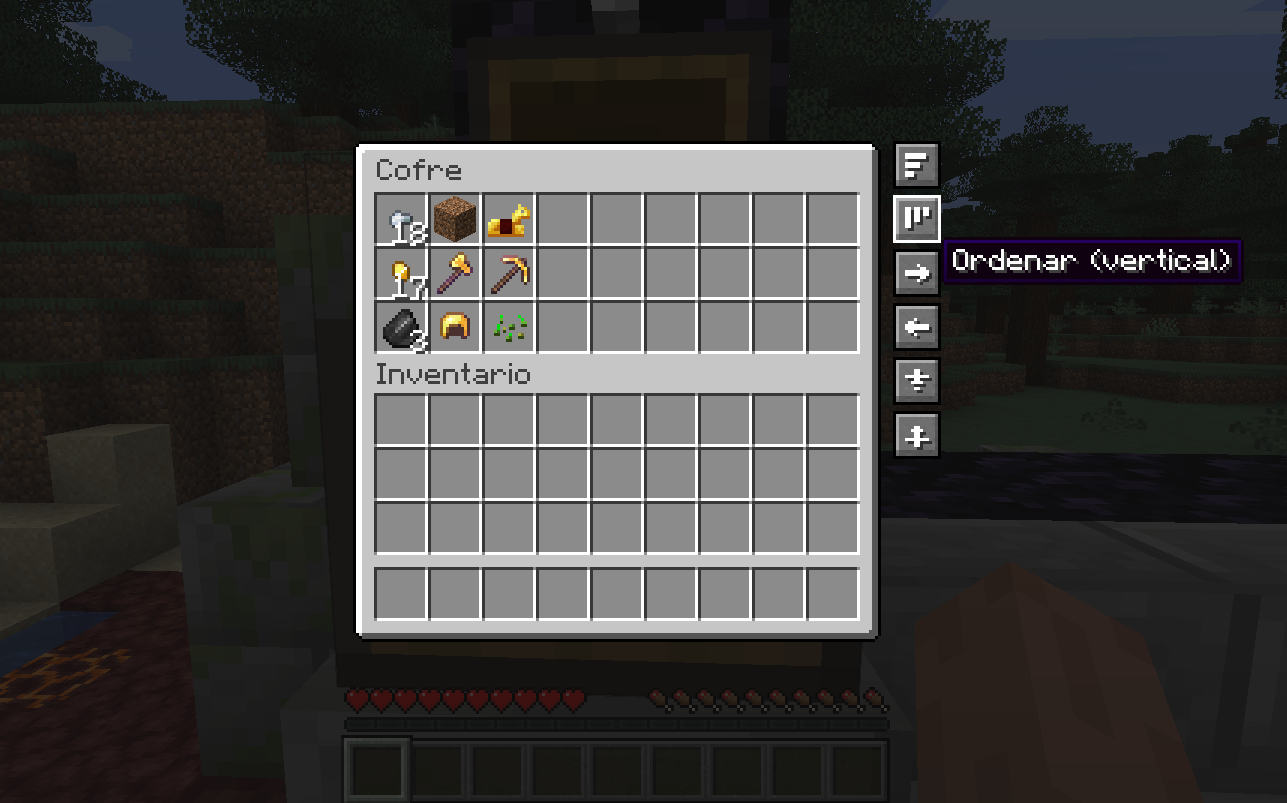 Vertical sorting buttons
 -
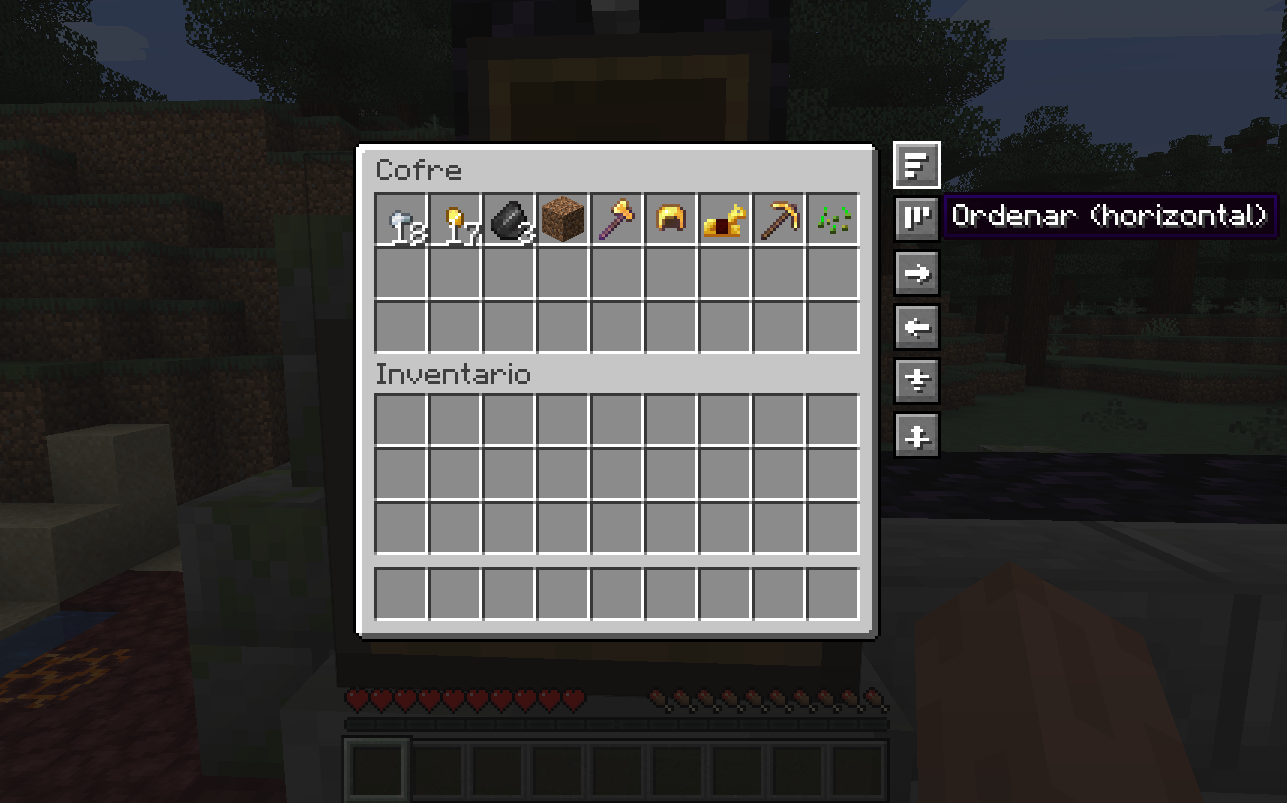 Sort buttons
 -
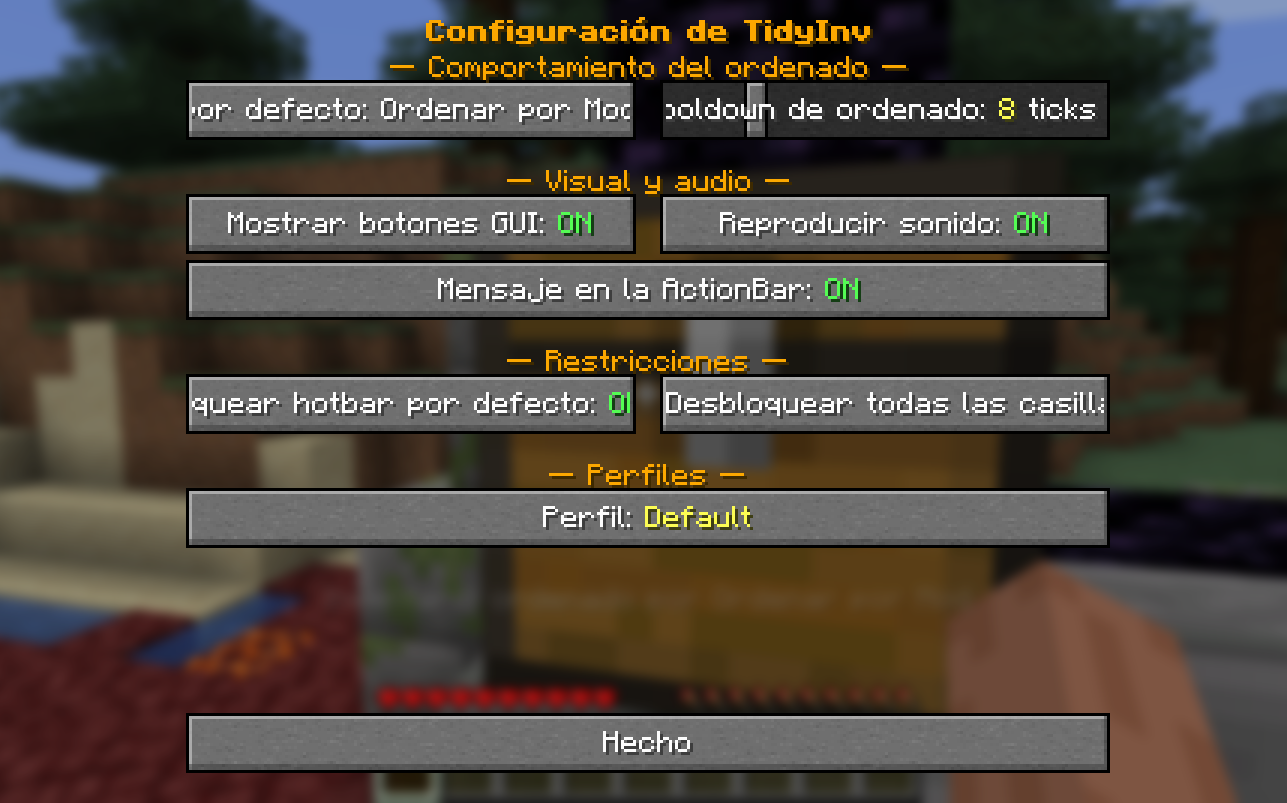 Settings
Versions
Files
Relations
Project Relations
More like this
Similar Mods
Suggestions use data such as tags, dependencies, dependents, descriptions, titles, and more to rank how much they overlap with this mod.
On ModDex
Community snapshot
By the numbers
Statistics
Want to reach Minecraft players?
We're looking for a server hosting partner to feature here and other parts of the site. Interested? Send us a message!
Get in touchGet it on
Available Platforms
On ModDex
Community snapshot
By the numbers
Statistics
Resources