Community listing page, reviews may not be monitored by the author.
Toggler

No reviews yet
Toggle click, toggle sneak, toggle run, toggle sprint, toggle jump, hold to attack

Community voices
Reviews
No reviews yet. Be the first to review this project!
Get it on
Available Platforms
About
Project Details
For authors
Embed Badge
If you're the author of this project, you can embed a live badge anywhere that supports HTML or Markdown. It updates automatically whenever ratings change.
Use HTML for any page that supports it, or Markdown for README files and Markdown-based descriptions.
Identifiers
Platform IDs
Resources
External Links
About
Description
This is a simple mod that saves you from having to hold down buttons on your keyboard. For example, instead of holding down the spacebar to stay afloat while swimming you could simply press the key that you have set for ToggleJump. Now Minecraft will act exactly like you're holding down spacebar until you either press the toggle key again or until you press spacebar yourself.
Sorry, screenshots can't really convey the essence of the mod but someone made a small video explaining the mod in the original Minecraft forum post here. That is an outdated video now and that version didn't a few things such as the hold to attack feature explained below.
FEATURES
Toggle buttons: Tired of holding down buttons?
Want to go on a long run and don't want to hold down W? Press the ToggleRun button once then you will run forward until you press it again or until you manually press forward or back. Staying afloat in the ocean is as simple as pressing ToggleJump. Buttons can configured in the controls menu or manually turned off in toggler.cfg found in your config folder.
Hold to attack: Why spam left click when it's easier just to hold the button down?
By holding down the left mouse button you will continually attack much like when mining you hold down the button. This option can be turned off in toggler.cfg found in you config folder.
Combat Mode: Ever tried to kill a bat only to end up knocking out torches and digging holes in your walls?
If you are holding down the left mouse button and facing a mob, you will automatically switch to Combat Mode. You will now ONLY attack mobs and not touch any blocks that you face. This will continue until you release the button. This also works with ToggleLeftClick active. This option can be turned off in toggler.cfg found in you config folder.
The Controls:
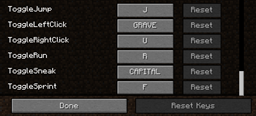
ToggleLeftClick (default key = GRAVE)
The GRAVE key is the ` key just above TAB. Not all keyboards may have this so you may wish to change it in options>controls. When ON you will mine the block in front of you just like if you were holding down the left mouse button. Also if you are aiming at an entity such as a pig, zombie or villager, you will continually attack it just as if you were clicking.
ToggleRightClick (default key = U)
When ON you will use the item you have selected in your hotbar, such as eat the food you are holding or drop a block on the ground just as if you were holding the right mouse button. Not sure how useful this is but it's there if you need it.
ToggleSneak (default key = CAPSLOCK)
When ON you will sneak.
ToggleRun (default key = R)
When ON you will run forward.
ToggleSprint (default key = F)
When ON and running forward you will sprint (if you are still fit enough).
ToggleJump (default key = J)
When ON you will jump. Good for swimming.
All key bindings can be changed in Options>Controls. Pressing the original key should cancel the toggled action, for example if you press jump (spacebar) while ToggleJump is active then you will no longer auto jump.
This mod should only affect the client input so it's unlikely to screw up existing worlds but you should take the usual precautions such as making backups of your worlds before installing. Also as this is only a client side mod you should not install this on the server side.
Latest version is for Minecraft 1.8 and was compiled and tested with Forge 11.14.0.1295.
You may freely include this mod in any ModPacks.
Changelog:
Version 1.8-0.1
(20/03/2015)
- Updated for 1.8, Compiled to Forge 11.14.0.1295
- Fixed localisation
Version 1.7.10-0.1
(18/03/2015)
- Updated for 1.7.10, Compiled to Forge 10.13.2.1291.
- Default toggle ToggleRight key changed to "U"
- Removed notification status and debugging code
Version 1.6.4-1.1
(18/03/2015)
- Finally decided to update this mod although still for 1.6.4. Compiled to Forge 9.11.1.965
- Default toggle sprint key changed to "F"
- Hopefully stopped accidently attacking entities after clicking close on a GUI menu
Version 1.6.4-1.0
(27/10/2013)
- Added configuration file. Should be found at: config/Toggler.cfg
- Can now disable controls in the config file if you feel any are a waste of keybindings.
- Chat notifications on Toggles can be turned on in config file. (Disabled by default)
- Hold to Attack can now be disabled in the config file. (Enabled by default)
- Using ToggleRun while manually running forward should now stay on when you let go of the forward button.
- If you are standing still and press ToggleSprint you will now automatically run forward and sprint if possible.
- Pressing the back button while auto running forward will now turn off ToggleRun.
- While ToggleLeftClick is on or if you are manually holding down left click, hitting a mob once will set you to attack only mode.
- NEW Only Attack Mode: you will no longer break blocks until you release the left click or turn off the toggle.
This can be changed in the config file under AutoOnlyAttack (Enabled by default).
Version 1.6.4-0.1
(24/10/2013)
- First release.
Screenshots
Gallery
Versions
Files
Relations
Project Relations
More like this
Similar Mods
Suggestions use data such as tags, dependencies, dependents, descriptions, titles, and more to rank how much they overlap with this mod.
On ModDex
Community snapshot
By the numbers
Statistics

Get it on
Available Platforms
On ModDex
Community snapshot
By the numbers
Statistics
Resources