Community listing page, reviews may not be monitored by the author.
Tool Pouch


No reviews yet
Store tools and equipment in the Tool Pouch to make them more useful

Community voices
Reviews
No reviews yet. Be the first to review this project!
Get it on
Available Platforms
Compatibility
Supported Environments
Must be installed on both the client and the server.
About
Project Details
For authors
Embed Badge
If you're the author of this project, you can embed a live badge anywhere that supports HTML or Markdown. It updates automatically whenever ratings change.
Use HTML for any page that supports it, or Markdown for README files and Markdown-based descriptions.
Identifiers
Platform IDs
About
Description
Tool Pouch
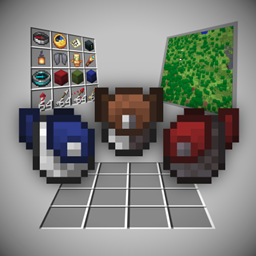
This mod adds a single item, the Tool Pouch. It's a portable storage item where you can store specific functional items to make them more useful and offload them from your inventory. Think of it as a portable chest that gives your items additional powers.
Requirements
Must have:
- Fzzy Config
- Fabric API (Fabric only)
Optional but highly recommended:
- Mod Menu (Fabric only): Required for in-game mod configuration.
- Immersive Overlays: Prettier item info overlays and support for many info items from other mods, such as calendars, thermometers and other trinkets.
- LambDynamicLights: Required for equipped lanterns to emit light.
- Shulker Box Tooltip: Allows you to see which items are inside the tool pouch from the item tooltip.
Using the Tool Pouch
Check out the image gallery for the crafting recipe, the look of the info overlay, and some additional info
- Open the pouch by right-clicking it from your hands or pressing a keybind (default H).
- You can carry multiple pouches, but only the items from the first one in your inventory will get used.
- The Tool Pouch has 16 (4x4) slots for storing your items.
- It can be upgraded to a Netherite Tool Pouch in the smithing table to make it fireproof and increase storage to 25 (5x5) slots.
- The storage capacity of both pouches is configurable, up to 256 (16x16) slots.
- Pouches can be attached to and detached from leggings in the crafting menu. The Netherite Tool Pouch can only be attached to fireproof leggings (like netherite). The attached pouch can be opened by pressing a keybind (default H) while the leggings are equipped.
- Pouches have restrictions on which and how many of each item can be stored inside them. These restrictions can be configured.
- Both pouches can be dyed. Use pouches on a cauldron filled with water to clear the dye.
- Installing Shulker Box Tooltip will let you see which items the pouch contains inside the tooltip. The tooltip color will also change based on the dye on the pouch.
Supported Items
Info Items
When stored in the Tool Pouch, these items will display certain information on the top left of the screen:
- Compass: coordinates, heading, biome
- Clock: time and day, weather, moon phase, season (if a season mod is installed)
- Recovery compass: last death coordinates
By default, only one of these items each can be stored inside the Tool Pouch at the same time.
Overlay appearance can be extensively configured in the configuration screen, such as position, which information to display, text background, shadow and color.
It's highly recommended to install Immersive Overlays for prettier info overlays and better support for info items from other mods, such as calendars, thermometers and other trinkets.
There is also an option to hide information shown by the accessories from the F3 debug screen in survival mode, so that they are the only sources of such information.
Maps
The first map stored in the Tool Pouch will display in the top left of the screen as a minimap! Toggle the minimap by pressing a keybind (default M).
Additionally, maps will update their contents while stored in the Tool Pouch. No need to hold them in your hands anymore!
By default, there is no limit on how many maps can be stored inside the Tool Pouch.
Minimap appearance can be configured in the configuration screen, such as position and background style.
Elytra
When stored in the Tool Pouch, it will function as if it's equipped in the chest slot. This allows you to fly and wear a chestplate at the same time!
By default, only one Elytra can be stored inside the Tool Pouch at the same time.
Totem of Undying
When stored in the Tool Pouch, they will trigger as if they are held in your hands to save you from death!
By default, only one Totem of Undying can be stored inside the Tool Pouch at the same time.
Lanterns
When stored in the Tool Pouch, they will show up on your waist and emit light around you in real time! This requires LambDynamicLights.
By default, only one lantern can be stored inside the Tool Pouch at the same time.
Ender Chest
When stored in the Tool Pouch, it can be opened by pressing a keybind (default V). It's a portable ender chest!
By default, only one Ender Chest can be stored inside the Tool Pouch at the same time.
Spyglass
When stored in the Tool Pouch, the spyglass can be used by holding a keybind (default C). This also allows you to zoom in and out using the mouse wheel while scoping!
Works with Spyglass Astronomy.
By default, only one spyglass can be stored inside the Tool Pouch at the same time.
Shulker Boxes
When stored in the Tool Pouch, they can be opened by holding a keybind (default X), which brings up a neat selection menu where you can choose which shulker box to open! If only one shulker box is stored, just pressing X will open it immediately, skipping the selection menu.
By default, there is no limit on how many shulker boxes can be stored inside the Tool Pouch.
Arrows
When stored in the Tool Pouch, they will be used by the bow and crossbow as if they're in your inventory! Additionally, holding a keybind (default X) while a bow or crossbow is in your hands brings up a neat selection menu where you can choose which arrows to use!
By default, there is no limit on how many arrows can be stored inside the Tool Pouch.
Fireworks
When stored in the Tool Pouch, pressing the jump key while flying with the Elytra will use the fireworks from the pouch to give you a boost!
Additionally, the crossbow can use the fireworks from the pouch as ammo, by selecting them in the arrow selection menu.
By default, there is no limit on how many fireworks can be stored inside the Tool Pouch.
Mod Compatibility
- Trinkets (Updated), Curios, or Ohmega: Allows equipping the tool pouch as a trinket and opening it by pressing a keybind (default H).
- Locator Lodestones: Lodestone compasses stored in the tool pouch will show up on the locator bar.
- Serene Seasons: Storing a calendar in the tool pouch will show the current season in the info overlay. There's also an optional setting to disable the calendar item tooltip so that the season can only be read from the tool pouch info overlay.
- Ok Zoomer: When "Spyglass Mode" is set to "Require Item" or "Both" in the Ok Zoomer config, Ok Zoomer will check tool pouches from Tool Pouch for a spyglass to use. This mod's own zoom features will be disabled.
- Zoomify: When "Zoom Behavior" is set to "Allow while carrying" in the Zoomify config, Zoomify will check tool pouches from Tool Pouch for a spyglass to use. This mod's own zoom features will be disabled.
FAQ
Can you add support for x item from x mod?
If it's a custom totem, elytra or shulker box, NO. Those require me to depend on the other mod and/or patch it on my own, and I'm not willing to do that.
Use Immersive Overlays for better modded item support. The default configuration allows storing all the items that Immersive Overlays supports in the tool pouch.
Any item can be allowed into the tool pouch via the mod configuration, however this only allows you to store the item inside the pouch - it doesn't add any additional functionality for the item.
For specific item requests and functionality ideas, feel free to open an issue on GitHub or ask on my Discord server (both linked in the sidebar).
How is this different from your other mod, Accessorify?
This is essentially a sequel to Accessorify. It doesn't require Accessories API while having all the features from Accessorify. This makes things much easier for me as I don't have to worry about building my mod around slow updating accessory APIs. It also makes things easier for the players themselves, as they don't have to install an API and deal with accessory user interfaces which get messy when there are many items equipped.
Tool Pouch
This mod adds a single item, the Tool Pouch. It's a portable storage item where you can store specific functional items to make them more useful and offload them from your inventory. Think of it as a portable chest that gives your items additional powers.
Requirements
Must have:
- Fzzy Config
- Fabric API (Fabric only)
Optional but highly recommended:
- Mod Menu (Fabric only): Required for in-game mod configuration.
- Immersive Overlays: Prettier item info overlays and support for many info items from other mods, such as calendars, thermometers and other trinkets.
- LambDynamicLights: Required for equipped lanterns to emit light.
- Shulker Box Tooltip: Allows you to see which items are inside the tool pouch from the item tooltip.
Using the Tool Pouch
Check out the image gallery for the crafting recipe, the look of the info overlay, and some additional info
- Open the pouch by right-clicking it from your hands or pressing a keybind (default H).
- You can carry multiple pouches, but only the items from the first one in your inventory will get used.
- The Tool Pouch has 16 (4x4) slots for storing your items.
- It can be upgraded to a Netherite Tool Pouch in the smithing table to make it fireproof and increase storage to 25 (5x5) slots.
- The storage capacity of both pouches is configurable, up to 256 (16x16) slots.
- Pouches can be attached to and detached from leggings in the crafting menu. The Netherite Tool Pouch can only be attached to fireproof leggings (like netherite). The attached pouch can be opened by pressing a keybind (default H) while the leggings are equipped.
- Pouches have restrictions on which and how many of each item can be stored inside them. These restrictions can be configured.
- Both pouches can be dyed. Use pouches on a cauldron filled with water to clear the dye.
- Installing Shulker Box Tooltip will let you see which items the pouch contains inside the tooltip. The tooltip color will also change based on the dye on the pouch.
Supported Items
Info Items
When stored in the Tool Pouch, these items will display certain information on the top left of the screen:
- Compass: coordinates, heading, biome
- Clock: time and day, weather, moon phase, season (if a season mod is installed)
- Recovery compass: last death coordinates
By default, only one of these items each can be stored inside the Tool Pouch at the same time.
Overlay appearance can be extensively configured in the configuration screen, such as position, which information to display, text background, shadow and color.
It's highly recommended to install Immersive Overlays for prettier info overlays and better support for info items from other mods, such as calendars, thermometers and other trinkets.
There is also an option to hide information shown by the accessories from the F3 debug screen in survival mode, so that they are the only sources of such information.
Maps
The first map stored in the Tool Pouch will display in the top left of the screen as a minimap! Toggle the minimap by pressing a keybind (default M).
Additionally, maps will update their contents while stored in the Tool Pouch. No need to hold them in your hands anymore!
By default, there is no limit on how many maps can be stored inside the Tool Pouch.
Minimap appearance can be configured in the configuration screen, such as position and background style.
Elytra
When stored in the Tool Pouch, it will function as if it's equipped in the chest slot. This allows you to fly and wear a chestplate at the same time!
By default, only one Elytra can be stored inside the Tool Pouch at the same time.
Totem of Undying
When stored in the Tool Pouch, they will trigger as if they are held in your hands to save you from death!
By default, only one Totem of Undying can be stored inside the Tool Pouch at the same time.
Lanterns
When stored in the Tool Pouch, they will show up on your waist and emit light around you in real time! This requires LambDynamicLights.
By default, only one lantern can be stored inside the Tool Pouch at the same time.
Ender Chest
When stored in the Tool Pouch, it can be opened by pressing a keybind (default V). It's a portable ender chest!
By default, only one Ender Chest can be stored inside the Tool Pouch at the same time.
Spyglass
When stored in the Tool Pouch, the spyglass can be used by holding a keybind (default C). This also allows you to zoom in and out using the mouse wheel while scoping!
Works with Spyglass Astronomy.
By default, only one spyglass can be stored inside the Tool Pouch at the same time.
Shulker Boxes
When stored in the Tool Pouch, they can be opened by holding a keybind (default X), which brings up a neat selection menu where you can choose which shulker box to open! If only one shulker box is stored, just pressing X will open it immediately, skipping the selection menu.
By default, there is no limit on how many shulker boxes can be stored inside the Tool Pouch.
Arrows
When stored in the Tool Pouch, they will be used by the bow and crossbow as if they're in your inventory! Additionally, holding a keybind (default X) while a bow or crossbow is in your hands brings up a neat selection menu where you can choose which arrows to use!
By default, there is no limit on how many arrows can be stored inside the Tool Pouch.
Fireworks
When stored in the Tool Pouch, pressing the jump key while flying with the Elytra will use the fireworks from the pouch to give you a boost!
Additionally, the crossbow can use the fireworks from the pouch as ammo, by selecting them in the arrow selection menu.
By default, there is no limit on how many fireworks can be stored inside the Tool Pouch.
Mod Compatibility
- Trinkets (Updated), Curios, or Ohmega: Allows equipping the tool pouch as an accessory and opening it by pressing a keybind (default H).
- Locator Lodestones: Lodestone compasses stored in the tool pouch will show up on the locator bar.
- Serene Seasons: Storing a calendar in the tool pouch will show the current season in the info overlay. There's also an optional setting to disable the calendar item tooltip so that the season can only be read from the tool pouch info overlay.
- Ok Zoomer: When "Spyglass Mode" is set to "Require Item" or "Both" in the Ok Zoomer config, Ok Zoomer will check tool pouches from Tool Pouch for a spyglass to use. This mod's own zoom features will be disabled.
- Zoomify: When "Zoom Behavior" is set to "Allow while carrying" in the Zoomify config, Zoomify will check tool pouches from Tool Pouch for a spyglass to use. This mod's own zoom features will be disabled.
FAQ
Can you add support for x item from x mod?
If it's a custom totem, elytra or shulker box, NO. Those require me to depend on the other mod and/or patch it on my own, and I'm not willing to do that.
Use Immersive Overlays for better modded item support. The default configuration allows storing all the items that Immersive Overlays supports in the tool pouch.
Any item can be allowed into the tool pouch via the mod configuration, however this only allows you to store the item inside the pouch - it doesn't add any additional functionality for the item.
For specific item requests and functionality ideas, feel free to open an issue on GitHub or ask on my Discord server (both linked in the sidebar).
How is this different from your other mod, Accessorify?
This is essentially a sequel to Accessorify. It doesn't require Accessories API while having all the features from Accessorify. This makes things much easier for me as I don't have to worry about building my mod around slow updating accessory APIs. It also makes things easier for the players themselves, as they don't have to install an API and deal with accessory user interfaces which get messy when there are many items equipped.
Screenshots
Gallery
-
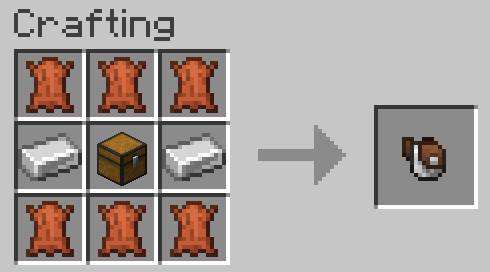 Crafting recipe
 -
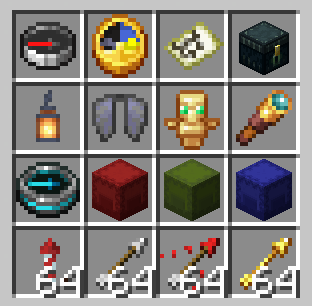 Filled pouch example Items can be distributed across the pouch however you want - nothing prevents you from filling up the pouch with only shulkers or arrows, but you lose the functionality of other items
 -
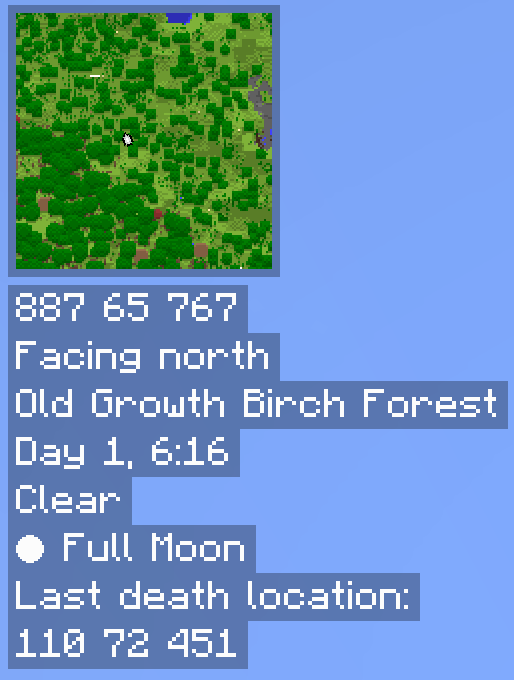 Full info overlay Stored items: map, compass, clock, recovery compass
 -
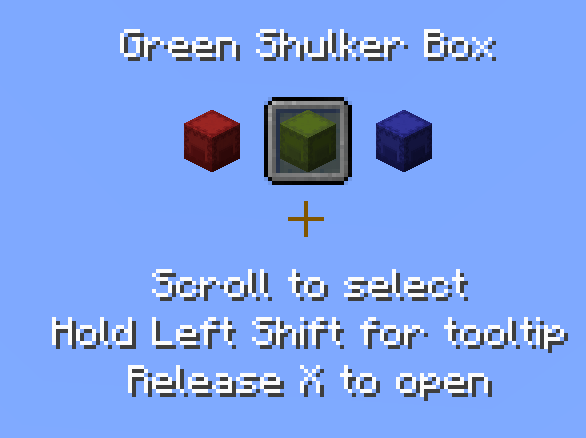 Shulker selection widget Opened by holding X while shulker boxes are stored in the pouch
 -
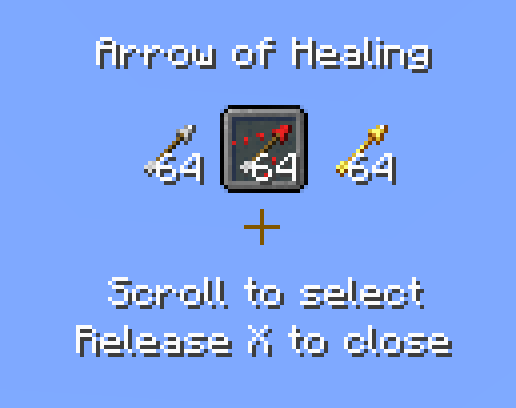 Ammo selection widget Opened by holding X while holding a ranged weapon and compatible ammo is stored in the pouch
 -
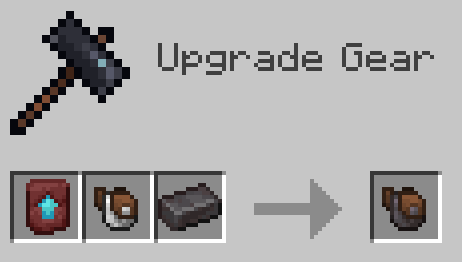 Netherite pouch upgrade recipe
 -
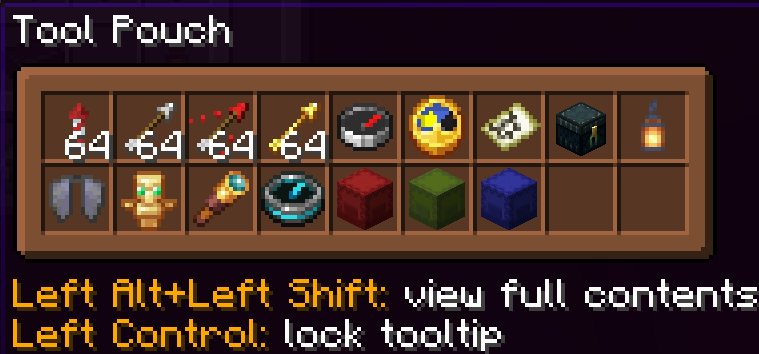 Tooltip showing pouch contents Requires Shulker Box Tooltips to be installed
 -
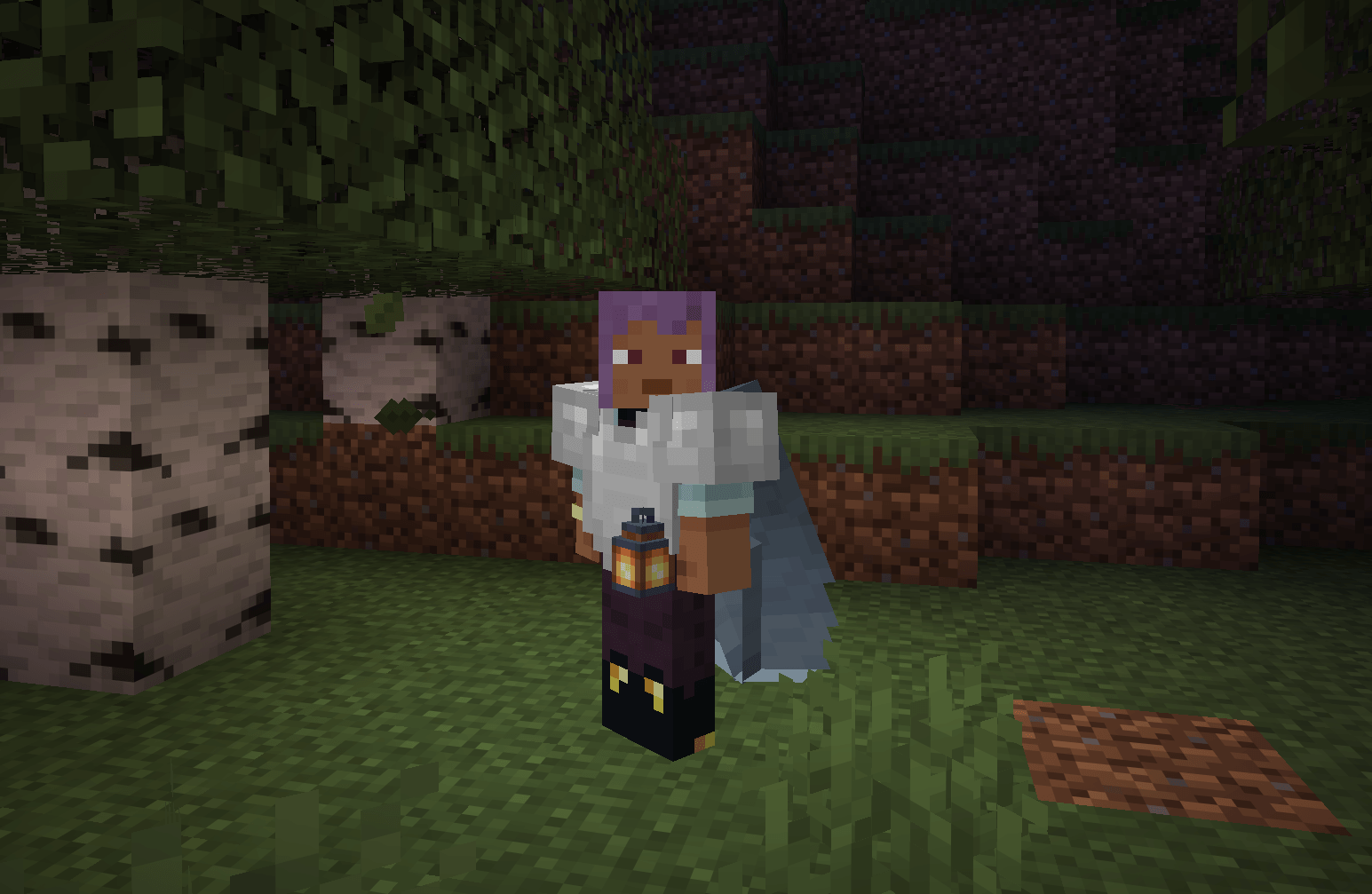 Lantern and Elytra showing on player when inside pouch Lantern light requires LambDynamicLights
-
 Crafting recipe
 -
 Filled pouch example Items can be distributed across the pouch however you want - nothing prevents you from filling up the pouch with only shulkers or arrows, but you lose the functionality of other items
 -
 Full info overlay Stored items: map, compass, clock, recovery compass
 -
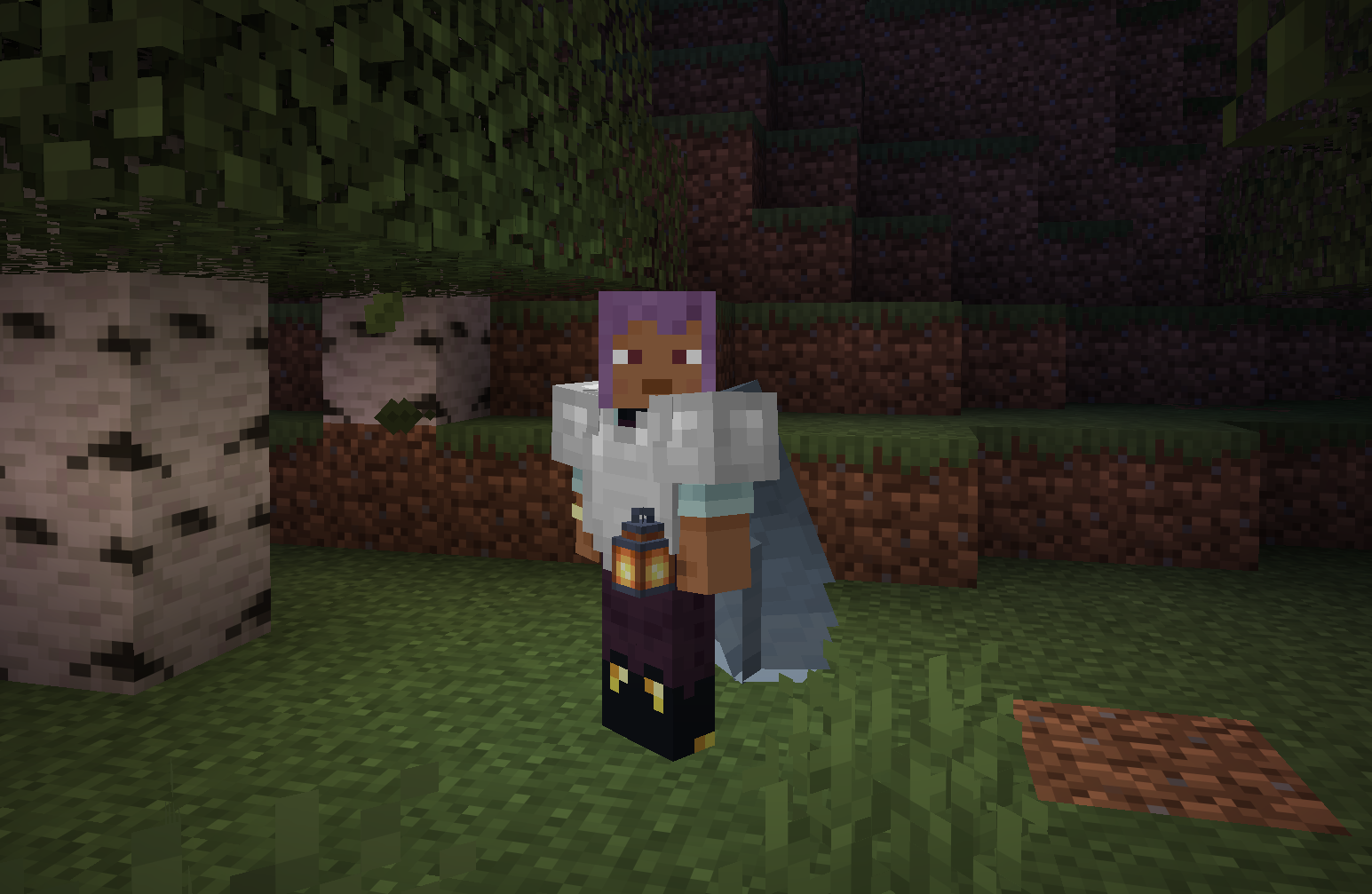 Lantern and Elytra showing on player when inside pouch Lantern light requires LambDynamicLights
 -
 Shulker selection widget Opened by holding X while shulker boxes are stored in the pouch
 -
 Ammo selection widget Opened by holding X while holding a ranged weapon and compatible ammo is stored in the pouch
 -
 Netherite pouch upgrade recipe
 -
 Tooltip showing pouch contents Requires Shulker Box Tooltips to be installed
Versions
Files
Relations
Project Relations
More like this
Similar Mods
Suggestions use data such as tags, dependencies, dependents, descriptions, titles, and more to rank how much they overlap with this mod.
On ModDex
Community snapshot
By the numbers
Statistics
 (opens in a new tab)
Get it on
Available Platforms
On ModDex
Community snapshot
By the numbers