Community listing page, reviews here may not be monitored by the author.
Tool Slots

No reviews yet
Four dedicated slots for your pickaxe, shovel, axe, and shears, with auto switch when breaking blocks.
Community voices
Reviews
No reviews yet. Be the first to review this project!
Get it on
Available Platforms
About
Project Details
For authors
Embed Badge
If you're the author of this project, you can embed a live badge anywhere that supports HTML or Markdown. It updates automatically whenever ratings change.
Use HTML for any page that supports it, or Markdown for README files and Markdown-based descriptions.
Identifiers
Platform IDs
About
Description
Tool Slots
AI usage disclaimer: This mod was developed with AI-agent assistance using this agent workflow. The project owner reviewed the work during development.
Adds four dedicated slots for a pickaxe, shovel, axe, and shears. You assign one position in your hotbar as your tool position, and breaking a block while holding it automatically switches in whichever of the four suits the block.
This is similar to auto switch mods, with one difference: it never searches your inventory and never guesses which tool you meant. It only ever uses the item you put in the slot yourself. Put a pickaxe in the Pickaxe Slot and that pickaxe is what you get on stone. Your silk touch pick stays your silk touch pick, and nothing is swapped for something the mod thought was better.
- Four Tool Slots. Pickaxe, shovel, axe, and shears, opened from a button beside your inventory. Any item can go in any slot; a slot is a category, not a restriction.
- One tool position, yours to pick, marked so you can see it. Choose the mark too: an outline, corner ticks, a line underneath, or none.
- Leave that position empty and the last tool you used returns to it whenever you close a screen.
- An On/Off switch, per player, in the screen or with
/toolslots toggle. - Your tools survive death by default.
Configuration
Optional, in config/toolslots.cfg, and most players never need it. Server owners can force a block
into a category or stop the mod reacting to it at all:
S:categoryOverrides <
    mymod:strange_ore=PICKAXE
    minecraft:glass=NONE
 >
The marker style and the On/Off control are client-side, so your choice is yours alone on a server.
Installing
Required on both the client and the server.
Also install Inventory Button Bar. It is what puts the button beside your inventory, and it lets several mods share that spot instead of drawing on top of each other. Tool Slots will not start without it.
Screenshots
Gallery
-
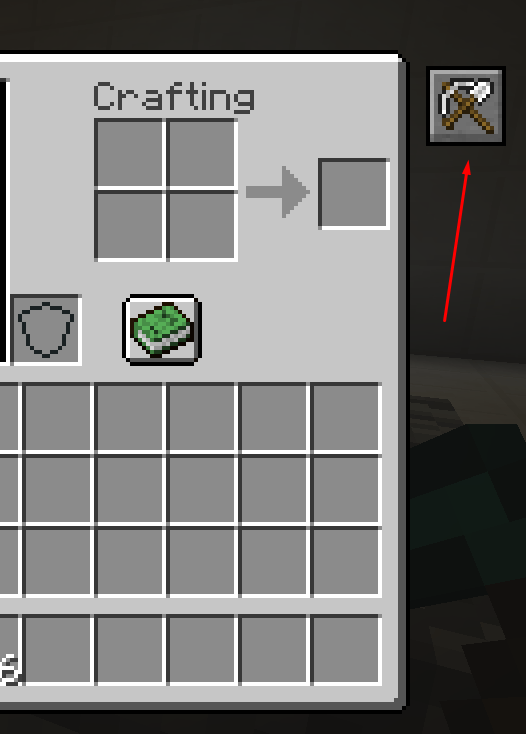 How to access your tool slots.png How to access your tool slots.png
 -
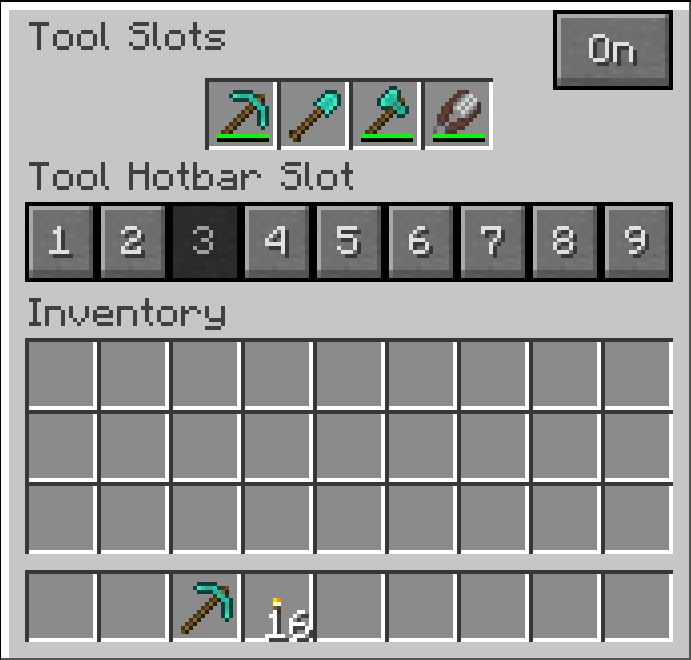 Where you place your tools.png Where you place your tools.png
 -
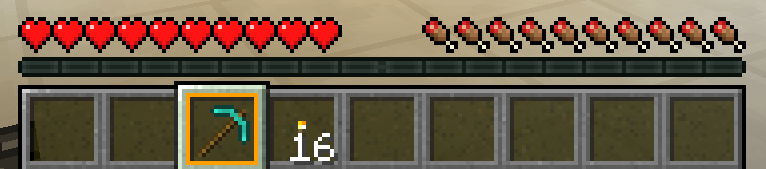 Orange outline in the tool slot.png Orange outline in the tool slot.png
Versions
Files
Relations
Project Relations
More like this
Similar Mods
Suggestions use data such as tags, dependencies, dependents, descriptions, titles, and more to rank how much they overlap with this mod.
On ModDex
Community snapshot
By the numbers
Statistics
Want to reach Minecraft players?
We're looking for a server hosting partner to feature here and other parts of the site. Interested? Send us a message!
Get in touchGet it on
Available Platforms
On ModDex
Community snapshot
By the numbers