Community listing page, reviews here may not be monitored by the author.
Tool Tiers

No reviews yet
Adds a custom tier system to tools to give modpack creators more control over what can mine what
Community voices
Reviews
No reviews yet. Be the first to review this project!
Get it on
Available Platforms
About
Project Details
For authors
Embed Badge
If you're the author of this project, you can embed a live badge anywhere that supports HTML or Markdown. It updates automatically whenever ratings change.
Use HTML for any page that supports it, or Markdown for README files and Markdown-based descriptions.
Identifiers
Platform IDs
About
Description
Tool Tiers
ToolTiers modifies the vanilla tool system to be more robust and allow modpack authors to better configure what should be breakable with what
Users
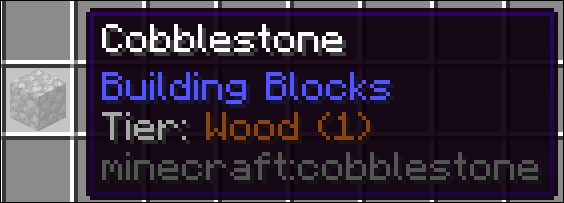
Users will notice a new line in their tooltips informing them of the tier of a given block (This also displays in Jade if you have it installed). By default, to mine a block, a tool will need to be the exact same tier, or a level above. The level is indicated by the number after the name
Developers
Modpack Developers can use KubeJs to modify and add tiers. If a block has multiple tier tags the highest one will be used.
Translations
If you want to give tiers a custom name or add translations for other languages overwrite the language keys with the following patter tier.tooltiers.<tier_name>. English translations will be automatically generated, but can still be overwritten in en_us.json
Creating tiers
// THIS IS A STARTUP EVENT

ToolTierEvents.register(event => {
  /**
   * This creates a new tool tier with the name 'Example', display color of pure white and level 3,
   * which is the same as iron. It can break all blocks below iron level and all blocks with the
   * same tier. It CANNOT break blocks at iron level. If you wish to change this
   * you have to modify the config to allow tiers to break the same level as them.
   */
  event.create("example", 0xFFFFFF, 3)

  /**
   * This creates a UNIQUE tier. Unique tiers can only break blocks with the exact same tier applied to them.
   * You can use this to make tools which can only break very specific blocks.
   */
  event.create("another", 0xFFFFFF)
})
Registering items to tiers
// THIS IS A STARTUP EVENT

/**
 * The first event parameter dictates the tier to register the items to.
 */
ToolTierEvents.tools('iron', event => {
  /**
   * This registers the 'example_mod:example_tool' item to the iron tier.
   * Only the exact resource location works here as tags are not built at this stage of the loading process yet.
   */
  event.add("example_mod:example_tool")

  /**
   * Remove the given tier assigment from the item.
   * The tier parameter specified does not matter here, any tier will be removed
   */
  event.remove("minecraft:wooden_sword")
})
Registering blocks to tiers
ServerEvents.tags('block', event => {
  /**
   * Block Tiers are represented via tags, so you can use the default kubejs tag event here.
   * This registers the 'example_mod:example_block' to the diamond tier
   */
  event.add('tooltiers:requires/diamond', 'example_mod:example_block')

  /**
   * You can also remove tool requirements from a block like this
   */
  event.remove('tooltiers:requires/diamond', 'minecraft:netherite_block')
})
Debug info
You can use the following command to make it easier to find missing tiers
/**
 * Creates a two files with all items and blocks and their respective tier assignment
 */
/tooltiers dump tiers

/**
 * Creates a two files with all items and blocks with the specified tier
 */
/tooltiers dump tiers <tier>

/**
 * Creates a files with all  blocks and the best attempt at showing their vanilla tier assignment
 */
/tooltiers dump vanilla

/**
 * Creates a files with all blocks which dont already have a tier assignment and the best attempt at showing their vanilla tier assignment
 */
/tooltiers dump vanilla missing_only
Screenshots
Gallery
Versions
Files
Relations
Project Relations
More like this
Similar Mods
Suggestions use data such as tags, dependencies, dependents, descriptions, titles, and more to rank how much they overlap with this mod.
On ModDex
Community snapshot
By the numbers
Statistics
Want to reach Minecraft players?
We're looking for a server hosting partner to feature here and other parts of the site. Interested? Send us a message!
Get in touchGet it on
Available Platforms
On ModDex
Community snapshot
By the numbers