Community listing page, reviews here may not be monitored by the author.
Torch Spots

No reviews yet
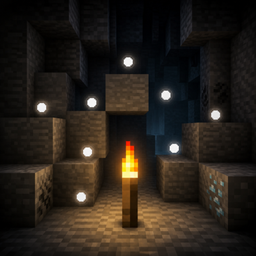
Hold a torch and tap Shift to see floating dots on blocks where monsters can spawn.
Community voices
Reviews
No reviews yet. Be the first to review this project!
Get it on
Available Platforms
About
Project Details
For authors
Embed Badge
If you're the author of this project, you can embed a live badge anywhere that supports HTML or Markdown. It updates automatically whenever ratings change.
Use HTML for any page that supports it, or Markdown for README files and Markdown-based descriptions.
Identifiers
Platform IDs
Resources
External Links
About
Description
# Torch Spots
**Torch Spots** helps you light up your base and caves safely by showing where hostile mobs can spawn.
Hold a torch, tap **Shift** quickly three times, and floating white dots appear on nearby spawnable blocks. Place torches until the dots disappear — then those spots are safe.
## Features
- Shows floating white dots on blocks where monsters can spawn
- Toggle overlay by holding a torch and tapping Shift 3 times quickly
- Works with Torch, Soul Torch, Redstone Torch, and Copper Torch (when available)
- Markers refresh as you move
- Spots disappear once the area is lit enough that mobs can no longer spawn there
- Compatible with Iris shader packs (optional)
## How to use
1. Hold a torch in your main hand or offhand.
2. Tap **Shift** quickly 3 times.
3. Floating white dots appear on nearby spawnable blocks.
4. Tap Shift quickly 3 times again (while holding a torch) to hide them.
## Requirements
- Minecraft (version matching the file you download)
- Fabric Loader
- Fabric API
## Notes
- Client-side overlay for spawn spotting while exploring and building
- Designed to make torch placement faster and clearer
## License
CC0-1.0 (Creative Commons Zero) — free to use, modify, and redistribute.
Screenshots
Gallery
Versions
Files
Relations
Project Relations
More like this
Similar Mods
Suggestions use data such as tags, dependencies, dependents, descriptions, titles, and more to rank how much they overlap with this mod.
On ModDex
Community snapshot
By the numbers
Statistics
Want to reach Minecraft players?
We're looking for a server hosting partner to feature here and other parts of the site. Interested? Send us a message!
Get in touchGet it on
Available Platforms
On ModDex
Community snapshot
By the numbers
Statistics
Resources