
Community listing page, reviews may not be monitored by the author.
Touhou Little Maid Custom Workspace

No reviews yet
Setting custom workspace for Touhou Little Maid

Community voices
Reviews
No reviews yet. Be the first to review this project!
Get it on
Available Platforms
About
Project Details
For authors
Embed Badge
If you're the author of this project, you can embed a live badge anywhere that supports HTML or Markdown. It updates automatically whenever ratings change.
Use HTML for any page that supports it, or Markdown for README files and Markdown-based descriptions.
Identifiers
Platform IDs
Resources
External Links
About
Description
Touhou Little Maid Custom Workspace
Adds Kappa's Smart Compass to Touhou Little Maid, giving each maid her own cuboid work, rest and sleep areas. You can use waypoints to guide her around obstacles, or use a schedule to send her to different work areas in sequence, rotating after a specified number of working game ticks.
Development Stage
If you encounter a stuck maid, unexpected area switching or UI problems, please include mod versions, reproduction steps, area/waypoint screenshots and relevant logs in Issues. Whenever possible, provide materials that help reproduce the issue, such as a world save.
Installation
| Component | Currently supported / tested version |
|---|---|
| Minecraft | 1.21.1 |
| Mod loader | NeoForge, developed and tested with version 21.1.219 |
| Required mod | Touhou Little Maid 1.5.3 for NeoForge / Minecraft 1.21.1 |
| Client-only? | Install on both client and server |
Usage
Kappa's Smart Compass
Kappa's Smart Compass can be crafted shapelessly using one Kappa Compass, one Redstone Dust and one Copper Ingot.
Hold it in your main hand. Hold the tool-menu key (default Left Alt), scroll to select a tool, then release to confirm:
| Tool | Action |
|---|---|
| Read from maid | Click your own maid to copy her addon configuration into the compass draft |
| Cuboid selection | Select two block corners to add a cuboid area, initially marked as work |
| Route nodes | Choose a starting node, then create or connect mandatory waypoints |
| Mark areas | Click an existing cuboid to cycle work → rest → sleep |
| Rename areas | Click a cuboid to open its name editor; its name and type appear above the box |
| Schedule options | Click to open the work schedule and edit destinations and delay conditions |
| Apply to maid | Click your own maid to apply the settings |
Reading replaces the draft's areas, names, routes and schedule. Reading and subsequent edits leave the maid unchanged; reapply to update her settings. If she has no addon configuration, the existing draft is retained.
Cuboid Areas
Work areas are red, rest areas green, and sleep areas blue, matching the original Kappa Compass. Bounds include both endpoint block coordinates and must contain the maid's actual feet block; selecting only a solid floor does not count as arrival. Sleep areas should also include the bed's head block.
Route Nodes
Waypoints can help a maid navigate around long walls, through entrances or across other terrain that requires several navigation stages.
- Select “Route nodes” and use an existing area or waypoint as the starting node.
- Walk to the position you want the maid to pass through. Click a position that is not an existing node, such as a block or air. The compass records your current feet block, creates a single-block node and connects it to the starting node.
- The new node becomes the starting point for the next connection. Continue adding nodes, or use another existing node to connect the two.
- Connect the route to the destination area, then apply it to the maid.
A link start is saved on the compass and survives item/tool changes, dimension changes and reloads. While linking, Attack anywhere cancels the start without deleting data. After cancellation, attack an intermediate waypoint to remove it and its incident edges. Attacking an area in the route tool removes only its connections, preserving the area itself.
Maids prioritize the shortest graph route and navigate through each node, advancing only after actually entering its box. If no valid graph route exists, they navigate directly to the destination area. Outside all nodes, a maid first enters the node with the nearest center in her current dimension within the destination's connected component. Work, rest and sleep areas, as well as intermediate waypoints, can all serve as entry nodes. Multiple rest or sleep areas are selected by total graph distance.
A graph can contain nodes from different dimensions. If the next node is in another dimension, the maid waits in place, preserving her route and progress until another mechanism transfers her there. Route navigation does not initiate dimension transfers, and waiting does not trigger travel-timeout skipping. Maid dimension compatibility is enabled by default: it restores vanilla entity dimension transfers, allowing portals or other mods to use the standard transfer API, and matches the player's portal cooldown of 10 game ticks.
After a Home state change or a successful dimension change, the maid replans from her actual position and current schedule, preserving her configuration, work destination, schedule entry and elapsed working ticks. Re-enabling Home after relocating her with a Smart Slab also selects a new graph entry.
Distances use game coordinates. Cross-dimension segments are multiplied by the configured rate for the dimension pair, defaulting to 1. Actual detours around obstacles are not simulated.
Work Schedules
“Schedule options” uses destination cards and separate condition editors, inspired by Create's train schedules. The current condition is delay x game ticks: after arriving at the specified work area, the maid starts counting working ticks, then proceeds to the next destination when the condition is met.
You can choose work areas, adjust delays, reorder, duplicate or remove entries, and run cyclically or once. With looping disabled, the maid finishes the last entry, stays in that work area and continues her original task. Without a custom schedule, work areas rotate in added order after 2400 working game ticks each.
Travel, rest, sleep and inability to work pause progress. After confirming the editor to save the compass draft, reapply it to the maid.
Deleting and Clearing
- Attack an existing cuboid in the cuboid tool to remove the area and related references. Sneak + Use cancels an unfinished selection.
- Sneak + Clear (default Shift+V) removes all work, rest and sleep cuboids in the cuboid tool, preserving intermediate waypoints. In the route tool it removes only intermediate points, preserving areas. Incident edges of removed nodes are also deleted.
- Sneak + Use your own maid in the apply tool to clear her custom areas and routes, restoring original area behavior.
Compatibility
- The original compass and Smart Compass can coexist. For each schedule type, custom cuboids take priority when present; otherwise TLM's original compass positions and behavior apply. The original compass retains its existing functions.
- Maids still use TLM's original pathfinding.
- The addon changes areas and candidate target searches. Individual tasks and their area effects are still controlled by TLM or the corresponding task mod.
- Each area and waypoint has its own UUID and dimension. Searches do not actively load or generate chunks.
- Compass and maid data migrate to V2 before use, converting areas, routes, schedules and runtime progress together. Unknown future versions or invalid data are preserved and disabled instead of overwritten.
Configuration
The configuration file is config/touhou_little_maid_custom_workspace-common.toml.
| Setting | Default | Purpose |
|---|---|---|
workTicksPerArea |
2400 | Default rotation budget and initial delay for new schedule entries |
travelTimeoutTicks |
0 | Travel timeout in game ticks; 0 disables timeout skipping |
maxAreasPerMaid |
16 | Combined limit for work, rest and sleep cuboids |
maxAreaEdge |
64 | Maximum length of each axis of an area |
maxAreaVolume |
131072 | Maximum volume of an area |
candidateBudget |
2048 | Candidate block budget per task search |
maidDimensionCompatibility |
true |
Master switch for vanilla maid dimension transfers, player portal cooldown and replanning after transfer |
dimensionDistanceMultipliers |
[] |
Distance multiplier per dimension pair; unspecified pairs use 1 |
Disabling maidDimensionCompatibility restores TLM's dimension-transfer handling and the ordinary entity portal cooldown of 300 game ticks. When enabled, the cooldown is the player's 10 game ticks. Both follow vanilla rules that refresh an active cooldown while touching a portal. Saved areas, graphs and work progress are preserved, and Home state changes still trigger replanning.
Rates apply to unordered dimension pairs in both directions. Same-dimension distances remain unchanged. For example:
dimensionDistanceMultipliers = ["minecraft:overworld|minecraft:the_nether=8", "minecraft:overworld|minecraft:the_end=0.5"]
Configure each pair once with a finite positive multiplier. Newly planned routes use the updated rates after configuration reload.
Asset License and Credits
The project's code is licensed under MIT. The Smart Compass texture artwork is adapted from Touhou Little Maid assets. The original assets belong to TLM's original author, TartaricAcid, and retain CC BY-NC-SA 4.0.
Screenshots
Gallery
-
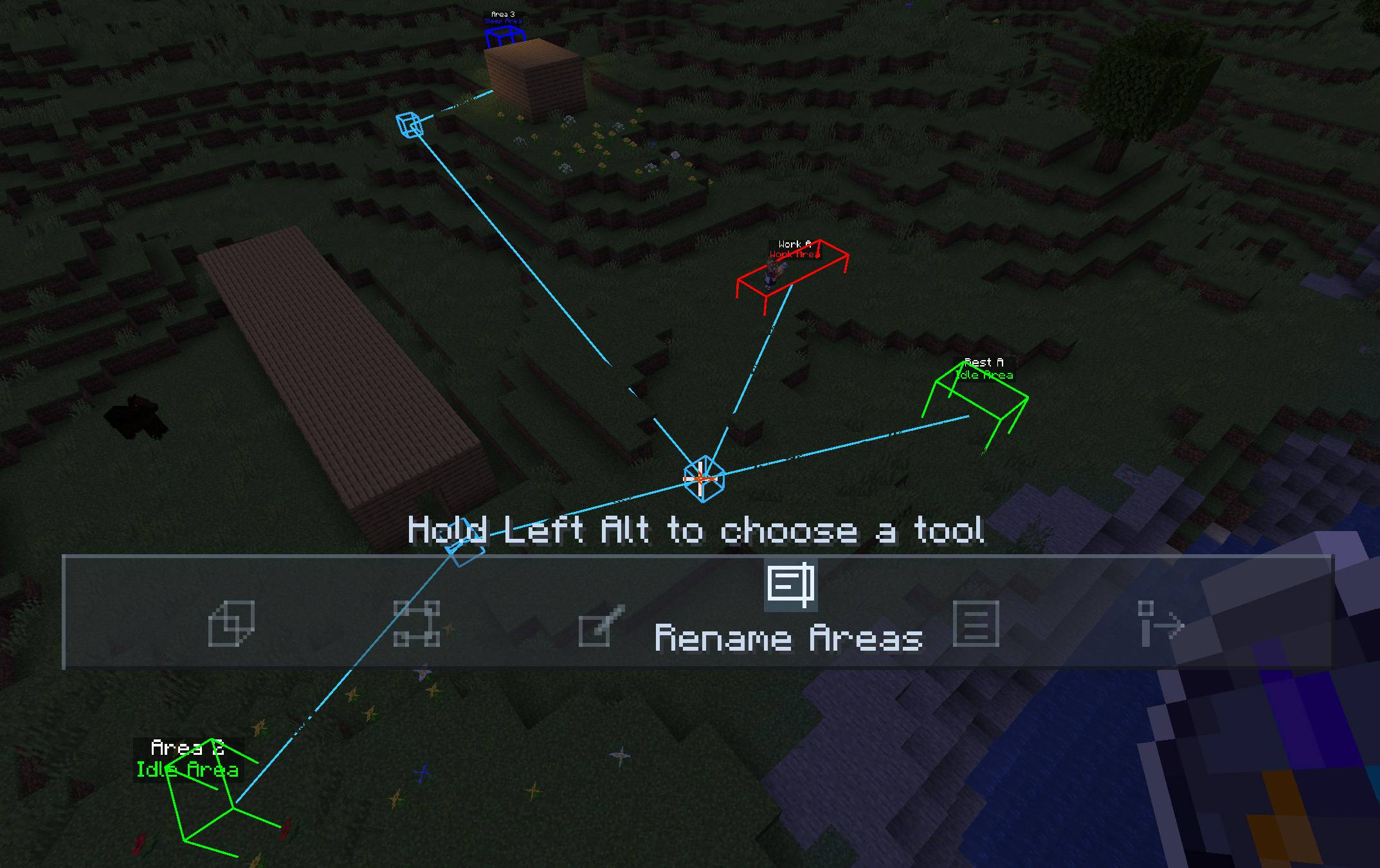 exp.jpg exp.jpg
Versions
Files
Relations
Project Relations
More like this
Similar Mods
Suggestions use data such as tags, dependencies, dependents, descriptions, titles, and more to rank how much they overlap with this mod.
On ModDex
Community snapshot
By the numbers
Statistics

Get it on
Available Platforms
On ModDex
Community snapshot
By the numbers
Statistics
Resources