
Community listing page, reviews here may not be monitored by the author.
TPA datapack

No reviews yet
Allows players to tp without OP
Community voices
Reviews
No reviews yet. Be the first to review this project!
Get it on
Available Platforms
About
Project Details
For authors
Embed Badge
If you're the author of this project, you can embed a live badge anywhere that supports HTML or Markdown. It updates automatically whenever ratings change.
Use HTML for any page that supports it, or Markdown for README files and Markdown-based descriptions.
Identifiers
Platform IDs
About
Description
Minecraft-TPA-Datapack


Optional Dependencies


English(United States) · 简体中文(中国大陆) · 正體中文(臺灣) · 日本語(日本) · More Languages
TPA datapack is a Minecraft Datapack which allows non-OP players to teleport each others easily, multiple additional features like Back, Home, Warp, Languages for different regions, etc. are also provided.
Join or follow our social media for more information or giving some ideas!
!


Advantage
- All options are editable using
/function tpa:options. No more worries about bad experience caused by bad presets. - We use the simplest way to install: Datapacks. Datapacks are the easiest type of content to install into Minecraft.
- We are also willing to actively ensure compatibility with any other datapacks/mods/plugins/resourcepacks. So even if you met some bugs which's probably not caused by TPA datapack, you can still report this to us with full contexts and show us how you can reproduce that.
- We provide two versions for you to choose from: the Extra version and the Light version. The Extra version includes all features we’ve developed, while the Light version includes only the basic features to suit different needs.
How it Works?
It works through the Vanilla Interface since Minecraft 1.13.
How can I Choose which to Download?
Use the table below to determine which file suffix matches your Minecraft version: Mapping Between Minecraft Versions and Datapack Filename Suffixes
| Game Versions | Extra | Light |
|---|---|---|
| 1.13 - 1.14.4 | +mc1.13 | light+mc1.13 |
| 1.15 - 1.20.1 | +mc1.15 | light+mc1.13 |
| 1.20.2 - 1.20.6 | +mc1.20.2 | light+mc1.13 |
| 1.21 - 1.21.4 | +mc1.20.2 | light+mc1.21 |
| 1.21.5 - | +mc1.20.2 | light+mc1.21.5 |
Lastest version for Light: v2.0.6 Lastest version for Extra: v2.0.6
- Check your current game version.
- Decide if you want to use the Extra version or the Light version, here's the difference: the Light version only contains basic feature: teleports and menus. the Extra version contains every features we've written like Back, Home, Warp and Languages. (Maybe more in the future)
- Go Releases page and download.
e.g.
If my Minecraft version is 1.20.1 and I want to use the Extra version, I'll choose the file named TPA_datapack-v2.0.6+mc1.15.zip.
How to Install?
So here's basically the same as how you can install any other datapacks, if you have already learnt that before, just skip this paragraph.
In Cloud-hosted Servers
- Open the server console of your hosted server.
- Find and click a button labeled File Manager.
- The following steps are the same as installing In local Server.
In Local Server
- Find the server folder containing the server JAR file
- If there is a
worldfolder, open the./world/datapacks/directory - If there's not or it doesn't work after doing step 4, check
server.properties -> level-nameand find the correct level folder - Put Datapack File into the
datapacksfolder. - Enter the server and do
/reload, and then do/datapack listto make sure datapack's been recognised.
In Singleplayer levels
- Quit the world.
- Go to the World Selection Menu and select the world.
- Click the left bottom button
Edit - Click the Button
Open World Folder, if you do have the button, skip and go step 8 - Go back to the World Selection Menu and memorize the gray title below the level in-game title.
- Go Main Menu and then
Options... -> Resource Packs... -> Open Pack Folder... - And then switch to the parent folder (It should be
.minecraftbtw) , gosavesfolder, and then the gray text you've memorized. (The directory will be like:../saves/(Your Level)/datapacks) - Go
datapacksfolder and then put Datapack File into thedatapacksfolder. - Enter the level, do
/datapack listto make sure datapack is recognised.
In the Level You're Creating
- Go
More -> Data Packs -> Open Pack Folder. - Put Datapack file inside.
- Create
- Do
/datapack listto make sure datapack is recognised.
How to Use?
Go documents for usage: Docs
Ending
Thank you for using the TPA Datapack! Latest version: v2.0.6 Extra version, v2.0.6 Light version Last edit time: Apr 27th, 2026
Screenshots
Gallery
-
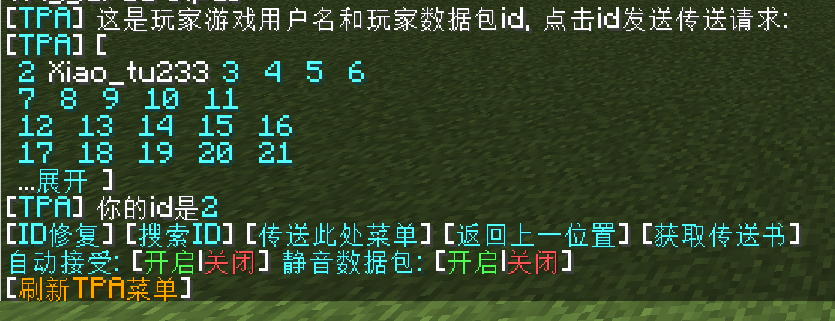 a image of TPA menu in Chinese
Versions
Files
Relations
Project Relations
More like this
Similar Mods
Suggestions use data such as tags, dependencies, dependents, descriptions, titles, and more to rank how much they overlap with this mod.
On ModDex
Community snapshot
By the numbers
Statistics

Want to reach Minecraft players?
We're looking for a server hosting partner to feature here and other parts of the site. Interested? Send us a message!
Get in touchGet it on
Available Platforms
On ModDex
Community snapshot
By the numbers