Community listing page, reviews here may not be monitored by the author.
TPS Reforged


No reviews yet
A simple TPS and MSPT monitor for Minecraft servers, with global and per-dimension performance display, configurable colors, formatting, and actionbar support.
Community voices
Reviews
No reviews yet. Be the first to review this project!
Get it on
Available Platforms
Compatibility
Supported Environments
Must be installed on both the client and the server.
About
Project Details
For authors
Embed Badge
If you're the author of this project, you can embed a live badge anywhere that supports HTML or Markdown. It updates automatically whenever ratings change.
Use HTML for any page that supports it, or Markdown for README files and Markdown-based descriptions.
Identifiers
Platform IDs
About
Description
TPS Reforged
TPS Reforged is a lightweight Minecraft utility mod that displays server TPS and MSPT in a clean and configurable way.
The mod is designed for server owners and modpack creators who want a simple command to quickly check server performance, including global tick time and per-dimension tick information.
Features
- Display global server TPS and MSPT
- Display TPS/MSPT per dimension
- Compact one-line display per dimension
- Custom display names for dimensions
- Automatically add unknown dimensions to the config
- Hide specific dimensions from the output
- Custom dimension ordering
- Configurable line format
- Configurable colors
- Optional actionbar TPS display
- Reloadable config with
/tps reload - Help command with
/tps help
Commands
/tps
Displays TPS/MSPT for all visible dimensions and the overall server./tps dim <dimension>
Displays TPS/MSPT for one specific dimension./tps toggle
Toggles the actionbar TPS display for the player./tps status
Shows whether the actionbar display is enabled for the player./tps reload
Reloads the configuration./tps help
Shows the available commands.
Configuration
TPS Reforged includes a configurable JSON file where you can customize:
- Prefix
- Colors
- TPS/MSPT thresholds
- Dimension display names
- Dimension order
- Hidden dimensions
- Output line format
- Actionbar format
Notes
TPS Reforged is not a full profiler.
It is made to quickly show server TPS/MSPT and identify which dimensions are heavier.
For advanced profiling such as entity cost, block entity cost, chunk analysis or method sampling, use a dedicated profiler such as Spark.
Support
If you'd like to support the project, feel free to use my BisectHosting affiliate link.
Si vous souhaitez soutenir le projet, vous pouvez utiliser mon lien d’affiliation BisectHosting.
TPS Reforged
TPS Reforged is a lightweight Minecraft utility mod that displays server TPS and MSPT in a clean and configurable way.
The mod is designed for server owners and modpack creators who want a simple command to quickly check server performance, including global tick time and per-dimension tick information.
Features
- Display global server TPS and MSPT
- Display TPS/MSPT per dimension
- Compact one-line display per dimension
- Custom display names for dimensions
- Automatically add unknown dimensions to the config
- Hide specific dimensions from the output
- Custom dimension ordering
- Configurable line format
- Configurable colors
- Optional actionbar TPS display
- Reloadable config with
/tps reload - Help command with
/tps help
Commands
-
/tps
Displays TPS/MSPT for all visible dimensions and the overall server. -
/tps dim <dimension>
Displays TPS/MSPT for one specific dimension. -
/tps toggle
Toggles the actionbar TPS display for the player. -
/tps status
Shows whether the actionbar display is enabled for the player. -
/tps reload
Reloads the configuration. -
/tps help
Shows the available commands.
Configuration
TPS Reforged includes a configurable JSON file where you can customize:
- Prefix
- Colors
- TPS/MSPT thresholds
- Dimension display names
- Dimension order
- Hidden dimensions
- Output line format
- Actionbar format
Notes
TPS Reforged is not a full profiler.
It is made to quickly show server TPS/MSPT and identify which dimensions are heavier.
For advanced profiling such as entity cost, block entity cost, chunk analysis or method sampling, use a dedicated profiler such as Spark.
Screenshots
Gallery
-
 Screenshot_3.png Action Bar
 -
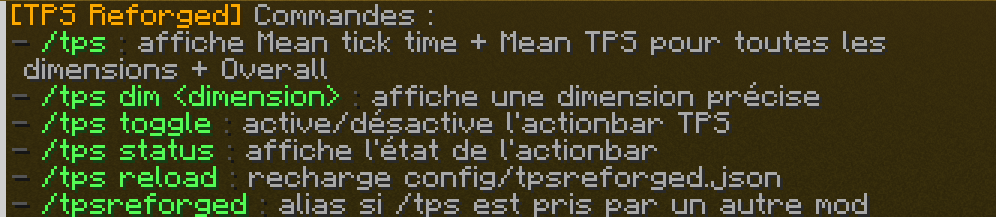 Screenshot_2.png Command help
 -
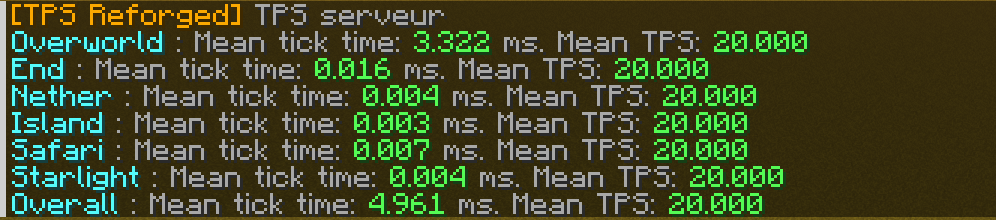 Screenshot_1.png Different dim
-
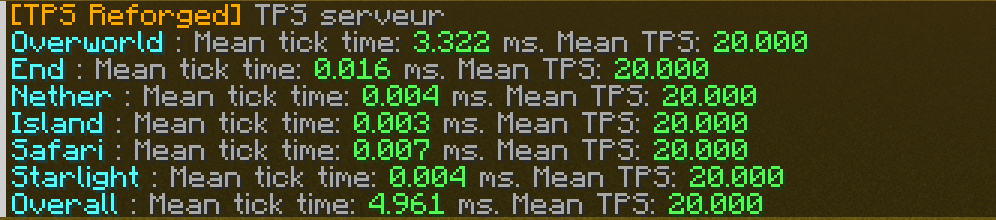 Chat Different dim
 -
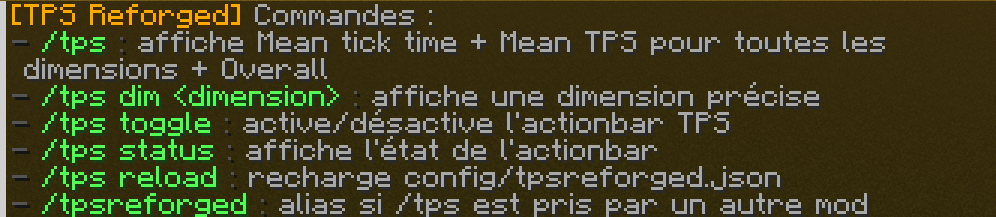 Help Command help
 -
 Action Bar Action Bar
Versions
Files
Relations
Project Relations
More like this
Similar Mods
Suggestions use data such as tags, dependencies, dependents, descriptions, titles, and more to rank how much they overlap with this mod.
On ModDex
Community snapshot
By the numbers
Statistics
Want to reach Minecraft players?
We're looking for a server hosting partner to feature here and other parts of the site. Interested? Send us a message!
Get in touchGet it on
Available Platforms
On ModDex
Community snapshot
By the numbers