
Community listing page, reviews here may not be monitored by the author.
Trash Slot

No reviews yet
Adds a seamless, vanilla-styled trash slot to your inventory
Community voices
Reviews
No reviews yet. Be the first to review this project!
Get it on
Available Platforms
About
Project Details
For authors
Embed Badge
If you're the author of this project, you can embed a live badge anywhere that supports HTML or Markdown. It updates automatically whenever ratings change.
Use HTML for any page that supports it, or Markdown for README files and Markdown-based descriptions.
Identifiers
Platform IDs
Resources
External Links
About
Description
🗑️ Trash Slot 🗑️
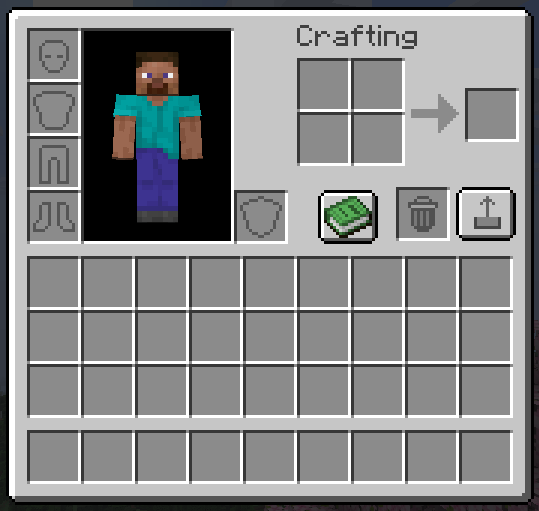
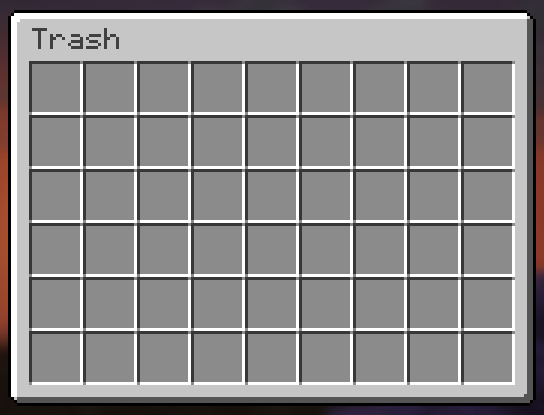
Trash Slot adds a dedicated trash slot to your inventory screen with a full 54-slot recovery chest. Drag items in to delete them, or use hotkeys for instant cleanup — and get them back anytime if you made a mistake.
✨ Features ✨
Drag-and-Drop Trash Slot
A real inventory slot right in your crafting area. Drag any item into it and it’s instantly deleted — no confirmation dialogs, no delays. Feels completely vanilla.
54-Slot Recovery Chest
Every deleted item is saved to a recovery grid styled as a vanilla large chest. Items fill left-to-right, top-to-bottom in deletion order. When the chest is full, the oldest items get overwritten first. Click any slot to recover instantly.
Delete Key Shortcuts
Press Delete while hovering any inventory item to trash it. Press Shift+Delete to trash all items of that type from your entire inventory at once.
Permanent Delete in Recovery
Press Delete while hovering an item inside the recovery chest to permanently destroy it — no recovery possible. Regular Delete from the inventory always goes to recovery first.
Vanilla Recovery Button
A pixel-perfect vanilla-style button next to the trash slot opens the recovery chest. Matches the recipe book button style exactly — proper border, highlight, and hover states.
Server-Safe
All delete and recover operations use custom network packets. The server validates everything — works correctly in multiplayer with no duplication or desync.
Configurable Position
Trash slot position is adjustable via config file (trashslot.json).
🎮 How to Use 🎮
- Open your inventory — trash slot appears next to the crafting grid
- Drag items into the trash slot — or press Delete over any item
- Click the recovery button — to open the 54-slot recovery chest
- Click items to recover — they return to your inventory instantly
📦 Installation
- Install NeoForge or Fabric for Minecraft 26.1.2
- Drop the jar into your
modsfolder - Launch the game — the trash slot appears automatically
🔧 Compatibility
Minecraft: 26.1.2
Loaders: NeoForge & Fabric
Side: Both (server + client)
Multiplayer: ✅ Fully supported
❓ FAQ ❓
Is deleted data saved between sessions?
Yes — deletion history is saved per-player and persists across logins.
What happens when the recovery chest is full?
The oldest deleted item gets overwritten. The chest holds 54 items (6×9 grid).
Does this need to be on the server?
Yes — the mod handles inventory changes server-side for safety. Install on both client and server for multiplayer.
Can I include this in my modpack?
Yes, freely — public or private, no notification needed.
Where do I report bugs?
Open an issue on the GitHub repository. Please include your loader, MC version, and a latest.log.
📄 License 📄
MIT — source available on GitHub.
Made by hooneyBadgers.
Screenshots
Gallery
Versions
Files
Relations
Project Relations
More like this
Similar Mods
Suggestions use data such as tags, dependencies, dependents, descriptions, titles, and more to rank how much they overlap with this mod.
On ModDex
Community snapshot
By the numbers
Statistics
Want to reach Minecraft players?
We're looking for a server hosting partner to feature here and other parts of the site. Interested? Send us a message!
Get in touchGet it on
Available Platforms
On ModDex
Community snapshot
By the numbers
Statistics
Resources