Community listing page, reviews may not be monitored by the author.
TweakletMC Minimap

No reviews yet
A compact map of the area around you in the corner of the screen, in the colors of Minecraft's own maps.

Community voices
Reviews
No reviews yet. Be the first to review this project!
Get it on
Available Platforms
About
Project Details
For authors
Embed Badge
If you're the author of this project, you can embed a live badge anywhere that supports HTML or Markdown. It updates automatically whenever ratings change.
Use HTML for any page that supports it, or Markdown for README files and Markdown-based descriptions.
Identifiers
Platform IDs
Resources
External Links
About
Description
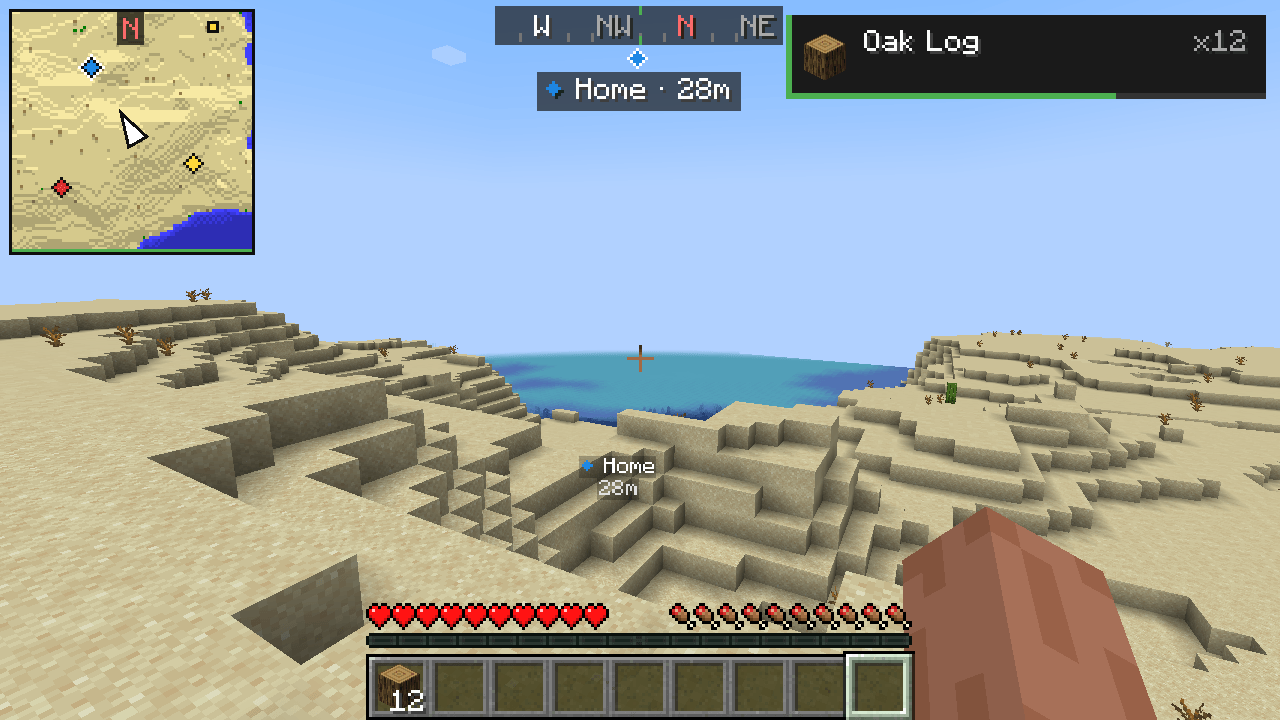
A compact map of the area around you in the top-left corner of the screen, in the same colors as Minecraft's own maps.
The map
- Shows the terrain around you with the colors and shading of vanilla Minecraft maps: grass, forests, water depth, sand, stone and so on.
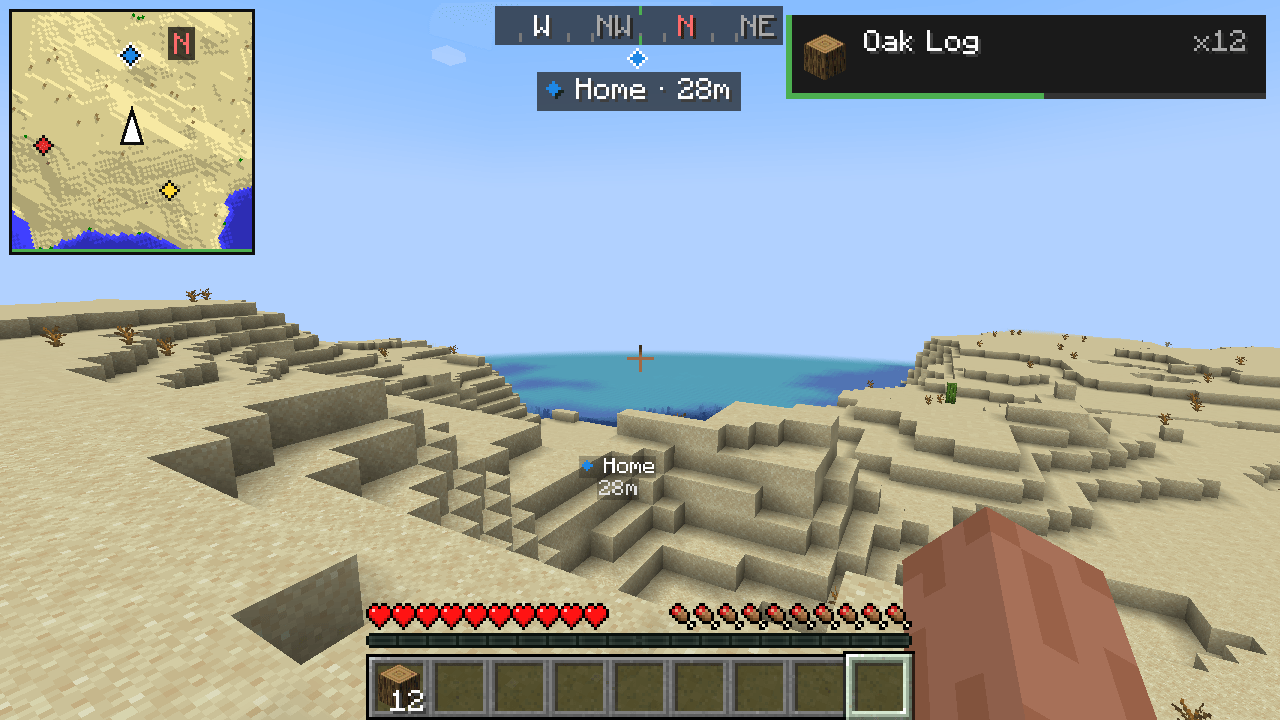
- Your position is the arrow in the middle; it points where you are looking. A red N at the edge always shows north.
- North up (default) or turns with you: the map rotates so that the way you are looking is always up.
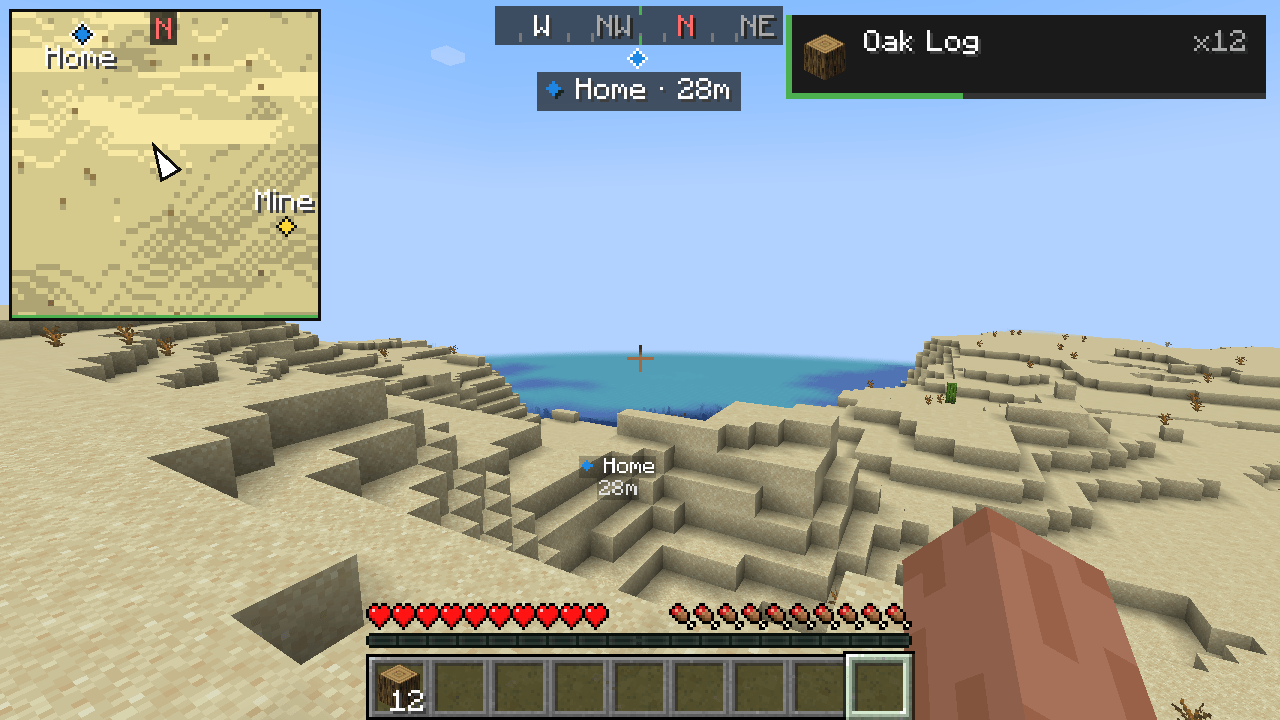
- Four zoom levels: 0.5×, 1×, 2× and 4×. Use Numpad + and Numpad -, or the settings.
- Three sizes. The map stays clear of boss bars, the TweakletMC Waypoints compass, the notifications in the top-right corner and the chat. It hides while the debug screen (F3), the player list (Tab), the hidden HUD (F1) or the chat input is open.
- Only terrain that the game has already loaded is drawn. The map never loads chunks by itself and never shows places you have not been near.
Dimensions
- The Overworld, the Nether and the End each have their own map; one never shows another's terrain.
- In the Nether the map shows the floor around the height you are at, with the walls at your level drawn darker. In the End the void is dark.
Explored map
- The map you have explored is saved for each singleplayer world, each server and each dimension, and is back when you reconnect.
-
Saved in compact compressed files in
<game folder>/tweaklet/<world>/map/. Nothing is written for a world before there is something to save. - Turn Save Map off to keep nothing: then only the terrain loaded right now is shown and no files are written.
Waypoints (optional)
With TweakletMC Waypoints installed:
- The waypoints of the current dimension appear on the map in their own colors.
- The navigation target is outlined in white and stays at the edge of the map when it is farther away, pointing the way.
- At 2× and 4× zoom, waypoint names are shown next to their markers, without covering each other or your arrow.
- Hidden waypoints are not shown, and the setting Waypoints turns them off on the map.
Without TweakletMC Waypoints, Minimap works on its own.
Nearby players and mobs
- Players (light blue), hostile mobs (red) and other mobs (yellow) near you are marked on the map.
- Choose all, only players, only mobs or none, and how far (8 to 128 blocks). Invisible entities and spectators are never shown.
- Some servers do not allow minimaps that show players or mobs; you can turn the markers off.
Settings (Mod Menu)
Minimap on/off, size, zoom, north up or turning, waypoints on/off, nearby players and mobs, their range, and Save Map. Saved in config/tweaklet-minimap.json. The keys can be changed in Options → Controls → Key Binds under the TweakletMC category; Minimap Show/Hide has no key until you choose one.
Requirements
- Minecraft Java Edition 1.21.1
- Fabric Loader 0.16.0 or newer
- Fabric API
- TweakletMC Core 0.2.1 or a newer 0.2.x version
- Java 21
- Optional: Mod Menu, for the settings screen
- Optional: TweakletMC Waypoints 0.1.0 or newer, to show waypoints on the map
Minimap runs on the client only. It works on servers without installing anything on the server.
Known limitations
- Underground in the Overworld the map shows the surface; there is no cave view.
- In the Nether, places saved at another height keep that look until you see them again.
- The map does not show coordinates.
- If TweakletMC Pickup Toast is set to the top-left corner, it overlaps the map; keep one of them in another corner.
- In very small windows (scaled screen width below 426 or height below 240 pixels) the map shrinks and can partly overlap the chat or boss bars.
- On Realms the explored map is not saved.
- A server's map is shared only between spellings of the same address; an IP address and a domain name pointing to the same server keep separate maps.
- Players and mobs are shown only as far as the server sends them to your game.
- Languages: English and Turkish. Other languages show the English text.
Türkçe
Ekranın sol üst köşesinde, çevrenin Minecraft'ın kendi haritalarıyla aynı renklerde küçük bir haritası.
Harita
- Çevrendeki araziyi vanilla Minecraft haritalarının renkleri ve gölgeleriyle gösterir: çimen, orman, suyun derinliği, kum, taş ve ötekiler.
- Ortadaki ok sensin; baktığın yönü gösterir. Kenardaki kırmızı K her zaman kuzeyi gösterir.
- Kuzey yukarıda (varsayılan) ya da seninle döner: harita, baktığın yön hep yukarıda kalacak şekilde döner.
- Dört yakınlaştırma düzeyi: 0,5×, 1×, 2× ve 4×. Sayısal tuş takımı + ve - tuşlarıyla ya da ayarlardan.
- Üç boyut. Harita boss bar'lara, TweakletMC Waypoints pusulasına, sağ üstteki bildirimlere ve sohbete girmez. Hata ayıklama ekranı (F3), oyuncu listesi (Tab), gizli arayüz (F1) ya da sohbet yazma satırı açıkken gizlenir.
- Yalnızca oyunun zaten yüklediği arazi çizilir. Harita kendiliğinden parça yükletmez ve yakınından geçmediğin yerleri göstermez.
Boyutlar
- Overworld, Nether ve End'in her birinin kendi haritası vardır; biri ötekinin arazisini hiç göstermez.
- Nether'da harita bulunduğun yükseklikteki zemini gösterir; o hizadaki duvarlar daha koyu çizilir. End'de boşluk koyu görünür.
Keşfedilen harita
- Keşfettiğin harita her tek oyunculu dünya, her sunucu ve her boyut için kaydedilir; yeniden bağlanınca yerinde olur.
-
<oyun klasörü>/tweaklet/<dünya>/map/içinde, sıkıştırılmış küçük dosyalara kaydedilir. Kaydedilecek bir şey olmadan bir dünya için hiçbir şey yazılmaz. - Haritayı Kaydet ayarını kapatırsan hiçbir şey saklanmaz: yalnızca o an yüklü arazi gösterilir ve dosya yazılmaz.
Waypoint'ler (isteğe bağlı)
TweakletMC Waypoints kuruluysa:
- Bulunduğun boyutun waypoint'leri haritada kendi renkleriyle görünür.
- Navigasyon hedefi beyaz kenarlıdır; uzaktaysa haritanın kenarında, yönünü göstererek durur.
- 2× ve 4× yakınlıkta waypoint adları işaretlerin yanında, birbirini ve oku örtmeden yazılır.
- Gizlenen waypoint'ler gösterilmez; Waypoint'ler ayarı haritadaki işaretleri kapatır.
TweakletMC Waypoints kurulu değilse Minimap tek başına çalışır.
Yakındaki oyuncular ve yaratıklar
- Yakınındaki oyuncular (açık mavi), saldırgan yaratıklar (kırmızı) ve diğer yaratıklar (sarı) haritada işaretlenir.
- Hepsi, yalnızca oyuncular, yalnızca yaratıklar ya da hiçbiri ve mesafe (8 ile 128 blok arası) seçilir. Görünmez varlıklar ve izleyici moddakiler hiç gösterilmez.
- Bazı sunucular oyuncu ya da yaratık gösteren mini haritalara izin vermez; işaretleri kapatabilirsin.
Ayarlar (Mod Menu)
Mini harita açık/kapalı, boyut, yakınlaştırma, kuzey yukarıda ya da dönen harita, waypoint'ler açık/kapalı, yakındaki oyuncular ve yaratıklar, onların mesafesi ve Haritayı Kaydet. config/tweaklet-minimap.json dosyasına kaydedilir. Tuşlar Seçenekler → Kontroller → Tuş Atamaları ekranında TweakletMC kategorisinden değiştirilir; Mini Harita: Göster/Gizle için sen seçene kadar tuş atanmamıştır.
Gereksinimler
- Minecraft Java Edition 1.21.1
- Fabric Loader 0.16.0 veya üstü
- Fabric API
- TweakletMC Core 0.2.1 veya daha yeni bir 0.2.x sürümü
- Java 21
- İsteğe bağlı: ayar ekranı için Mod Menu
- İsteğe bağlı: waypoint'leri haritada göstermek için TweakletMC Waypoints 0.1.0 veya üstü
Minimap yalnızca istemcide çalışır. Sunuculara hiçbir şey kurmadan sunucularda da kullanılabilir.
Bilinen sınırlar
- Overworld'de yer altındayken harita yüzeyi gösterir; mağara görünümü yoktur.
- Nether'da başka bir yükseklikte kaydedilen yerler, yeniden görene kadar o hâlleriyle kalır.
- Harita koordinat göstermez.
- TweakletMC Pickup Toast sol üst köşeye alınırsa haritayla çakışır; birini başka bir köşede tut.
- Çok küçük pencerelerde (ölçeklenmiş ekran genişliği 426 ya da yüksekliği 240 pikselden az) harita küçülür ve sohbetle ya da boss bar'larla kısmen çakışabilir.
- Realms'te keşfedilen harita kaydedilmez.
- Bir sunucunun haritası yalnızca aynı adresin farklı yazımları arasında paylaşılır; aynı sunucuya giden bir IP adresi ile alan adı ayrı haritalar kullanır.
- Oyuncular ve yaratıklar yalnızca sunucunun oyununa gönderdiği mesafeye kadar gösterilir.
- Diller: İngilizce ve Türkçe. Diğer dillerde İngilizce metin görünür.
Screenshots
Gallery
-
 01-map-and-waypoints.png
 -
 02-turns-with-you.png
 -
 03-zoomed-in.png
 -
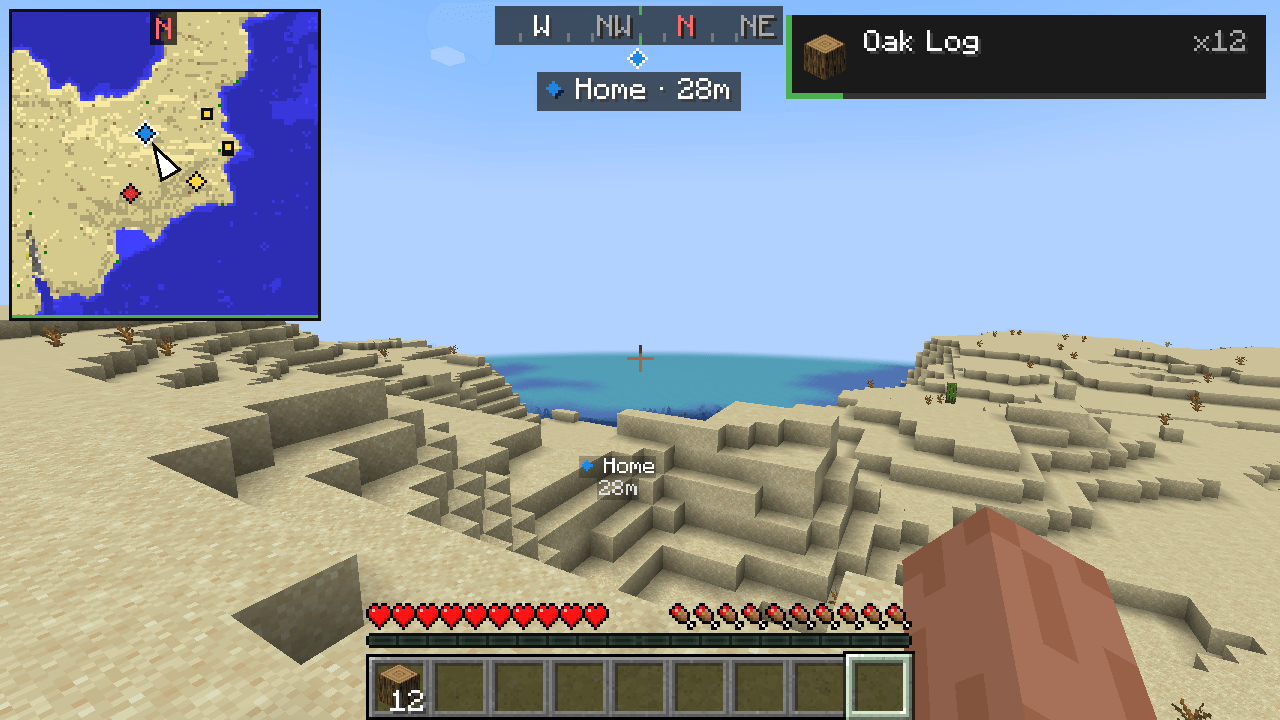 04-large-zoomed-out.png
 -
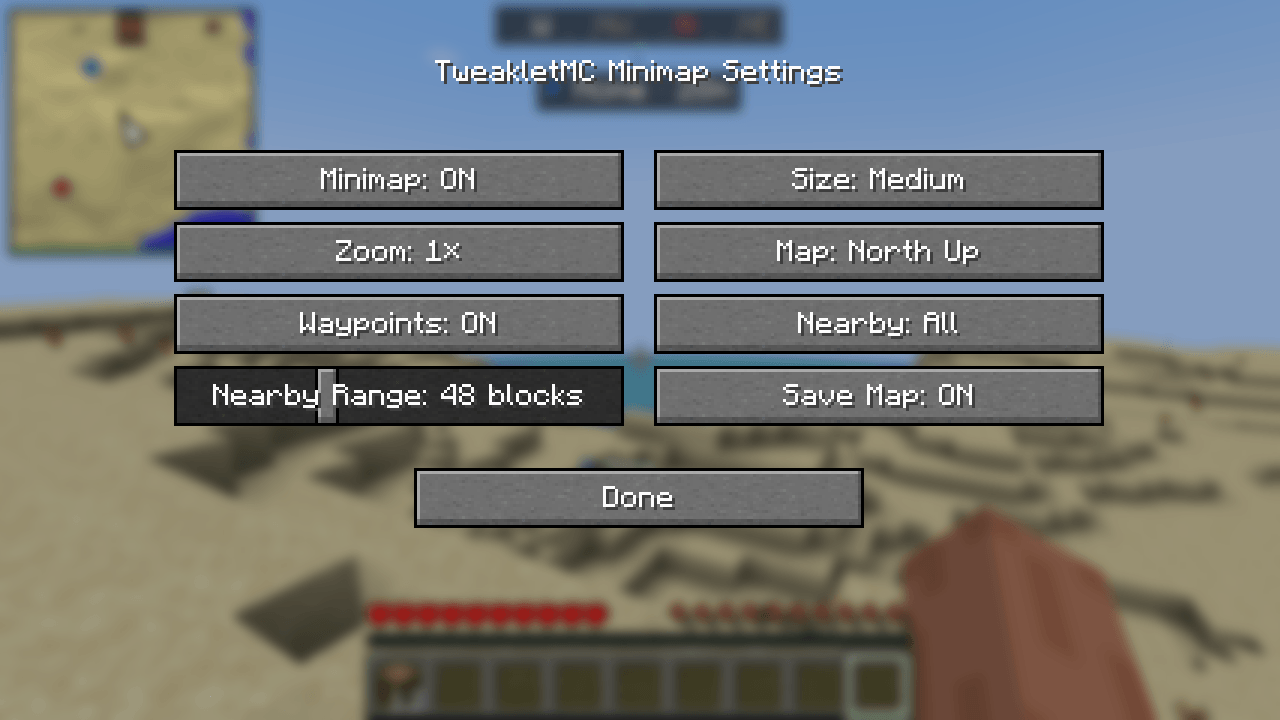 05-settings-mod-menu.png
 -
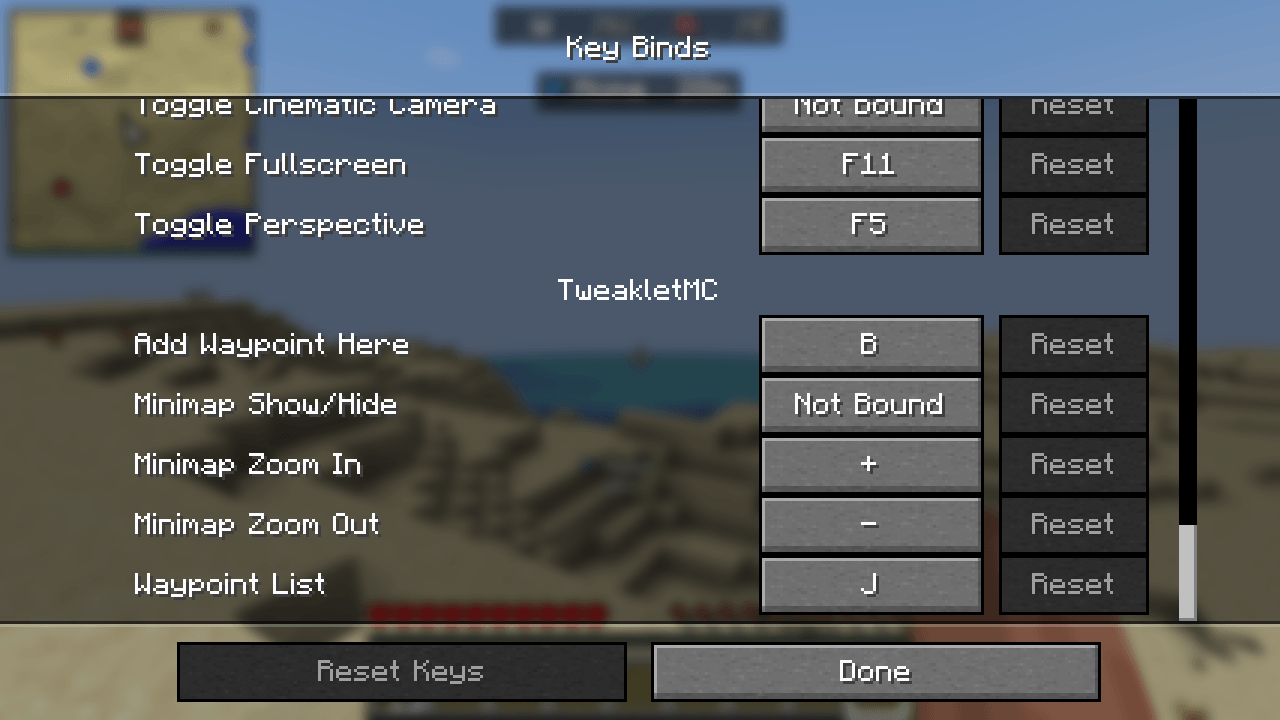 06-controls.png
Versions
Files
Relations
Project Relations
More like this
Similar Mods
Suggestions use data such as tags, dependencies, dependents, descriptions, titles, and more to rank how much they overlap with this mod.
On ModDex
Community snapshot
By the numbers
Statistics

Get it on
Available Platforms
On ModDex
Community snapshot
By the numbers
Statistics
Resources