
Community listing page, reviews here may not be monitored by the author.
txt2book

No reviews yet
Convert texts into Minecraft books
Community voices
Reviews
No reviews yet. Be the first to review this project!
Get it on
Available Platforms
Compatibility
Supported Environments
Runs entirely on the server. Also works in singleplayer.
About
Project Details
For authors
Embed Badge
If you're the author of this project, you can embed a live badge anywhere that supports HTML or Markdown. It updates automatically whenever ratings change.
Use HTML for any page that supports it, or Markdown for README files and Markdown-based descriptions.
Identifiers
Platform IDs
Resources
External Links
About
Description
txt2book
This mod allows you to import books or articles from supported websites and convert them into in-game Minecraft books.
Supported Websites:
- Telegraph (good)
- Ponyfiction (good)
- Ficbook (good with small texts)
- .docx documents (WIP)
You can set up a proxy in the config.
Check out my new mod - PxIgnis!
A server-side mod that enables Lua scripting in Minecraft! Instant hot reload, very simple but powerful API for prototyping game mechanics, custom mob AI, mini games, custom commands & everything that comes into your mind.
local arena = world:createRegion(vec(-50, 64, -50), vec(50, 80, 50))

arena:on("entity_enter", function(entity)
    if entity:isPlayer() then
        mc.broadcast(entity.name .. " entered the arena")

        coroutine.wrap(function()
            local res = mc.fetch("https://api.example.com/arena/log")
            if not res.ok then
                mc.broadcast("log failed: " .. res.error, true)
            end
        end)()
    end
end)
How to Use
To import a book, use the following command:
/txt2book <source> <workId> [signed]
Example:
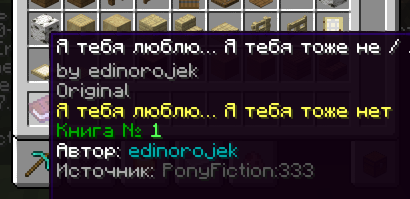
/txt2book ponyfiction 333
This will import the story from ponyfiction.org/story/333 and give you a Minecraft book.
You can also specify whether the book should be signed (minecraft:written_book) or unsigned (minecraft:writable_book). By default, the book will be signed.
Examples:
/txt2book ponyfiction 333 true– Creates a signed book./txt2book ponyfiction 333 false– Creates an unsigned, writable book.
Finding workId:
- Ficbook:
ficbook.net/readfic/**10936980**→ Work ID is"10936980" - Ponyfiction:
ponyfiction.org/story/**220**→ Work ID is"220" - Telegraph:
telegra.ph/**Pikabu-Puls-August-2024-09-16**→ Work ID is"Pikabu-Puls-August-2024-09-16"
Docx importing (a little guide)
/txt2book docx "<url>" [writtenBook]
url is a link to the .docx file.
You can just send the file in Discord and copy the link to it.
How Chapters Work
Chapters are split by paragraph styles in the docx file.
Title - Sets the book title
Heading 1...9 - Starts a new chapter
Any other style - text
Example Structure
[Title] MY SUPER BOOK
[Heading 1] Everything goes good
But main hero dies
[Heading 1] Now everything is bad
And sad
Produces:
- Book title:
MY SUPER BOOK - Chapter 1:
Everything goes good— body text - Chapter 2:
Now everything is bad— body text
Admin Commands
/txt2book reload– Reloads the configuration./txt2book resetCache– Clears the book cache, allowing faster access to recently imported books.
Permissions
By default, all commands are restricted to server operators. You can adjust access using the permission system.
ru.pyxiion.txt2book– Permission to use the main command.ru.pyxiion.txt2book.ficbook– Permission to import books from Ficbook.ru.pyxiion.txt2book.ponyfictionru.pyxiion.txt2book.telegraphru.pyxiion.txt2book.docxru.pyxiion.txt2book.reload– Permission to reload the mod configuration.ru.pyxiion.txt2book.resetCache– Permission to reset the book cache.
Configuration
File: config/txt2book.toml
Parameters:
config_version— do not modify this value.lang— mod language. You can set "ru" or "en", or add your own language.maximum_file_size— maximum size for imported files.[characters],[characters.category],[characters.width]— system parameters.[langs.X]— messages for language X.
Language Support
The mod supports both English and Russian. You can select or add languages in the configuration file (txt2book.toml).
Some limitations
The mod does not support all possible letters. It filters them out if the mod doesn't know their size.
About docx importing
The first title in a document is considered the title of the book. All subsequent titles are chapter titles.
Plans
- Improve .docx importing
- Improve Ficbook importing
Let me know if you found a bug or have a suggestion, such as adding a new source.

Screenshots
Gallery
Versions
Files
Relations
Project Relations
More like this
Similar Mods
Suggestions use data such as tags, dependencies, dependents, descriptions, titles, and more to rank how much they overlap with this mod.
On ModDex
Community snapshot
By the numbers
Statistics

Want to reach Minecraft players?
We're looking for a server hosting partner to feature here and other parts of the site. Interested? Send us a message!
Get in touchGet it on
Available Platforms
On ModDex
Community snapshot
By the numbers
Statistics
Resources