Community listing page, reviews may not be monitored by the author.
Tycoon Retail

No reviews yet
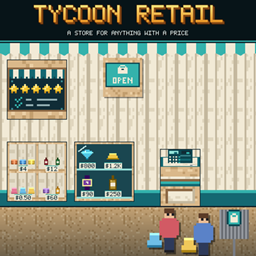
Open a real shop: put up a shop sign, a register and shelves, fill them with goods, and customers arrive, browse, queue and pay. Sells anything other mods give a price.

Community voices
Reviews
No reviews yet. Be the first to review this project!
Get it on
Available Platforms
About
Project Details
For authors
Embed Badge
If you're the author of this project, you can embed a live badge anywhere that supports HTML or Markdown. It updates automatically whenever ratings change.
Use HTML for any page that supports it, or Markdown for README files and Markdown-based descriptions.
Identifiers
Platform IDs
Resources
External Links
About
Description
Tycoon Retail
A store for anything with a price.
Tycoon Retail lets you open a real shop in Minecraft. Put up a Shop Sign in a closed room with a door, add a Register and some shelves, fill them with goods - and customers get off the Customer Bus Stop, browse, queue at your till and pay. You stand at the register, right-click, and the money lands in your Money account. Price too high and they leave grumbling; run a good store and the word gets around.
Tycoon Retail has no goods of its own: it sells what other mods offer with a daily price (see Requirements). Without such a mod there is nothing to sell.
Your store
- Shop Sign: stand it inside a closed room and that room is your store. Right-click to open and close. A hole in the wall, no door or no register closes the store and tells you why.
- Register: customers queue on the side it faces. Right-click to check out the one at the front.
- Customer Bus Stop: place it outside, near your store. Customers arrive here and leave from here - but not at night. The more kinds of goods, stock and reputation you have, the more come.
- Goods Shelf: four compartments, one stack each. Customers help themselves.
- Glass Cabinet: six locked compartments for the expensive pieces. Only collectors and well-off customers ask for them, at the register.
- Storage Rack: 54 slots of back stock. Only you open it, hoppers can fill it but not empty it. Customers never touch it.
- Compartments remember their goods: a shelf you sold out stays reserved for that kind until you clear it with an empty hand.
- Other mods' racks, stands and showcases count as sales floor too.
Customers
Five kinds, from pocket money to rich, each with a budget and a different chance of buying - plus rare patrons who buy pieces that are too dear even for the rich. They browse, queue, pay - and say what they think of your prices.
- Prices: each kind of goods costs the market price plus the store's markup (10 percent by default), or a price of your own. There is no price ceiling - but the dearer it gets, the fewer buy, and the reputation suffers when customers find it too expensive or wait too long.
- Reputation rises with every sale and falls with unhappy customers.
Store Manager
The price list of the whole store in one screen: every kind of goods with its market price today, your own price (click to change, Shift and Ctrl for bigger steps), the chance a customer buys at that price, and what is in stock - and in storage. Search by name or category. At the bottom set one percentage for everything without a price of its own: "All: market + X %".
Store Rating
Hang a Store Rating Terminal on a wall. Your store earns up to 100 points - range (kinds, categories, stock, price classes, showpieces), ambience (furniture, lighting, decoration, floor space, tidiness) and service (fair prices, full shelves, registers, satisfied customers) - which turn into up to five stars.
More stars bring more customers. Collectors and well-off customers come from two stars, the rich and patrons from three. Right-click the terminal to see every point and what would earn more.
Stock Room
A Stock Room Sign turns a second closed room with a door into your stock room. Chests, barrels, storage racks and other mods' storage blocks inside count. The sign shows what the goods are worth today. Flip the switch and the shelves of your nearby store are refilled from the stock room.
For servers and pack makers
- Config: every number of the store - customers per minute, floor space per customer, bus stop
range, queue length and patience, buy chance, collector and rich shares, patron credit, refill
speed, and every point and star threshold of the rating (
store.*andrating.*). - Data: decoration is the block tag
tycoonretail:decoration- add or remove blocks. Customers are Tycoon Citizens roles (tycoonretail:customer,tycoonretail:rich_customer). - All recipes are ordinary data and can be changed by a pack. There are no commands.
For mod developers
RetailAPI lets your mod put goods on the shelf: register a provider that recognises a stack, gives
its daily price, name and category, and gets told when it was sold. You can also register your own
furniture as sales floor and your own storage blocks as stock room storage.
Requirements
- Minecraft 1.21.1, NeoForge
- Money 0.3.0 or later (required) - the owner's account
- Tycoon Calendar (required) - days and nights
- Tycoon Citizens (required) - the customers
Goods come from other mods that offer them to the store, none of them required: Tycoon Market (any item at its market price), Tycoon Vault (watches, wine, whisky), Tycoon Collectibles (memorabilia) and TCG Packs (cards and packs).
Works in singleplayer and multiplayer: stores, customers and payments are all kept on the server.
A note on how this was made
This mod was built with substantial help from AI. The design decisions, the playtesting and the direction are mine; a large share of the code, the textures and this text was written with an AI assistant. I would rather say that plainly than have you wonder.
Discord
Questions, bug reports, ideas, or just want to show what you built? Join the Discord - that is where I answer fastest, and where the next version gets shaped.
Screenshots
Gallery
Versions
Files
Relations
Project Relations
More like this
Similar Mods
Suggestions use data such as tags, dependencies, dependents, descriptions, titles, and more to rank how much they overlap with this mod.
On ModDex
Community snapshot
By the numbers
Statistics

Get it on
Available Platforms
On ModDex
Community snapshot
By the numbers
Statistics
Resources