
Community listing page, reviews may not be monitored by the author.
Ufo Problems

No reviews yet
Craft, fly, repair, and battle with a fully functional UFO featuring multiplayer support, deployable weapons, energy projectiles, custom HUD, and survival progression.

Community voices
Reviews
No reviews yet. Be the first to review this project!
Get it on
Available Platforms
About
Project Details
For authors
Embed Badge
If you're the author of this project, you can embed a live badge anywhere that supports HTML or Markdown. It updates automatically whenever ratings change.
Use HTML for any page that supports it, or Markdown for README files and Markdown-based descriptions.
Identifiers
Platform IDs
Resources
External Links
About
Description
Ufo Problems Mod is based on the free game Ufo Problems, available for both PC and Android on its official page:
https://eldoudev.itch.io/ufo-problems
This Minecraft mod brings the main idea of the original game into Minecraft as a fully functional, survival-friendly UFO system.
You can craft your UFO piece by piece, assemble the main chassis, install the dome, add a deployable weapon, and then use the finished vehicle for exploration, transportation, combat, and multiplayer gameplay.
Main Features
- Fully functional UFO vehicle
- Survival-friendly crafting progression
- UFO built from multiple craftable parts
- Up to 4 players can ride the same UFO
- One player controls the UFO while the others can travel as passengers
- Full flight controls
- Normal flight and turbo mode
- Vertical movement
- Smooth visual banking and movement animations
- Configurable third-person camera distance and height
- First-person and third-person support
- Deployable and retractable weapon system
- Animated weapon deployment
- Custom weapon sounds
- Custom blue energy sphere projectiles
- UFO vs UFO combat
- Passengers are protected during vehicle combat, with most damage being transferred to the UFO itself
- Separate health system for the UFO and weapon
- Custom health HUD
- Delayed damage effect
- Repair effect and repair system
- UFO and weapon can be repaired using different materials
- Damage is preserved when the UFO is picked up and placed again
- UFO can be picked up and stored in the inventory
- Armed UFO item variant
- Weapon can be destroyed independently from the UFO
- Smoke and fire particles when the UFO is heavily damaged
- Powerful explosion when the UFO is destroyed
- Passengers inside the UFO are heavily damaged when the vehicle explodes
- Custom death messages
- Custom 3D item models
- Custom crafting recipes
- Recipe book unlock support
- Custom creative mode tab
- English and Spanish language support
- Multiplayer support
Controls
The UFO includes configurable controls through the normal Minecraft Controls menu.
Default controls include:
- W / S – Move forward / backward
- A / D – Strafe left / right
- Space – Move up
- Ctrl – Move down
- Alt – Turbo
- R – Deploy / retract weapon
- Left Mouse Button – Fire
- H – Repair
- Camera settings can also be adjusted in-game
Survival Progression
The UFO is designed to require real progression in Survival Mode.
You must craft several parts separately before assembling the complete vehicle. Some recipes require materials such as Quartz, Copper, Lapis Lazuli, Glass, Redstone-related materials, and other resources, so the UFO is intended to feel like a late or mid-game vehicle rather than an early-game item.
Multiplayer
The mod supports multiplayer gameplay.
Up to four players can ride inside one UFO, and UFO battles are designed around damaging the vehicle rather than instantly killing the passengers. Players inside another UFO are mostly protected from direct projectile damage until their vehicle is destroyed.
Requirements
- Minecraft 1.21.11
- Fabric Loader
- Fabric API
- Java 25
Current Version
1.0.0
Initial release of Ufo Problems Mod.
Screenshots
Gallery
-
 Armed UFO 2026-10-17_23.47.31.png
 -
 Unarmed UFO 2026-10-17_23.48.12.png
 -
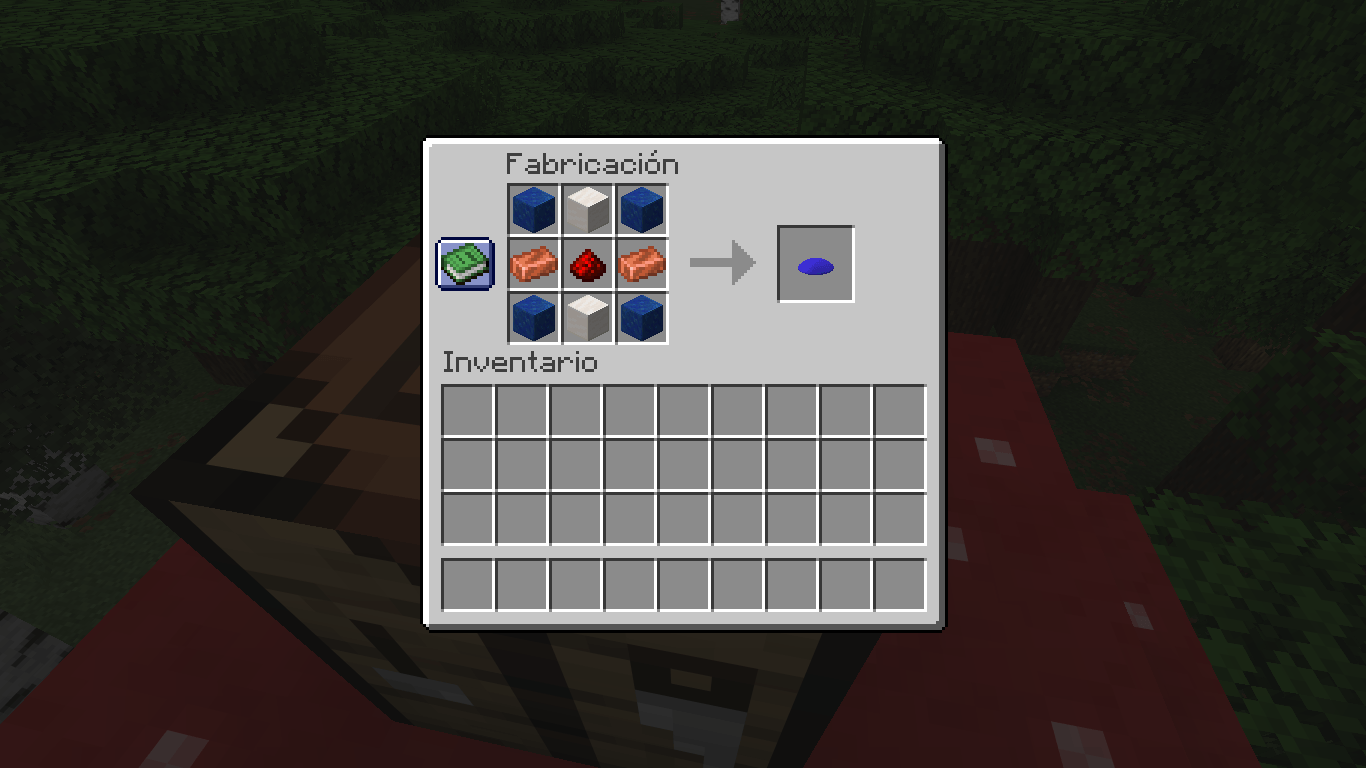 Craft UFO Body Section 2026-10-17_23.50.28.png
 -
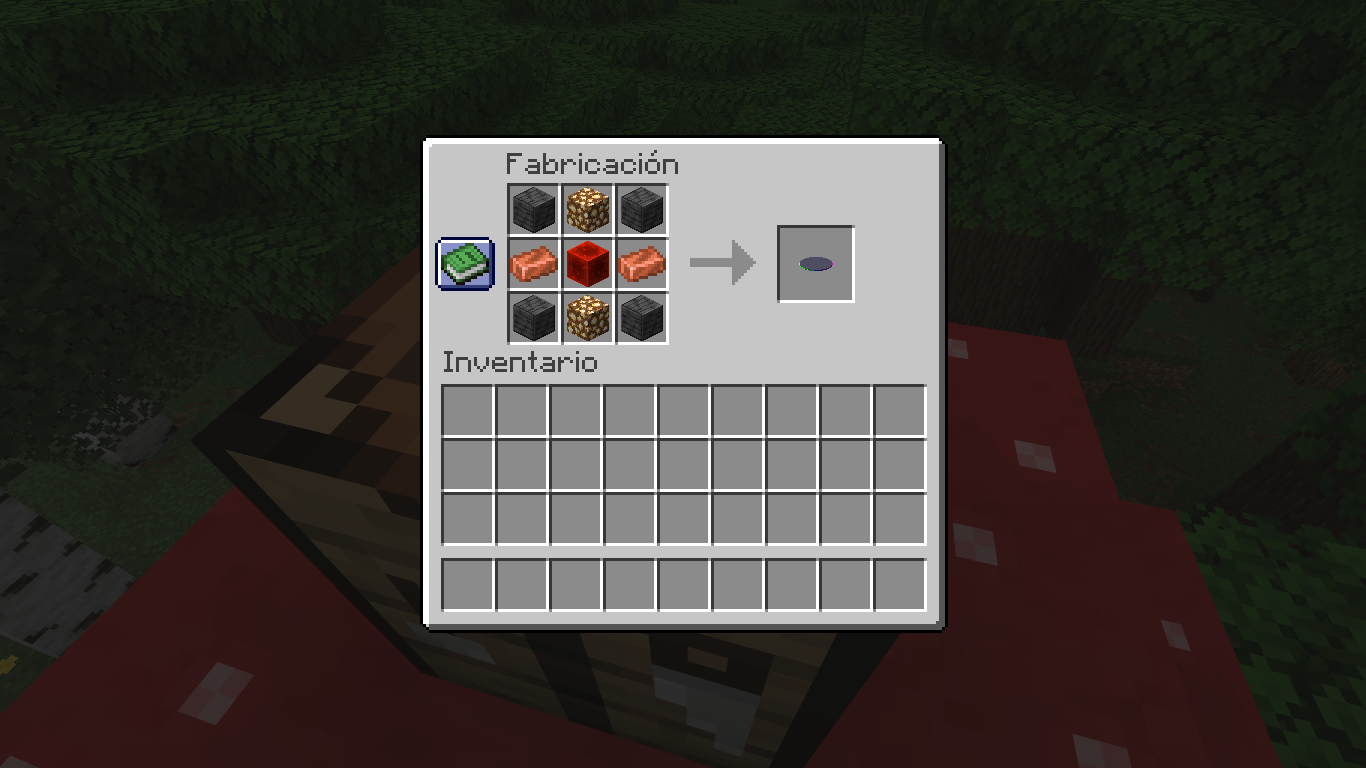 Craft UFO Rotor 2026-10-17_23.51.42.png
 -
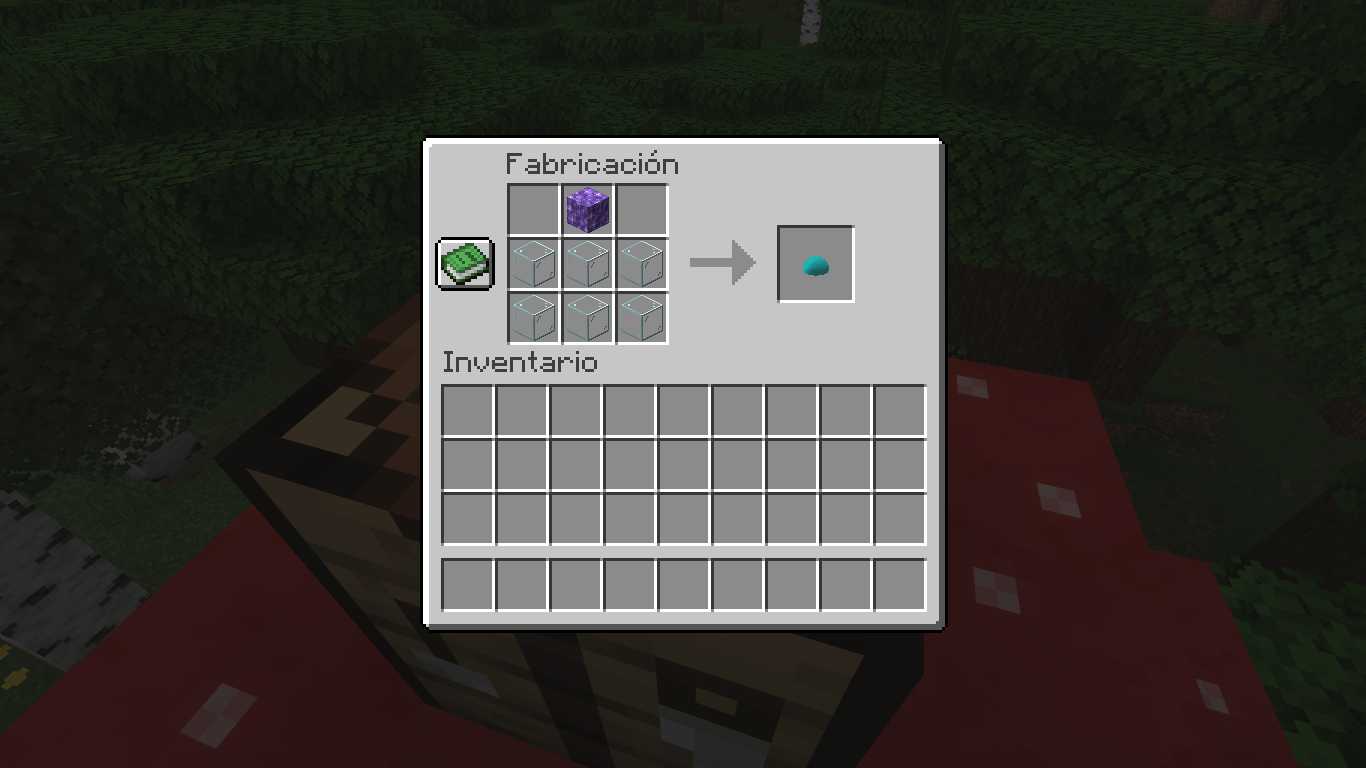 Craft UFO Glass Dome 2026-10-17_23.52.35.png
 -
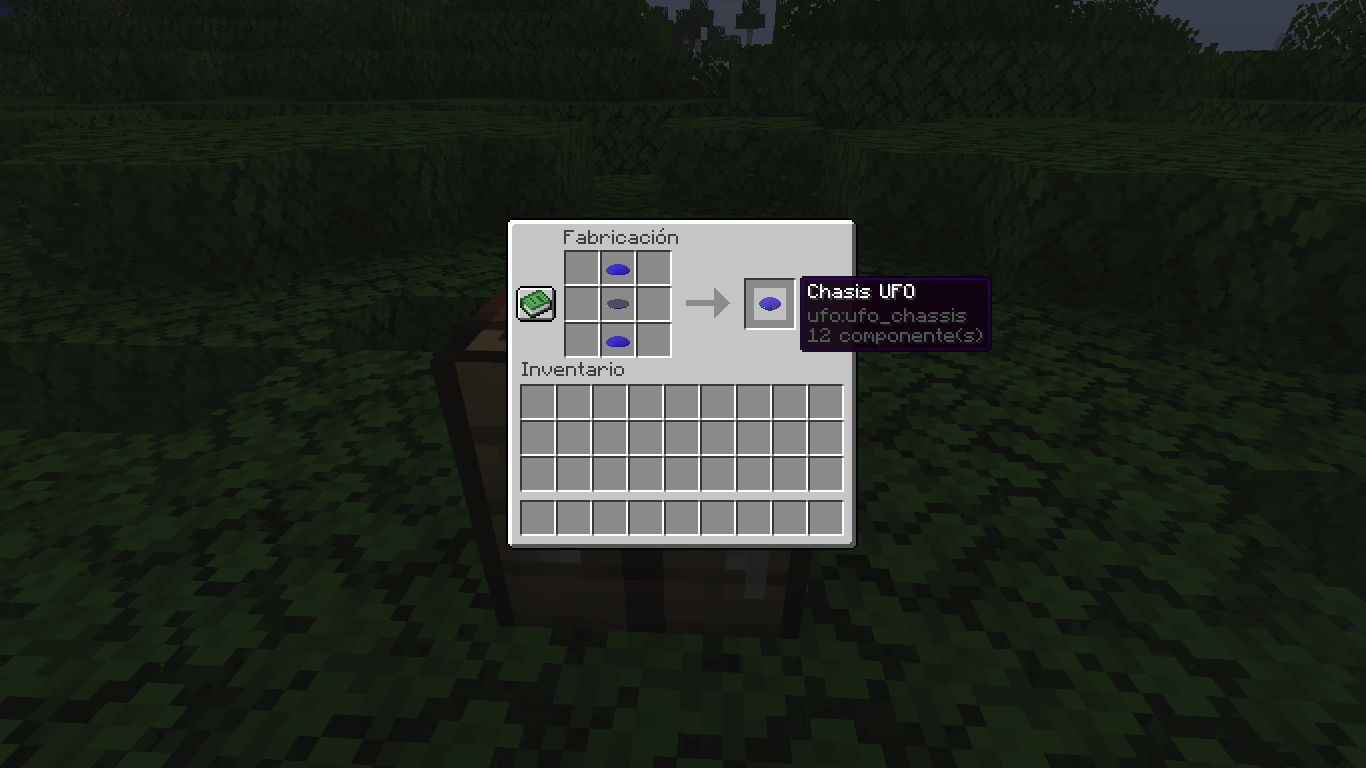 Craft UFO Chassis 2026-10-18_00.09.25.png
 -
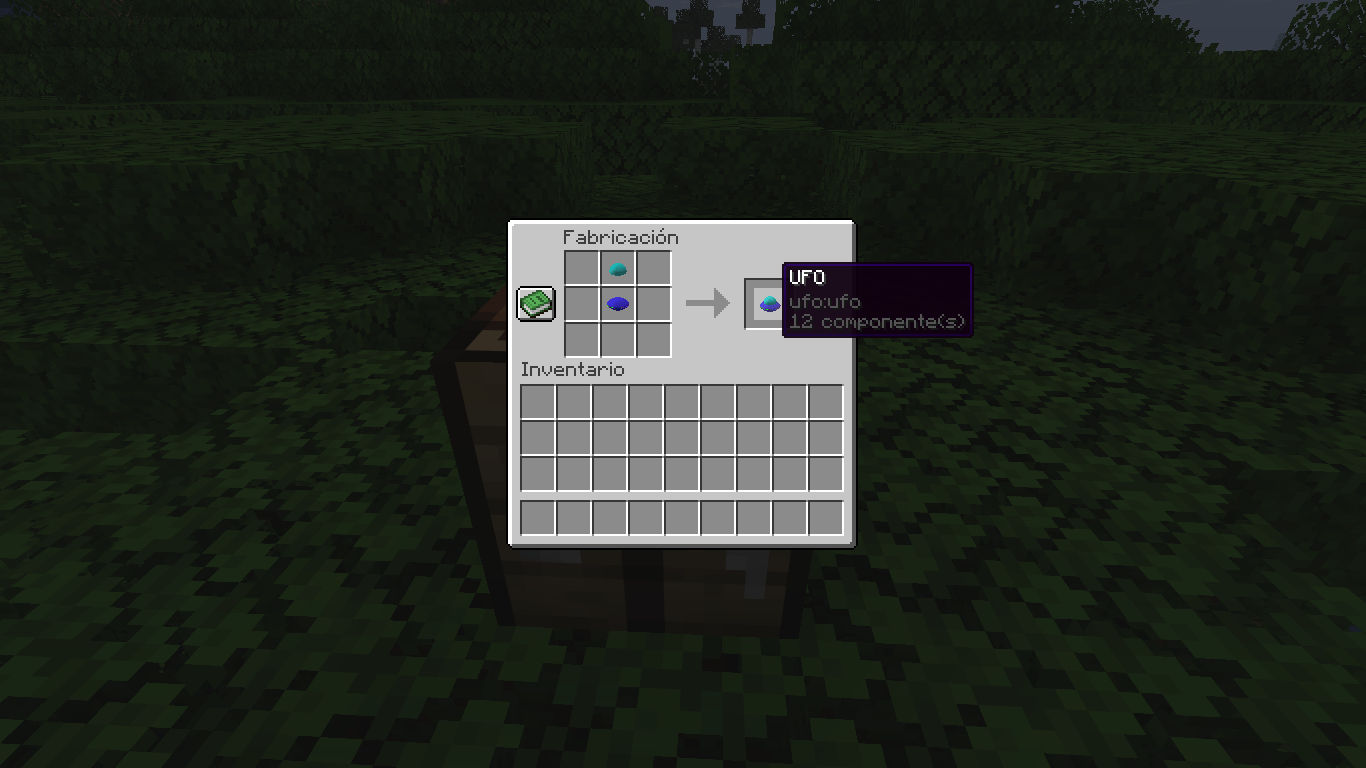 Craft UFO 2026-10-18_00.09.47.png
 -
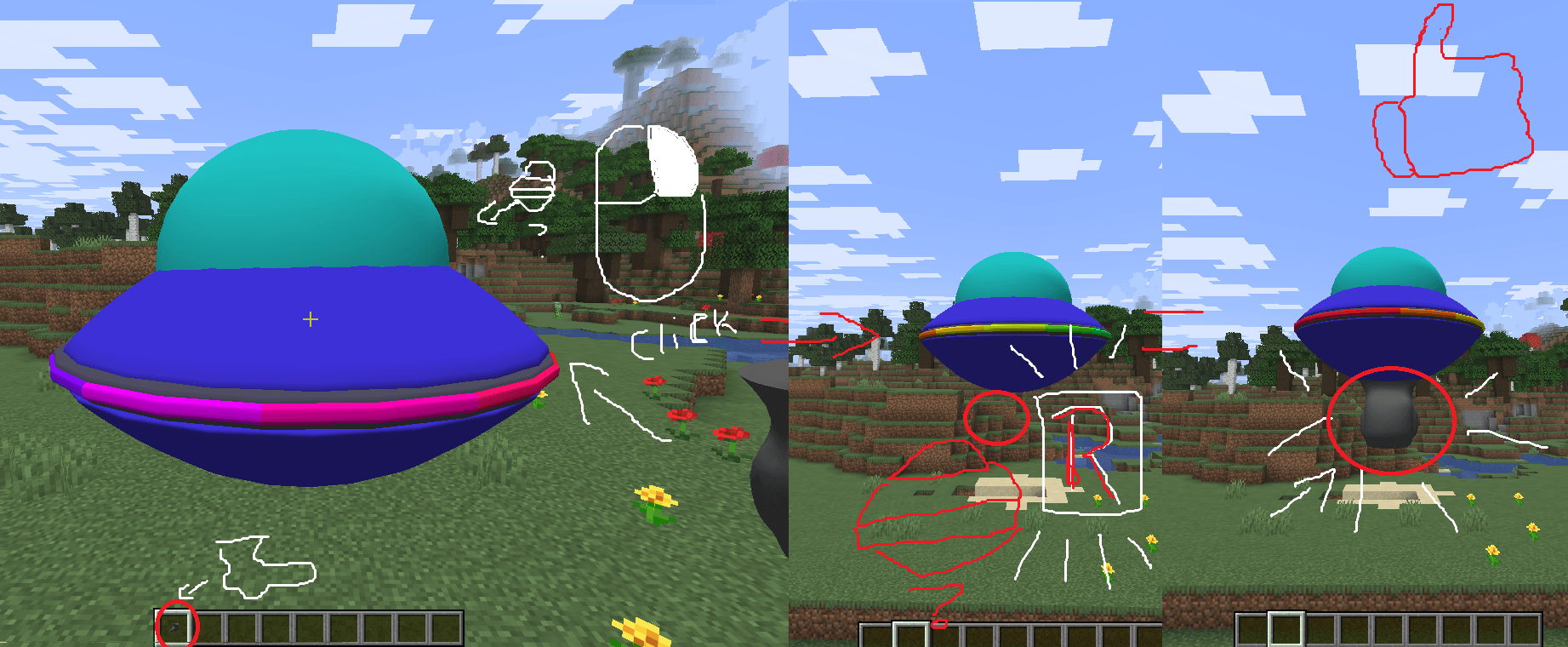 How to put the weapon on the UFO and activate it tutorial.png
 -
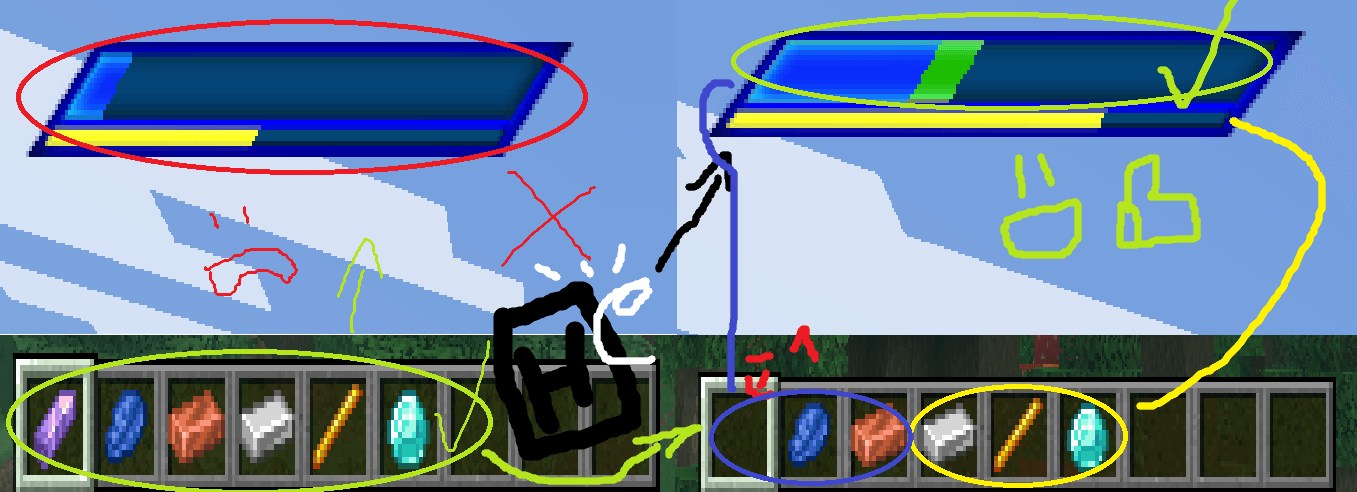 How to health the UFO and weapon tutorial2.png
Versions
Files
Relations
Project Relations
More like this
Similar Mods
Suggestions use data such as tags, dependencies, dependents, descriptions, titles, and more to rank how much they overlap with this mod.
On ModDex
Community snapshot
By the numbers
Statistics

Get it on
Available Platforms
On ModDex
Community snapshot
By the numbers
Statistics
Resources