
Community listing page, reviews here may not be monitored by the author.
UIWheel

No reviews yet
A mod that makes opening UIs easier

Community voices
Reviews
No reviews yet. Be the first to review this project!
Get it on
Available Platforms
About
Project Details
For authors
Embed Badge
If you're the author of this project, you can embed a live badge anywhere that supports HTML or Markdown. It updates automatically whenever ratings change.
Use HTML for any page that supports it, or Markdown for README files and Markdown-based descriptions.
Identifiers
Platform IDs
Resources
External Links
About
Description
this mod won't be updated for about 2 years (2026.6.27)
UI Wheel is a utility mod that allows you to open a radial menu by holding down the "Open UI Wheel" key (default: Alt).
You can assign actions to each slot and execute them by hovering and releasing or clicking.
Features
- Supports most mod UI actions
- Custom slot labels and descriptions
- Custom slot icons
- Open your backpack directly from the wheel without any additional steps (compatible with Sophisticated Backpacks and Traveler's Backpack)
Note: Compatibility with other mods may vary. Some actions (e.g. Combat Roll) may not function as expected.
Commands
/uiwheel open - Opens the UIWheel config folder directly
Sets or loads a global default slot configuration for the entire modpack
- /uiwheel default set - Saves the current slot configuration as the default
- /uiwheel default clear - Removes the saved default configuration
- /uiwheel default status - Checks whether a default configuration exists
Saves or loads named slot configuration profiles
- /uiwheel profile save <name> - Saves the current configuration as a profile
- /uiwheel profile load <name> - Loads a saved profile
- /uiwheel profile delete <name> - Deletes a saved profile
- /uiwheel profile list - Lists all saved profiles
Custom Icons
You can assign custom images to each slot icon
- Place your image files in config/uiwheel/icons/
- Supported formats: PNG, JPEG, GIF (first frame only)
- Open the in-game wheel settings screen, click a slot, and select the icon button
- Choose your image from the icon picker
If an image fails to load, the slot will display a placeholder icon instead
Manual Translation
This feature is intended for modpack creators who want to provide multilingual translations manually
- Open the wheel settings screen and click the translation button at the bottom of the Settings tab
- Select the language you want to translate into
- Select the slot you want to translate
Translated files are saved in config/uiwheel/lang/
If no translation is available for the user's language, the default slot text will be displayed instead
Screenshots
Gallery
-
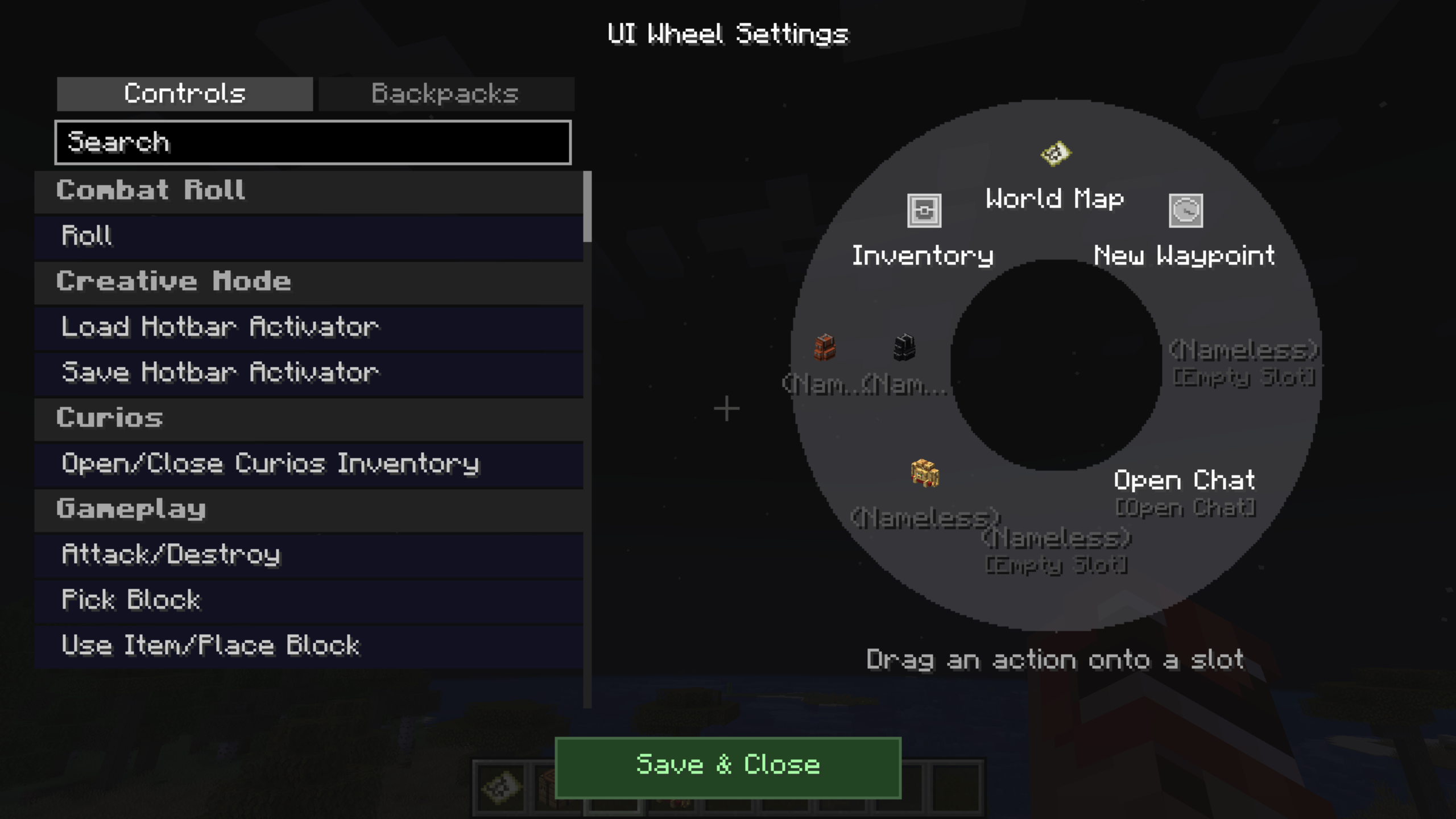 Wheel Setting
 -
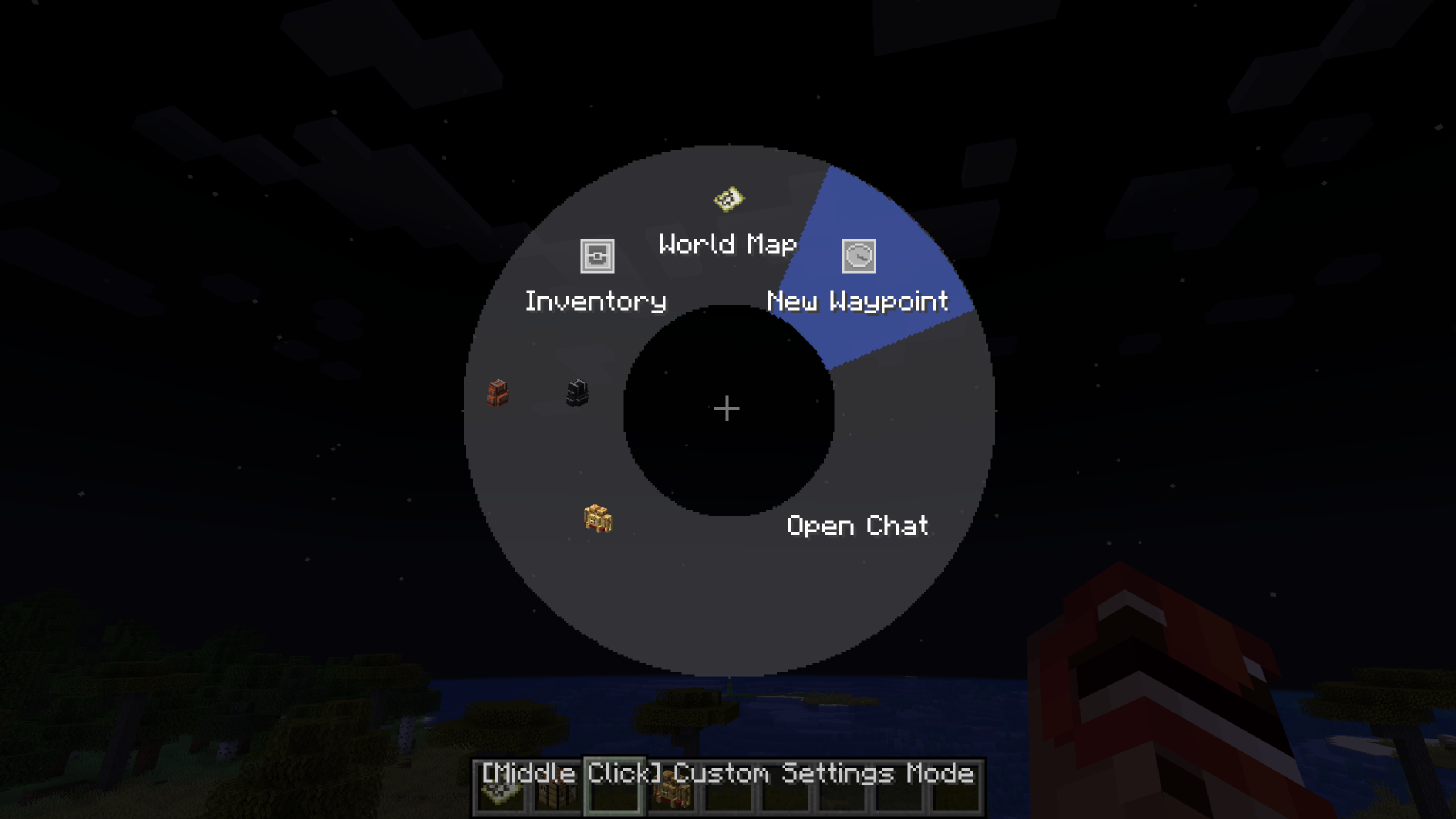 Wheel Example
Versions
Files
Relations
Project Relations
More like this
Similar Mods
Suggestions use data such as tags, dependencies, dependents, descriptions, titles, and more to rank how much they overlap with this mod.
On ModDex
Community snapshot
By the numbers
Statistics
 (opens in a new tab)
Get it on
Available Platforms
On ModDex
Community snapshot
By the numbers
Statistics
Resources