
Community listing page, reviews may not be monitored by the author.


Community voices
Reviews
No reviews yet. Be the first to review this project!
Get it on
Available Platforms
 CurseForge
Modrinth
CurseForge
Modrinth
Compatibility
Supported Environments
Must be installed on both the client and the server.
About
Project Details
For authors
Embed Badge
If you're the author of this project, you can embed a live badge anywhere that supports HTML or Markdown. It updates automatically whenever ratings change.
Use HTML for any page that supports it, or Markdown for README files and Markdown-based descriptions.
Identifiers
Platform IDs
About
Description
Unified
Annoying for a lot of same items from different mods cannot use mutually? This mod can help you.
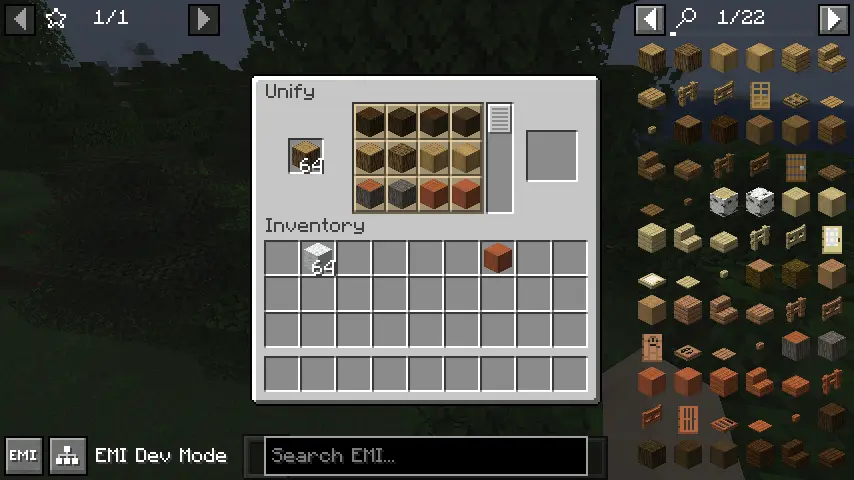
This mod add a command /unify, which you can open a unify screen. You can exchange items with same tag.
How to use
By default, this mod don't provide any exchange in the screen. You need to configure first.
Open file .minecraft/config/unified.json. If file don't exist, create it.
[
  "Write item tag here",
  "More tag",
  "You can write as much as you want to add"
]
Then, when you put items which has one of these tags into the unify screen, you can select other items which have the same tag to exchange.
I recommend to use EMI for tag checking.
Example
You want to let all logs can exchange.
First, find the tag id.

Then write following contents into config file.
[
  "minecraft:logs"
]
Open game (or /reload), and you can exchange now.
Unified
Annoying for a lot of same items from different mods cannot use mutually? This mod can help you.
This mod add a command /unify, which you can open a unify screen. You can exchange items with same tag.
How to use
By default, this mod don't provide any exchange in the screen. You need to configure first.
Open file .minecraft/config/unified.json. If file don't exist, create it.
[
  "Write item tag here",
  "More tag",
  "You can write as much as you want to add"
]
Then, when you put items which has one of these tags into the unify screen, you can select other items which have the same tag to exchange.
I recommend to use EMI for tag checking.
Example
You want to let all logs can exchange.
First, find the tag id.
Then write following contents into config file.
[
  "minecraft:logs"
]
Open game (or /reload), and you can exchange now.
Screenshots
Gallery
Versions
Files
Relations
Project Relations
More like this
Similar Mods
Suggestions use data such as tags, dependencies, dependents, descriptions, titles, and more to rank how much they overlap with this mod.
On ModDex
Community snapshot
By the numbers
Statistics
 (opens in a new tab)
Get it on
Available Platforms
CurseForge
Modrinth
On ModDex
Community snapshot
By the numbers