Community listing page, reviews may not be monitored by the author.
Universal Uncrafting Table

No reviews yet
Deconstruct, recycle, and repurpose everything! A smart, dynamic uncrafting station that safely breaks down items from almost any mod back into their base ingredients without complex hardcoding.

Community voices
Reviews
No reviews yet. Be the first to review this project!
Get it on
Available Platforms
About
Project Details
For authors
Embed Badge
If you're the author of this project, you can embed a live badge anywhere that supports HTML or Markdown. It updates automatically whenever ratings change.
Use HTML for any page that supports it, or Markdown for README files and Markdown-based descriptions.
Identifiers
Platform IDs
Resources
External Links
About
Description
♻️ Universal Uncrafting Table
Deconstruct, Recycle, and Repurpose Everything in NeoForge 1.21!
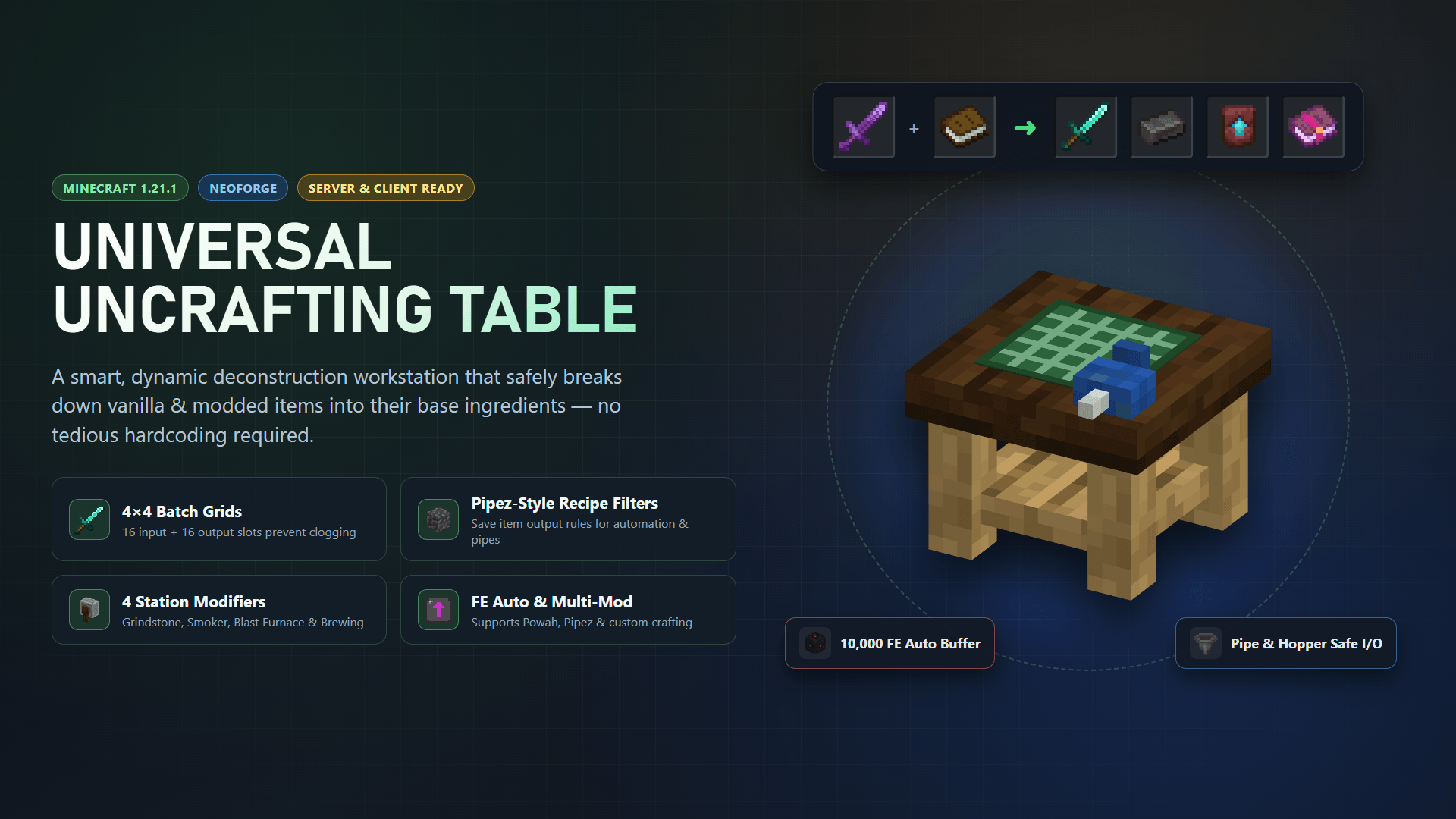
Ever accidentally crafted 64 Diamond Chestplates instead of one? Tired of hoarding junk you’ll never use? Universal Uncrafting Table is here to solve your inventory woes!
This mod introduces the Universal Uncrafting Table, a highly intelligent, fully dynamic recycling station block that hooks directly into Minecraft’s recipe systems to break down almost any item, from any mod.
✨ Core Features
🧩 Expanded 4×4 Batch Grids & Custom Mod Crafting Support
The Uncrafting Table dynamically reads your game's recipe registry in real-time. If an item can be crafted, smelted, blasted, smithing-upgraded, stonecut, or brewed, the table knows exactly how to tear it back down to its base ingredients!
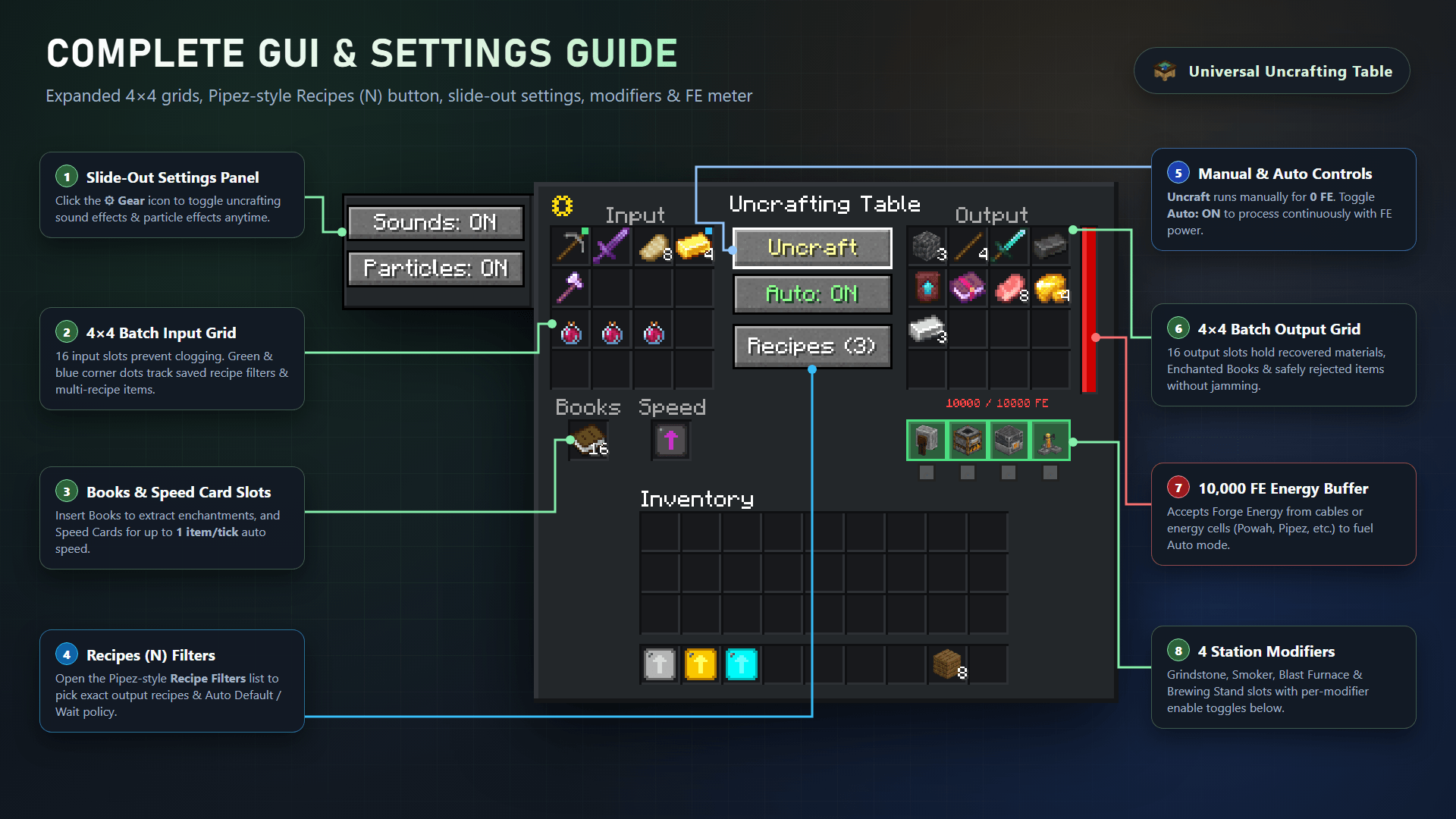
- Expanded 4×4 Input & 4×4 Output Grids (16 + 16 Slots): Generous 16-slot input and 16-slot output grids handle large multi-item deconstruction and batch uncrafting without clogging.
- Custom Mod Crafting Support: Native reverse support for Iron's Gems 'n Jewelry (
irons_jewelry:jewelry_data), custom moddedRecipeTypes,SizedIngredientrecipes, Smithing upgrades, and Stonecutting.
🎯 Pipez-Style Output Recipe Filters (Recipes (N) + Configure Window)
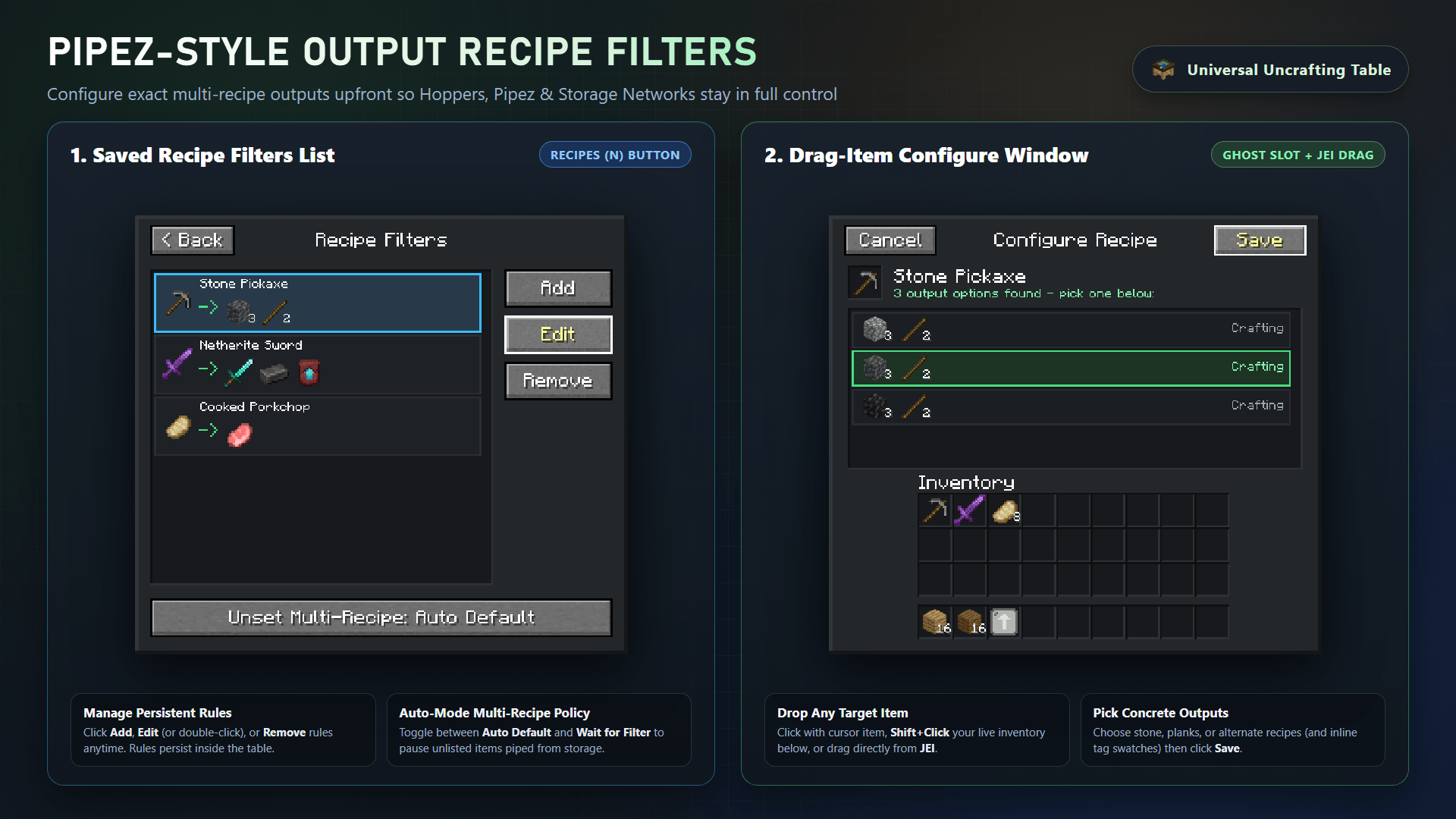
Need exact control over items with multiple recipes or tag variants? Open Recipes (N) to configure persistent, Pipez-style per-item output rules:
- Drag-Item Configure Window: Drop items via cursor,
Shift + Clickfrom your inventory, or drag directly from JEI to register an output filter rule for any item. - Concrete Outcome Selection: Lock the exact ingredients you want back (e.g., Cobbled Deepslate vs Cobblestone vs Blackstone for Stone Tools, or specific wood/modded variants).
- Automation-Safe Unset Rule Toggle: Switch
Unset Multi-Recipe: Auto Default / Wait for Filterso Hoppers, Pipez, and storage automation either pick the default recipe or wait until you configure a filter—never producing the wrong output!
⚙️ Modifiers System
Powerful uncrafting requires powerful tools. Specialized item uncrafting requires installing Modifiers in the table's UI:
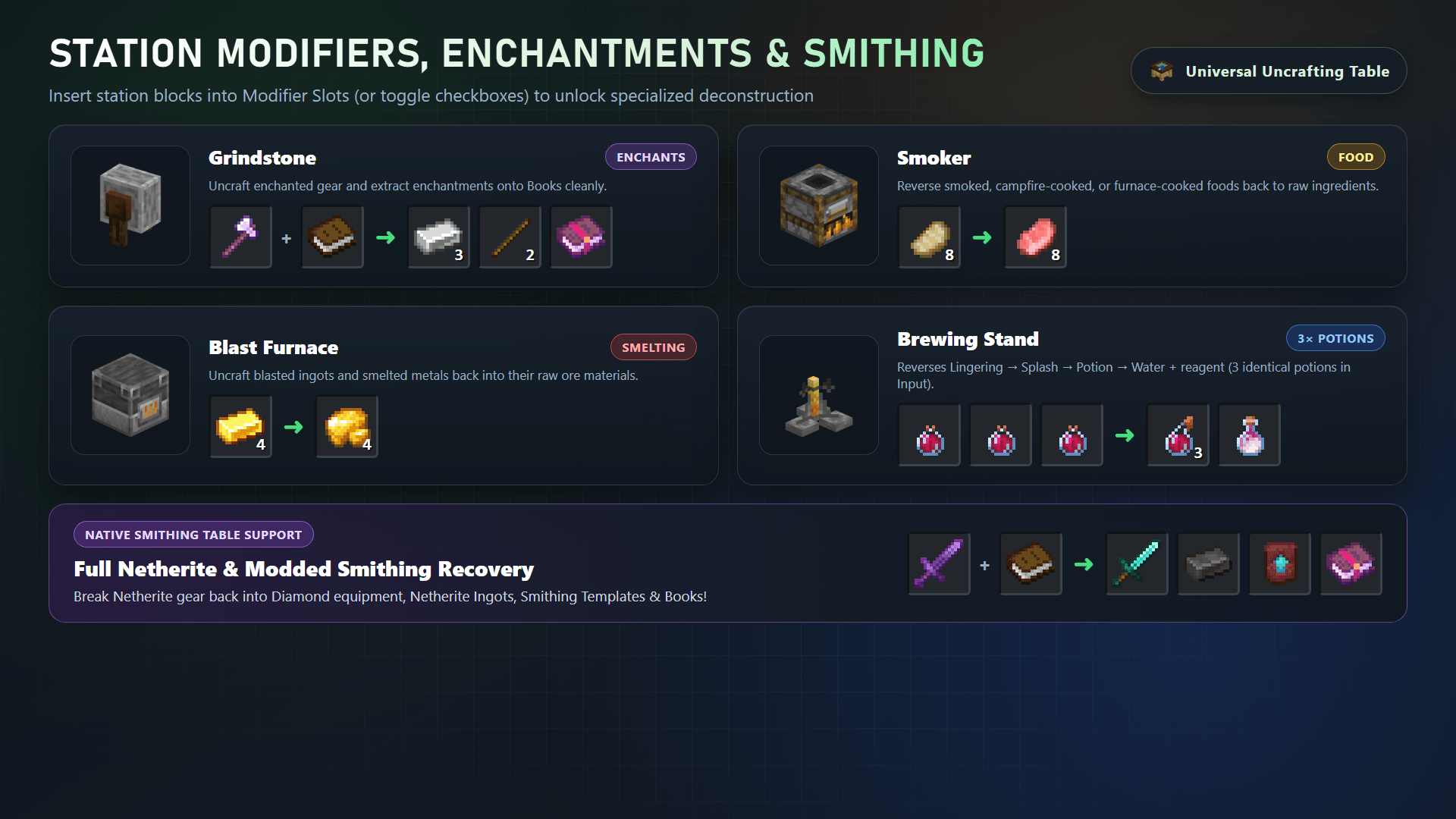
- Grindstone: Required to strip enchantments onto Books and uncraft enchanted gear.
- Smoker: Required to uncook food items.
- Blast Furnace: Required to unsmelt hardened ores and materials.
- Brewing Stand: Required to reverse potion brewing (Lingering → Splash → Normal → ingredients; insert 3 identical unstackable potions).
Toggle modifiers on or off with one click in the UI anytime! Full Netherite & modded Smithing recovery is supported.
⚡ Speed Cards & Forge Energy (FE)
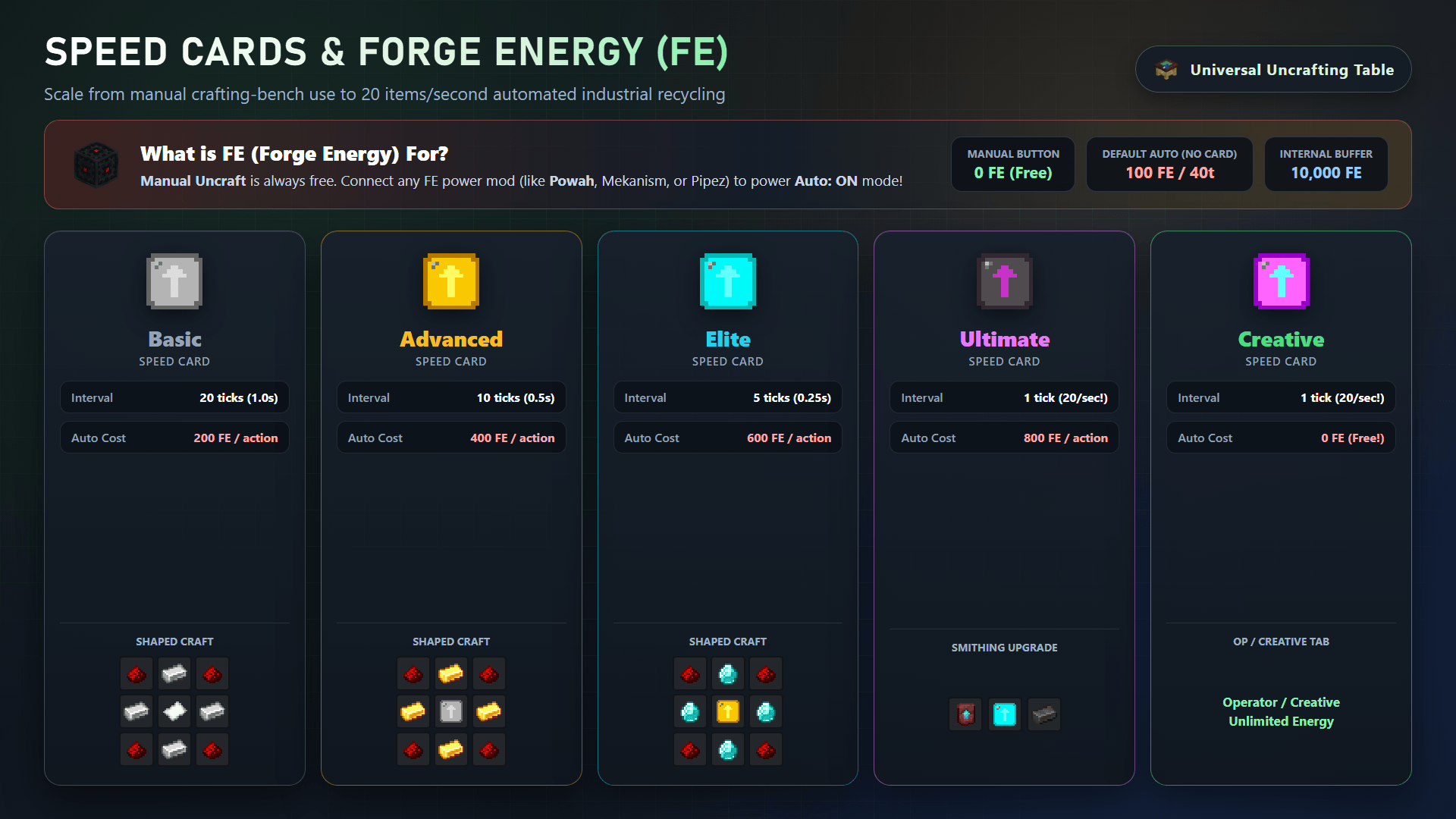
What is FE for?
- Manual
Uncraftis always FREE (0 FE) — click Uncraft anytime with zero power required! - Auto: ON mode uses Forge Energy (FE) — supply power from compatible energy mods (such as Powah or Pipez energy cables) into the 10,000 FE internal buffer to automate continuous uncrafting.
Upgrading the table is a breeze! Insert Speed Cards into the Speed slot to increase Auto: ON processing speed:
- Basic Speed Card: Faster uncrafting.
- Advanced Speed Card: Even faster!
- Elite Speed Card: Lightning fast!
- Ultimate Speed Card: Instantaneous uncrafting (up to 1 item/tick)!
- Creative Speed Card: Zero energy or time constraints (perfect for testing or creative mode).
🎨 Immersive & Dynamic Feedback
The table reacts to what you're doing!
- Uncrafting enchanted items unleashes arcane particles and grindstone sounds.
- Breaking down standard blocks unleashes fiery sparks and heavy smithing thuds.
- Pop open the sleek slide-out Settings Panel (⚙️) on the left side of the UI to individually toggle particle effects and sounds, or automate uncrafting with the Auto button!
🛠️ Crafting Recipe & How to Use
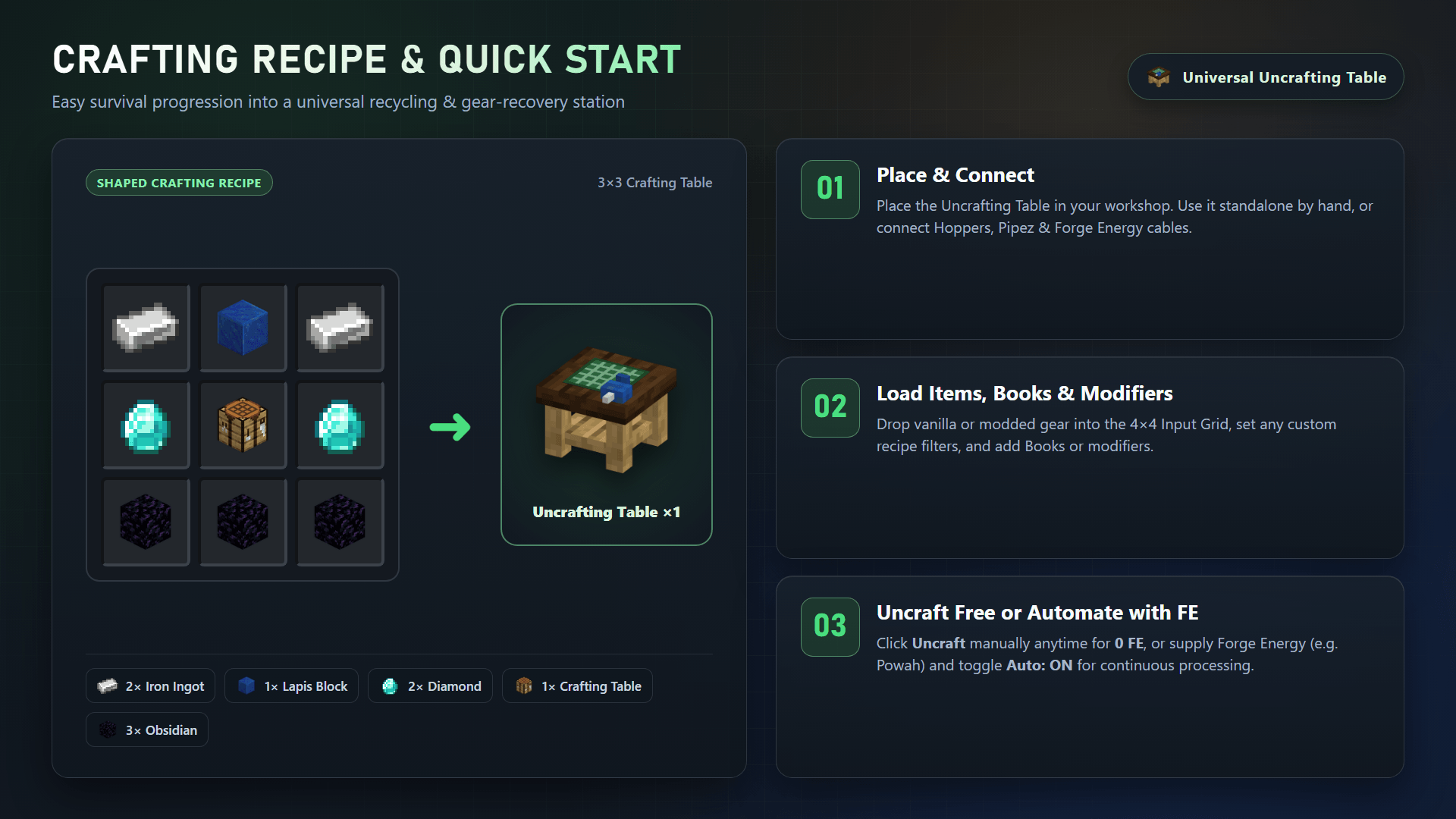
- Craft the Uncrafting Table (Iron Ingots, Lapis Lazuli Block, Diamonds, a Crafting Table, and Obsidian) and place it down.
- Open the UI and drop the item(s) you wish to uncraft into the 4×4 Input grid (16 slots).
- If an item has multiple recipes or tag variants, open
Recipes (N)to configure an output rule (drop from cursor,Shift + Click, or drag from JEI) and setUnset Multi-Recipeto Auto Default or Wait for Filter. - If it requires a modifier (like uncooking a steak), simply
Shift + Clicka Smoker from your inventory into the table's modifier slots. - Click Uncraft (free, 0 FE) or enable Auto: ON with FE power and watch its original ingredients get safely deposited into the 4×4 Output inventory!
⚙️ Technical Details, Automation & Compatibility
- Requires: NeoForge 1.21+
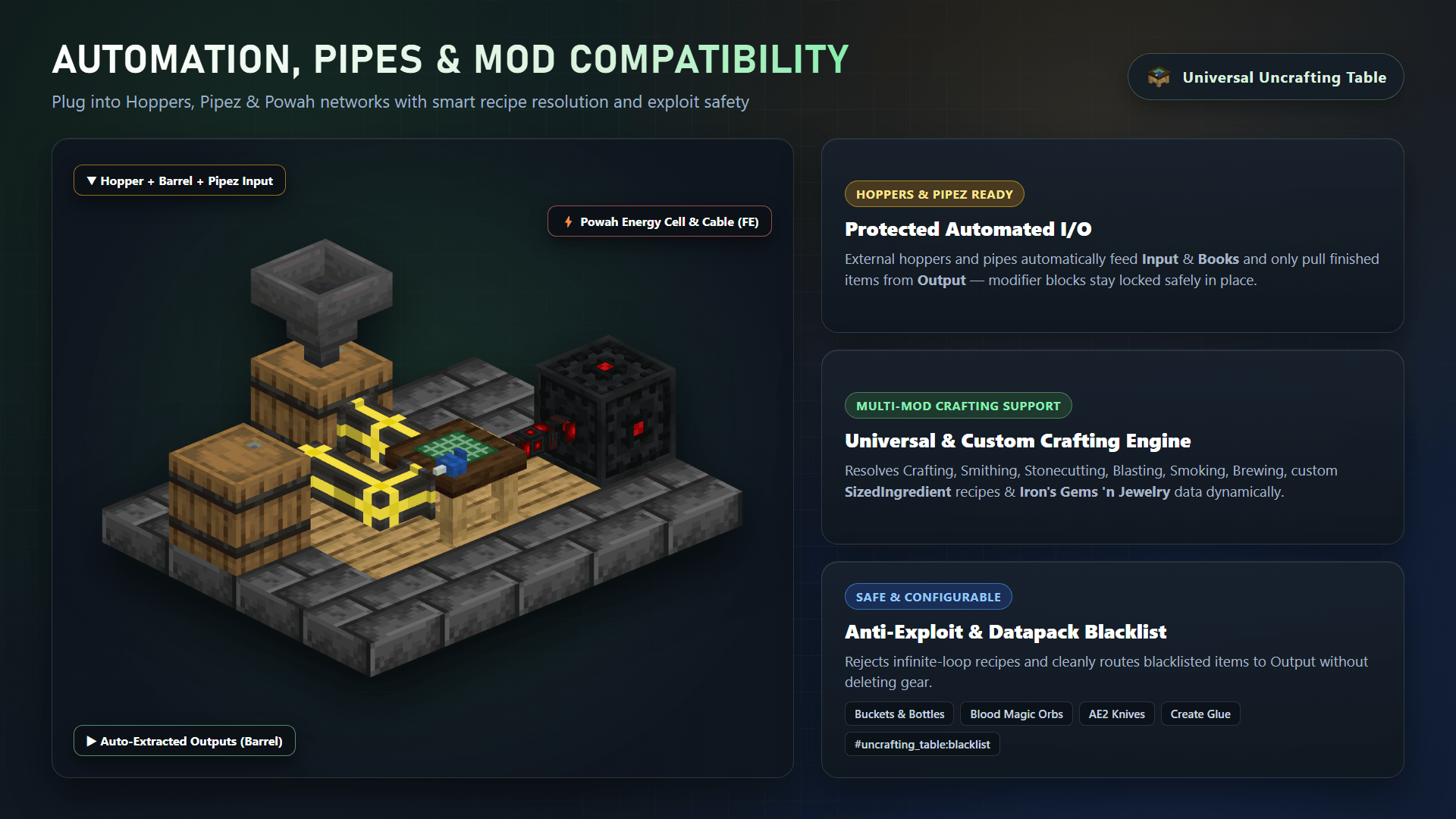
- Automation Friendly: Works seamlessly with vanilla Hoppers, Pipez, and Powah energy cables for automated input, output, and FE power delivery. With Pipez-style Output Recipe Filters and
Wait for Filtermode, automated setups never output unintended variants. - Modpack Friendly: Zero recipe hardcoding! Dynamically reverses vanilla and modded
RecipeTypes—includingSizedIngredients, Smithing, Stonecutting, and Iron's Gems 'n Jewelry (irons_jewelry:jewelry_data)—so custom modpack recipes uncraft accurately. - Safety First: Built with strict anti-exploit checks and datapack blacklist support: uncraftable items, zero-recipe items, and blacklisted items are cleanly rejected and pushed to the output slots to prevent item loss or duping.
(Found a bug or have a suggestion? Please leave it in the comments below!)
Screenshots
Gallery
-
1. Universal Uncrafting Table Showcase
-
2. Complete GUI & Settings Guide (4x4 Grids)
-
3. Crafting Recipe & Quick Start
-
Station Modifiers, Enchantments & Smithing
-
Speed Cards & Forge Energy (FE) Guide
-
Automation, Pipes & Mod Compatibility
-
7. Pipez-Style Output Recipe Filters & Configure Window
Versions
Files
Relations
Project Relations
More like this
Similar Mods
Suggestions use data such as tags, dependencies, dependents, descriptions, titles, and more to rank how much they overlap with this mod.
On ModDex
Community snapshot
By the numbers
Statistics

Get it on
Available Platforms
On ModDex
Community snapshot
By the numbers
Statistics
Resources