
Community listing page, reviews here may not be monitored by the author.
Unsay


No reviews yet
Delete, edit, reply to, and moderate chat messages with synchronized in-game controls.
Community voices
Reviews
No reviews yet. Be the first to review this project!
Get it on
Available Platforms
Compatibility
Supported Environments
Must be installed on both the client and the server.
About
Project Details
For authors
Embed Badge
If you're the author of this project, you can embed a live badge anywhere that supports HTML or Markdown. It updates automatically whenever ratings change.
Use HTML for any page that supports it, or Markdown for README files and Markdown-based descriptions.
Identifiers
Platform IDs
About
Description

Take back what you said.
Delete, edit, and reply to messages directly from Minecraft chat.





Delete it. Fix it. Reply to it.
Sent something too soon? Made a typo? Lost the message you wanted to answer in a busy chat?
Unsay brings familiar message controls into Minecraft without commands or separate menus. Open chat, hold Shift over a tracked message, and choose the action you need.
- Delete a message for everyone.
- Edit a typo without posting a correction underneath it.
- Reply with the original sender and a short preview for context.
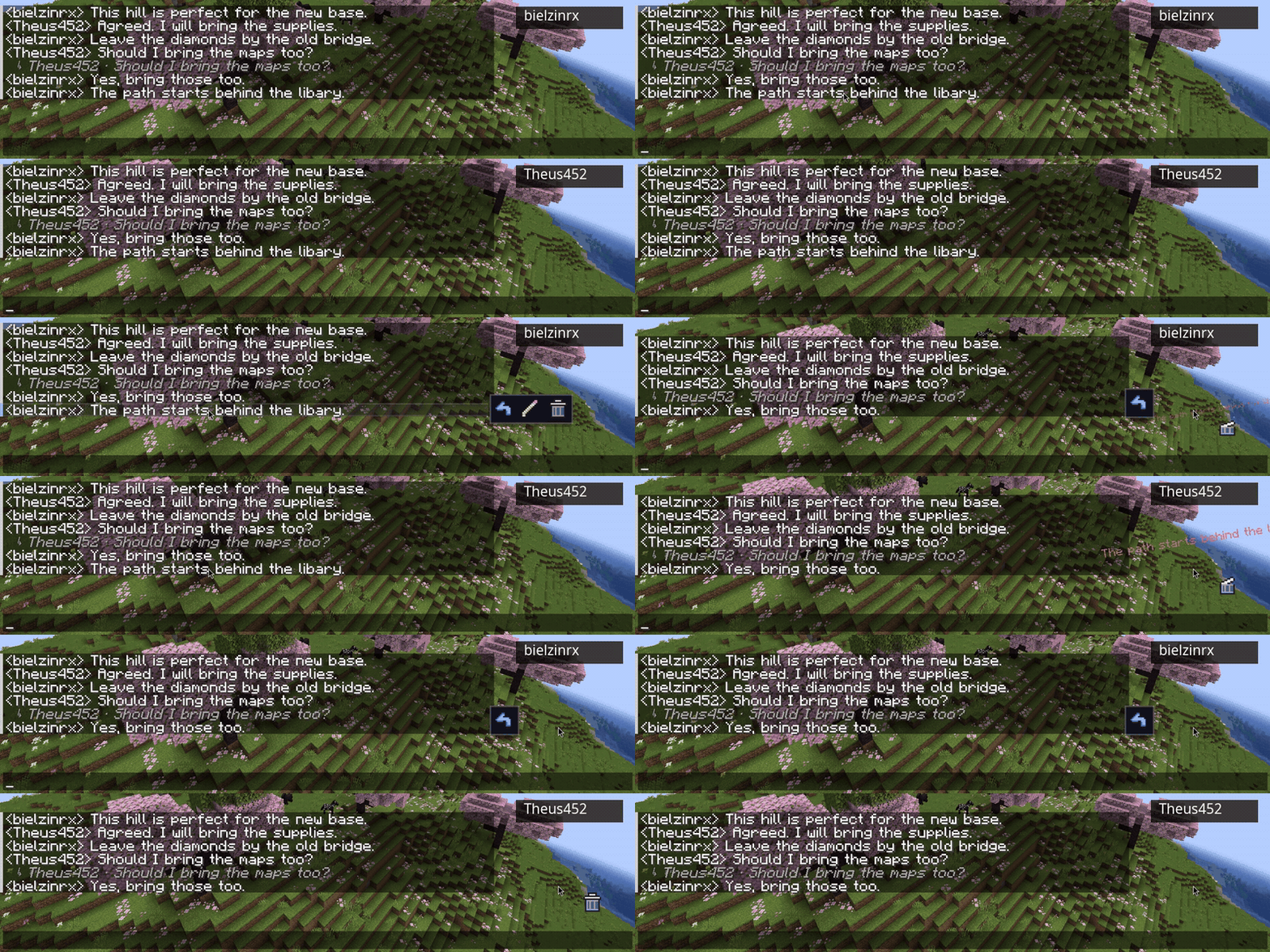
Actions stay inside the regular chat screen, so the experience feels immediate and familiar.
More control when chat gets busy
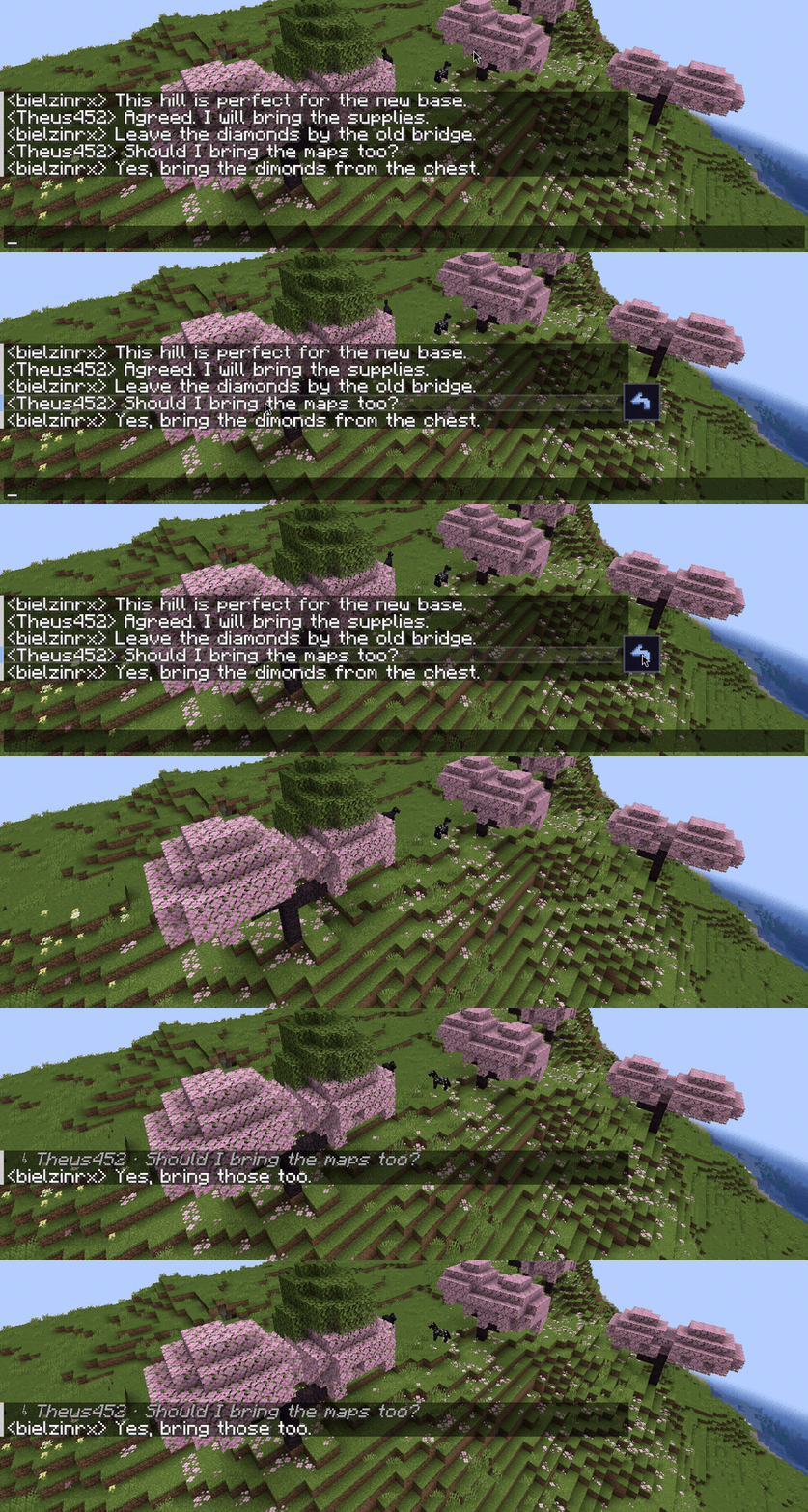
Unsay also includes tools for quickly managing recent or multiple messages.
- Delete your newest or oldest message with a shortcut.
- Select individual messages or the loaded chat history.
- Delete a selection together.
- Keep your current draft when selecting or canceling.
- Customize shortcuts, confirmation behavior, limits, and animations.
Built for multiplayer
Edits and deletions are validated by the server and synchronized with connected players, keeping everyone on the same conversation.
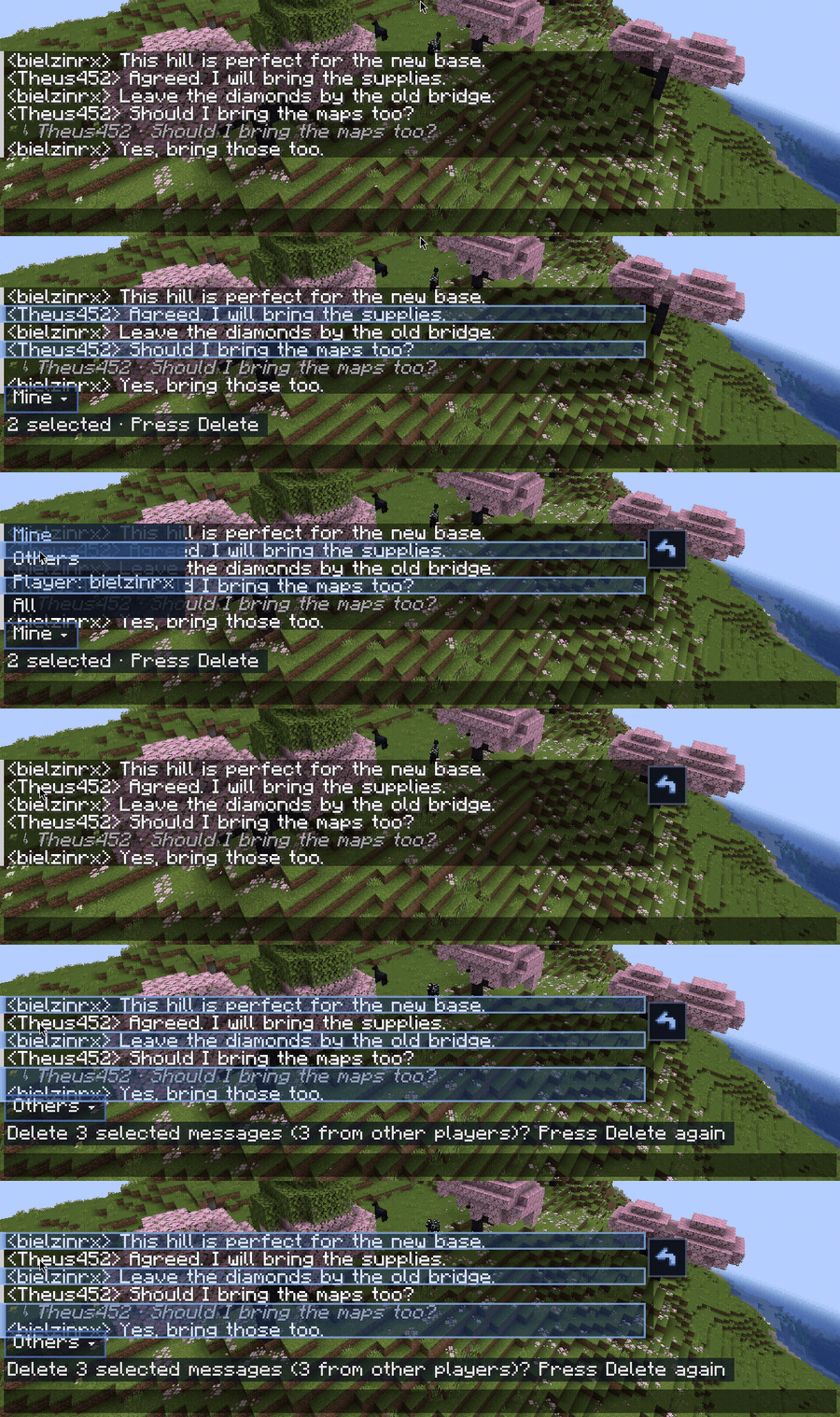
Server operators receive permission-aware moderation controls with four filters:
- Mine: only the operator's messages.
- Others: messages from other players.
- Player: one specific player, identified by UUID.
- All: every message the operator can moderate.
Operators always begin in Mine. Deleting another player's message requires an additional confirmation.
Essential controls
| Action | Default control |
|---|---|
| Show message actions | Shift |
| Select or deselect a message | Ctrl + Click |
| Select loaded messages | Ctrl + Shift + A |
| Delete selected messages | Delete |
| Cancel a selection | Esc |
| Delete your newest message | Shift + Delete or Shift + Backspace |
| Delete your oldest message | Ctrl + Shift + Delete or Ctrl + Shift + Backspace |
| Browse recent messages for editing | Shift + Up Arrow |
See the complete controls guide for every shortcut and configuration option.
Installation
Unsay must be installed on the server and every participating client.
| Minecraft | Fabric | Forge |
|---|---|---|
| 1.20.1 | Unsay + matching Fabric API | Unsay |
| 1.19.2 | Unsay + matching Fabric API | Unsay |
- Download the file matching your Minecraft version and loader from the Files page.
- Install Fabric API when using the Fabric build.
- Place the required JARs inside the
modsfolder on the server and clients. - Restart the game and server.
Use the same Minecraft version, loader, and Unsay release on both sides. Do not mix Fabric and Forge files. Java 17 or newer is required.
Unsay also works in singleplayer through Minecraft's integrated server.
Support


Unsay is currently in beta. Bug reports and suggestions are always welcome.
Take back what you said.
Delete, edit, and reply to messages directly from Minecraft chat.




Delete it. Fix it. Reply to it.
Sent something too soon? Made a typo? Lost the message you wanted to answer in a busy chat?
Unsay brings familiar message controls into Minecraft without commands or separate menus. Open chat, hold Shift over a tracked message, and choose the action you need.
- Delete a message for everyone.
- Edit a typo without posting a correction underneath it.
- Reply with the original sender and a short preview for context.

Actions stay inside the regular chat screen, so the experience feels immediate and familiar.
More control when chat gets busy
Unsay also includes tools for quickly managing recent or multiple messages.
- Delete your newest or oldest message with a shortcut.
- Select individual messages or the loaded chat history.
- Delete a selection together.
- Keep your current draft when selecting or canceling.
- Customize shortcuts, confirmation behavior, limits, and animations.

Built for multiplayer
Edits and deletions are validated by the server and synchronized with connected players, keeping everyone in the same conversation.
Server operators receive permission-aware moderation controls with four filters:
- Mine: only the operator's messages.
- Others: messages from other players.
- Player: one specific player, identified by UUID.
- All: every message the operator can moderate.
Operators always begin in Mine. Deleting another player's message requires an additional confirmation.

Essential controls
| Action | Default control |
|---|---|
| Show message actions | Hold Shift |
| Select or deselect a message | Ctrl + Click |
| Select loaded messages | Ctrl + Shift + A |
| Delete selected messages | Delete |
| Cancel a selection | Esc |
| Delete your newest message | Shift + Delete or Shift + Backspace |
| Delete your oldest message | Ctrl + Shift + Delete or Ctrl + Shift + Backspace |
| Browse recent messages for editing | Shift + Up Arrow |
See the complete controls guide for every shortcut and configuration option.
Installation
Unsay must be installed on the server and every participating client.
| Minecraft | Fabric | Forge |
|---|---|---|
| 1.20.1 | Unsay + matching Fabric API | Unsay |
| 1.19.2 | Unsay + matching Fabric API | Unsay |
- Download the file matching your Minecraft version and loader from the Versions page.
- Install Fabric API when using the Fabric build.
- Place the required JARs inside the
modsfolder on the server and clients. - Restart the game and server.
Use the same Minecraft version, loader, and Unsay release on both sides. Do not mix Fabric and Forge files. Java 17 or newer is required.
Unsay also works in singleplayer through Minecraft's integrated server.
Support



Unsay is currently in beta. Bug reports and suggestions are always welcome.
Screenshots
Gallery
-
 delete Deleting the message.
 -
 editing Editing the message.
 -
 replying Replying the message.
Versions
Files
Relations
Project Relations
More like this
Similar Mods
Suggestions use data such as tags, dependencies, dependents, descriptions, titles, and more to rank how much they overlap with this mod.
On ModDex
Community snapshot
By the numbers
Statistics
Want to reach Minecraft players?
We're looking for a server hosting partner to feature here and other parts of the site. Interested? Send us a message!
Get in touchGet it on
Available Platforms
On ModDex
Community snapshot
By the numbers