Community listing page, reviews here may not be monitored by the author.
UtilitiesForProgrammers

No reviews yet
Client-side utilities for Minecraft programmers — HUD with coordinates & block inspector, block-update highlighting with placement-order coloring, a coordinate-axis grid, and window controls for working alongside other apps.
Community voices
Reviews
No reviews yet. Be the first to review this project!
Get it on
Available Platforms
About
Project Details
For authors
Embed Badge
If you're the author of this project, you can embed a live badge anywhere that supports HTML or Markdown. It updates automatically whenever ratings change.
Use HTML for any page that supports it, or Markdown for README files and Markdown-based descriptions.
Identifiers
Platform IDs
Resources
External Links
About
Description
UtilitiesForProgrammers
A client-side mod that adds tools to help you learn and understand programming concepts inside Minecraft — visualize coordinates, track block updates, overlay a coordinate-axis grid, and keep the game visible while you work in another window.
Client-side only. No server installation required. Works on vanilla servers.
Features
| Feature | Description | |
|---|---|---|
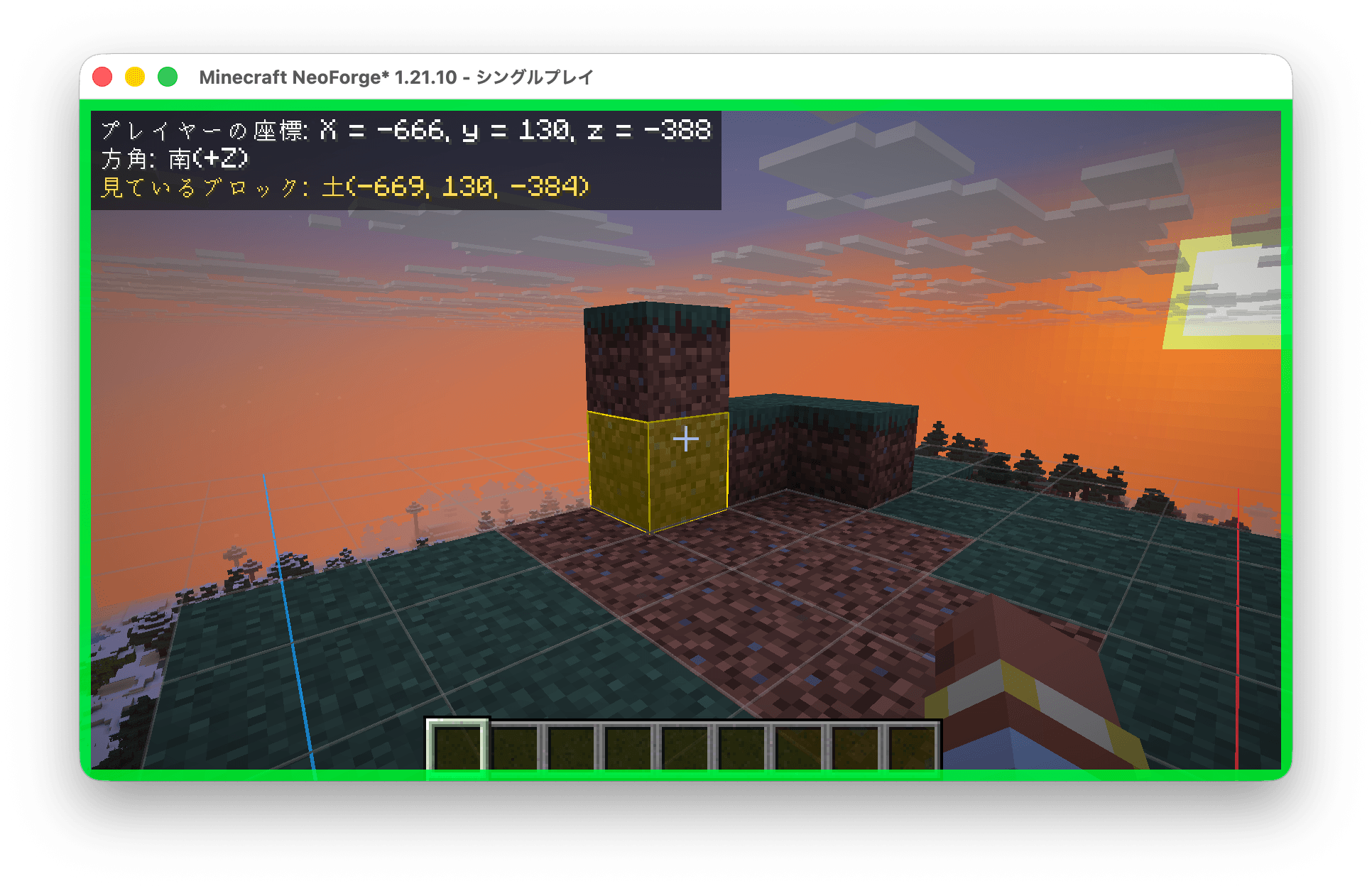
| 🧭 | HUD | Displays absolute coordinates, facing direction, and target-block info (block ID + block-state properties) in the top-left corner |
| 🟥 | Block Update Highlight | Colors blocks by placement order (newest = red → oldest = blue) and fades them out over time. Detects updates from the server via mixin — works even on vanilla servers |
| 🎯 | Target Highlight | Stronger outline + translucent fill on the block you're looking at |
| 📐 | Coordinate Grid | 1-block-unit grid around the player with origin-anchored axis arrows (+X = red, +Z = blue) |
| 🪟 | Window Controls | Render while unfocused, always-on-top toggle, focus-border indicator, and External Operation Mode |
Keybindings
Default keys are unbound in vanilla 1.21.10 and will not conflict with normal gameplay. All bindings can be changed in Options > Controls.
| Key | Action |
|---|---|
H |
Toggle all mod features on/off at once |
K |
Toggle External Operation Mode |
External Operation Mode (K)
Designed for studying code in an editor while referencing Minecraft at the same time:
- Releases the mouse cursor so you can click in other windows
- Stops player movement input
- Blocks all click actions (attack, place, pick) to prevent accidental changes
- Freezes HUD values and highlight timers so you can copy coordinates or observe block states without them updating
Configuration
Enable/disable each feature and tweak highlight colors, fade duration, grid size, and more:
config/utilitiesforprogrammers-client.toml
Changes apply without restarting the game.
Requirements
- Minecraft 1.21.10
- NeoForge 21.10.x
Source & Issues
Screenshots
Gallery
-
 screenshot.png screenshot.png
Versions
Files
Relations
Project Relations
More like this
Similar Mods
Suggestions use data such as tags, dependencies, dependents, descriptions, titles, and more to rank how much they overlap with this mod.
On ModDex
Community snapshot
By the numbers
Statistics
Want to reach Minecraft players?
We're looking for a server hosting partner to feature here and other parts of the site. Interested? Send us a message!
Get in touchGet it on
Available Platforms
On ModDex
Community snapshot
By the numbers
Statistics
Resources