Community listing page, reviews here may not be monitored by the author.
Vanishmod


No reviews yet
A Forge/NeoForge mod that allows admins to vanish
Community voices
Reviews
No reviews yet. Be the first to review this project!
Get it on
Available Platforms
Compatibility
Supported Environments
Runs entirely on the server. Also works in singleplayer.
About
Project Details
For authors
Embed Badge
If you're the author of this project, you can embed a live badge anywhere that supports HTML or Markdown. It updates automatically whenever ratings change.
Use HTML for any page that supports it, or Markdown for README files and Markdown-based descriptions.
Identifiers
Platform IDs
About
Description
Vanishmod
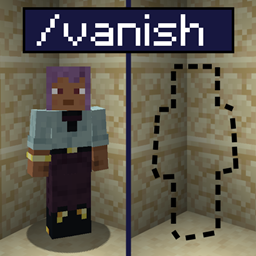
The primary feature of this Forge/NeoForge mod is to allow players (limited to server admins by default) to vanish for other players. This is mainly done through the /vanish (or /v) command.
A vanished player won't show up in the player tab list and other player lists, they are invisible, inaudible*, do not cause world events like updating sculk sensors, and their chat and announcement messages are suppressed - in short, vanished players are almost undetectable for other players.
Vanishmod is hugely configurable through the mod's server configuration file, where some default features of this mod can be disabled and some experimental ones enabled (and much more). Do check it out!
Command Usage Overview:
/vto vanish yourself,/vto unvanish again./v toggle <player>to vanish/unvanish the given player./v get <player>to get the vanished status of another player./v helpto get in-game information about all subcommands, including ones not listed here.
* Regarding sound suppression: By default, this mod has built-in indirect sound suppression, which means that the mod tries to suppress any sound related to (and not necessarily directly caused by) a vanished player. This suppression might suppress a few extra unrelated sounds as collateral damage, and can thus be turned off in the configuration. Furthermore, some sounds (like activating a dispenser) might not be caught due to a very indirect relation to the vanished causer, so be careful when interacting with the world.
This mod uses a ton of mixins, so there will be bugs. If you encounter one, please report it on the mod's GitHub issue tracker.
Vanishmod only needs to be installed on the server to work.
Huge thanks to bl4ckscor3 for helping me out in the process of creating this mod. He's also created some cool mods, go check them out!
Advertisement:
Check out my other server utility mods if you're interested!
Vanishmod
The primary feature of this Forge/NeoForge mod is to allow players (limited to server admins by default) to vanish for other players. This is mainly done through the /vanish (or /v) command.
A vanished player won't show up in the player tab list and other player lists, they are invisible, inaudible*, do not cause world events like updating sculk sensors, and their chat and announcement messages are suppressed - in short, vanished players are almost undetectable for other players.
Vanishmod is hugely configurable through the mod's server configuration file, where some default features of this mod can be disabled and some experimental ones enabled (and much more). Do check it out!
Command Usage Overview:
/vto vanish yourself,/vto unvanish again./v toggle <player>to vanish/unvanish the given player./v get <player>to get the vanished status of another player./v helpto get in-game information about all subcommands, including ones not listed here.
* Regarding sound suppression: By default, this mod has built-in indirect sound suppression, which means that the mod tries to suppress any sound related to (and not necessarily directly caused by) a vanished player. This suppression might suppress a few extra unrelated sounds as collateral damage, and can thus be turned off in the configuration. Furthermore, some sounds (like activating a dispenser) might not be caught due to a very indirect relation to the vanished causer, so be careful when interacting with the world.
This mod uses a ton of mixins, so there will be bugs. If you encounter one, please report it on the mod's GitHub issue tracker.
Vanishmod only needs to be installed on the server to work.
Huge thanks to bl4ckscor3 for helping me out in the process of creating this mod. He's also created some cool mods, go check them out!
Advertisement
Check out my other server-utility mods if you're interested!Screenshots
Gallery
Versions
Files
Relations
Project Relations
More like this
Similar Mods
Suggestions use data such as tags, dependencies, dependents, descriptions, titles, and more to rank how much they overlap with this mod.
On ModDex
Community snapshot
By the numbers
Statistics
Want to reach Minecraft players?
We're looking for a server hosting partner to feature here and other parts of the site. Interested? Send us a message!
Get in touchGet it on
Available Platforms
On ModDex
Community snapshot
By the numbers