
Community listing page, reviews here may not be monitored by the author.
VartaPack


No reviews yet
beta! A support report and diagnostics tool for Minecraft modpack authors.
Community voices
Reviews
No reviews yet. Be the first to review this project!
Get it on
Available Platforms
Compatibility
Supported Environments
Runs entirely on the client. Works on vanilla servers.
About
Project Details
For authors
Embed Badge
If you're the author of this project, you can embed a live badge anywhere that supports HTML or Markdown. It updates automatically whenever ratings change.
Use HTML for any page that supports it, or Markdown for README files and Markdown-based descriptions.
Identifiers
Platform IDs
About
Description
VartaPack
A lightweight diagnostics, integrity, and support-report tool for Minecraft modpacks.
VartaPack helps modpack authors understand whether a player's instance is clean, modified, unsupported, or broken. It validates the local environment, detects common setup problems, and generates structured reports that are easy to share when support is needed.
Purpose
VartaPack is not a performance mod.
It is a support layer for modpacks. It helps players see what is wrong and gives authors a clear overview before requesting full logs or crash reports.
Checks
VartaPack can validate:
- Minecraft version
- mod loader
- Java version
- allocated RAM
- required mods
- recommended mods
- blocked mods
- extra mods
- known conflicts
- selected file integrity
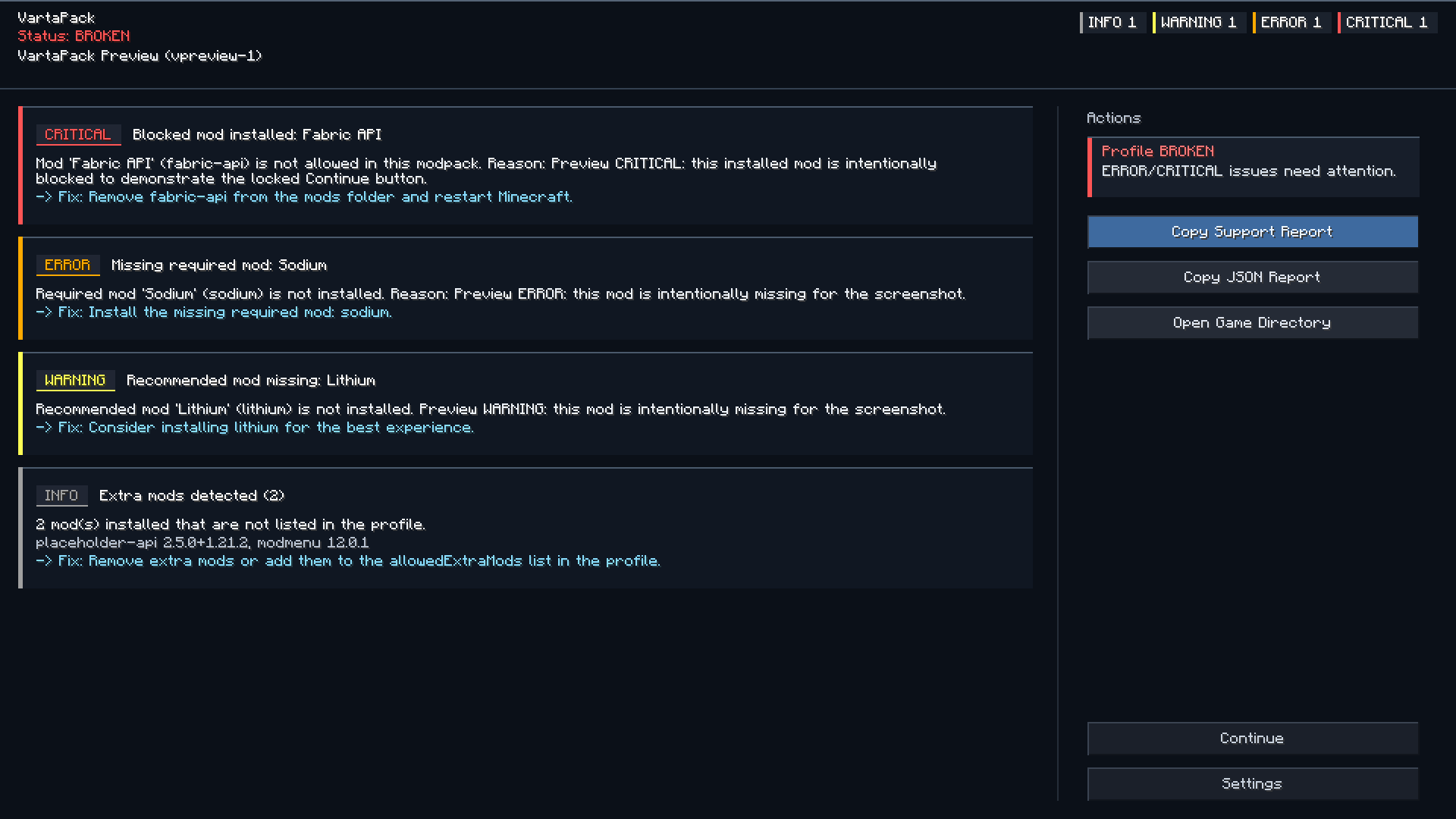
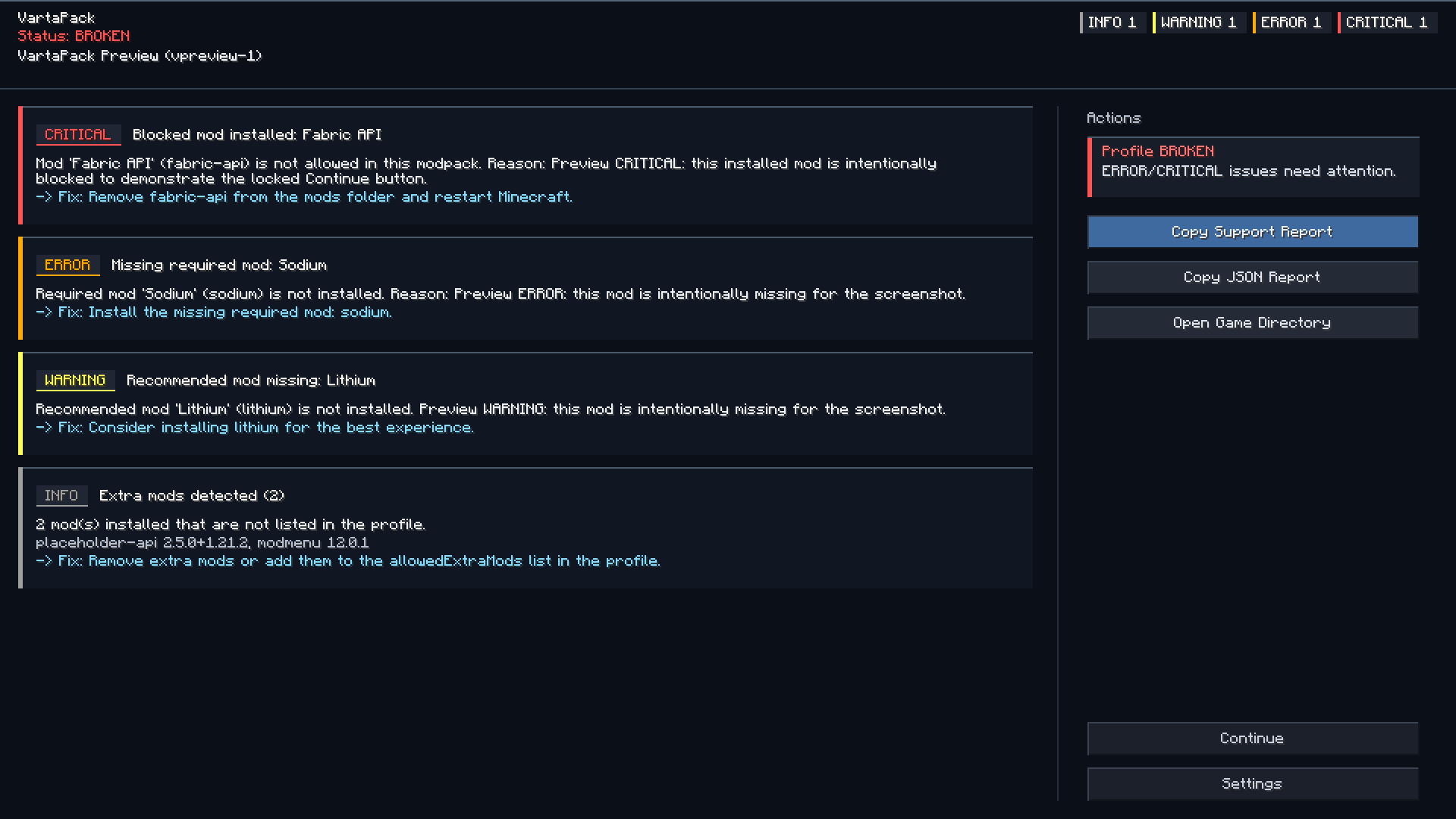
Detected issues can be shown through a startup notification and an in-game issues screen.
Pack status
VartaPack classifies the current instance as:
| Status | Meaning |
|---|---|
| Clean | The instance matches the expected profile. |
| Modified | The player changed something, but no critical issue was detected. |
| Unsupported | The instance may still run, but support should be limited. |
| Broken | A critical issue was detected. |
Support reports
Players can copy a generated support report with one click.
Reports may include:
- pack name and profile version
- Minecraft version
- loader and loader version
- Java version
- allocated RAM
- operating system
- detected issues
- missing required mods
- blocked mods
- extra mods
- installed mods
- suggested fixes
Reports are useful for GitHub issues, Discord support, CurseForge comments, and Modrinth support threads.
Crash analysis
VartaPack can scan local logs and crash reports for common patterns, such as:
- mixin failures
- missing dependencies
- incompatible mod sets
- duplicate mods
- wrong Java version
- out of memory errors
- renderer conflicts
Crash analysis is meant to help with debugging. It does not replace manual investigation.
Configuration
Modpack authors can configure VartaPack through:
config/vartapack/Common files:
profile.json
rules.json
integrity.json
vartapack.json
These files define the expected environment, mod rules, conflict rules, integrity checks, support links, and report behavior.
Configuration examples and usage guide are available on GitHub.
Privacy
VartaPack does not collect telemetry.
Reports are generated locally. Logs, mod lists, usernames, file paths, and personal data are not uploaded automatically.
The player decides whether to copy and share a report.
Private paths and usernames are redacted where possible.
Limitations
VartaPack is a client-side diagnostics tool.
It cannot prevent every startup crash, because some crashes happen before any mod code can run. For those cases, use crash reports, doctor mode, and proper loader-level dependency or conflict rules.
Companion use
VartaPack can be used together with PackPing.
Recommended setup:
- VartaPack for diagnostics, integrity checks, and support reports
- PackPing for modpack update notifications
They can also be used separately.
VartaPack
A lightweight diagnostics, integrity, and support-report tool for Minecraft modpacks.
VartaPack helps modpack authors understand whether a player's instance is clean, modified, unsupported, or broken. It validates the local environment, detects common setup problems, and generates structured reports that are easy to share when support is needed.
Purpose
VartaPack is not a performance mod.
It is a support layer for modpacks. It helps players see what is wrong and gives authors a clear overview before requesting full logs or crash reports.
Checks
VartaPack can validate:
- Minecraft version
- mod loader
- Java version
- allocated RAM
- required mods
- recommended mods
- blocked mods
- extra mods
- known conflicts
- selected file integrity
Detected issues can be shown through a startup notification and an in-game issues screen.
Pack status
VartaPack classifies the current instance as:
| Status | Meaning |
|---|---|
| Clean | The instance matches the expected profile. |
| Modified | The player changed something, but no critical issue was detected. |
| Unsupported | The instance may still run, but support should be limited. |
| Broken | A critical issue was detected. |
Support reports
Players can copy a generated support report with one click.
Reports may include:
- pack name and profile version
- Minecraft version
- loader and loader version
- Java version
- allocated RAM
- operating system
- detected issues
- missing required mods
- blocked mods
- extra mods
- installed mods
- suggested fixes
Reports are useful for GitHub issues, Discord support, CurseForge comments, and Modrinth support threads.
Crash analysis
VartaPack can scan local logs and crash reports for common patterns, such as:
- mixin failures
- missing dependencies
- incompatible mod sets
- duplicate mods
- wrong Java version
- out of memory errors
- renderer conflicts
Crash analysis is meant to help with debugging. It does not replace manual investigation.
Configuration
Modpack authors can configure VartaPack through:
config/vartapack/
Common files:
profile.json
rules.json
integrity.json
vartapack.json
These files define the expected environment, mod rules, conflict rules, integrity checks, support links, and report behavior.
Configuration examples and usage guide are available on GitHub.
Privacy
VartaPack does not collect telemetry.
Reports are generated locally. Logs, mod lists, usernames, file paths, and personal data are not uploaded automatically.
The player decides whether to copy and share a report.
Private paths and usernames are redacted where possible.
Limitations
VartaPack is a client-side diagnostics tool.
It cannot prevent every startup crash, because some crashes happen before any mod code can run. For those cases, use crash reports, doctor mode, and proper loader-level dependency or conflict rules.
Companion use
VartaPack can be used together with PackPing.
Recommended setup:
- VartaPack for diagnostics, integrity checks, and support reports
- PackPing for modpack update notifications
They can also be used separately.
Screenshots
Gallery
-
 2026-06-02_20.40.05.png 2026-06-02_20.40.05.png
Versions
Files
Relations
Project Relations
More like this
Similar Mods
Suggestions use data such as tags, dependencies, dependents, descriptions, titles, and more to rank how much they overlap with this mod.
On ModDex
Community snapshot
By the numbers
Statistics
Want to reach Minecraft players?
We're looking for a server hosting partner to feature here and other parts of the site. Interested? Send us a message!
Get in touchGet it on
Available Platforms
On ModDex
Community snapshot
By the numbers