
Community listing page, reviews here may not be monitored by the author.
Version Mod Sorter


No reviews yet
Load a different set of mods for each Minecraft version. Just drop them in mods/[loader]/[version]/ — no more swapping mods when you switch versions. Works on Fabric, Forge, and NeoForge.
Community voices
Reviews
No reviews yet. Be the first to review this project!
Get it on
Available Platforms
Compatibility
Supported Environments
Works on the client or the server alone, but does more when on both.
About
Project Details
For authors
Embed Badge
If you're the author of this project, you can embed a live badge anywhere that supports HTML or Markdown. It updates automatically whenever ratings change.
Use HTML for any page that supports it, or Markdown for README files and Markdown-based descriptions.
Identifiers
Platform IDs
Resources
External Links
About
Description
Version Mod Sorter
Tired of swapping mods every time you switch Minecraft versions or loaders? Version Mod Sorter loads mods from version-specific and loader-specific folders so you don't have to.
How It Works
Place your mods in mods/<loader>/<version>/ (e.g. mods/fabric/1.20.4/), and only the mods matching the current loader and Minecraft version will be loaded — in addition to mods in the regular mods/ folder.
You can also drop mods directly in mods/<loader>/ (e.g. mods/fabric/) to share them across all Minecraft versions of that loader. Subfolders inside a version folder are also picked up, so you can organize mods by category.
The version folder is automatically created on first launch. Just drop your mods in and go.
Folder structure example:
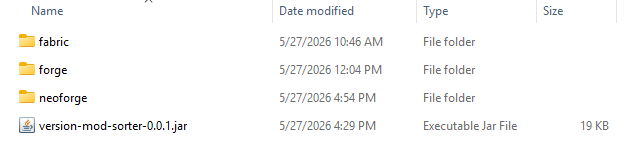
📁 mods
├─ version-mod-sorter-x.x.x.jar
│  (VMS itself)
├─ ModA.jar
│  (mods/ root: loaded on every loader and version)
├─ 📁 fabric
│  ├─ ModB.jar
│  │  (Fabric: loaded on every version)
│  └─ 📁 26.1.2
│     ├─ ModC.jar
│     │  (Fabric MC26.1.2 only)
│     └─ 📁 folder
│        └─ ModD.jar
│           (subfolders can be used for organization)
├─ 📁 forge
│  ├─ ModE.jar
│  │  (Forge: loaded on every version)
│  └─ 📁 1.21.4
│     └─ ModF.jar
│        (Forge MC1.21.4 only)
└─ 📁 neoforge
   ├─ ModG.jar
   │  (NeoForge: loaded on every version)
   └─ 📁 1.20.6
      └─ ModH.jar
         (NeoForge MC1.20.6 only)
Features
- Works with Fabric, Forge, and NeoForge — a single jar supports all three
- Per-loader shared folder for mods that work across all Minecraft versions
- Subfolder organization inside each version folder
- No need for separate game directories or instances
- No Minecraft class modifications or bytecode patching
Crash Analysis (Fabric)
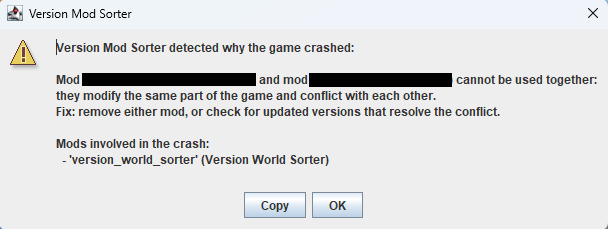
When the game crashes on Fabric, VMS analyzes the cause and shows a dialog. It checks crash reports (crash-reports/) first, then falls back to the tail of logs/latest.log.
It detects two categories of crashes and shows the involved mods and suggested fixes:
- Mod conflicts — when multiple mods modify the same code and collide, both mod names are shown with the suggestion to remove one or check for updates
- Version mismatch — when a mod references code that does not exist in the current Minecraft version, the mod name is shown with the suggestion to move it to the matching version folder, update it, or remove it
For crashes that match neither category, VMS still lists mods inferred from the stack trace. If the loader itself reports a mod resolution failure (Mod resolution failed, etc.), VMS stays silent because the loader already shows its own error screen.
Requirements
- Fabric Loader 0.13.0+ / Forge 41.1.0 (MC 1.19)+ / NeoForge 20.6.62-beta (MC 1.20.6)+
Notes
- The version folder name must exactly match the Minecraft version reported by the loader.
- Startup may take slightly longer when loading mods.
- This mod relies on internal loader implementations. A major loader update may cause it to stop working, but it will never affect the game or other mods.
Version Mod Sorter
Tired of swapping mods every time you switch Minecraft versions or loaders? Version Mod Sorter loads mods from version-specific and loader-specific subfolders so you don't have to. Keep one instance, organize your mods folder with nested folders, and let VMS sort out which mods to load.
How It Works
Place your mods in mods/<loader>/<version>/ (e.g. mods/fabric/1.20.4/), and only the mods matching the current loader and Minecraft version will be loaded — in addition to mods in the regular mods/ folder.
You can also drop mods directly in mods/<loader>/ (e.g. mods/fabric/) to share them across all Minecraft versions of that loader. Subfolders inside a version folder are also picked up, so you can organize and categorize mods however you like — by category, by modpack, or by client/server side.
The version folder is automatically created on first launch. Just drop your mods in and go.
Folder structure example:
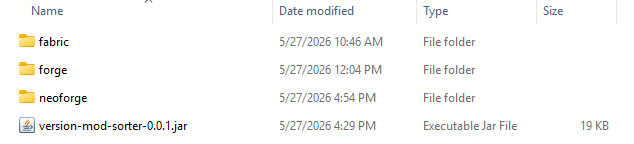
📁 mods
├─ version-mod-sorter-x.x.x.jar
│  (VMS itself)
├─ ModA.jar
│  (mods/ root: loaded on every loader and version)
├─ 📁 fabric
│  ├─ ModB.jar
│  │  (Fabric: loaded on every version)
│  └─ 📁 26.1.2
│     ├─ ModC.jar
│     │  (Fabric MC26.1.2 only)
│     └─ 📁 folder
│        └─ ModD.jar
│           (subfolders can be used for organization)
├─ 📁 forge
│  ├─ ModE.jar
│  │  (Forge: loaded on every version)
│  └─ 📁 1.21.4
│     └─ ModF.jar
│        (Forge MC1.21.4 only)
└─ 📁 neoforge
   ├─ ModG.jar
   │  (NeoForge: loaded on every version)
   └─ 📁 1.20.6
      └─ ModH.jar
         (NeoForge MC1.20.6 only)
Features
- Works with Fabric, Forge, and NeoForge — a single jar supports all three
- Per-loader shared folder for mods that work across all Minecraft versions
- Subfolder organization inside each version folder — organize, sort, and categorize your mods
- No need for separate game directories, profiles, or instances
- No Minecraft class modifications or bytecode patching
FAQ
Can Fabric load mods from subfolders?
Not by default. Fabric Loader only loads mods placed directly in the mods/ folder, and subfolder support has been declined by the loader developers. Version Mod Sorter adds this missing feature: it loads mods from subfolders inside mods/, sorted by loader and Minecraft version.
Can I use one instance for multiple Minecraft versions?
Yes. That is exactly what this mod is for. Put version-specific mods in their matching version folders and shared mods in the loader folder or mods/ root, then switch versions freely from your launcher without touching the mods folder.
Do I need to rename or move mods when updating Minecraft?
No. Mods in non-matching version folders are simply ignored, so old versions' mods can stay where they are.
Crash Analysis (Fabric)
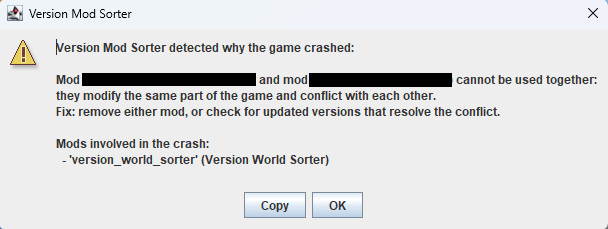
When the game crashes on Fabric, VMS analyzes the cause and shows a dialog. It checks crash reports (crash-reports/) first, then falls back to the tail of logs/latest.log.
It detects two categories of crashes and shows the involved mods and suggested fixes:
- Mod conflicts — when multiple mods modify the same code and collide, both mod names are shown with the suggestion to remove one or check for updates
- Version mismatch — when a mod references code that does not exist in the current Minecraft version, the mod name is shown with the suggestion to move it to the matching version folder, update it, or remove it
For crashes that match neither category, VMS still lists mods inferred from the stack trace. If the loader itself reports a mod resolution failure (Mod resolution failed, etc.), VMS stays silent because the loader already shows its own error screen.
Requirements
- Fabric Loader 0.13.0+ / Forge 41.1.0 (MC 1.19)+ / NeoForge 20.6.62-beta (MC 1.20.6)+
Notes
- The version folder name must exactly match the Minecraft version reported by the loader.
- Startup may take slightly longer when loading mods.
- This mod relies on internal loader implementations. A major loader update may cause it to stop working, but it will never affect the game or other mods.
Screenshots
Gallery
-
mods-folder.png mods-folder.en.png
-
crash-dialog.png crash-dialog.png
-
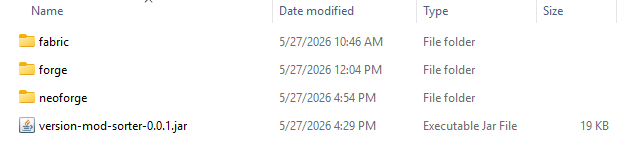 mods folder Example of the mods folder structure
 -
crash-dialog
Versions
Files
Relations
Project Relations
More like this
Similar Mods
Suggestions use data such as tags, dependencies, dependents, descriptions, titles, and more to rank how much they overlap with this mod.
On ModDex
Community snapshot
By the numbers
Statistics
Want to reach Minecraft players?
We're looking for a server hosting partner to feature here and other parts of the site. Interested? Send us a message!
Get in touchGet it on
Available Platforms
On ModDex
Community snapshot
By the numbers
Statistics
Resources