
Community listing page, reviews here may not be monitored by the author.
ViewBoard


No reviews yet
Adds a keyboard preview that shows which keys are used!
Community voices
Reviews
No reviews yet. Be the first to review this project!
Get it on
Available Platforms
Compatibility
Supported Environments
Runs entirely on the client. Works on vanilla servers.
About
Project Details
For authors
Embed Badge
If you're the author of this project, you can embed a live badge anywhere that supports HTML or Markdown. It updates automatically whenever ratings change.
Use HTML for any page that supports it, or Markdown for README files and Markdown-based descriptions.
Identifiers
Platform IDs
Resources
External Links
About
Description


The Controlling mod is officially supported by ViewBoard 1.2.0+
IMPORTANT NOTE: A GUI scale of 3 or below is heavily recommended to display the keyboard at a resolution of 1080p or more.
TL;DR
This mod adds a button in the bottom-right corner of the keybinds settings. It opens a preview of your keyboard and color codes each key depending on whether it's:
- Free (No keybinds are using the key)
- Used (The key is being used by one keybind)
- Conflicting (Multiple keybinds use the key)
This mod is especially useful if you are playing a large modpack with multiple keybinds using the same key. You can also use it to find which key on the keyboard is free and can be assigned to a new keybind.
New Features in ViewBoard 1.2.0
- Official support for the Controlling mod
- Full compatibility with Controlling's replacement keybind screen:
- Ignore/group conflict rules now apply there as well
- Conflict filtering support
- Keybind tooltip integration
- Saved Controls / Key Binds width modes:
DefaultLargeVery Large
- Wider layouts prevent long modded keybind names from overlapping ViewBoard tools
- Improved compatibility with FancyMenu:
- Avoids widget-discovery slowdowns
- Compatibility with KeyBind Bundles:
- Proper handling of bundled keybind rows
New Features in ViewBoard 1.1.0
- Support for most GUI scales (best results at GUI scale 3 or below)
- Ignore system for keybinds that lets intentional conflicts exist without warnings
- Integration with Vanilla Controls / Key Binds:
- Respects ignored keybinds
- Suppresses warnings there as well
- Keybind group system:
- Grouped keybinds share a forced key
- Key is removed when bindings leave the group
- Multiple keyboard layouts in keyboard view:
QWERTY,AZERTY, andQWERTZ
- Mouse button support in keyboard view
- Detection and display of custom keys assigned via Minecraft's keybind settings
Usage
- Open Minecraft → Controls / Key Binds
- Click the Keyboard View button (bottom-right) to open the keyboard map
- Hover keys to inspect:
- Conflicts
- Ignored bindings
- Grouped bindings
- Use Manage Rules to configure keybind rules
- In Keybind Rules:
- Search keybinds
- Toggle ignored bindings
- Jump into group editing for specific keybinds
- In Keybind Groups:
- Create and rename groups
- Assign a shared trigger key
- Add or remove bindings
- Ignored bindings will no longer trigger conflict warnings in:
- ViewBoard
- Vanilla keybind screen
Bugs
- Fixed issue: UI rendering and logic conflict when paired with the Controlling mod on older ViewBoard versions. (Fixed on ViewBoard 1.2.0+)
If you encounter any other bugs, please report them on the mod's GitHub page.
If you need a server: https://url-shortener.curseforge.com/Gg4yU
The Controlling mod is officially supported by ViewBoard 1.2.0+
IMPORTANT NOTE: A GUI scale of 3 or below is heavily recommended to display the keyboard at a resolution of 1080p or more.
TL;DR
This mod adds a button in the bottom-right corner of the keybinds settings. It opens a preview of your keyboard and color codes each key depending on whether it's:
- Free (No keybinds are using the key)
- Used (The key is being used by one keybind)
- Conflicting (Multiple keybinds use the key)
This mod is especially useful if you are playing a large modpack with multiple keybinds using the same key. You can also use it to find which key on the keyboard is free and can be assigned to a new keybind.
New Features in ViewBoard 1.2.0
- Official support for the Controlling mod
- Full compatibility with Controlling's replacement keybind screen:
- Ignore/group conflict rules now apply there as well
- Conflict filtering support
- Keybind tooltip integration
- Saved Controls / Key Binds width modes:
DefaultLargeVery Large
- Wider layouts prevent long modded keybind names from overlapping ViewBoard tools
- Improved compatibility with FancyMenu:
- Avoids widget-discovery slowdowns
- Compatibility with KeyBind Bundles:
- Proper handling of bundled keybind rows
New Features in ViewBoard 1.1.0
- Support for most GUI scales (best results at GUI scale 3 or below)
- Ignore system for keybinds that lets intentional conflicts exist without warnings
- Integration with Vanilla Controls / Key Binds:
- Respects ignored keybinds
- Suppresses warnings there as well
- Keybind group system:
- Grouped keybinds share a forced key
- Key is removed when bindings leave the group
- Multiple keyboard layouts in keyboard view:
QWERTY,AZERTY, andQWERTZ
- Mouse button support in keyboard view
- Detection and display of custom keys assigned via Minecraft's keybind settings
Usage
- Open Minecraft → Controls / Key Binds
- Click the Keyboard View button (bottom-right) to open the keyboard map
- Hover keys to inspect:
- Conflicts
- Ignored bindings
- Grouped bindings
- Use Manage Rules to configure keybind rules
- In Keybind Rules:
- Search keybinds
- Toggle ignored bindings
- Jump into group editing for specific keybinds
- In Keybind Groups:
- Create and rename groups
- Assign a shared trigger key
- Add or remove bindings
- Ignored bindings will no longer trigger conflict warnings in:
- ViewBoard
- Vanilla keybind screen
Bugs
- Fixed issue: UI rendering and logic conflict when paired with the Controlling mod on older ViewBoard versions. (Fixed on ViewBoard 1.2.0+)
If you encounter any other bugs, please report them on the mod's GitHub page.
Screenshots
Gallery
-
![[1.2.0+] Keybinds Groups settings screen](https://media.forgecdn.net/attachments/1722/519/screenshot-2026-06-07-at-13-27-33-png.png) [1.2.0+] Keybinds Groups settings screen Keybinds Groups settings screen in ViewBoard 1.2.0+
[1.2.0+] Keybinds Groups settings screen Keybinds Groups settings screen in ViewBoard 1.2.0+ -
![[1.2.0+] Main ViewBoard GUI](https://media.forgecdn.net/attachments/1722/515/screenshot-2026-06-07-at-13-25-02-png.png) [1.2.0+] Main ViewBoard GUI Main ViewBoard GUI on 1.2.0+
[1.2.0+] Main ViewBoard GUI Main ViewBoard GUI on 1.2.0+ -
![[1.2.0+] Width setting: Large](https://media.forgecdn.net/attachments/1722/502/screenshot-2026-06-07-at-13-17-20-png.png) [1.2.0+] Width setting: Large The keybinds settings screen with the Large width setting.
[1.2.0+] Width setting: Large The keybinds settings screen with the Large width setting. -
![[1.2.0+] Width setting: Very Large](https://media.forgecdn.net/attachments/1722/501/screenshot-2026-06-07-at-13-17-23-png.png) [1.2.0+] Width setting: Very Large The keybinds settings screen with the Very Large width setting.
[1.2.0+] Width setting: Very Large The keybinds settings screen with the Very Large width setting. -
![[1.2.0+] Width setting: Default](https://media.forgecdn.net/attachments/1722/500/screenshot-2026-06-07-at-13-16-57-png.png) [1.2.0+] Width setting: Default The keybinds settings screen with the Minecraft default width setting.
[1.2.0+] Width setting: Default The keybinds settings screen with the Minecraft default width setting. -
![[1.2.0+] Keybinds with Ignore Conflict ON](https://media.forgecdn.net/attachments/1722/484/screenshot-2026-06-07-at-13-00-44-png.png) [1.2.0+] Keybinds with Ignore Conflict ON Conflicting Keybinds with Ignore Conflict ON in ViewBoard 1.2.1+
[1.2.0+] Keybinds with Ignore Conflict ON Conflicting Keybinds with Ignore Conflict ON in ViewBoard 1.2.1+ -
![[1.2.0+] Key Popup](https://media.forgecdn.net/attachments/1700/855/screenshot-2026-05-26-at-15-00-36-png.png) [1.2.0+] Key Popup Key Popup with Keybinds Grouped on ViewBoard 1.2.0+
[1.2.0+] Key Popup Key Popup with Keybinds Grouped on ViewBoard 1.2.0+ -
![[1.1.0+] Keybinds with Ignore Conflict ON](https://media.forgecdn.net/attachments/1638/310/screenshot-2026-04-19-at-02-00-41-png.png) [1.1.0+] Keybinds with Ignore Conflict ON Conflicting Keybinds with Ignore Conflict ON in ViewBoard 1.1.0+
[1.1.0+] Keybinds with Ignore Conflict ON Conflicting Keybinds with Ignore Conflict ON in ViewBoard 1.1.0+ -
![[1.1.0+] Main ViewBoard GUI](https://media.forgecdn.net/attachments/1638/307/screenshot-2026-04-19-at-02-02-36-png.png) [1.1.0+] Main ViewBoard GUI Main ViewBoard GUI on 1.1.0+
[1.1.0+] Main ViewBoard GUI Main ViewBoard GUI on 1.1.0+ -
 What the tooltip of a button looks like What the tooltip of a button looks like in the Keyboard View screen
 -
![[1.1.0+] Keyboard Rules screen](https://media.forgecdn.net/attachments/1638/305/screenshot-2026-04-19-at-02-04-57-png.png) [1.1.0+] Keyboard Rules screen Default Keyboard Rules screen
[1.1.0+] Keyboard Rules screen Default Keyboard Rules screen -
![[1.1.0+] Filtered Keyboard Rules screen 2](https://media.forgecdn.net/attachments/1638/304/screenshot-2026-04-19-at-02-05-07-png.png) [1.1.0+] Filtered Keyboard Rules screen 2 Filtered Keyboard Rules screen showing only ignored keybinds
[1.1.0+] Filtered Keyboard Rules screen 2 Filtered Keyboard Rules screen showing only ignored keybinds -
![[1.1.0+] Filtered Keyboard Rules screen 1](https://media.forgecdn.net/attachments/1638/303/screenshot-2026-04-19-at-02-05-39-png.png) [1.1.0+] Filtered Keyboard Rules screen 1 Filtered by name Keyboard Rules screen
[1.1.0+] Filtered Keyboard Rules screen 1 Filtered by name Keyboard Rules screen -
![[1.1.0+] Filtered Keyboard Rules screen 3](https://media.forgecdn.net/attachments/1638/302/screenshot-2026-04-19-at-02-05-45-png.png) [1.1.0+] Filtered Keyboard Rules screen 3 Filtered Keyboard Rules screen with only not-ignored keybinds.
[1.1.0+] Filtered Keyboard Rules screen 3 Filtered Keyboard Rules screen with only not-ignored keybinds. -
![[1.1.0+] Keybind Groups screen](https://media.forgecdn.net/attachments/1638/300/screenshot-2026-04-19-at-02-06-12-png.png) [1.1.0+] Keybind Groups screen Keybind Groups screen in ViewBoard 1.1.0+
[1.1.0+] Keybind Groups screen Keybind Groups screen in ViewBoard 1.1.0+ -
![[1.0.0+] ViewBoard GUI below 1.1.0](https://media.forgecdn.net/attachments/1581/514/rsz_1screenshot_2026-03-13_at_162438-png.png) [1.0.0+] ViewBoard GUI below 1.1.0 ViewBoard GUI below 1.1.0
[1.0.0+] ViewBoard GUI below 1.1.0 ViewBoard GUI below 1.1.0
-
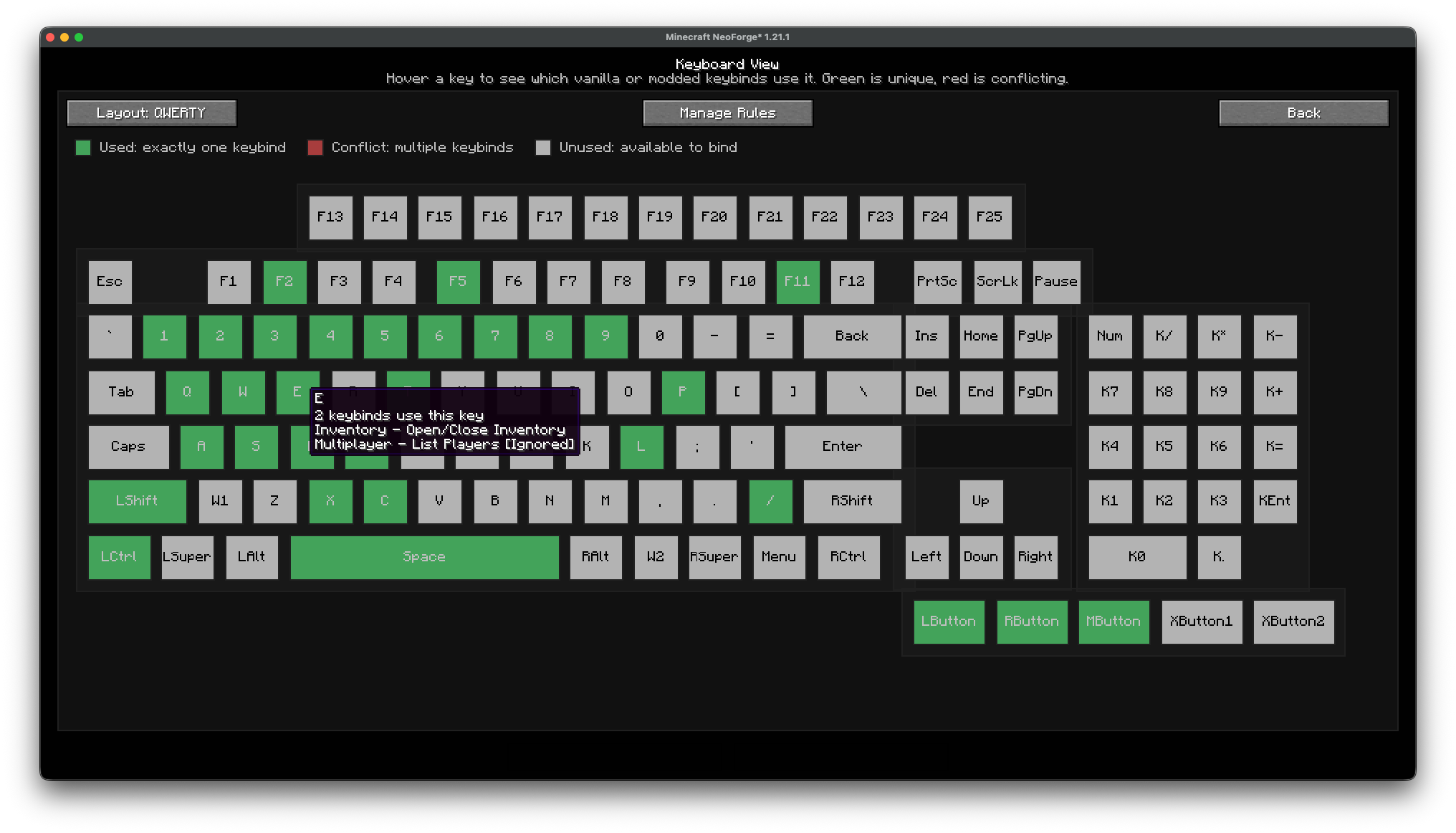 Main ViewBoard GUI on 1.1.0+ Main ViewBoard GUI on 1.1.0+
 -
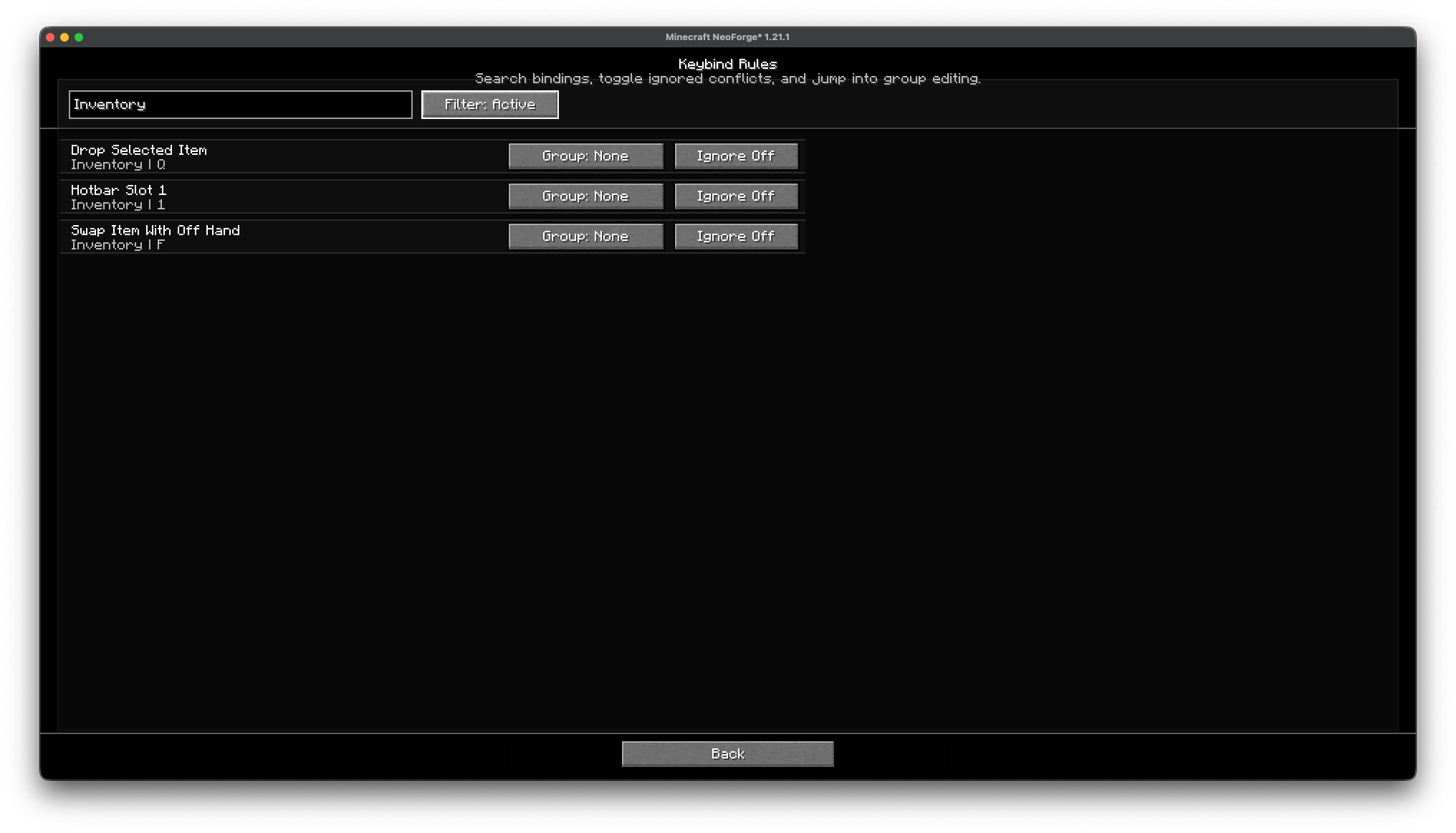 Filtered Keyboard Rules screen 3 Filtered Keyboard Rules screen with only not-ignored keybinds.
 -
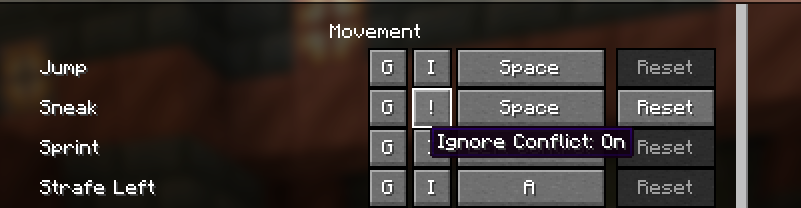 Keybinds with Ignore Conflict ON Conflicting Keybinds with Ignore Conflict ON
 -
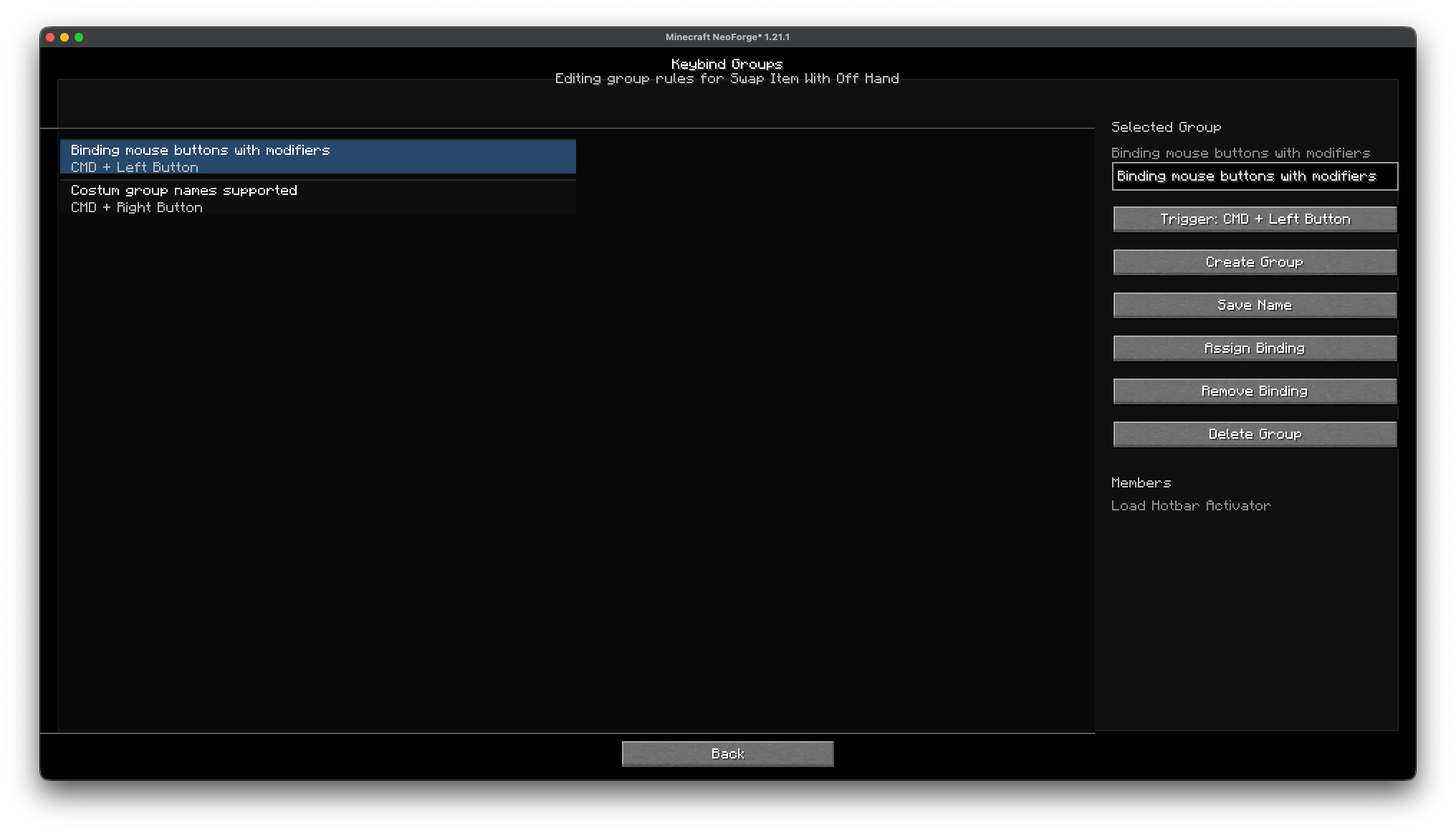 Keybind Groups screen Keybind Groups screen
 -
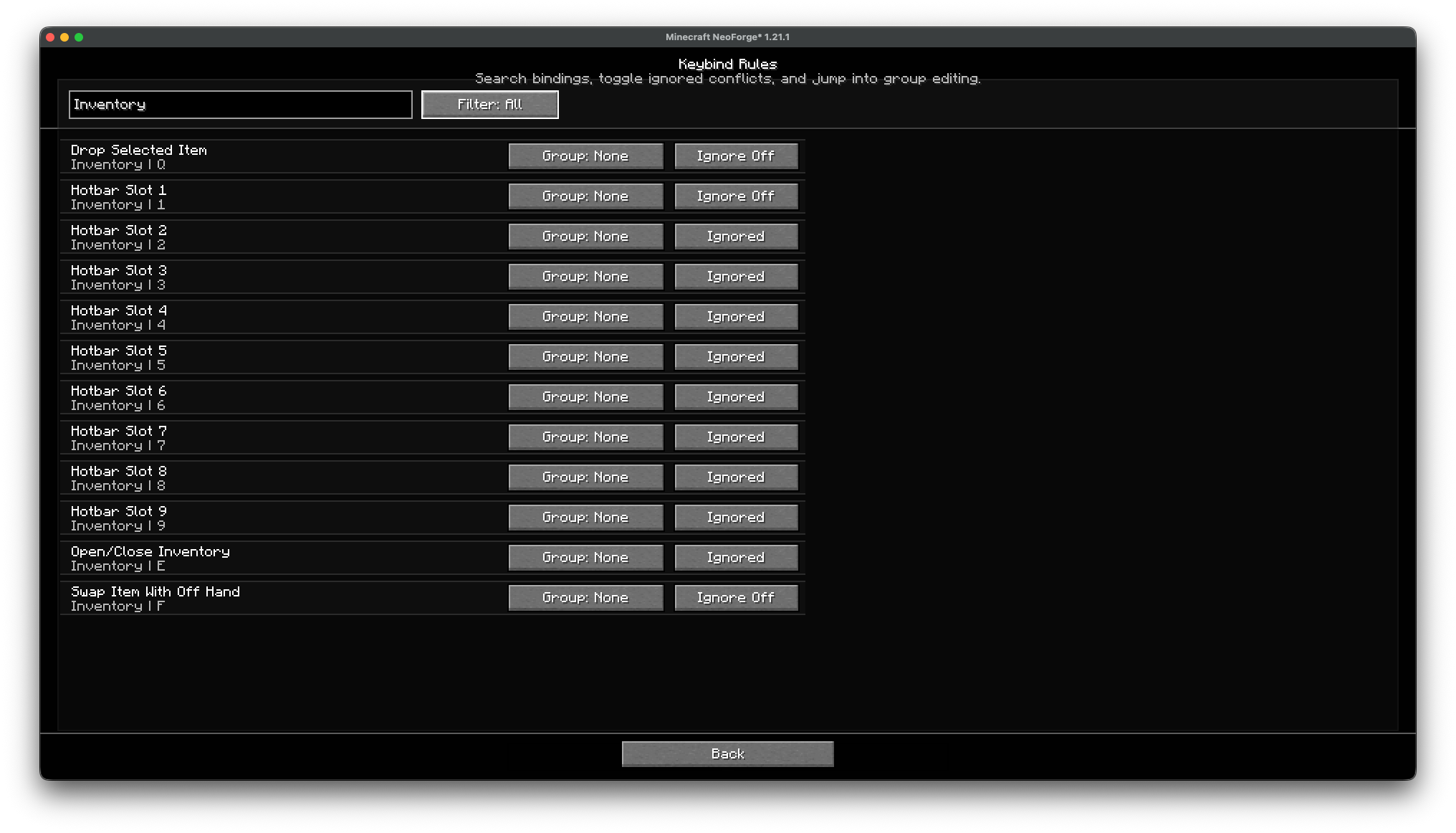 Filtered Keyboard Rules screen 1 Filtered by name Keyboard Rules screen
 -
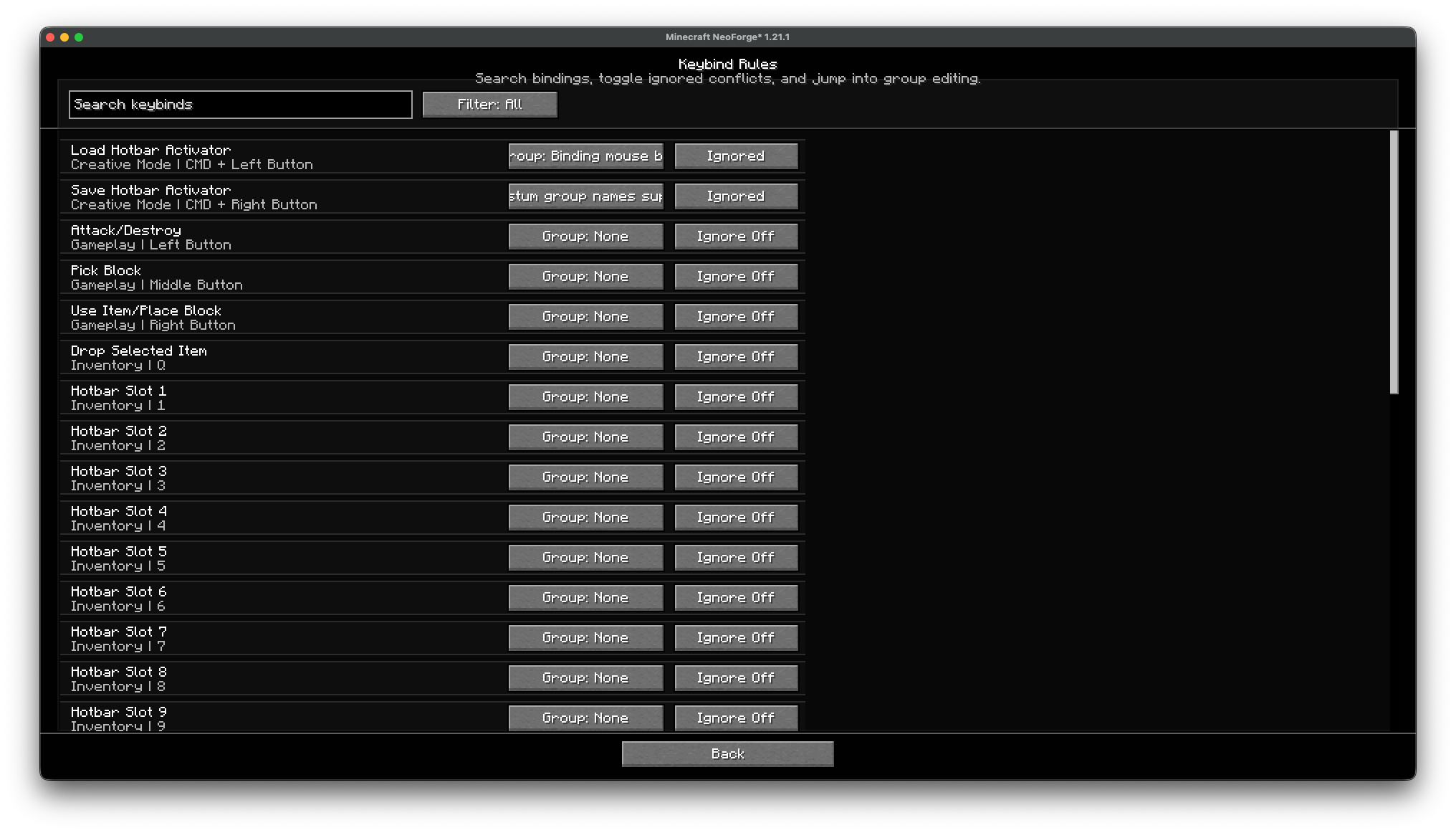 Keyboard Rules screen Default Keyboard Rules screen
 -
 What the tooltip of a button looks like What the tooltip of a button looks like in the Keyboard View screen
 -
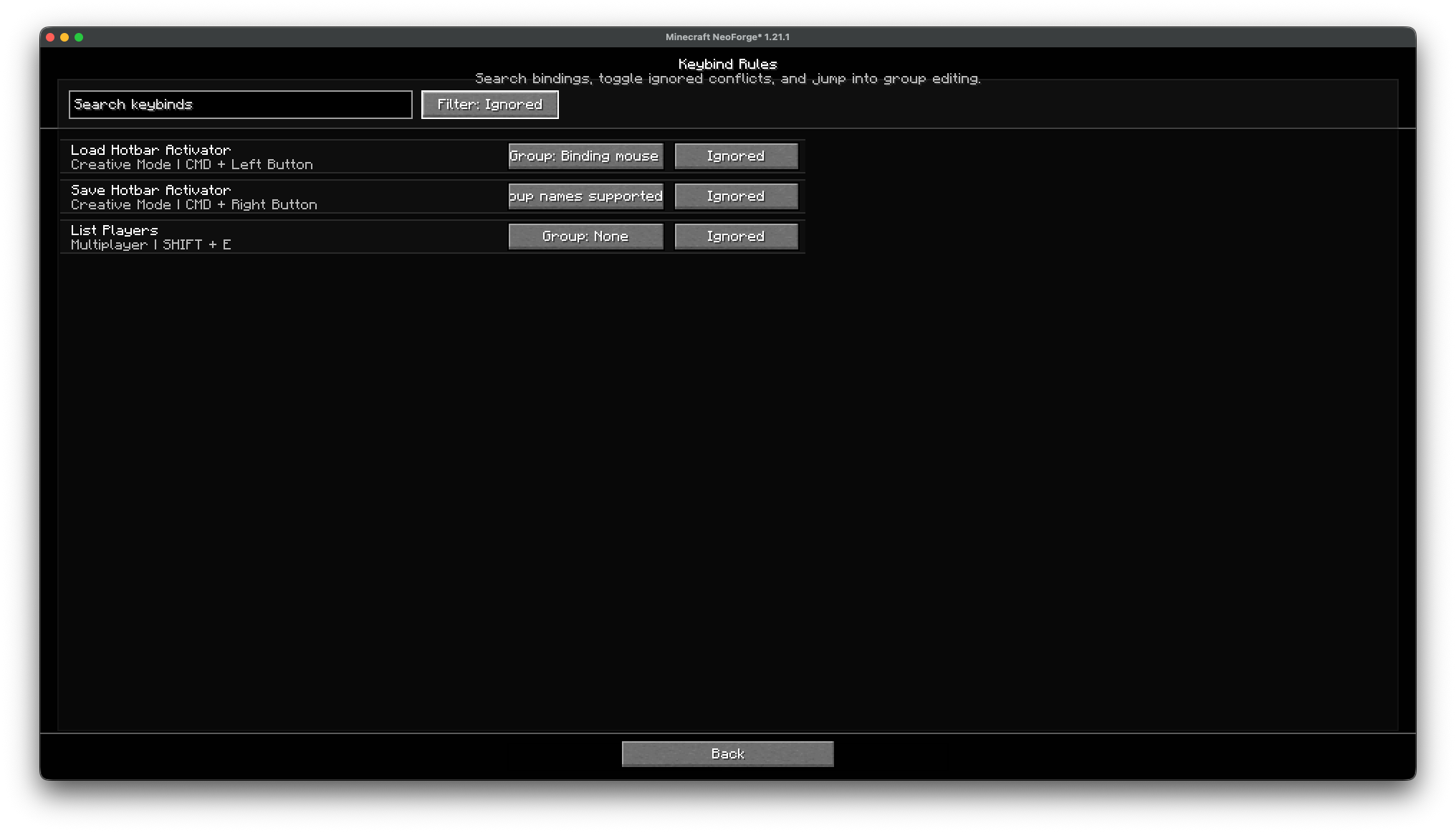 Filtered Keyboard Rules screen 2 Filtered Keyboard Rules screen showing only ignored keybinds
 -
 ViewBoard UI below 1.1.0
Versions
Files
Relations
Project Relations
More like this
Similar Mods
Suggestions use data such as tags, dependencies, dependents, descriptions, titles, and more to rank how much they overlap with this mod.
On ModDex
Community snapshot
By the numbers
Statistics
Want to reach Minecraft players?
We're looking for a server hosting partner to feature here and other parts of the site. Interested? Send us a message!
Get in touchGet it on
Available Platforms
On ModDex
Community snapshot
By the numbers
Statistics
Resources