
Community listing page, reviews here may not be monitored by the author.
Villager Trade Reset


No reviews yet
A mod that allows to reset villager trades of any experience level, at a cost.
Community voices
Reviews
No reviews yet. Be the first to review this project!
Get it on
Available Platforms
Compatibility
Supported Environments
Must be installed on both the client and the server.
About
Project Details
For authors
Embed Badge
If you're the author of this project, you can embed a live badge anywhere that supports HTML or Markdown. It updates automatically whenever ratings change.
Use HTML for any page that supports it, or Markdown for README files and Markdown-based descriptions.
Identifiers
Platform IDs
Resources
External Links
About
Description

This mod allows to reset the villager trades at any experience level at a configurable cost to the player.
No need to kill your less productive villagers any more!
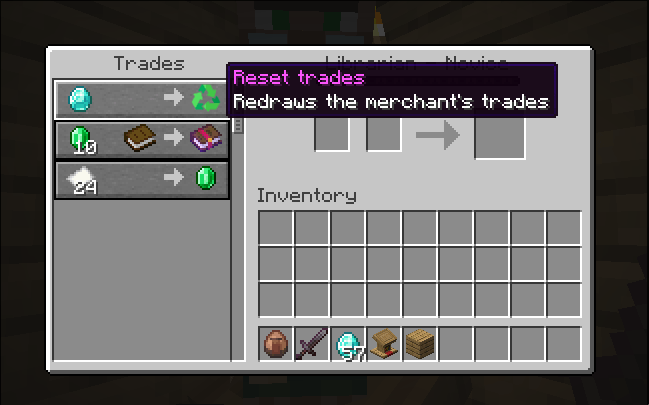
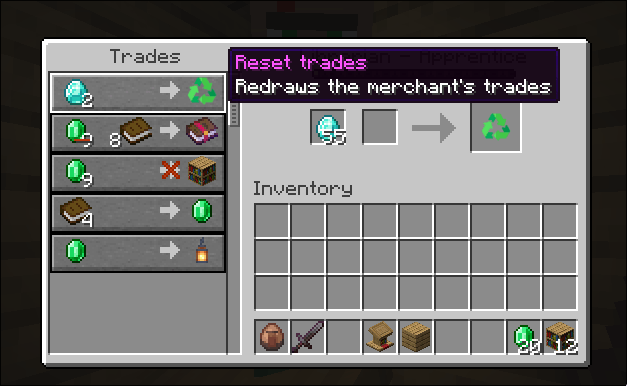
When trading with a villager, you will notice that an extra offer has been added, which we will refer to as "trade reset offer".
When you accept the trade reset offer by clicking on the result slot, the merchant GUI closes and the villager will emit some particles, signaling that the trades have been redrawn.
The item shown in the result slot is not obtainable, it is only there to describe the effect of the trade reset offer. The new trades are redrawn as if the villager had levelled up from level 0 to their current level.
Trade modifiers like discounts or demand are retained, but the number of uses is reset because the redrawn trades are considered new.

This mod allows to reset the villager trades at any experience level at a configurable cost to the player.
When trading with a villager, you will notice that an extra offer has been added, which we will refer to as "trade reset offer". When you accept the trade reset offer by clicking on the result slot, the merchant GUI closes and the villager will emit some particles, signaling that the trades have been redrawn. The item shown in the result slot is not obtainable, it is only there to describe the effect of the trade reset offer. The new trades are redrawn as if the villager had levelled up from level 0 to their current level. Trade modifiers like discounts or demand are retained, but the number of uses is reset because the redrawn trades are considered new.
The default configuration of the mod requires the player to submit diamonds, thus given this vanilla item an interesting new purpose.
The amount required coincides with the villager's experience level, and the trade reset offer has a maximum number of uses of 5 before restock is needed.
The material required, amount per level and maximum number of uses are configurable from within the game in the mod's configuration or directly in the generated toml file.
See the Configuration section for more information on how to change the configuration.
However, when changing the configuration any villagers already holding a trade reset offer will not see this offer updated.
If the villager has not been traded with yet, you can regenerate the trade reset offer by resetting their job or levelling them up.
Otherwise... more drastic methods are required.
Translation

Translations are handled via Crowdin for easy community contributions. I provide translations to English, Spanish and Catalan, although other languages may be added in the future.
Configuration
One of the main features of the mod is its configuration so that it can not just suit a wide variety of players looking for an easier or harder challenge, but also be integrated in modpacks where a different item might be preferred to counterbalance the power resetting a villager's offers brings.
For normal players, changing the configuration in-game throught the mod configuration UI is the easiest and recommended way to make adjustments. However, if you are a modpack creator you might want to save yourself from the pain of launching the game and edit the configuration file directly. In either case, here are the instructions for both methods.
Changing the config within the game (NeoForge only)
In the menu, go to the mods window and open the config for Villager trade reset.

In Required item, you can choose the item required in the trade reset offer. This is set to minecraft:diamond by default but can be set to any other vanilla item:
- To set it to another vanilla item, like Dirt, use
minecraft:dirt. The item's identifier can usually be checked in the wiki under the Data values section. - If the item is added by a mod, apart from using the item's correct identifier, you need to change minecraft to the mod's ID. For example, to use our trade reset item you would write
villagertradereset:trade_reset.
The Maximum uses field sets the maximum number of uses of the offer before it is exhausted and in need of restock. Must be greater than 0.
The Cost per level... field sets the cost to accept the trade reset offer for each level:

The amounts are store in a 0-indexed vector, so the column on the left are the indexes in such vector. The index 0 corresponds to the cost for a level 1 villager. In general, the index i corresponds to the cost for a level i+1 villager. Therefore, in the example shown above, the cost corresponds to the level of the villager.
You can add or remove positive values to the vector at your convenience. If the vector is so short that it doesn't contain the cost for a certain level, the cost for that level will be taken from the last element of the vector. If we take the example below:

The cost of the trade reset offer is set to 3 for any villager level, since it is set for level 1 and for any level higher it would take the last element of the vector, which is 3.
Changing the config manually
The configuration can be created/found in config/villagertradereset-common.toml within your minecraft instance.
An example configuration for NeoForge can be:
max_uses = 4
cost_per_level = [1, 2, 3]
required_item = "minecraft:emerald"
While the corresponding configuration in Fabric would be (uses Java properties syntax):
max_uses = 4
cost_per_level = [1, 2, 3]
required_item = minecraft\:emerald
- Sets the maximum number of uses to 4.
- Sets the required item to emerald.
- Sets the cost of the trade reset offer to 1 for a level 1 merchant, 2 for a level 2 merchant and 3 for level 3 and higher.
Screenshots
Gallery
-
 u1.png u1.png
 -
 u2.png u2.png
-
 Trade reset offer at level 1
 -
 Trade reset offer at level 2
Versions
Files
Relations
Project Relations
More like this
Similar Mods
Suggestions use data such as tags, dependencies, dependents, descriptions, titles, and more to rank how much they overlap with this mod.
On ModDex
Community snapshot
By the numbers
Statistics
Want to reach Minecraft players?
We're looking for a server hosting partner to feature here and other parts of the site. Interested? Send us a message!
Get in touchGet it on
Available Platforms
On ModDex
Community snapshot
By the numbers
Statistics
Resources