
Community listing page, reviews here may not be monitored by the author.
Villager Trading Overhaul


No reviews yet
A fully client-side mod that enhances vanilla villager trading screen with mod supports
Community voices
Reviews
No reviews yet. Be the first to review this project!
Get it on
Available Platforms
Compatibility
Supported Environments
Runs entirely on the client. Works on vanilla servers.
About
Project Details
For authors
Embed Badge
If you're the author of this project, you can embed a live badge anywhere that supports HTML or Markdown. It updates automatically whenever ratings change.
Use HTML for any page that supports it, or Markdown for README files and Markdown-based descriptions.
Identifiers
Platform IDs
About
Description
Villager Trading Overhaul
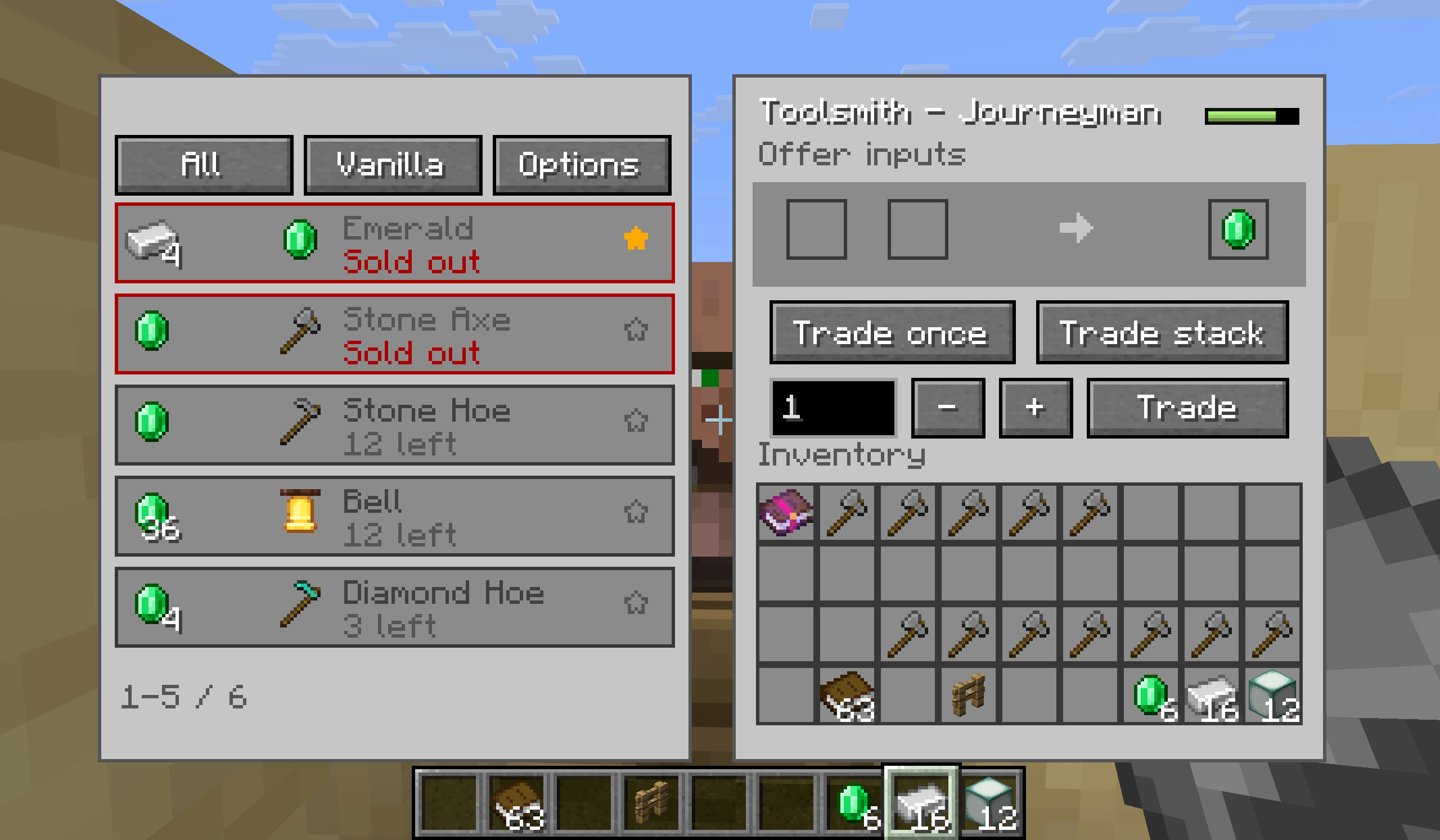
A client-side Fabric/NeoForge mod that replaces the vanilla villager trading screen with a clearer trading desk for browsing offers and completing repeated trades with fewer clicks.
The mod keeps vanilla villager offers and pricing intact. It changes the client interface only.
Features
- Replaces the standard merchant screen with a two-panel trading desk.
- Displays each offer's input items, output item, remaining stock, and out-of-stock state.
- Uses the vanilla trade arrow and out-of-stock arrow between the input and result slots.
- Filter offers by all offers, currently affordable offers, or favorites.
- Sort offers by vanilla order, input cost, or remaining stock. Favorites are kept at the top.
- Right-click an offer to add or remove it from favorites.
- Trade once, trade up to the configured batch limit, or enter an exact trade count.
- Limits queued trades to the selected offer's available stock and the materials in your inventory.
- Stops a queued trade if the result slot no longer contains the exact result of the selected offer, preventing an unintended different trade from being collected.
- Shows villager level progress when the merchant provides it.
Usage
- Open a villager's trading screen as usual.
- Left-click an offer in the list to select it. Right-click it to toggle its favorite state.
- Use Trade Once, Trade Stack, or enter a number and use Trade Amount.
- Open Options to set the batch-trade limit or hide sold-out offers.
Configuration
Available options:
- Batch trade limit: limits the Trade Stack action from 1 to 128. Default: 32.
- Hide unavailable trades: hides sold-out offers from the list.
- Favorites: saved locally and reused when the same offer is encountered again.
Required dependencies
For Fabric versions, Fabric API and Cloth Config API are required
No server-side component is included. The mod uses the normal villager trading flow and does not add, remove, or rebalance villager offers.
License
MIT
Villager Trading Overhaul
A client-side Fabric/Forge/NeoForge mod that replaces the vanilla villager trading screen with a clearer trading desk for browsing offers and completing repeated trades with fewer clicks.
The mod keeps vanilla villager offers and pricing intact. It changes the client interface only.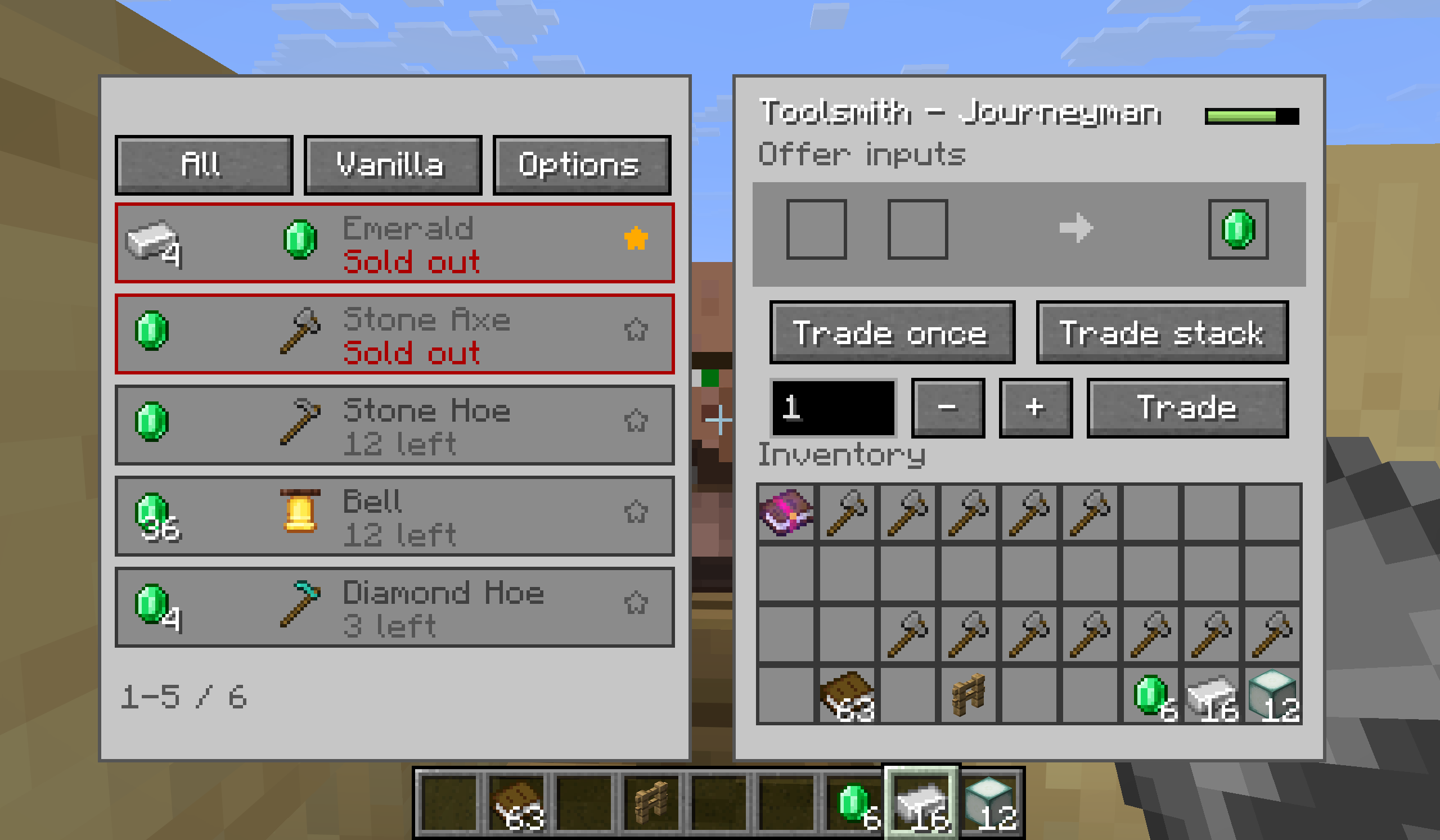
Features
- Replaces the standard merchant screen with a two-panel trading desk.
- Displays each offer's input items, output item, remaining stock, and out-of-stock state.
- Uses the vanilla trade arrow and out-of-stock arrow between the input and result slots.
- Filter offers by all offers, currently affordable offers, or favorites.
- Sort offers by vanilla order, input cost, or remaining stock. Favorites are kept at the top.
- Right-click an offer to add or remove it from favorites.
- Trade once, trade up to the configured batch limit, or enter an exact trade count.
- Limits queued trades to the selected offer's available stock and the materials in your inventory.
- Stops a queued trade if the result slot no longer contains the exact result of the selected offer, preventing an unintended different trade from being collected.
- Shows villager level progress when the merchant provides it.
Usage
- Open a villager's trading screen as usual.
- Left-click an offer in the list to select it. Right-click it to toggle its favorite state.
- Use Trade Once, Trade Stack, or enter a number and use Trade Amount.
- Open Options to set the batch-trade limit or hide sold-out offers.
Configuration
Available options:
- Batch trade limit: limits the Trade Stack action from 1 to 128. Default: 32.
- Hide unavailable trades: hides sold-out offers from the list.
- Favorites: saved locally and reused when the same offer is encountered again.
Required dependencies
-
For Fabric versions, Fabric API and Cloth Config API are required.
-
For Forge/NeoForge versions, only Cloth Config API is required
No server-side component is included. The mod uses the normal villager trading flow and does not add, remove, or rebalance villager offers.
License
MIT
Screenshots
Gallery
-
2026-07-25_00.31.23.png Trade screen
-
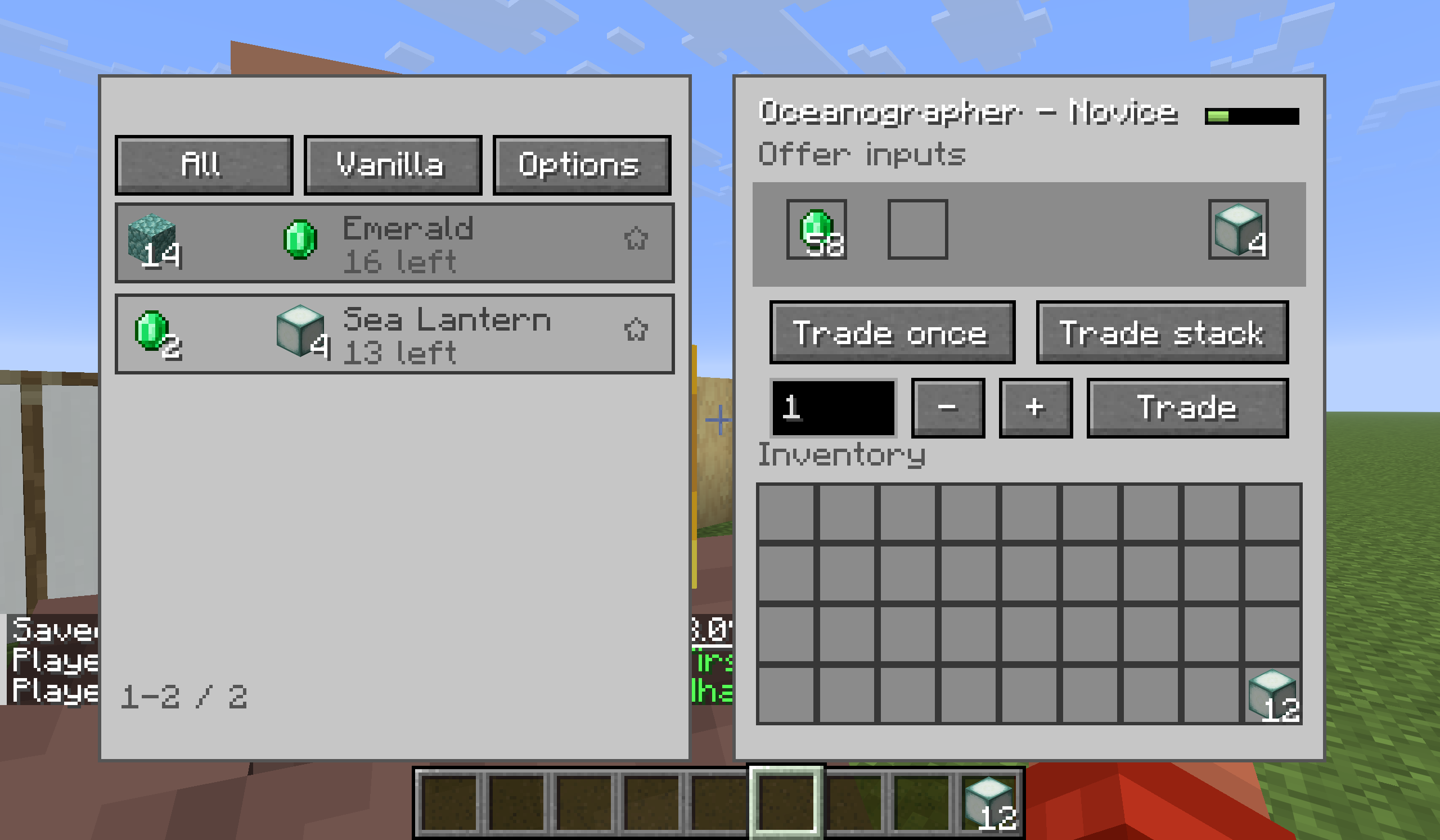 Mod compatibility (More Villagers)
 -
Trade screen
Versions
Files
Relations
Project Relations
More like this
Similar Mods
Suggestions use data such as tags, dependencies, dependents, descriptions, titles, and more to rank how much they overlap with this mod.
On ModDex
Community snapshot
By the numbers
Statistics
Want to reach Minecraft players?
We're looking for a server hosting partner to feature here and other parts of the site. Interested? Send us a message!
Get in touchGet it on
Available Platforms
On ModDex
Community snapshot
By the numbers