
Community listing page, reviews may not be monitored by the author.
Player stats

No reviews yet
Server-side player stat tracking for Fabric servers. Tracks 30+ stat categories per player with admin commands. No client mod required.

Community voices
Reviews
No reviews yet. Be the first to review this project!
Get it on
Available Platforms
Compatibility
Supported Environments
Runs entirely on the server. Also works in singleplayer.
About
Project Details
For authors
Embed Badge
If you're the author of this project, you can embed a live badge anywhere that supports HTML or Markdown. It updates automatically whenever ratings change.
Use HTML for any page that supports it, or Markdown for README files and Markdown-based descriptions.
Identifiers
Platform IDs
Resources
External Links
About
Description
Player Stats
Player Stats is a server-side Fabric mod that tracks detailed per-player statistics and stores them in per-player JSON files. It works by polling each player's vanilla statistic map on a configurable interval and recording only what changed since the last poll, which keeps server overhead near zero. The collected data is exposed in game through admin commands with formatted, color-coded output. Nothing needs to be installed on the client; players join with a vanilla client and are tracked automatically.
How it works
- On every poll interval the mod snapshots each online player's vanilla stats, computes the difference against the previous snapshot, and adds the deltas to that player's persistent profile.
- Profiles are saved to
stats/player_data/<player-uuid>.jsonin the server folder on a configurable save interval, when a player disconnects, and when the server stops. - Tracking starts automatically on server start. No setup is required beyond installing the mod.
- Every tracker category can be enabled or disabled individually in
config/viper_player_stats.json.
Commands
All commands require operator permission level 2. Tab completion is provided for player names, stat types, and limits.
| Command | Description |
|---|---|
/stats list |
Lists all tracked stat categories, grouped by section (Mining and Blocks, Combat, Items, Movement, World and Life). |
/stats <player> |
Shows a full stat card for a player, grouped into sections. Only sections that contain data are displayed. |
/stats <player> all |
Same as above; shows every recorded stat for the player. |
/stats <player> <stat_type> |
Shows one stat in detail: a highlighted total plus a top-entries breakdown (for example the most mined blocks or most killed mobs), with a clickable shortcut to the leaderboard. |
/stats <player> <stat_type> <timeframe> |
Same detailed view; accepts a timeframe argument (24h, 7d, 30d, all). |
/stats top <stat_type> <limit> |
Ranked leaderboard for a stat across all tracked players (limit 1-100). The top 3 ranks are highlighted. Clicking a row opens that player's detail view for the stat. |
/stats reset <player> <stat_type> |
Resets one stat category for a player, or use all to wipe the whole profile. |
Tracked stats
| Stat type | Description |
|---|---|
blocks_broken |
Blocks broken, counted per block. |
ores_mined |
Ores mined, counted per ore block (tag-aware detection). |
items_crafted |
Items crafted, counted per item. |
items_dropped |
Items dropped, counted per item. |
items_picked_up |
Items picked up, counted per item. |
mob_kills |
Entity kills, counted per entity type. |
mob_deaths |
Deaths caused by entities, counted per entity type. |
food_eaten |
Food items eaten, counted per food item. |
deaths |
Total deaths, with a breakdown of the top death causes. |
damage_dealt |
Damage dealt to entities. |
damage_taken |
Damage taken from all sources. |
distance_walked |
Distance walked, shown in meters or kilometers. |
distance_flown |
Distance flown (elytra/creative), shown in meters or kilometers. |
distance_swum |
Distance swum, shown in meters or kilometers. |
jumps |
Jumps performed. |
beds_slept |
Times slept in a bed. |
trades_made |
Villager trades completed. |
items_enchanted |
Items enchanted. |
books_written |
Books signed. |
potions_brewed |
Potions taken from a brewing stand. |
armor_durability_lost |
Armor durability damage, tracked per armor slot. |
teleports_used |
Teleports used (chorus fruit, ender pearls, commands). |
buckets_emptied_filled |
Buckets filled and emptied, counted per bucket type. |
jukebox_plays |
Music discs played in a jukebox. |
crops_harvested |
Fully grown crops harvested. |
doors_gates_opened |
Doors and fence gates opened. |
explosions_caused |
Explosions caused (TNT usage). |
projectiles_fired |
Projectiles fired (bows, crossbows, tridents), with hit accuracy. |
projectiles_hit |
Projectiles that hit a target. |
fishing |
Fishing results, split into fish caught and junk caught. |
dimension_time |
Time spent in each dimension. |
time_played |
Total play time. |
time_since_death |
Time since the last death (shown after the first death). |
Configuration
All settings live in config/viper_player_stats.json and are created with defaults on first start. Boolean flags toggle individual trackers; intervals are in server ticks (20 ticks = 1 second).
| Option | Type | Default | Description |
|---|---|---|---|
enabled |
boolean | true |
Master switch for all tracking. |
saveIntervalTicks |
number | 1200 |
How often player profiles are written to disk (default every 60 seconds). |
pollIntervalTicks |
number | 600 |
How often vanilla stats are polled for changes (default every 30 seconds). |
trackBlocksBroken |
boolean | true |
Track blocks broken. |
trackOresMined |
boolean | true |
Track ores mined. |
trackCrops |
boolean | true |
Track crops harvested. |
trackDoorsGates |
boolean | true |
Track doors and gates opened. |
trackItemsCrafted |
boolean | true |
Track items crafted. |
trackItemsDropped |
boolean | true |
Track items dropped. |
trackItemsPickedUp |
boolean | true |
Track items picked up. |
trackFoodEaten |
boolean | true |
Track food eaten. |
trackBuckets |
boolean | true |
Track buckets filled and emptied. |
trackEnchanting |
boolean | true |
Track items enchanted. |
trackBooks |
boolean | true |
Track books written. |
trackJukebox |
boolean | true |
Track jukebox plays. |
trackMobKills |
boolean | true |
Track entity kills. |
trackMobDeaths |
boolean | true |
Track deaths caused by entities. |
trackDamage |
boolean | true |
Track damage dealt and taken. |
trackProjectiles |
boolean | true |
Track projectiles fired and hits. |
trackExplosions |
boolean | true |
Track explosions caused. |
trackArmorDurability |
boolean | true |
Track armor durability loss. |
trackDistance |
boolean | true |
Track distance walked, flown and swum. |
trackBedsSlept |
boolean | true |
Track beds slept in. |
trackTrades |
boolean | true |
Track villager trades. |
trackBrewing |
boolean | true |
Track potions brewed. |
trackFishing |
boolean | true |
Track fishing catches. |
trackDimensionTime |
boolean | true |
Track time spent per dimension. |
trackTeleports |
boolean | true |
Track teleports used. |
Data storage
- Player profiles:
stats/player_data/<player-uuid>.json(pretty-printed JSON, includes the player name for readability). - Profiles load when a player joins and save on the save interval, on disconnect, and on server stop.
- To wipe a player's data, use
/stats reset <player> allor delete the player's JSON file while the server is stopped.
Installation
- Install Fabric Loader for your Minecraft version (0.15.11 or newer for 1.21.x, 0.18.4 or newer for 26.1.x, the latest loader for 26.2.x and 26.3.x).
- Download the matching Fabric API version and place it in the server
modsfolder. - Download the Player Stats file for your Minecraft version and place it in the server
modsfolder. - Start the server. Tracking starts automatically.
No client-side installation is needed. Requires Java 21 for the 1.21.x file and Java 25 for the 26.x files.
Supported versions
| File | Minecraft | Loader | Java |
|---|---|---|---|
| 1.21.x build | 1.21 - 1.21.11 | Fabric | 21+ |
| 26.1.x build | 26.1 - 26.1.2 | Fabric | 25+ |
| 26.2 build | 26.2 | Fabric | 25+ |
| 26.3 build | 26.3 | Fabric | 25+ |
Screenshots
Gallery
-
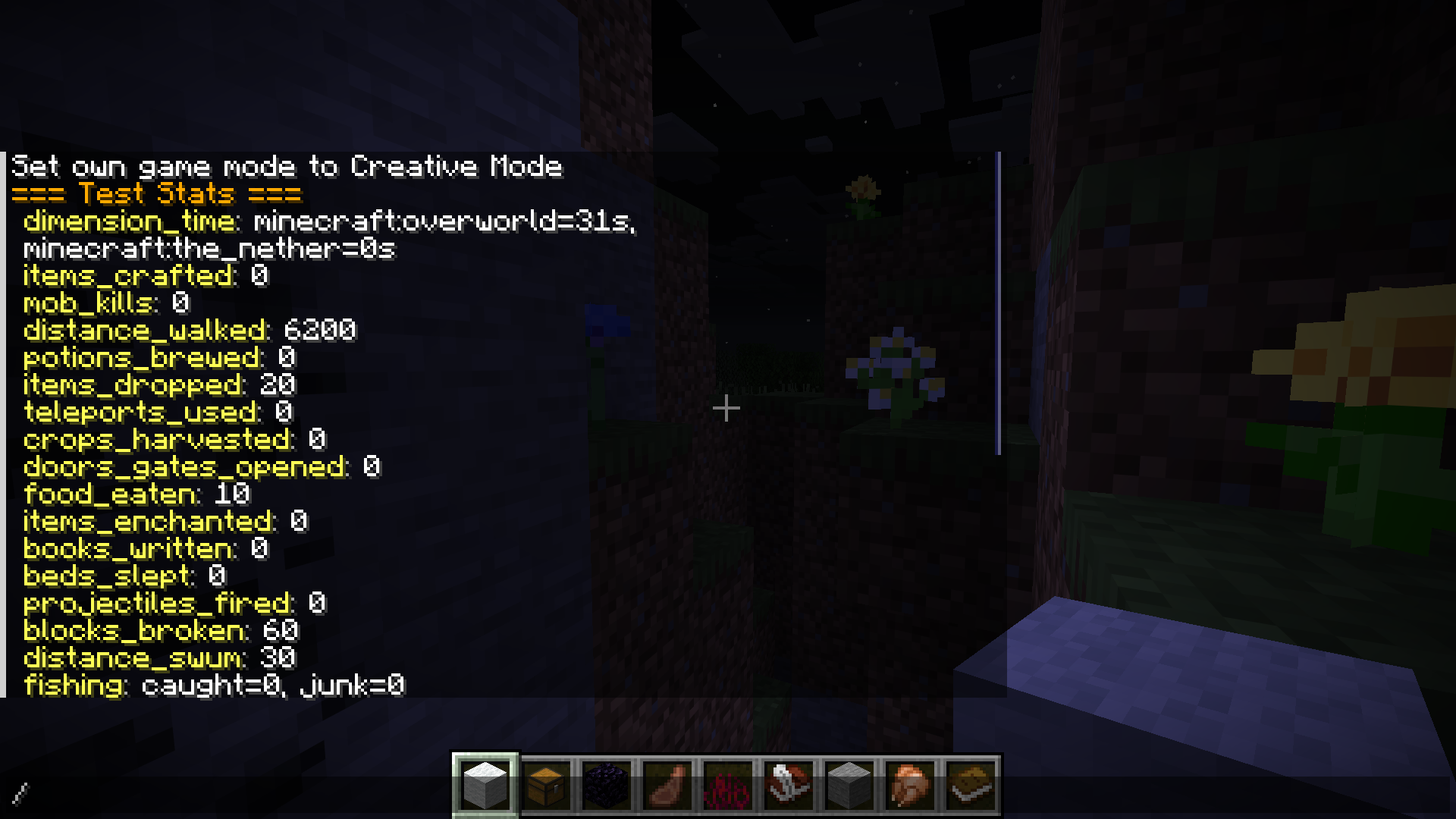 Example stats for player "Test" 👾
Versions
Files
Relations
Project Relations
More like this
Similar Mods
Suggestions use data such as tags, dependencies, dependents, descriptions, titles, and more to rank how much they overlap with this mod.
On ModDex
Community snapshot
By the numbers
Statistics


Get it on
Available Platforms
On ModDex
Community snapshot
By the numbers
Statistics
Resources