
Community listing page, reviews here may not be monitored by the author.

Community voices
Reviews
No reviews yet. Be the first to review this project!
Get it on
Available Platforms
Compatibility
Supported Environments
Runs entirely on the client. Works on vanilla servers.
About
Project Details
For authors
Embed Badge
If you're the author of this project, you can embed a live badge anywhere that supports HTML or Markdown. It updates automatically whenever ratings change.
Use HTML for any page that supports it, or Markdown for README files and Markdown-based descriptions.
Identifiers
Platform IDs
Resources
External Links
About
Description
🎮 Vissed FOV Control — Ultimate Camera & Visual Control Mod
The ultimate client-side mod for complete control over your camera, FOV, and visual effects. Perfect for PvP players, content creators, and anyone looking to eliminate unwanted screen shaking and fine-tune their visual experience.











open menu - right shift
🎥 About Vissed FOV Control Vissed FOV Control is a lightweight Fabric mod that gives you complete control over your camera and visual experience in Minecraft. Unlike simple mods that just disable one or two effects, Vissed FOV Control provides a comprehensive interface to tweak everything from FOV multipliers to camera smoothness.
Whether you're a competitive PvP player who needs consistent FOV, a content creator who hates screen shake, or just someone who wants a smoother visual experience, Vissed FOV Control has you covered.
✨ Feature Showcase
🎯 Camera & FOV Control Feature Description FOV Multiplier Independent multipliers for different states (normal, sprinting, flying, etc.) Camera Tilt Disable annoying camera tilting when strafing or landing Swimming FOV Control FOV changes while swimming Smooth Transitions Configure how smoothly FOV changes apply Speed-Based FOV Adjust how much movement speed affects FOV
🚫 Visual Disables Feature Description No Camera Shake Completely remove all camera shaking effects No Portal Shake Disable the shaking effect when going through portals No Nausea Effect Remove the distortion from nausea/potion effects No Bobbing Disable hand bobbing while walking/running
⚙️ Real-Time Configuration Feature Description In-Game Menu Beautiful, intuitive interface to adjust all settings Instant Apply Changes take effect immediately — no restart needed Config File Manual configuration via JSON file for power users Presets Save and load different configurations 📥 Installation Guide Step Action
1️⃣ Install Fabric — Download and install Fabric Loader for Minecraft 1.21.11 2️⃣ Download — Get the latest .jar from Modrinth 3️⃣ Place — Put the JAR into your mods/ folder 4️⃣ Launch — Start Minecraft and enjoy! 5️⃣ Configure — Press your configured keybind to open the settings menu 🎮 Settings Overview
Based on the in-game configuration menu:
🧪 Main Toggles Setting Options Бер (Take) ✕ / ✓ Злитры (Sprint) ✕ / ✓ Плавание (Swimming) ✕ / ✓ Предметы (Items) ✕ / ✓ 📊 FOV Multipliers 🎚️ Additional Controls Setting Description Скорость FOV speed influence factor Трасса камеры Camera trail effect toggle 🎨 Why Choose Vissed FOV Control? Lightweight — Minimal performance impact, written with Fabric best practices
Active Development — Regular updates and community feedback
Screenshots
Gallery
-
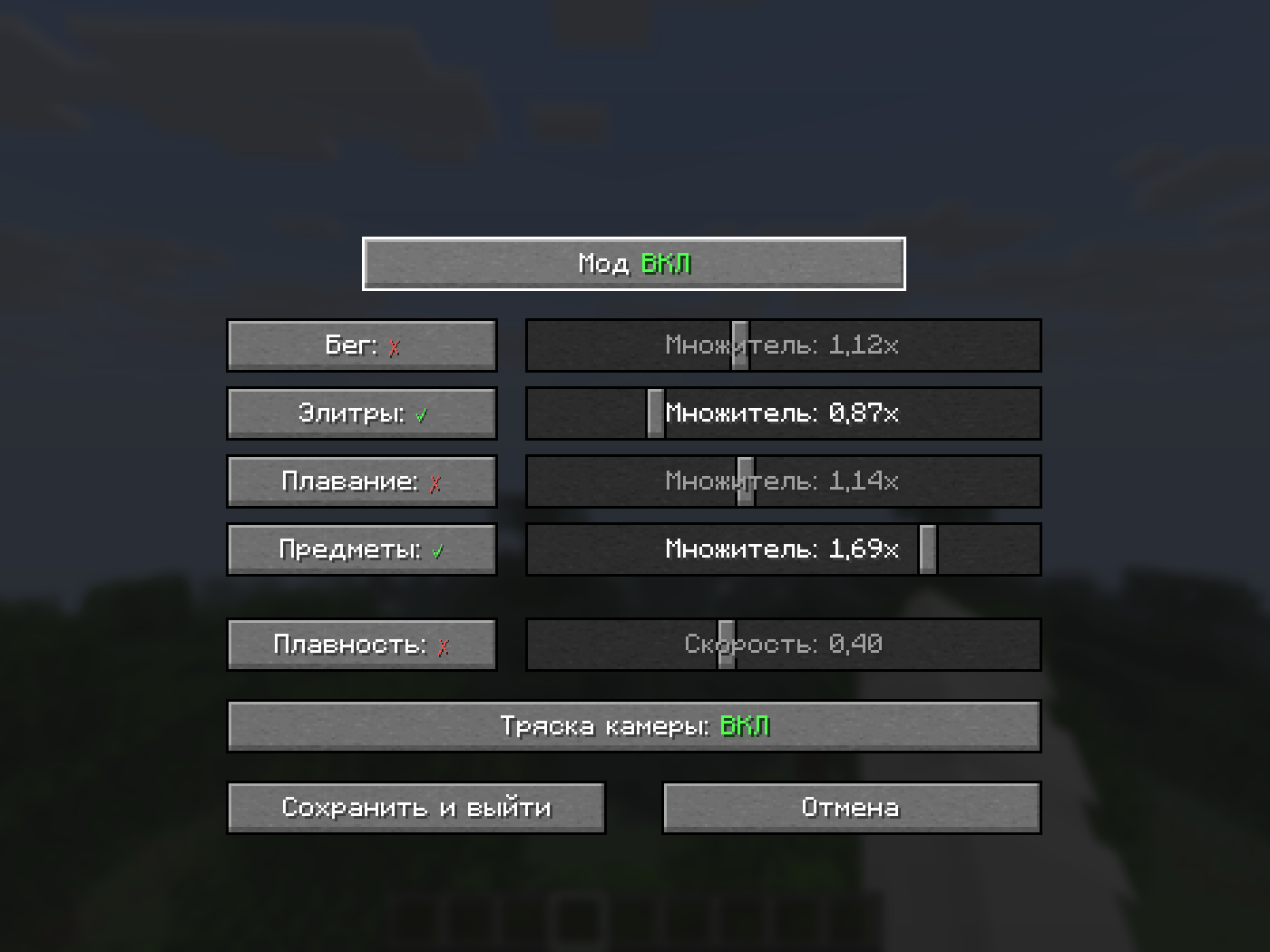 main menu > right shift
Versions
Files
Relations
Project Relations
More like this
Similar Mods
Suggestions use data such as tags, dependencies, dependents, descriptions, titles, and more to rank how much they overlap with this mod.
On ModDex
Community snapshot
By the numbers
Statistics

Want to reach Minecraft players?
We're looking for a server hosting partner to feature here and other parts of the site. Interested? Send us a message!
Get in touchGet it on
Available Platforms
On ModDex
Community snapshot
By the numbers
Statistics
Resources