
Community listing page, reviews here may not be monitored by the author.
Voyagermap


No reviews yet
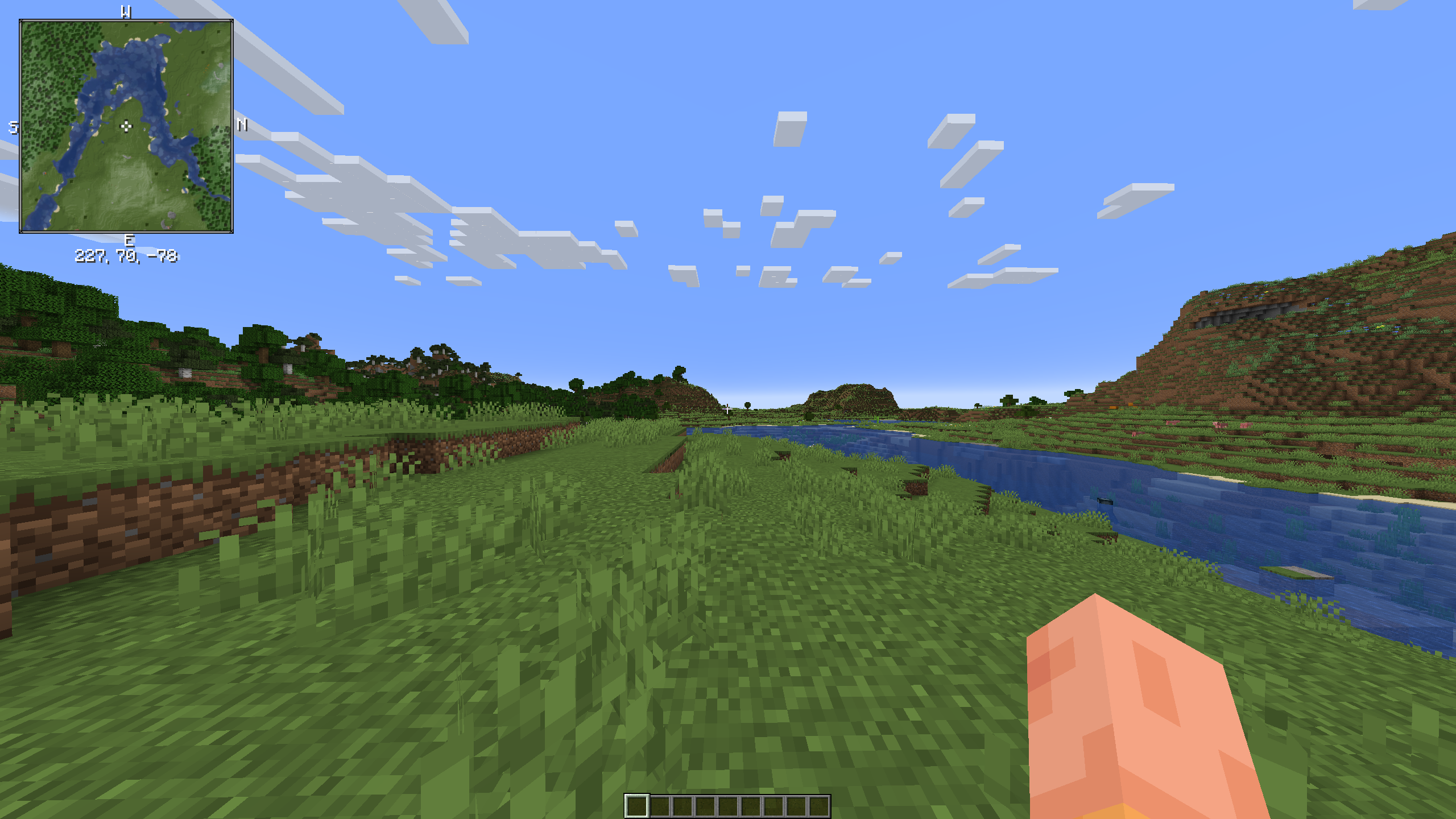
Voyagermap is a minimap and worldmap mod for Minecraft 1.19.4, designed to enhance your navigation and exploration experience.
Community voices
Reviews
No reviews yet. Be the first to review this project!
Get it on
Available Platforms
Compatibility
Supported Environments
Required on the client. Installing it on the server adds functionality.
About
Project Details
For authors
Embed Badge
If you're the author of this project, you can embed a live badge anywhere that supports HTML or Markdown. It updates automatically whenever ratings change.
Use HTML for any page that supports it, or Markdown for README files and Markdown-based descriptions.
Identifiers
Platform IDs
Resources
External Links
About
Description
Welcome to Voyagermap: A Minecraft Mod
What is this mod?
Voyagermap is a minimap and worldmap mod for Minecraft 1.19.4, designed to enhance your navigation and exploration experience.
What does this mod do?
- Minimap and World Map: Voyagermap allows you to see the world around you that you have loaded, including players and mobs in your environment.
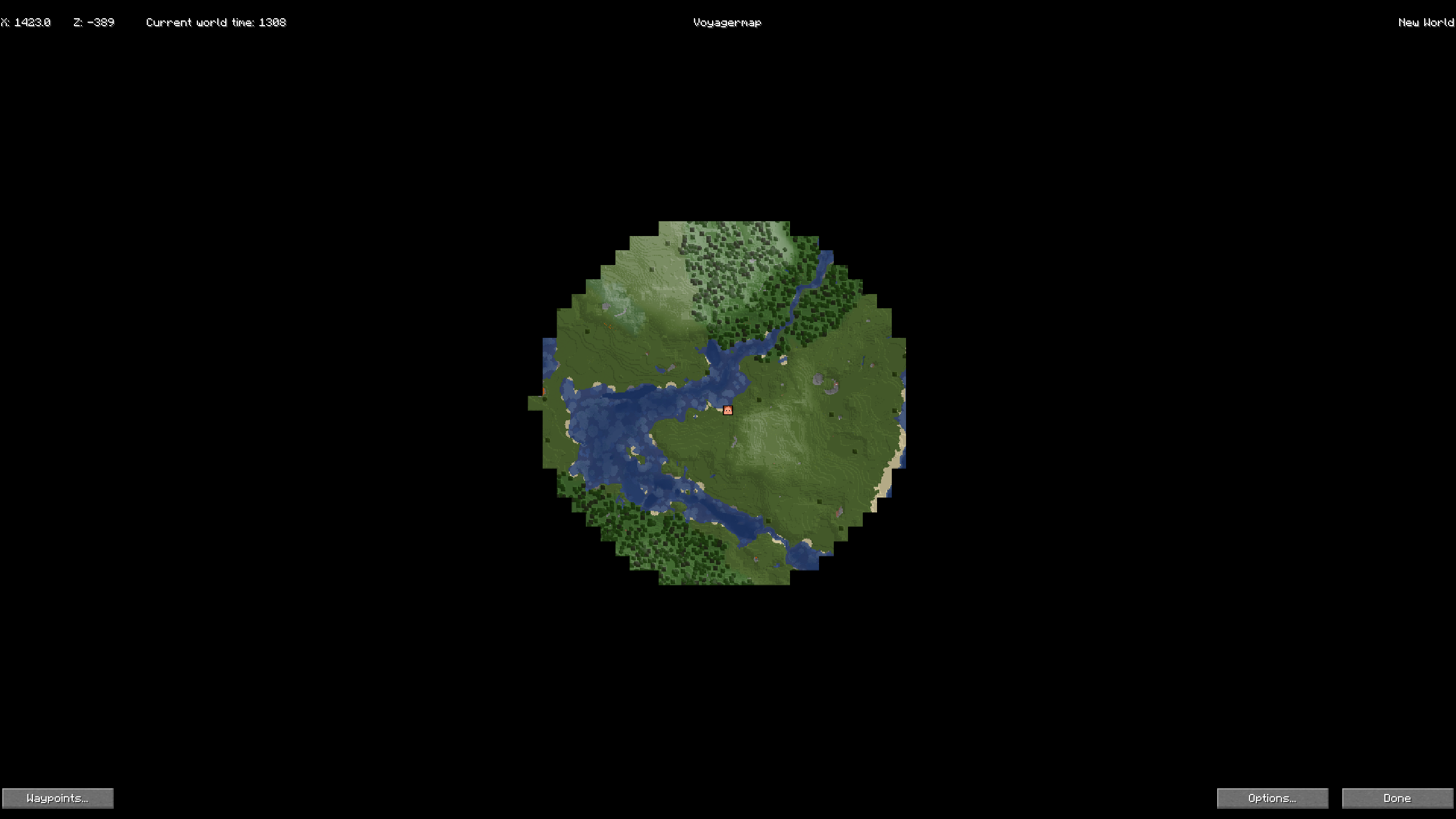
- World Map Overview: It offers a detailed world map with zoom capabilities and teleport commands for an expansive view of your entire world.
- Waypoints System: Easily mark places of interest with the built-in waypoints system, which aids in quick location and navigation. These waypoints are visible on both the minimap and the world map.
- Cave View: If the cave mode is enabled, Voyagermap lets you see caves, providing a comprehensive underground navigation experience.
Features
Worldmap
- Detailed Overview: Get a comprehensive view of your entire world, including loaded chunks and points of interest.
- Zoom and Teleport: Zoom in and out for different levels of detail and use the right click menu for teleport commands for quick travel.
- Customizability: Set custom keybinds, edit veiwing settings, and also radar settings
Minimap
- Real-Time Environment View: See the world around you in real-time, including nearby players and mobs.
- Custom Waypoints: Mark and manage waypoints for easy navigation and location tracking.
- Cave Mapping: If enabled, view underground caves to aid in your spelunking adventures.
FAQ
Q: How do I open the worldmap?
A: To open the worldmap, press the default key 'M'. You can change this keybinding in the settings menu if needed.
Q: How do I set a waypoint?
A: To set a waypoint, open the minimap by pressing the default key 'N', then configure the settings to your liking and click "Done" To save the waypoint.
Q: Can I see other players on the map?
A: Yes, Voyagermap allows you to see nearby players on both the minimap and worldmap, as long as they are within your chunks.
Q: How do I enable cave view?
A: To enable cave view, go the worldmap,click options,look for "Enable Cave Mode:" and change as you wish.
Q: Where is the options menu?
A: The options menu is located in the bottom right corner of the worldmap, which you can open by pressing 'M' by default.
Q: How do I zoom the minimap?
A: To zoom the minimap, press the default key 'Z' to cycle through different zoom levels. Note that in release 0.125, zooming only works with filtering enabled.
Q: The worldmap is blurry. What do I do?
A: If the worldmap appears blurry, go to the options menu, navigate to "Details/Performance," and turn off filtering.
Q: How can I zoom further in the worldmap? It's stopping my zoom.
A: To zoom further in the worldmap, go to the options menu, navigate to "Worldmap," and adjust the minimum and maximum zoom levels to your preference.
Support me on patreon
You can donate here https://www.patreon.com/hotsuop
Is this mod client or server side or both?
Client-Side Features
- Cave Mapping: Allows users to map caves in their Minecraft world.
- Radar: Displays nearby entities or players.
Server-Side Configuration
When installed on a server, administrators can control certain options using chat commands:
Disable Cave Mapping: Admins can disable cave mapping for all users by entering
§3 §6 §3 §6 §3 §6 §d. This command disables cave mapping on the server.Disable Radar: Admins can disable the radar for all users by entering
§3 §6 §3 §6 §3 §6 §e. This command disables the radar feature for all users.Enable Cave Mapping: Admins can enable cave mapping for all users by entering
§3 §6 §3 §6 §3 §6 §f. This command enables cave mapping on the server.Enable Radar: Admins can enable the radar for all users by entering
§3 §6 §3 §6 §3 §6 §0. This command enables the radar feature for all users.
Simple tips and how too's
You can bind a copy cords button in the optons menu
Fun facts about this mod
Total number of characters in folder: 992168 Number of devs: 2
Planned features
- Round map
- None more! Suggest some here
Got an issue?
Report it here!
Meet the devs
License and Usage Info
License
Voyagermap is licensed under the Apache License, Version 2.0 . See below for the terms of the license: http://www.apache.org/licenses/LICENSE-2.0
Welcome to Voyagermap: A Minecraft Mod
What is this mod?
Voyagermap is a minimap and worldmap mod for Minecraft 1.19.4, designed to enhance your navigation and exploration experience.
What does this mod do?
- Minimap and World Map: Voyagermap allows you to see the world around you that you have loaded, including players and mobs in your environment.
- World Map Overview: It offers a detailed world map with zoom capabilities and teleport commands for an expansive view of your entire world.
- Waypoints System: Easily mark places of interest with the built-in waypoints system, which aids in quick location and navigation. These waypoints are visible on both the minimap and the world map.
- Cave View: If the cave mode is enabled, Voyagermap lets you see caves, providing a comprehensive underground navigation experience.
Features
Worldmap
- Exportable map(Options coming soon) Export the world map into and image to share with freinds!
- Detailed Overview: Get a comprehensive view of your entire world, including loaded chunks and points of interest.
- Zoom and Teleport: Zoom in and out for different levels of detail and use the right click menu for teleport commands for quick travel.
- Customizability: Set custom keybinds, edit veiwing settings, and also radar settings
Minimap
- All entity radar: shows all entitys on the map including boats and other dropped items
- Real-Time Environment View: See the world around you in real-time, including nearby players and mobs.
- Custom Waypoints: Mark and manage waypoints for easy navigation and location tracking.
- Cave Mapping: If enabled, view underground caves to aid in your spelunking adventures.
FAQ
Q: How do I open the worldmap?
A: To open the worldmap, press the default key 'M'. You can change this keybinding in the settings menu if needed.
Q: How do I set a waypoint?
A: To set a waypoint, open the minimap by pressing the default key 'N', then configure the settings to your liking and click "Done" To save the waypoint.
Q: Can I see other players on the map?
A: Yes, Voyagermap allows you to see nearby players on both the minimap and worldmap, as long as they are within your chunks.
Q: How do I enable cave view?
A: To enable cave view, go the worldmap,click options,look for "Enable Cave Mode:" and change as you wish.
Q: Where is the options menu?
A: The options menu is located in the bottom right corner of the worldmap, which you can open by pressing 'M' by default.
Q: How do I zoom the minimap?
A: To zoom the minimap, press the default key 'Z' to cycle through different zoom levels. Note that in release 0.125, zooming only works with filtering enabled.
Q: The worldmap is blurry. What do I do?
A: If the worldmap appears blurry, go to the options menu, navigate to "Details/Performance," and turn off filtering.
Q: How can I zoom further in the worldmap? It's stopping my zoom.
A: To zoom further in the worldmap, go to the options menu, navigate to "Worldmap," and adjust the minimum and maximum zoom levels to your preference.
Support me on patreon
You can donate here https://www.patreon.com/hotsuop
Is this mod client or server side or both?
Client-Side Features
- Cave Mapping: Allows users to map caves in their Minecraft world.
- Radar: Displays nearby entities or players.
Server-Side Configuration
When installed on a server, administrators can control certain options using chat commands:
-
Disable Cave Mapping: Admins can disable cave mapping for all users by entering
§3 §6 §3 §6 §3 §6 §d. This command disables cave mapping on the server. -
Disable Radar: Admins can disable the radar for all users by entering
§3 §6 §3 §6 §3 §6 §e. This command disables the radar feature for all users. -
Enable Cave Mapping: Admins can enable cave mapping for all users by entering
§3 §6 §3 §6 §3 §6 §f. This command enables cave mapping on the server. -
Enable Radar: Admins can enable the radar for all users by entering
§3 §6 §3 §6 §3 §6 §0. This command enables the radar feature for all users.
Simple tips and how too's
You can bind a copy cords button in the optons menu
Fun facts about this mod
Total number of characters in folder: 992168 Number of devs: 2
Planned features
- Round map
- None more! Suggest some here
Got an issue?
Report it here!
Meet the devs
License and Usage Info
License
Voyagermap is licensed under the Apache License, Version 2.0 . See below for the terms of the license: http://www.apache.org/licenses/LICENSE-2.0
Screenshots
Gallery
-
World map screenshot
-
Real world demo
Versions
Files
Relations
Project Relations
More like this
Similar Mods
Suggestions use data such as tags, dependencies, dependents, descriptions, titles, and more to rank how much they overlap with this mod.
On ModDex
Community snapshot
By the numbers
Statistics
Want to reach Minecraft players?
We're looking for a server hosting partner to feature here and other parts of the site. Interested? Send us a message!
Get in touchGet it on
Available Platforms
On ModDex
Community snapshot
By the numbers
Statistics
Resources