Community listing page, reviews may not be monitored by the author.
VS: Ship Retrieval Service


No reviews yet
A Addon for Valkyrien Skies to manage and name Ships (Delete, Tp, Freeze)

Community voices
Reviews
No reviews yet. Be the first to review this project!
Get it on
Available Platforms
Compatibility
Supported Environments
Must be installed on both the client and the server.
About
Project Details
For authors
Embed Badge
If you're the author of this project, you can embed a live badge anywhere that supports HTML or Markdown. It updates automatically whenever ratings change.
Use HTML for any page that supports it, or Markdown for README files and Markdown-based descriptions.
Identifiers
Platform IDs
Resources
External Links
About
Description
Ship Retrieval Service
Ship Retrieval Service is an admin and utility mod for Valkyrien Skies 2.
It provides tools to view, manage, and recover Valkyrien Skies ships through an in-game GUI and commands. This mod helps server administrators and technical players handle ships that are lost, bugged, or causing performance issues.
This mod is intended for server administrators, modpack creators, and technical players who need admin-level control over Valkyrien Skies ships.
What does this mod do?
Ship Retrieval Service provides:
Ship Management GUI:
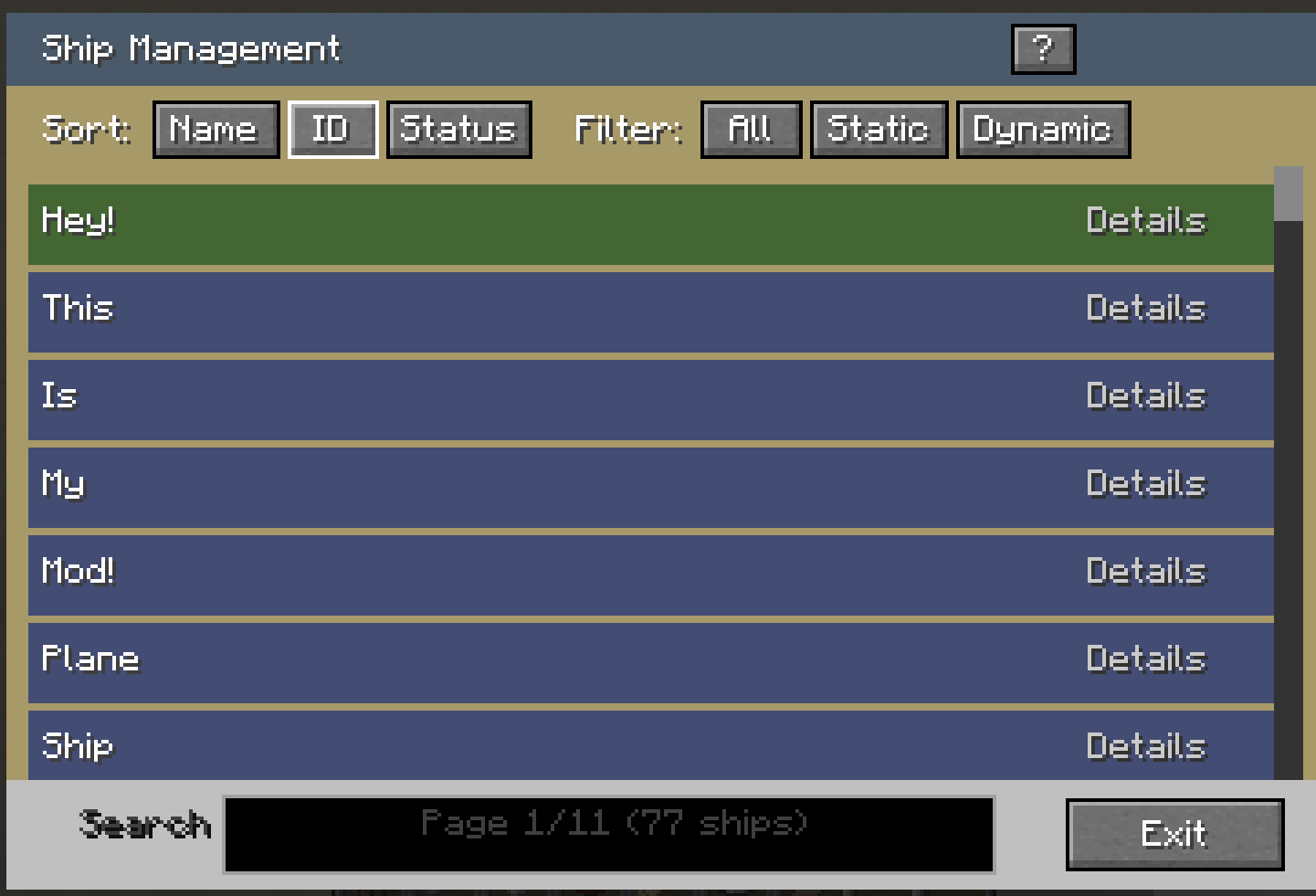
- View all Valkyrien Skies ships in the world (including ships in other dimensions)
- Search, filter (Static/Dynamic/All), and sort (Name/ID/Status) ships
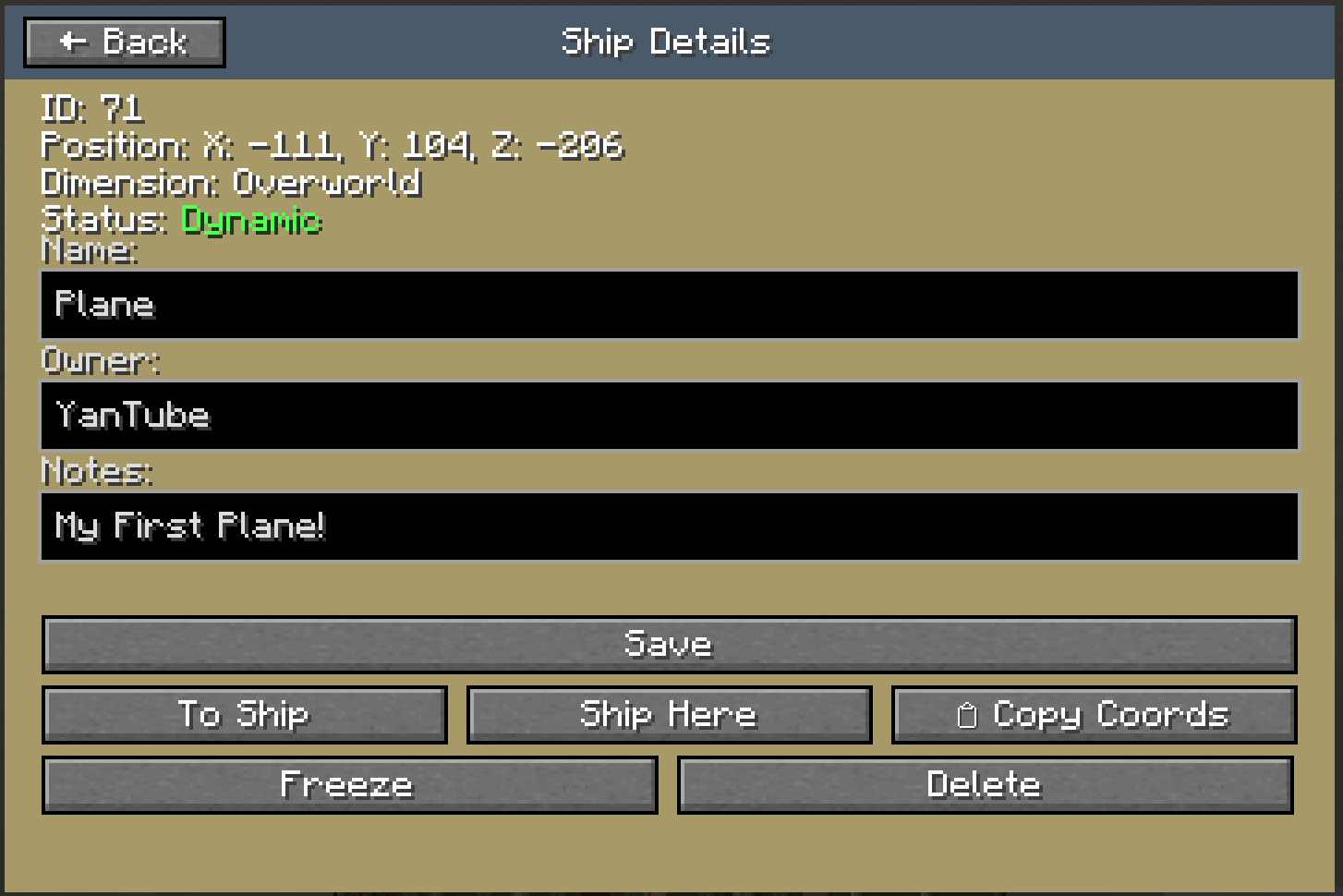
- See ship ID, position (X/Y/Z coordinates), dimension, and status
- Click any ship to open a detailed view with 3D block preview
- Reload button to refresh ship list and preview data
Ship Details & Actions:
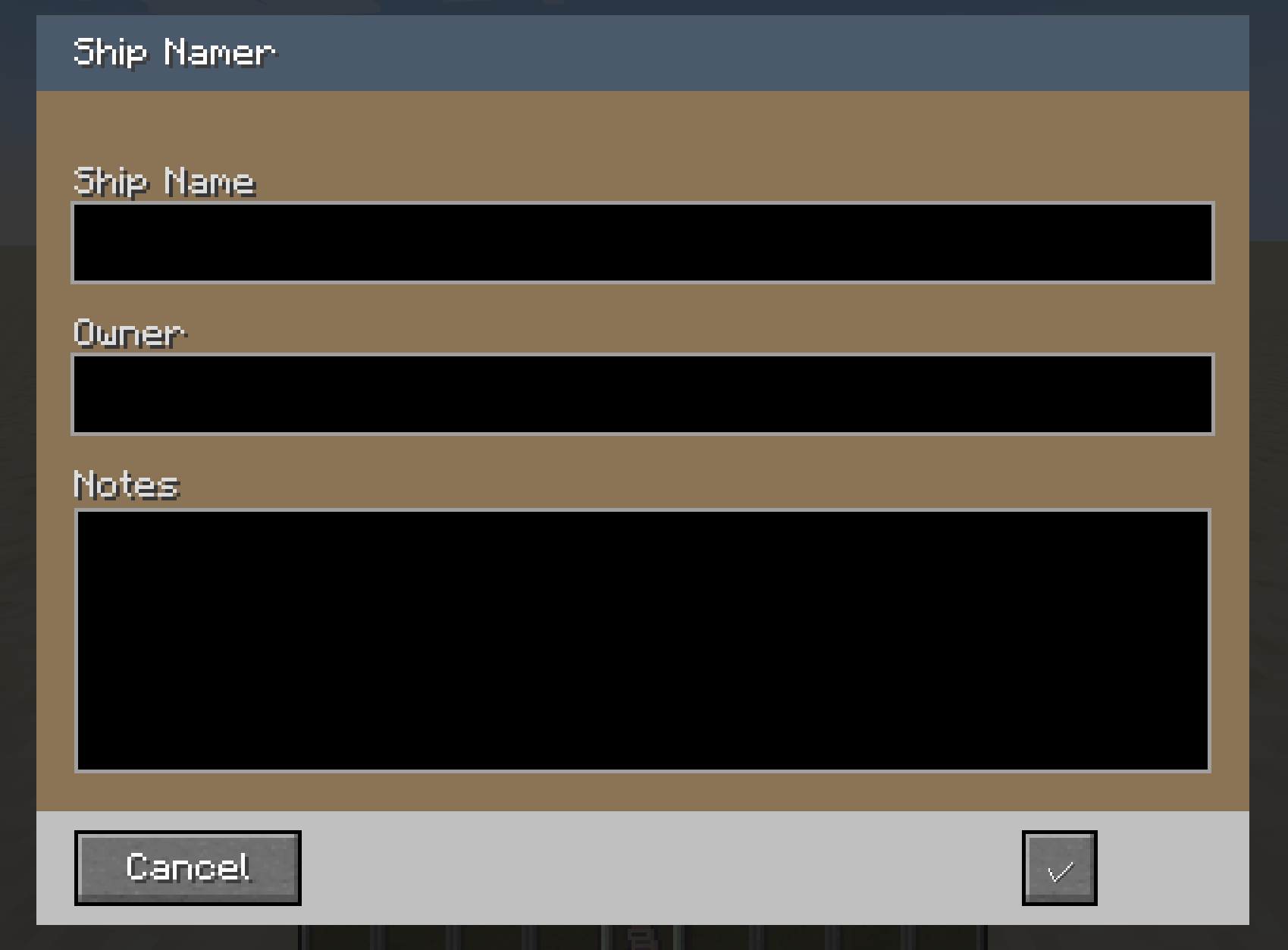
- Edit ship name, owner, and notes for identification
- Teleport to a ship's location (works across dimensions)
- Teleport a ship to your current position
- Freeze or unfreeze ships (stop/allow physics)
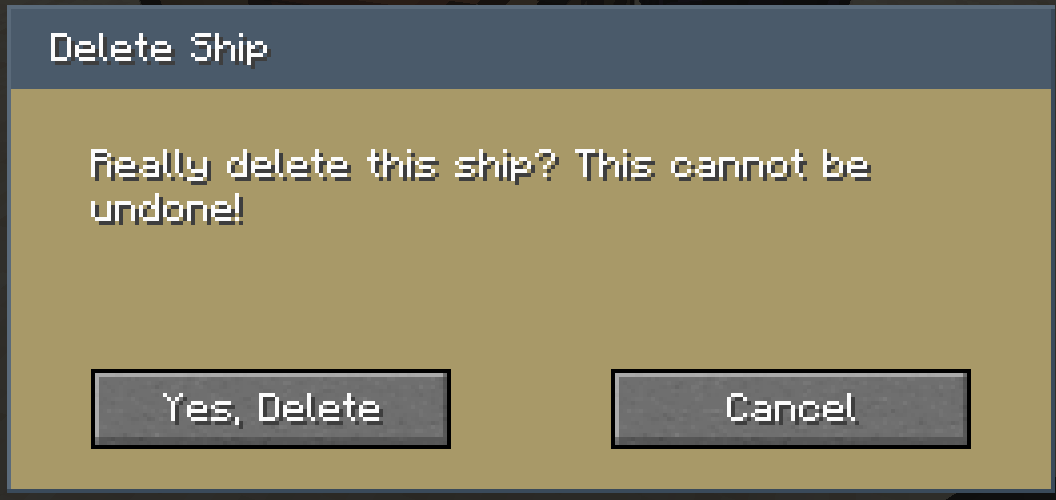
- Delete ships permanently with confirmation dialog
- Copy ship coordinates to clipboard
Ship Namer Item:
- Survival-friendly item available to all players (no admin permissions required)
- Allows every player to name and tag their own ships
- Right-click on any ship to open the naming interface
- Add owner and notes for better organization
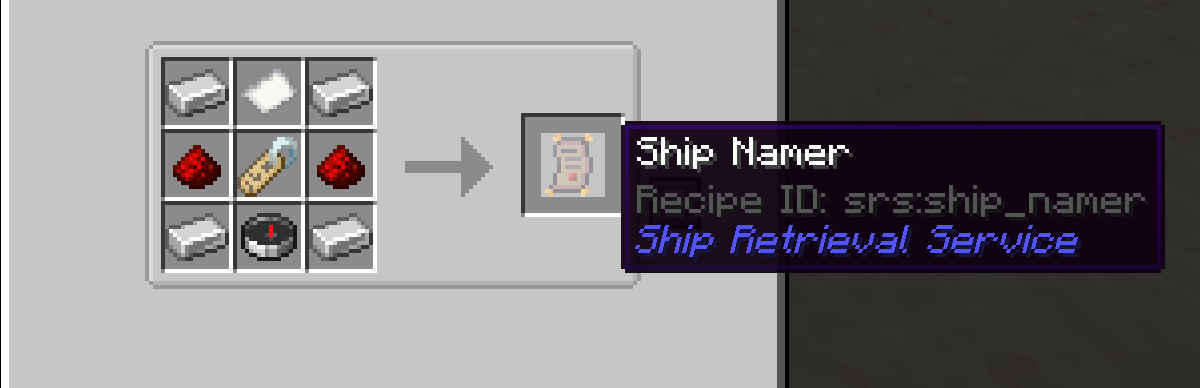
- Can be crafted or obtained in-game
- Validation for allowed characters (a-z, A-Z, 0-9, _, -)
Hub / Anchor System:
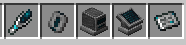
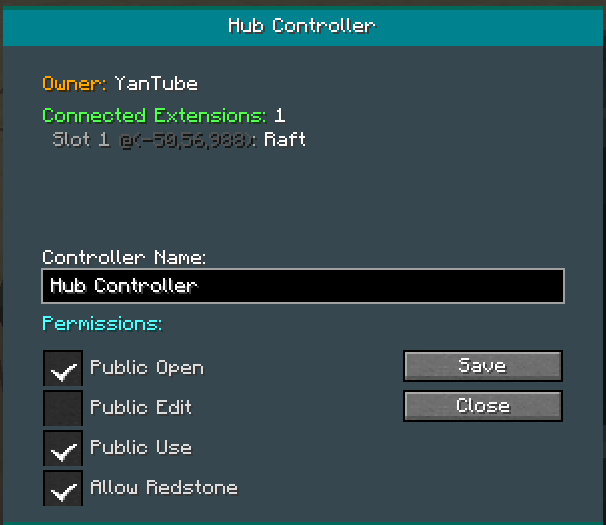
- Hub Controller – Central block for managing ship call stations (e.g. harbours, hangars)
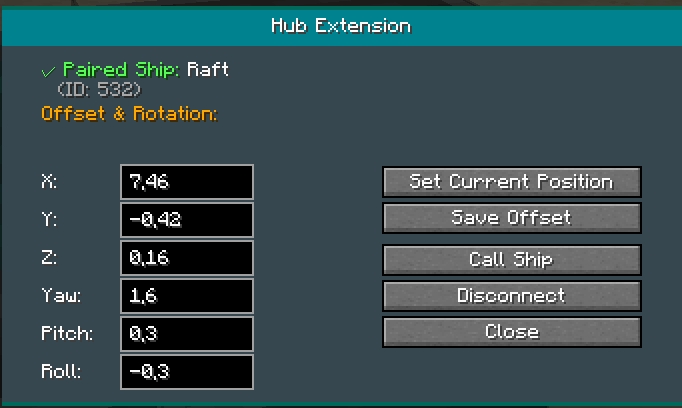
- Hub Extension – Docking slots for ship teleport destinations with individual offset and rotation
- Ship Anchor – Place on ships to pair with hub extensions
- Hub Linker – Tool to connect anchors and extensions
- Workflow: Place Hub at destination → Add extensions/slots → Place Anchor on ship → Use Linker to pair → Call ship to dock
- Configurable permissions: Owner, Manager, User (who can edit slots, call ships, etc.)
- Optional particle preview to visualize spawn position before calling
Admin Commands:
/srs ships– Open the ship management GUI/srs reload– Reload configuration/srs toggle debug– Toggle debug messages/srs debug– Debug tools for troubleshooting (admin screen, ship list, etc.)
Configuration:
- Set command permission levels (OP-only or all players)
- Choose from 10 supported languages
- Enable/disable Ship Namer item
- Configurable admin action permissions
- Teleport warning thresholds (distance, velocity)
- Ship preview settings (max blocks, cache size)
- Hub settings (max extensions per hub, call cooldown, redstone control)
- Auto-delete orphan ships: Optional automatic cleanup of unnamed, unowned ships (configurable interval, disabled by default)
Why should I use this mod?
You may want to use this mod if:
- A ship has flown away or is unreachable (even in other dimensions)
- Ships are causing server lag or crashes
- You need to organize and label ships on a server
- Valkyrien Skies ships prevent world loading
- You want admin control without third-party tools
- You need structured docking for ships (harbours, hangars) with the Hub system
- You want to automatically remove abandoned, unnamed ships
Ship Retrieval Service lets you manage ships directly in-game without external editors or world resets.
Important Information
Before Using:
- This is an admin/utility mod – requires operator permissions by default
- Deleted ships cannot be restored – always confirm before deleting
- Create world backups before using delete functions
- Only affects Valkyrien Skies ships (vanilla entities are not touched)
Permissions:
- Default: OP level 2 required for commands and GUI
- Configurable in
config/srs-common.toml(Forge) orconfig/srs.json(Fabric) - Fabric: Also configurable via Mod Menu
- Can be set to allow all players if desired
Language Support:
- English, German, Spanish, French, Italian, Portuguese, Russian, Chinese, Japanese, Korean
- Change language in configuration file
- Chat messages follow the client's language setting
Requirements
- Minecraft 1.20.1
- Valkyrien Skies 2 (required dependency)
- Forge or Fabric (depending on the build you download)
- Fabric: Cloth Config and Mod Menu (bundled/included for config screen)
How to Use
<details> <summary>Click to expand</summary>
Opening the Ship Management GUI
- Join your world with operator permissions (or configure permissions)
- Run
/srs shipscommand - The Ship Management GUI will open with a list of all ships (including those in other dimensions)
Using the Ship List
- Use the search bar to find ships by name
- Use filter buttons to show only Static or Dynamic ships
- Use sort buttons to sort by Name, ID, or Status
- Click Details button next to any ship to view details (including 3D block preview)
- Use Reload to refresh the list and preview data
Managing a Ship
- In the detail screen, you can:
- Edit name, owner, and notes in the text fields
- Save – Click save button or press Ctrl+S
- Teleport to Ship – Teleports you to the ship's location (works across dimensions)
- Teleport Ship Here – Moves the ship to your position
- Freeze/Activate – Toggle ship physics on/off
- Delete – Permanently remove the ship (with confirmation)
- Copy Coords – Copy ship coordinates to clipboard
Using the Ship Namer Item
- Obtain the "Ship Namer" item:
- Survival: Craft it in-game (recipe available)
- Creative: Find it in the Operator Utilities tab
- Right-click on any Valkyrien Skies ship
- Edit the ship's name, owner, and notes
- Click Save or Cancel
- Note: Ship Namer works for all players, not just admins
Using the Hub / Anchor System
- Place a Hub Controller at your destination (e.g. harbour, hangar)
- Right-click the Hub to open the GUI and add Hub Extensions (docking slots)
- Configure each slot: name, offset (X/Y/Z), and rotation
- Craft a Hub Linker and right-click the Hub to bind the Linker
- Place a Ship Anchor on your ship
- Right-click the Anchor with the bound Linker to select a slot and pair
- Use "Call Ship" in the Hub GUI or from the Anchor to teleport the ship to the dock
- Use Preview (if enabled) to see where the ship will spawn before calling
Configuration
- Find the config file:
- Forge:
config/srs-common.toml - Fabric:
config/srs.jsonor Mod Menu (Mods → Ship Retrieval Service → Config)
- Forge:
- Configure:
- Command permission level (0–4, default: 2)
- Admin actions permission level
- Language preference
- Enable/disable Ship Namer item
- Auto-delete orphan ships (interval, enabled/disabled)
- Hub settings (max extensions, call cooldown)
- Debug mode
Troubleshooting
- Use
/srs debugto access debug tools (admin screen, ship list, etc.) - Use
/srs toggle debugto enable detailed logging - Check server logs for error messages
- Ensure you have proper permissions (OP level 2+ by default)
- For cross-dimension issues: ships in Nether/End are shown and can be teleported to
</details>
Credits
Development: Created for the Valkyrien Skies 2 community
Art & Design:
- SuperHappyPurson – Ship Namer item texture design in the First Version
- HoneyVee – 3D models and textures
Bug Report
You can submit any bugs via CurseForge or with this form: https://forms.gle/2o6ot9XfARs7pDkz9
License
This project is licensed under the Apache License 2.0.
(Note: The new Files (1.1.0) may not be uploadet jet! So the Description can be wrong)
Ship Retrieval Service
(Bevor your judge the new GUI Backround is comming soon)
Ship Retrieval Service is an admin and utility mod for Valkyrien Skies 2.
It provides tools to view, manage, and recover Valkyrien Skies ships through an in-game GUI and commands. This mod helps server administrators and technical players handle ships that are lost, bugged, or causing performance issues.
This mod is intended for server administrators, modpack creators, and technical players who need admin-level control over Valkyrien Skies ships.
What does this mod do?
Ship Retrieval Service provides:
Ship Management GUI:
- View all Valkyrien Skies ships in the world
- Search, filter (Static/Dynamic/All), and sort (Name/ID/Status) ships
- See ship ID, position (X/Y/Z coordinates), dimension, and status
- Click any ship to open a detailed view
Ship Details & Actions:
- Edit ship name, owner, and notes for identification
- Teleport to a ship's location
- Teleport a ship to your current position
- Freeze or unfreeze ships (stop/allow physics)
- Delete ships permanently with confirmation dialog
- Copy ship coordinates to clipboard
Ship Namer Item:
- Survival-friendly item available to all players (no admin permissions required)
- Allows every player to name and tag their own ships
- Right-click on any ship to open the naming interface
- Add owner and notes for better organization
- Can be crafted or obtained in-game
Admin Commands:
/srs ships- Open the ship management GUI/srs reload- Reload configuration/srs toggle debug- Toggle debug messages/srs debug- Debug tools for troubleshooting
Configuration:
- Set command permission levels (OP-only or all players)
- Choose from 10 supported languages
- Enable/disable Ship Namer item
- Configurable admin action permissions
Why should I use this mod?
You may want to use this mod if:
- A ship has flown away or is unreachable
- Ships are causing server lag or crashes
- You need to organize and label ships on a server
- Valkyrien Skies ships prevent world loading
- You want admin control without third-party tools
Ship Retrieval Service lets you manage ships directly in-game without external editors or world resets.
Important Information
Before Using:
- This is an admin/utility mod - requires operator permissions by default
- Deleted ships cannot be restored - always confirm before deleting
- Create world backups before using delete functions
- Only affects Valkyrien Skies ships (vanilla entities are not touched)
Permissions:
- Default: OP level 2 required for commands and GUI
- Configurable in
config/srs-common.toml(Forge) or mod config - Can be set to allow all players if desired
Language Support:
- English, German, Spanish, French, Italian, Portuguese, Russian, Chinese, Japanese, Korean
- Change language in configuration file
Requirements
- Minecraft 1.20.1
- Valkyrien Skies 2 (required dependency)
- Forge or Fabric (depending on the build you download)
How to Use
Click to expand
Opening the Ship Management GUI
- Join your world with operator permissions (or configure permissions)
- Run
/srs shipscommand - The Ship Management GUI will open with a list of all ships
Using the Ship List
- Use the search bar to find ships by name
- Use filter buttons to show only Static or Dynamic ships
- Use sort buttons to sort by Name, ID, or Status
- Click Details button next to any ship to view details
Managing a Ship
- In the detail screen, you can:
- Edit name, owner, and notes in the text fields
- Save - Click save button or press Ctrl+S
- Teleport to Ship - Teleports you to the ship's location
- Teleport Ship Here - Moves the ship to your position
- Freeze/Activate - Toggle ship physics on/off
- Delete - Permanently remove the ship (with confirmation)
- Copy Coords - Copy ship coordinates to clipboard
Using the Ship Namer Item
- Obtain the "Ship Namer" item:
- Survival: Craft it in-game (recipe available)
- Creative: Find it in the Operator Utilities tab
- Right-click on any Valkyrien Skies ship
- Edit the ship's name, owner, and notes
- Click Save or Cancel
- Note: Ship Namer works for all players, not just admins
Configuration
- Find the config file:
- Forge:
config/srs-common.toml - Fabric: Mod Menu settings
- Forge:
- Configure:
- Command permission level (0-4, default: 2)
- Admin actions permission level
- Language preference
- Enable/disable Ship Namer item
- Debug mode
Troubleshooting
- Use
/srs debug listto see all loaded ships - Use
/srs toggle debugto enable detailed logging - Check server logs for error messages
- Ensure you have proper permissions (OP level 2+ by default)
Credits
Development: Created for the Valkyrien Skies 2 community
Art & Design:
- SuperHappyPurson - Ship Namer item texture design
- SuperHappyPurson - GUI background designs (coming soon)
License
This project is licensed under the Apache License 2.0.
Screenshots
Gallery
-
 Screenshot 2026-03-02 174215.png Screenshot 2026-03-02 174215.png
 -
 Screenshot 2026-03-02 174152.png Screenshot 2026-03-02 174152.png
 -
 Screenshot 2026-03-02 174149.png Screenshot 2026-03-02 174149.png
 -
 Screenshot 2026-01-02 120143.png Screenshot 2026-01-02 120143.png
 -
 Screenshot 2026-01-02 120139.png Screenshot 2026-01-02 120139.png
 -
 Screenshot 2026-01-02 120132.png Screenshot 2026-01-02 120132.png
 -
 Screenshot 2026-01-02 115539.png Screenshot 2026-01-02 115539.png
 -
 Screenshot 2026-01-02 114909.png Screenshot 2026-01-02 114909.png
-
 Ship Detail GUI
 -
 Final Delete Warning
 -
 Ship List GUI
 -
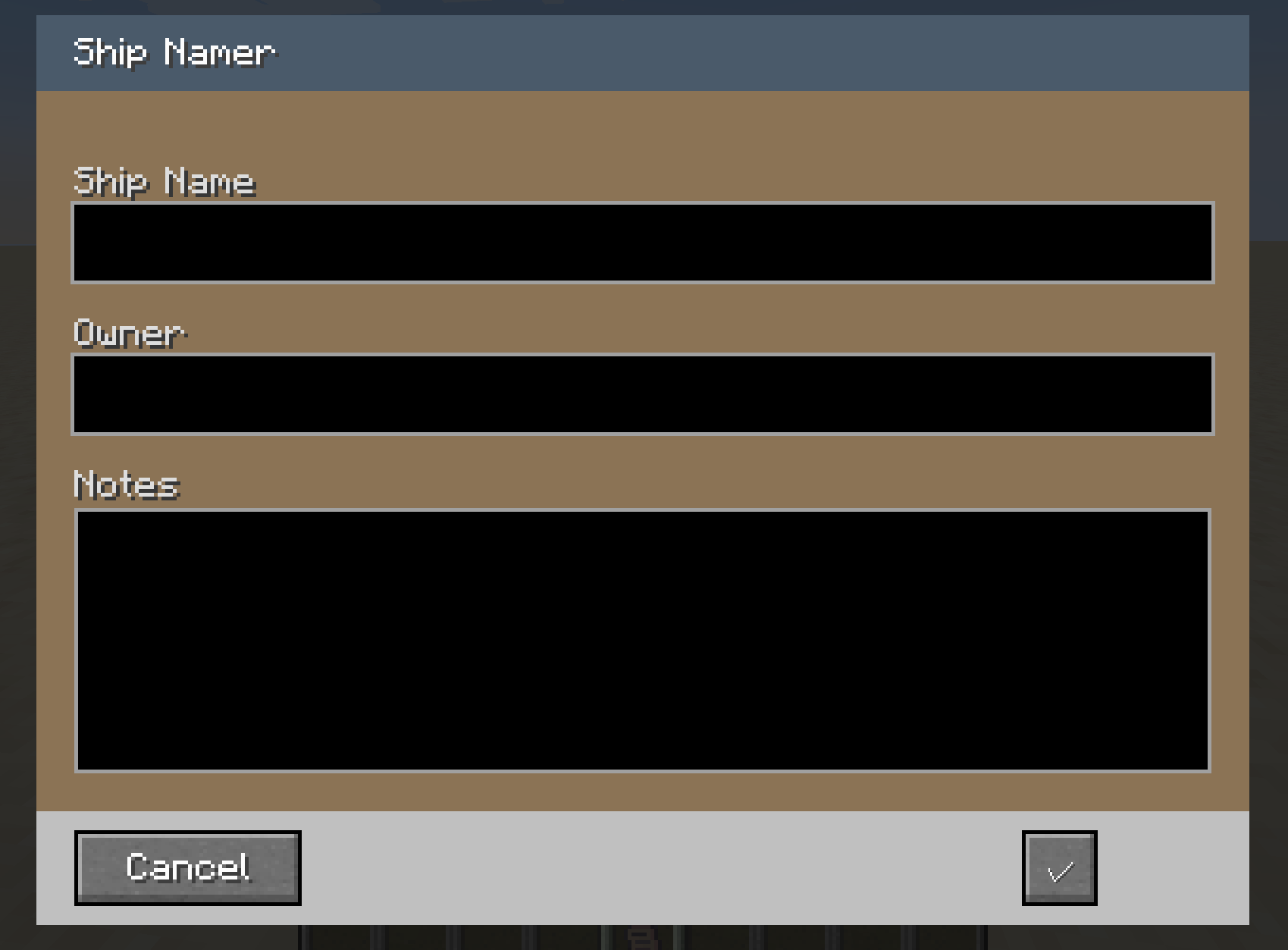 Ship Rename GUI (Survival)
 -
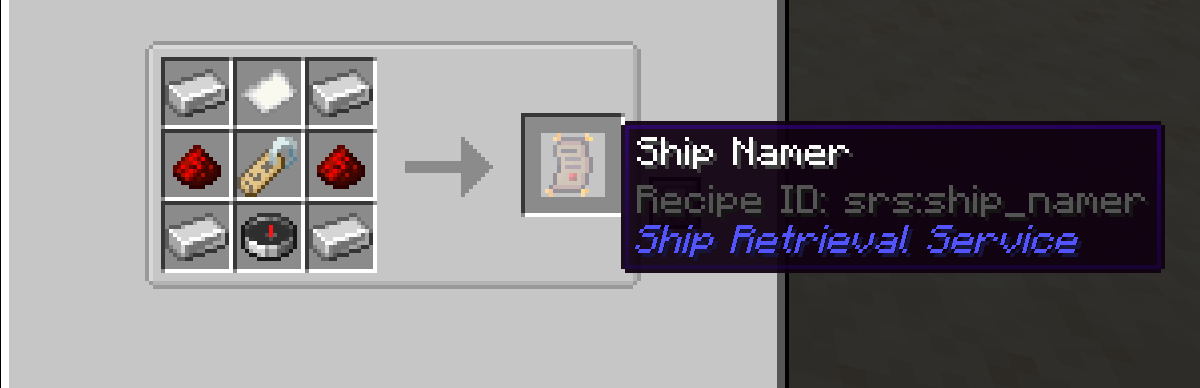 Crafting Recepie
Versions
Files
Relations
Project Relations
More like this
Similar Mods
Suggestions use data such as tags, dependencies, dependents, descriptions, titles, and more to rank how much they overlap with this mod.
On ModDex
Community snapshot
By the numbers
Statistics
 (opens in a new tab)
Get it on
Available Platforms
On ModDex
Community snapshot
By the numbers
Statistics
Resources