Community listing page, reviews here may not be monitored by the author.
WatcherHUD

No reviews yet
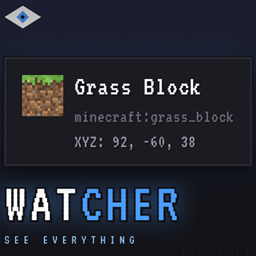
A context-aware HUD that shows what you're looking at: blocks, entities, containers, redstone, and more.

Community voices
Reviews
No reviews yet. Be the first to review this project!
Get it on
Available Platforms
About
Project Details
For authors
Embed Badge
If you're the author of this project, you can embed a live badge anywhere that supports HTML or Markdown. It updates automatically whenever ratings change.
Use HTML for any page that supports it, or Markdown for README files and Markdown-based descriptions.
Identifiers
Platform IDs
Resources
External Links
About
Description
# WatcherHUD
**A context-aware HUD that shows what you're looking at.**
WatcherHUD is a modern, lightweight HUD mod for Minecraft 1.20.1 (Forge) that displays real-time information about the block, entity or container under your crosshair — without opening any menu.
---
## ✨ Features
### 🧱 Block Information
- **Name** and mod origin (namespace:path)
- **Coordinates** (XYZ + relative to player)
- **Redstone signal** (input power + analog output)
- **Mining tool** required to break the block
- **Break progress** (percentage while mining)
- **Liquid detection** (water, lava and modded fluids)
- **Fluid bucket icon** when targeting liquids
### 📦 Containers & Machines
- **Chests, barrels, shulkers, hoppers, droppers, dispensers** — full item grid preview
- **Double chests** — merged into a single 54-slot view
- **Ender chests** — per-player content
- **Furnaces** — input, fuel, output in real time
- **Brewing stands** — fuel + potions
- **Beehives** — bee count + honey level
- **Jukeboxes** — currently playing disc
- **Note blocks** — note and instrument
- **Command blocks** — stored command
- **Spawners** — entity type
### 🐄 Entity Information
- **Name** and mod origin
- **3D preview** of living entities
- **Health bar** (with armor value)
- **Active potion effects** with duration
- **Breeding status** (baby timer, cooldown)
- **Horses** — jump strength + speed
- **Llamas** — strength value
- **Villagers** — profession and level
- **Tamed pets** — owner name
- **Item frames** — displayed item
- **Armor stands** — equipped armor
- **Chickens** — egg timer
### 🎨 Interface
- Sleek dark tooltip with **blue accent**
- **Auto-scales** with GUI Scale and screen resolution
- **Sneak** to reveal extra details
- **Configurable position** via drag-and-drop
- All toggles in an **in-game custom config screen** (KP_0)
### 🔌 Plugin System
- **Public API** for other mods to add their own providers
- **Plugin manager** with runtime enable/disable
- **Per-plugin toggles** shown in the config screen
- **Keybind tracking** — automatically disabled when the plugin is
- **Version check** — plugins declare their target API version
---
## ⌨️ Keybinds (Default)
| Key | Action |
|---|---|
| **KP_0** | Open the config screen |
| **KP_1** | Toggle the overlay |
| **KP_2** | Toggle liquid display |
| **KP_5** | Narrate current target |
### Optional — WatcherHUDJEI addon
| Key | Action |
|---|---|
| **KP_3** | Open JEI recipes for the targeted block |
| **KP_4** | Open JEI uses for the targeted block |
---
## 🔧 Installation
1. Install **Forge 47.4.10** for Minecraft **1.20.1**
2. Drop `WatcherHUD-1.0.0-Alpha.jar` into your `mods/` folder
3. Launch the game — that's it
**Optional:** Install the **WatcherHUDJEI** addon for Just Enough Items integration.
---
## 🧩 Compatibility
- **Client-side** for most features
- **Server-side** installation recommended for container content (chests, shulkers, etc.)
- Works alongside **JEI**, **REI**, **EMI** via addons
- Independent from **Jade**, **WTHIT**, **TOP** — can be used together
---
## 🛠️ For Mod Developers
WatcherHUD exposes a **public plugin API**. Any Forge mod can extend the HUD with custom providers, toggles and keybinds.
```java
public class MyPlugin implements WatcherHUDPlugin {
@Override
public String getPluginId() { return "mymod:main"; }
@Override
public void registerBlockProviders(BlockProviderRegistry registry) {
registry.register(
ResourceLocation.fromNamespaceAndPath("mymod", "my_provider"),
MyBlock.class,
(accessor, tooltip) -> tooltip.addStyled(
Component.literal("Hello from MyMod"),
TextStyle.SUCCESS)
);
}
@Override
public void registerEntityProviders(EntityProviderRegistry registry) {
// ...
}
}
Screenshots
Gallery
Versions
Files
Relations
Project Relations
More like this
Similar Mods
Suggestions use data such as tags, dependencies, dependents, descriptions, titles, and more to rank how much they overlap with this mod.
On ModDex
Community snapshot
By the numbers
Statistics
 (opens in a new tab)
Get it on
Available Platforms
On ModDex
Community snapshot
By the numbers
Statistics
Resources