
Community listing page, reviews here may not be monitored by the author.
Way Better Title Bar

No reviews yet
Way Better Title Bar gives the Windows title bar a dark theme and can display your name, FPS, ping, memory usage, biome, and coordinates. You can choose which details appear, set how often they update
Community voices
Reviews
No reviews yet. Be the first to review this project!
Get it on
Available Platforms
About
Project Details
For authors
Embed Badge
If you're the author of this project, you can embed a live badge anywhere that supports HTML or Markdown. It updates automatically whenever ratings change.
Use HTML for any page that supports it, or Markdown for README files and Markdown-based descriptions.
Identifiers
Platform IDs
Resources
External Links
About
Description
About
Way Better Title Bar gives Minecraft 1.21.1 a dark Windows title bar and replaces the window title with useful live information while you play.
Choose whether to show your player name, FPS, ping, memory usage, biome, and coordinates. The title updates at a configurable interval, and only the information you enable is collected for display.
Way Better Title Bar is completely client-side. It does not change gameplay or server behavior, and servers do not need to install it.
Features
- 🌙 Dark Title Bar: Applies Windows’ native dark style to the Minecraft window.
- 📊 Live Game Information: Shows your name, FPS, ping, memory usage, biome, and X/Y/Z coordinates.
- 🎛️ Individual Controls: Enable or disable each item independently.
- ⏱️ Adjustable Update Interval: Choose how often the title refreshes, from 1 to 60 seconds.
- ⚡ Performance-Minded: Updates periodically instead of rebuilding the title every frame.
- 🧭 Clean Biome Names: Shows readable biome names without mod namespaces.
- 🖥️ Client-Side Only: Works in singleplayer and multiplayer without a server installation.
Configuration
Open Mods → Way Better Title Bar → Config to change settings in-game. The Reset to Defaults button restores all options.
The configuration file is located at:
config/waybetter/way_better_title_bar-client.toml
Screenshots
Gallery
-
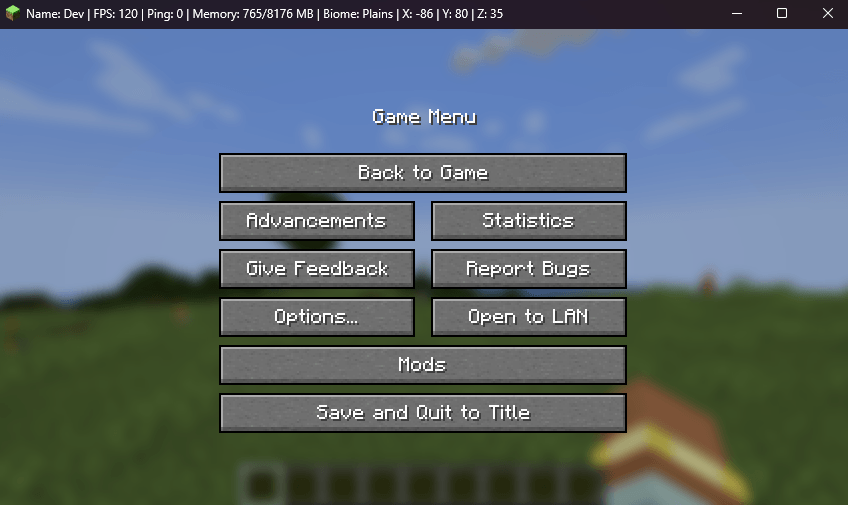 screenshot.png All features enabled
Versions
Files
Relations
Project Relations
More like this
Similar Mods
Suggestions use data such as tags, dependencies, dependents, descriptions, titles, and more to rank how much they overlap with this mod.
On ModDex
Community snapshot
By the numbers
Statistics
Want to reach Minecraft players?
We're looking for a server hosting partner to feature here and other parts of the site. Interested? Send us a message!
Get in touchGet it on
Available Platforms
On ModDex
Community snapshot
By the numbers
Statistics
Resources