
Community listing page, reviews here may not be monitored by the author.
WebGUI


No reviews yet
Embed any web page — React, Vue, plain HTML — as a full-screen GUI or transparent HUD overlay inside Minecraft. Powered by Chromium (MCEF).
Community voices
Reviews
No reviews yet. Be the first to review this project!
Get it on
Available Platforms
Compatibility
Supported Environments
Required on the server. Installing it on the client adds functionality.
Must be installed on both the client and the server.
Varies by version.
About
Project Details
For authors
Embed Badge
If you're the author of this project, you can embed a live badge anywhere that supports HTML or Markdown. It updates automatically whenever ratings change.
Use HTML for any page that supports it, or Markdown for README files and Markdown-based descriptions.
Identifiers
Platform IDs
About
Description
WebGUI lets you render real web interfaces inside Minecraft using the technologies you already know.
Open any web page — React, Vue, Svelte, or plain HTML/CSS/JavaScript — as a full-screen GUI or transparent HUD overlay directly in-game. Powered by real Chromium via MCEF, so modern web features just work: CSS animations, WebSockets, fetch, WebGL, localStorage, realtime updates, and more.
Available for both Fabric and NeoForge.
- GitHub — https://github.com/mc-webgui/webgui
- Documentation — https://webgui.space
- npm — https://www.npmjs.com/package/@webgui/react
YouTube demo: https://www.youtube.com/watch?v=wqZ400GWKUw
Why WebGUI exists
I'm a fullstack developer. Most of my work is building web applications — React frontends, APIs, realtime systems, dashboards, all the usual web stack.
I've always loved Minecraft not only as a game, but as a creative platform. Servers, custom mechanics, communities, minigames, roleplay worlds — Minecraft gives people incredible freedom to build experiences together.
At some point I realized something:
Web developers already have amazing tools for building interfaces — but almost no good way to use them inside Minecraft.
Every day we build polished UIs with responsive layouts, animations, maps, shops, live dashboards, and realtime interaction. But bringing that same workflow into Minecraft has always been difficult, limited, or awkward.
So I asked a simple question:
What if Minecraft could just open a real web app?
Not a custom inventory GUI system. Not another proprietary UI framework. Not a new language to learn.
Just the web.
That's how WebGUI started.
Built for web developers
WebGUI is designed for developers who already know modern frontend.
If you know:
- HTML
- CSS
- JavaScript
—you already know how to build Minecraft interfaces with WebGUI.
Use React, Vue, Svelte, Tailwind, WebSockets, REST APIs, animations, state managers, component libraries — whatever you already use for normal web development.
Build:
- server shops
- HUD overlays
- maps
- menus
- admin panels
- quest systems
- roleplay interfaces
- realtime dashboards
- entire in-game applications
Then load them directly inside Minecraft.
How it works
The server sends a URL to the client. The client opens it inside embedded Chromium. The page automatically receives live player data and can exchange realtime events with the game in both directions — page → server and server → page. A page can also be bound to an entity and open on right-click with that entity's context.
Compatibility
| Minecraft | Loader | Status |
|---|---|---|
| 26.2 | NeoForge | 🧪 Beta |
| 26.1 | NeoForge | 🧪 Beta |
| 1.21.5 – 1.21.11 | Fabric | ✅ Active |
| 1.21.5 – 1.21.11 | NeoForge | ✅ Active |
| 1.21 – 1.21.1 | Fabric | ✅ Supported |
| 1.21 – 1.21.1 | NeoForge | ✅ Supported |
| 1.20.1 | Fabric | ✅ Supported |
Minecraft 26 builds are NeoForge-only and in beta — Fabric is on hold until Yarn mappings for 26.x are published. Chromium (~150 MB) is downloaded automatically on first launch.
Features
- Full-screen GUI — replace Minecraft screens with your web app
- HUD overlay — transparent browser layer rendered over gameplay
- Real Chromium browser — powered by MCEF
- Live player data — position, look, health, food, XP, gamemode, dimension, username, UUID, server
- Realtime communication — browser ↔ Minecraft messaging (page → server and server → page events)
- Entity-bound GUIs — bind a page to an entity; right-click opens it with the entity's context
- Signed player tokens — secure backend authentication without login screens
- Auto HUD on join
- Per-player main menu
- Server-side Mod API
- Fabric & NeoForge — one mod, both loaders
- Works with any frontend stack
Commands
All commands require operator level 2 (on Fabric, fabric-permissions-api / LuckPerms is supported).
| Command | Description |
|---|---|
/webgui gui <targets> <url> |
open a URL as a full-screen GUI |
/webgui hud <targets> <url> |
open a URL as a HUD overlay |
/webgui bind entity <selector> <url> [cancel_interaction] |
bind entities — right-click opens the URL with entity context |
/webgui unbind entity <selector> |
remove entity bindings |
/webgui reload |
reload server config and entity bindings |
JavaScript API
// Live player data — pushed every tick when it changes, and on page load
const c = window.webgui.client;
// {
//   playerUuid, username, webviewMode,   // GUI_SCREEN | HUD_OVERLAY | NONE
//   dimension, gamemode,
//   health, maxHealth, food, xpLevel,
//   pos:  { x, y, z },
//   look: { yaw, pitch },
//   server: { address, ping }
// }

// Subscribe to updates
window.webgui.on('client', c => console.log(c));        // live player data
window.webgui.on('entity', e => console.log(e));        // bound-entity context (or null)
window.webgui.on('my-event', d => console.log(d));      // custom server → page events
window.webgui.off('client', handler);                   // unsubscribe
// (equivalent DOM events are also dispatched: 'webgui:client', 'webgui:entity', 'webgui:<name>')

// Send messages back to Minecraft — custom channels reach the server-side Mod API
window.webgui.postToGame({ channel: 'shop:buy', item: 'diamond', qty: 1 });

// Close the current GUI / HUD
window.webgui.closeGui();
Also available: window.webgui.entity (current entity context) and a window.webgui.onClientInfo(c) callback.
React integration
npm i @webgui/reactimport { useWebGUIClient } from '@webgui/react';
function App() {
const client = useWebGUIClient();
return (
<div>
Hello, {client?.username}
</div>
);
}Server configuration
config/webgui/server.json is generated on first run; the token secret is created automatically.
{
  "autoHudOnJoin": false,
  "autoHudUrl": "https://your-server.com/hud",
  "mainMenuUrl": "https://your-server.com/menu",
  "tokenTtlSeconds": 900,
  "queryParamName": "webgui_token",
  "tokenSecretBase64": "<auto-generated 32-byte secret>",
  "updateCheckUrl": ""
}
Requirements
- Fabric — Fabric Loader ≥ 0.18 + Fabric API, or NeoForge (no extra dependencies)
- Java 21 — Minecraft 1.20.1 – 1.21.11
- Java 25 — Minecraft 26.x (NeoForge beta)
Your web app, running inside Minecraft.
WebGUI opens a real web page in the game — as a full-screen interface or as a transparent overlay on top of gameplay. Not a reskinned inventory, not another UI framework to learn: actual HTML, CSS and JavaScript, rendered by actual Chromium.
If you can build a website, you can build a Minecraft interface.
What people build with it
- Server shops that look like an online store, with images, search and a cart
- Quest journals and codexes with real typography and layout
- Live maps — Leaflet or your own canvas, following the player as they walk
- HUD overlays — team scores, timers, health bars, a minimap, drawn over the world
- Admin panels for staff, with the same dashboard you already run in a browser
- Custom death screens that say who killed you and let you respawn
- Launch menus and lobby screens with your server's own branding
- Entire in-game apps — anything you would otherwise build as a web app
Why it feels different
Everything you already use keeps working. React, Vue, Svelte or plain JavaScript. Tailwind. Your component library. Your animations, your API, your WebSocket. You develop in a browser with hot reload, then point the mod at the page — and it looks exactly the same in the game.
The page is not a decoration, either. It knows who is looking at it and what is happening around them — the player's name, health, food, position, where they are looking, which block or mob is under the crosshair — updated as they move. And it can talk back: a click in the page becomes an event on the server, so a shop can actually sell, and a button can actually run a command.
// This is the whole integration
window.webgui.on('client', player => {
  document.title = `${player.username} — ${player.health} HP`;
});

window.webgui.postToGame({ channel: 'shop:buy', item: 'diamond' });
For React, Vue and Svelte there is one package with hooks and stores ready to go:
npm i @webgui/client
You don't even need a web host
Put your files in a folder on the server and point the mod at them. They travel down the same connection the player is already on — no domain, no hosting bill, no port to open, works behind NAT. Edit a file, run one command, and the page a player has open refreshes in front of them.
Prefer your own host? Nothing changes: an https:// address works exactly as it always did, and the two mix freely.
For server owners
Opening a page is one command:
/webgui gui @a https://your-site.example/shop
/webgui hud @a webgui:/hud.html
Pages can also be bound to an entity, so right-clicking a villager opens your shop with that villager's context. Every URL the mod opens carries a signed token, so your backend knows which player is asking without a login screen. Players without the mod are told what they are missing instead of quietly seeing nothing.
Compatibility
| Minecraft | Loader |
|---|---|
| 26.2 · 26.1.2 | NeoForge |
| 1.21.5 – 1.21.11 | Fabric · NeoForge |
| 1.21 – 1.21.1 | Fabric · NeoForge |
| 1.20.1 | Fabric |
Minecraft 26 is NeoForge-only for now — Fabric is waiting on Yarn mappings for 26.x.
Installing: on Fabric you need Fabric API, and that is it — the browser ships inside the jar. On NeoForge, add Rinku alongside it; launchers pick it up automatically. Chromium (~150 MB) downloads itself on first launch. Java 21, or Java 25 for Minecraft 26.
Links
- Documentation — https://webgui.space — guides, the full API, and examples you can paste
- GitHub — https://github.com/mc-webgui/webgui — issues and source
- npm — https://www.npmjs.com/package/@webgui/client
Screenshots
Gallery
-
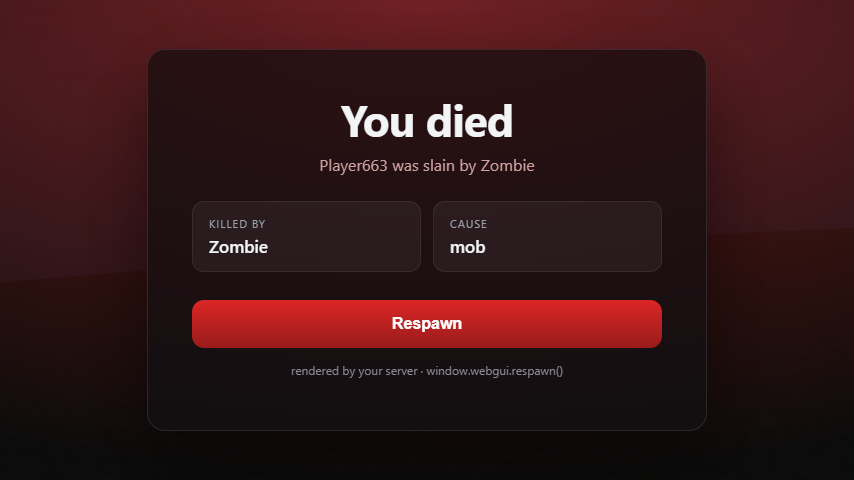 Custom death screen
Versions
Files
Relations
Project Relations
More like this
Similar Mods
Suggestions use data such as tags, dependencies, dependents, descriptions, titles, and more to rank how much they overlap with this mod.
On ModDex
Community snapshot
By the numbers
Statistics
Want to reach Minecraft players?
We're looking for a server hosting partner to feature here and other parts of the site. Interested? Send us a message!
Get in touchGet it on
Available Platforms
On ModDex
Community snapshot
By the numbers