Community listing page, reviews here may not be monitored by the author.



Community voices
Reviews
No reviews yet. Be the first to review this project!
Get it on
Available Platforms
Compatibility
Supported Environments
Runs entirely on the client. Works on vanilla servers.
About
Project Details
For authors
Embed Badge
If you're the author of this project, you can embed a live badge anywhere that supports HTML or Markdown. It updates automatically whenever ratings change.
Use HTML for any page that supports it, or Markdown for README files and Markdown-based descriptions.
Identifiers
Platform IDs
About
Description


For Spotify

For Youtube

Prerequisites
- Minecraft 1.21.4 or 1.20.1 or 1.19.4 or 1.21.1(Fabric,Forge,NeoForge)
- Fabric API
- ClothConfig API
- Spotify Desktop App + Spicetify CLI or WNP installed browser
Install
1 For Sptify Desktop
- Install the Spicetify CLI).
- Run the following command to install and enable the WebNowPlaying extension:
spicetify config extensions webnowplaying.js
spicetify apply
1.2 For YouTube, Twitch, etc.
- (Firefox) https://addons.mozilla.org/en-US/firefox/addon/webnowplaying/
1.2 (Chrome) https://chromewebstore.google.com/detail/webnowplaying/jfakgfcdgpghbbefmdfjkbdlibjgnbli - Install it!!
Configuration
In-game, find Webnowcraft in the mod list in the Mod Menu and press the settings button to adjust the following parameters.
X Offset / Y Offset: Adjusts the display position from the edge of the screen.
Scale: Changes the HUD size between 50% and 200%.
Anchor Top-Left: Turn on to position the HUD from the top left, or turn off to
position it from the top right.
Other
In the future, we plan to provide files for Forge and 1.16.5 1.8.9
Also, you can freely change the HUD color.
Most releases are on Fabric.
Supporting Forge is a pain.
For Dev https://github.com/pa81/Webnowcraft

For Spotify
For Youtube
Prerequisites
- Minecraft 1.21.4 or 1.20.1 or 1.19.4 or 1.21.1(Fabric,Forge,NeoForge)
- Fabric API
- ClothConfig API
- Spotify Desktop App + Spicetify CLI or WNP installed browser
Install
1 For Sptify Desktop
- Install the Spicetify CLI).
- Run the following command to install and enable the WebNowPlaying extension:
spicetify config extensions webnowplaying.js
spicetify apply
1.2 For YouTube, Twitch, etc.
- (Firefox) https://addons.mozilla.org/en-US/firefox/addon/webnowplaying/
1.2 (Chrome) https://chromewebstore.google.com/detail/webnowplaying/jfakgfcdgpghbbefmdfjkbdlibjgnbli - Install it!!
Configuration
In-game, find Webnowcraft in the mod list in the Mod Menu and press the settings button to adjust the following parameters.
X Offset / Y Offset: Adjusts the display position from the edge of the screen.
Scale: Changes the HUD size between 50% and 200%.
Anchor Top-Left: Turn on to position the HUD from the top left, or turn off to
position it from the top right.
Other
In the future, we plan to provide files for Forge and 1.16.5 1.8.9
Also, you can freely change the HUD color.
Most releases are on Fabric.
Supporting Forge is a pain.
For Dev https://github.com/pa81/Webnowcraft
Screenshots
Gallery
-
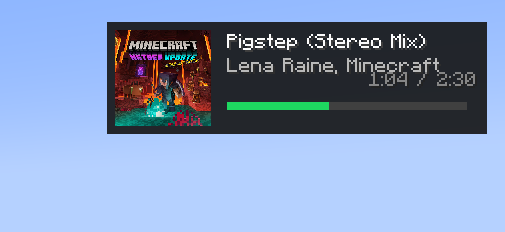 hud
hud -
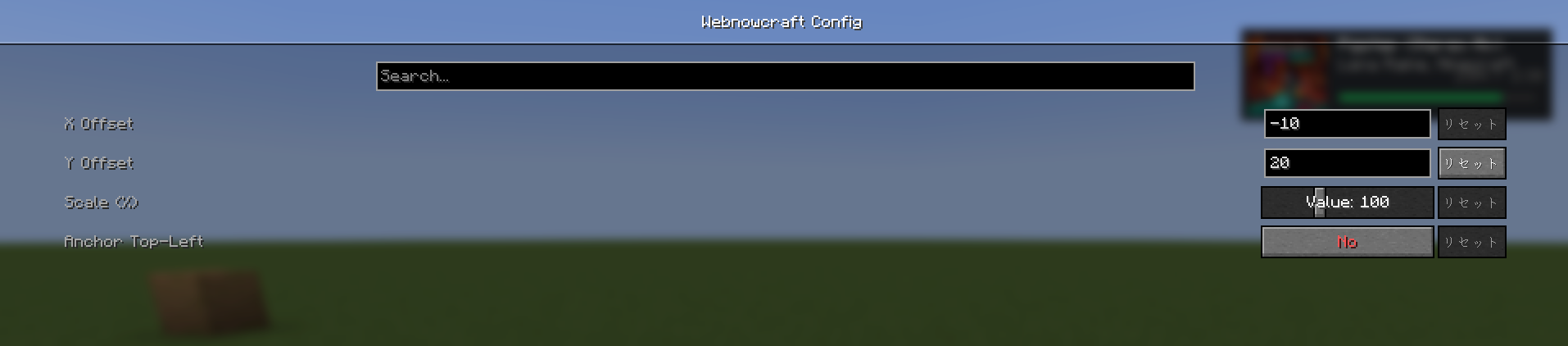 Config
Versions
Files
Relations
Project Relations
More like this
Similar Mods
Suggestions use data such as tags, dependencies, dependents, descriptions, titles, and more to rank how much they overlap with this mod.
On ModDex
Community snapshot
By the numbers
Statistics
 (opens in a new tab)
Get it on
Available Platforms
On ModDex
Community snapshot
By the numbers