Community listing page, reviews here may not be monitored by the author.
Welcome Wagon


No reviews yet
This mod introduces clean, customizable join messages that can be configured for new players and/or existing players logging back in. It also included timed auto-repeating announcements for the server. All messages can be customised.
Community voices
Reviews
No reviews yet. Be the first to review this project!
Get it on
Available Platforms
Compatibility
Supported Environments
Runs on a dedicated server only; does not work in singleplayer.
About
Project Details
For authors
Embed Badge
If you're the author of this project, you can embed a live badge anywhere that supports HTML or Markdown. It updates automatically whenever ratings change.
Use HTML for any page that supports it, or Markdown for README files and Markdown-based descriptions.
Identifiers
Platform IDs
Resources
External Links
About
Description
WELCOME WAGON MOD!
✨ Welcome!
This mod introduces clean, customizable join messages that can be configured for new players and/or existing players logging back in. It also included timed auto-repeating announcements for the server.
All messages can be customised with Minecraft colour and formatting codes, add clickable links + hover text, and manage everything in-game with /wwm commands or edit via config.
🎯 What it is:
Ever played on a Bucket or Spigot server? Remember the plugins that let you add customisable welcome messages for new players or for existing players? As well as timed announcements? I sure do. But when searching for a FORGE alternative, it seemed like you can get one or the other but nothing that combines everything into one mod. Well, now you can! Get most of the same functionality on FORGE modded servers!
Welcome Wagon lets server owners craft:
- First-join welcome messages for new players.
- Returning player greetings for existing players logging in.
- Timed announcements that repeat every customer number of minutes.
All text supports Minecraft formatting codes (&a, &b, &l, etc.) and {player} expands to the joining player’s name. You can also define named links (click actions) and hover text that attach to words in your messages - or just drop full URLs and they’ll auto-link. (Also supports Unicode Symbols.
🤝 Who it’s for
- Community servers that want friendly, branded, separate welcomes for both new and existing players.
- SMPs with rotating announcements (rules, Discord, Dynmap, events)
- Admins who prefer commands over config files (but a TOML is included)
✅ Features
/wwm root command (short & conflict-free)
First Join and Returning Player message sets with separate content.
Timed announcements with per-timer repeat minutes
Clickable links and hover tooltips (per set and per timer)

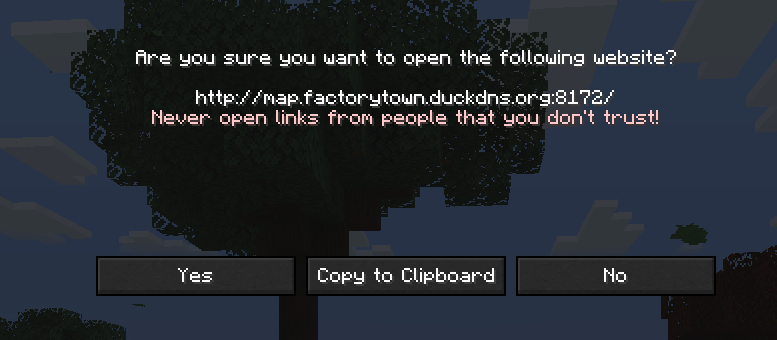
Autolink: paste a full http(s)://… URL and it becomes clickable
Formatting: all standard & codes (&0…&f, &l, &n, &o, &k, &r)
Placeholders: {player} → online name (works at login & previews)

Works on Forge 1.20.1
Server-side, clients don’t need the mod.
📦 Commands
(root: /wwm)
Permission: server operator (typical Forge command level).
1) First-Join set
/wwm first addline <text> Append a line. Supports & codes, {player}, autolinks.
/wwm first show Preview the current first-join message (all lines).
/wwm first clear Remove all lines.
/wwm set first link <Name> <URL> Define a named link. Any occurrence of <Name> in your lines becomes clickable (and keeps bold/formatting).
/wwm set first hover <Name> <Hover text> Define hover text attached to <Name> words in your lines.
Examples
/wwm first addline &6⭐ &aWelcome, &b&l{player}&r&a! /wwm set first link Discord https://discord.gg/yourinvite /wwm set first hover Discord &7Click to join our &bDiscord
2) Returning set
Same subcommands as first:
/wwm returning addline <text>
/wwm returning show
/wwm returning clear
/wwm set returning link <Name> <URL>
/wwm set returning hover <Name> <Hover text>
3) Timed announcements
/wwm timed on · /wwm timed off · /wwm timed status
/wwm timed add <minutes> <text> → returns ID Creates a new timer using the lowest free ID (e.g., #1 if none exist).
/wwm timed list Shows ID, repeat interval, and the first line (truncated) for each timer.
/wwm timed <id> addline <text> Append another line to timer <id>.
/wwm timed <id> minutes <n> Change repeat minutes.
/wwm timed <id> show · /wwm timed <id> clear Preview or clear the timer’s lines.
/wwm timed <id> link <Name> <URL> Named link for that specific timer.
/wwm timed <id> hover <Name> <Hover text> Hover text for that specific timer.
/wwm timed remove <id> Removes the timer (reports success accurately; IDs are reused).
Examples
/wwm timed add 1 &eVote for rewards! // => Timer #1 /wwm timed 1 addline &7Our map: Dynmap /wwm timed 1 link Dynmap http://map.example.com /wwm timed 1 hover Dynmap &7Open our live map /wwm timed list
🖌️ Formatting & links
Use & color/format codes just like server MOTDs: &a, &b, &c… · &l (bold) · &n (underline) · &o (italic) · &r (reset)
Bold sticks even on linked words—e.g., &b&lDynmap remains bold when a link/hover is applied.
Autolink: paste a full URL (https://…) and it becomes clickable without a named link.
Named links: set … link <Name> <URL> makes every standalone occurrence of <Name> in the set clickable.
Named hovers: set … hover <Name> <Hover text> attaches tooltip text to that word.
Tip: If a name is part of a larger word, use spacing or punctuation to keep it as a standalone token.
Here is a list of all Minecraft formatting codes: https://minecraft.fandom.com/wiki/Formatting_codes
⚙️ Config
File: config/ww_message.toml
The config is updated automatically by commands; you generally don’t need to edit it by hand.
Example Config:
nextId = 3
timedEnabled = true
firstJoinMessage = "&6⚡ &aHI &b&l{player}! &aWELCOME TO &e&lSERVER! &6⚡\\n&6🔔 &aJoin our &b&lDiscord &6🔔\\n&6⭐ &aExplore the &b&lDynmap &6⭐"
returningMessage = "&6⚡ &aWelcome back to &e&lSERVER &b&l{player}! &6⚡"

[timers]

        [timers.1]
                minutes = 300
                text = "&6🔔 &aDon't forget to join the &b&lDiscord&b! &6🔔"

                [timers.1.links]
                               Discord = "URL"

                 [timers.1.hovers]
                        Discord = "&7Click to open our &bDiscord"

        [timers.2]
                minutes = 400
                text = "&6⭐ &aExplore our &b&lDynmap&b! &6⭐"

                 [timers.2.links]
                        Dynmap = "URL"

                 [timers.2.hovers]
                        Dynmap = "&7Click to open the live &bDynmap"

[links]
        returning = {}

        [links.first]
                 Dynmap = "URL"
                 Discord = "URL"

[hovers]
         returning = {}

         [hovers.first]
                Dynmap = "&7Click to open the live &bDynmap"
                Discord = "&7Click to open our &bDiscord"
🚀 Installation
Forge 1.20.1 server (Tested on the latest build of 47.4.8).
Drop the mod JAR into mods/.
Start the server once, then run commands in-game: /wwm first addline ... etc.
📝 License
Code: MIT License
💬 Support / Feedback
Found an edge case (e.g., a word not autolinking)? Let us know. Join the server to feel free to ask any questions: https://discord.gg/5U5wMhmSSs.
Need a Fabric/NeoForge or 1.21.x line? We are looking at expanding compatibility with other versions, but it depends on how much interest the mod has.
WELCOME WAGON MOD!
✨ Welcome!
This mod introduces clean, customizable join messages that can be configured for new players and/or existing players logging back in. It also included timed auto-repeating announcements for the server.
All messages can be customised with Minecraft colour and formatting codes, add clickable links + hover text, and manage everything in-game with /wwm commands or edit via config.

🎯 What it is:
Ever played on a Bucket or Spigot server? Remember the plugins that let you add customisable welcome messages for new players or for existing players? As well as timed announcements? I sure do. But when searching for a FORGE alternative, it seemed like you can get one or the other but nothing that combines everything into one mod. Well, now you can! Get most of the same functionality on FORGE modded servers!
Welcome Wagon lets server owners craft:
-
First-join welcome messages for new players.
-
Returning player greetings for existing players logging in.
-
Timed announcements that repeat every customer number of minutes.
All text supports Minecraft formatting codes (&a, &b, &l, etc.) and {player} expands to the joining player’s name. You can also define named links (click actions) and hover text that attach to words in your messages - or just drop full URLs and they’ll auto-link. (Also supports Unicode Symbols.
🤝 Who it’s for
-
Community servers that want friendly, branded, separate welcomes for both new and existing players.
-
SMPs with rotating announcements (rules, Discord, Dynmap, events)
-
Admins who prefer commands over config files (but a TOML is included)
✅ Features
/wwm root command (short & conflict-free)
First Join and Returning Player message sets with separate content.
Timed announcements with per-timer repeat minutes
Clickable links and hover tooltips (per set and per timer)


Autolink: paste a full http(s)://… URL and it becomes clickable
Formatting: all standard & codes (&0…&f, &l, &n, &o, &k, &r)
Placeholders: {player} → online name (works at login & previews)

Works on Forge 1.20.1
Server-side, clients don’t need the mod.
📦 Commands
Spoiler
(root: /wwm)
Permission: server operator (typical Forge command level).
1) First-Join set
/wwm first addline Append a line. Supports & codes, {player}, autolinks.
/wwm first show Preview the current first-join message (all lines).
/wwm first clear Remove all lines.
/wwm set first link <Name> <URL> Define a named link. Any occurrence of <Name> in your lines becomes clickable (and keeps bold/formatting).
/wwm set first hover <Name> <Hover text> Define hover text attached to <Name> words in your lines.
Examples
/wwm first addline &6⭐ &aWelcome, &b&l{player}&r&a! /wwm set first link Discord https://discord.gg/yourinvite /wwm set first hover Discord &7Click to join our &bDiscord
2) Returning set
Same subcommands as first:
/wwm returning addline
/wwm returning show
/wwm returning clear
/wwm set returning link <Name> <URL>
/wwm set returning hover <Name> <Hover text>
3) Timed announcements
/wwm timed on · /wwm timed off · /wwm timed status
/wwm timed add → returns ID Creates a new timer using the lowest free ID (e.g., #1 if none exist).
/wwm timed list Shows ID, repeat interval, and the first line (truncated) for each timer.
/wwm timed addline Append another line to timer .
/wwm timed minutes Change repeat minutes.
/wwm timed show · /wwm timed clear Preview or clear the timer’s lines.
/wwm timed link <Name> <URL> Named link for that specific timer.
/wwm timed hover <Name> <Hover text> Hover text for that specific timer.
/wwm timed remove Removes the timer (reports success accurately; IDs are reused).
Examples
/wwm timed add 1 &eVote for rewards! // => Timer #1 /wwm timed 1 addline &7Our map: Dynmap /wwm timed 1 link Dynmap http://map.example.com /wwm timed 1 hover Dynmap &7Open our live map /wwm timed list
🖌️ Formatting & links
Spoiler
Use & color/format codes just like server MOTDs: &a, &b, &c… · &l (bold) · &n (underline) · &o (italic) · &r (reset)
Bold sticks even on linked words—e.g., &b&lDynmap remains bold when a link/hover is applied.
Autolink: paste a full URL (https://…) and it becomes clickable without a named link.
Named links: set … link <Name> <URL> makes every standalone occurrence of <Name> in the set clickable.
Named hovers: set … hover <Name> <Hover text> attaches tooltip text to that word.
Tip: If a name is part of a larger word, use spacing or punctuation to keep it as a standalone token.
Here is a list of all Minecraft formatting codes: https://minecraft.fandom.com/wiki/Formatting_codes
⚙️ Config
Spoiler
File: config/ww_message.toml
The config is updated automatically by commands; you generally don’t need to edit it by hand.
Example Config:
nextId = 3
timedEnabled = true
firstJoinMessage = "&6⚡ &aHI &b&l{player}! &aWELCOME TO &e&lSERVER! &6⚡\\n&6🔔 &aJoin our &b&lDiscord &6🔔\\n&6⭐ &aExplore the &b&lDynmap &6⭐"
returningMessage = "&6⚡ &aWelcome back to &e&lSERVER &b&l{player}! &6⚡"

[timers]

	[timers.1]
		minutes = 300
		text = "&6🔔 &aDon't forget to join the &b&lDiscord&b! &6🔔"

		[timers.1.links]
			Discord = "URL"

		[timers.1.hovers]
			Discord = "&7Click to open our &bDiscord"

	[timers.2]
		minutes = 400
		text = "&6⭐ &aExplore our &b&lDynmap&b! &6⭐"

		[timers.2.links]
			Dynmap = "URL"

		[timers.2.hovers]
			Dynmap = "&7Click to open the live &bDynmap"

[links]
	returning = {}

	[links.first]
		Dynmap = "URL"
		Discord = "URL"

[hovers]
	returning = {}

	[hovers.first]
		Dynmap = "&7Click to open the live &bDynmap"
		Discord = "&7Click to open our &bDiscord"
🚀 Installation
Spoiler
Forge 1.20.1 server (Tested on the latest build of 47.4.8).
Drop the mod JAR into mods/.
Start the server once, then run commands in-game: /wwm first addline ... etc.
📝 License
Spoiler
Code: MIT License
💬 Support / Feedback
Spoiler
Found an edge case (e.g., a word not autolinking)? Let us know. Join the server to feel free to ask any questions: https://discord.gg/5U5wMhmSSs.
Need a Fabric/NeoForge or 1.21.x line? We are looking at expanding compatibility with other versions, but it depends on how much interest the mod has.
Screenshots
Gallery
-
Player Name Insert Example Can automatically insert the players name who is seeing the message.
-
Hovelinks Message Popup Hovelinks Message Popup
-
Hovelinks Message Example Hovelinks Message Example
-
Welcome Wagon Logo Welcome Wagon Logo
-
 Welcome message for existing players logging in. Welcome back message example. Existing players will see this when they log back into the server.
 -
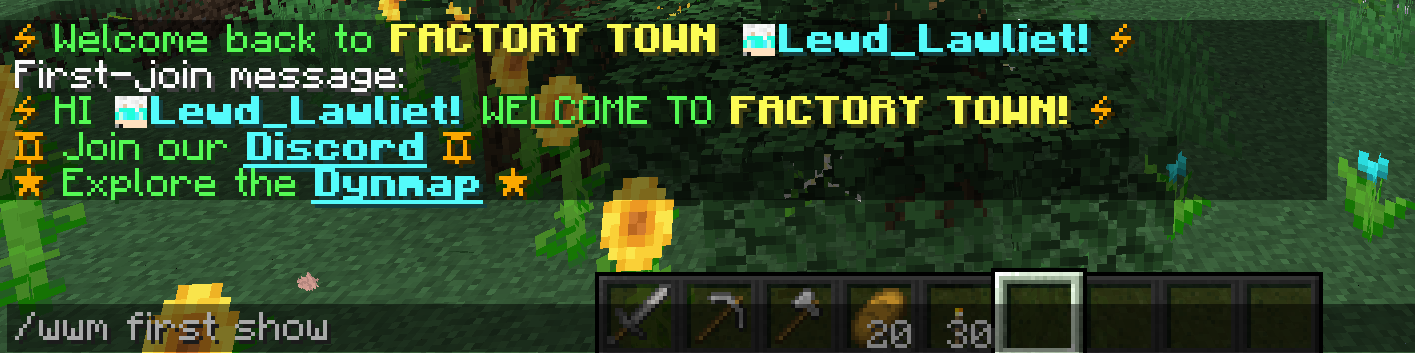 Welcome message for new players! Welcome to the server, first join message example. New players will see this message when they log in for the first time.
 -
 Timed message command example. Timed message commands let you set up server announcements that can auto-repeat at however many minutes you set.
 -
 Welcome Wagon Icon The Icon for the Welcome Wagon Mod
 -
 Hover Links Example You can make it so you can turn words in the message into links, and include a custom hover text when you mouse over it.
 -
 Show name of joining player. Give a personal touch to your messages by putting the name of the player joining in it.
Versions
Files
Relations
Project Relations
More like this
Similar Mods
Suggestions use data such as tags, dependencies, dependents, descriptions, titles, and more to rank how much they overlap with this mod.
On ModDex
Community snapshot
By the numbers
Statistics
Want to reach Minecraft players?
We're looking for a server hosting partner to feature here and other parts of the site. Interested? Send us a message!
Get in touchGet it on
Available Platforms
On ModDex
Community snapshot
By the numbers
Statistics
Resources