
Community listing page, reviews here may not be monitored by the author.
Where Is It


No reviews yet
Find items in nearby inventories. Now functions server-side only!
Community voices
Reviews
No reviews yet. Be the first to review this project!
Get it on
Available Platforms
Compatibility
Supported Environments
Required on the server. Installing it on the client adds functionality.
About
Project Details
For authors
Embed Badge
If you're the author of this project, you can embed a live badge anywhere that supports HTML or Markdown. It updates automatically whenever ratings change.
Use HTML for any page that supports it, or Markdown for README files and Markdown-based descriptions.
Identifiers
Platform IDs
About
Description
Where Is It
Minecraft mod to locate items in nearby inventories. Press Y over an item to search.

Requirements
Also embeds JackFredLib and MixinExtras.
Features
- Not required - vanilla clients can join without restricting mod users.
- Detailed searching - search by item ID, name, item tag, fluid contents, enchantment, potions, and more, and any combination of the previous.
- Server-side functionality - clients without the mod can use the command
/whereis(default, changeable) to use the mod. - Support for recipe viewers, including the vanilla Recipe Book, and for JEI, REI, EMI:
- Ability to search for items containing specific fluids, and tags for recipes.
- Custom searches (search for enchantments using enchanted books, and potion effects using potions).
- Smart favourite handling - add a named Shulker Box in your favourites, and search for it regardless of the contents.
Usage
Press Y (by default) to search by item ID.
Inventory
Hold shift to also search for NBT data.
Recipes (Recipe Book / JEI / REI / EMI)
Will search for tags in the recipe if applicable. If hovered over a fluid, will search for items containing said fluid.
Item Overlays (JEI / REI / EMI)
Normally matches the inventory, however certain items contain different behavior:
- Enchanted books will search for any items with that enchantment. Holding shift will specify the level as well.
- Potions will search for the potion effect on any item. Holding shift will match the specific item.
Item Favourites/Bookmarks (JEI / REI / EMI)
Will try to look for the specific item by looking at name, enchantments or potion effects.
Where Is It
Minecraft mod to locate items in nearby inventories. Press Y over an item to search.
Requirements
Also embeds JackFredLib and MixinExtras.
Features
- Not required - vanilla clients can join without restricting mod users.
- Detailed searching - search by item ID, name, item tag, fluid contents, enchantment, potions, and more, and any combination of the previous.
- Server-side functionality - clients without the mod can use the command
/whereis(default, changeable) to use the mod. - Support for recipe viewers, including the vanilla Recipe Book, and for JEI, REI, EMI:
- Ability to search for items containing specific fluids, and tags for recipes.
- Custom searches (search for enchantments using enchanted books, and potion effects using potions).
- Smart favourite handling - add a named Shulker Box in your favourites, and search for it regardless of the contents.
Usage
Press Y (by default) to search by item ID.
Inventory
Hold shift to also search for NBT data.
Recipes (Recipe Book / JEI / REI / EMI)
Will search for tags in the recipe if applicable. If hovered over a fluid, will search for items containing said fluid.
Item Overlays (JEI / REI / EMI)
Normally matches the inventory, however certain items contain different behavior:
- Enchanted books will search for any items with that enchantment. Holding shift will specify the level as well.
- Potions will search for the potion effect on any item. Holding shift will match the specific item.
Item Favourites/Bookmarks (JEI / REI / EMI)
Will try to look for the specific item by looking at name, enchantments or potion effects.
Screenshots
Gallery
-
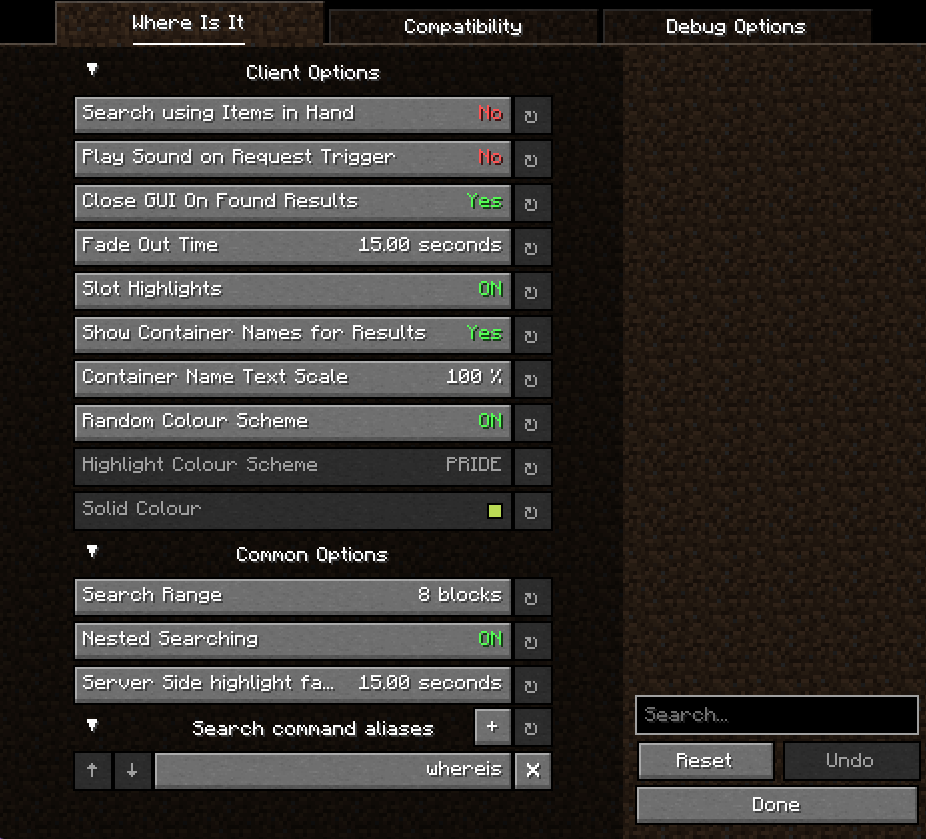 Extensive Config A screenshot of the config menu, with all the client and server options displayed.
 -
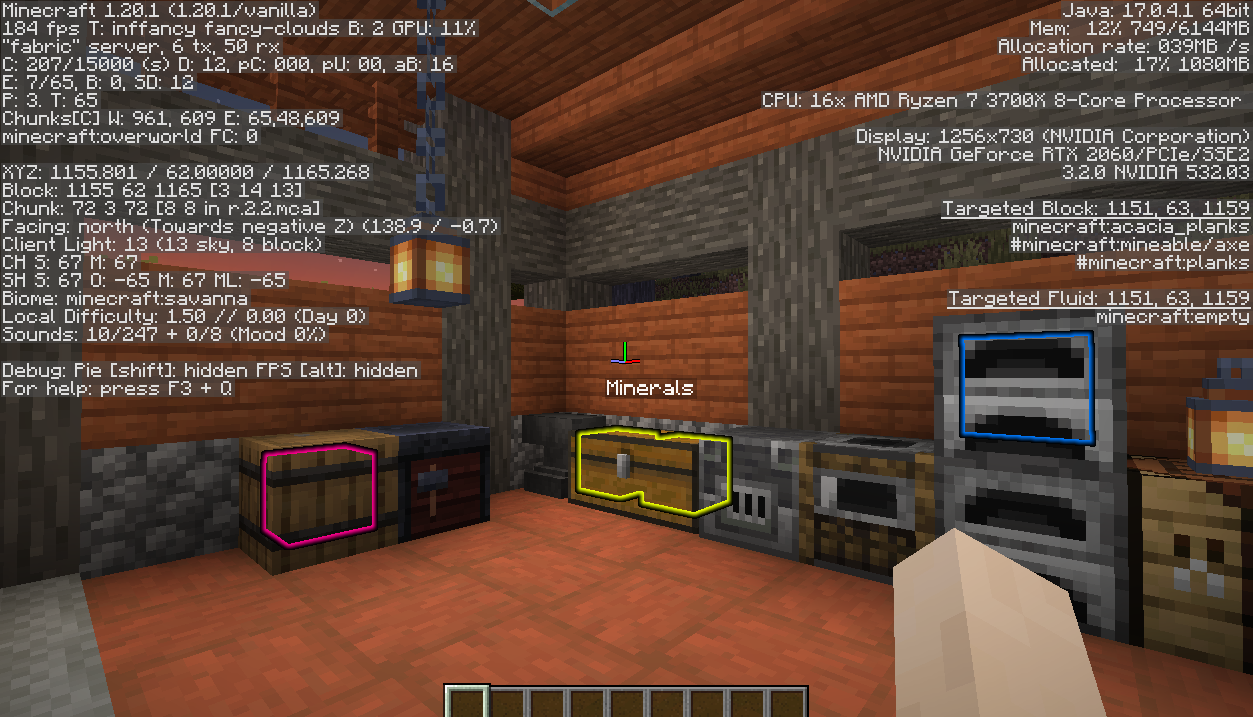 Server Side Mode Where Is It can function purely server-side; players including vanilla clients can use the `/whereis` command (default, changeable) to search by item, tag or enchantment.
 -
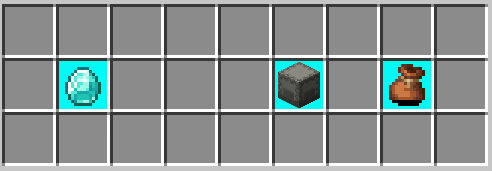 Nested Searching An example of searching within nested containers; currently this supports shulker boxes and bundles.
 -
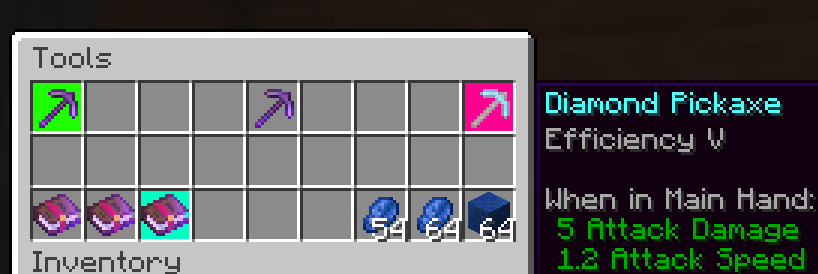 More Specific Searching Example of a search purely for the Efficiency V enchantment - you can do this in your favourite recipe viewer by searching for the given enchanted book, and by holding shift you can filter further for a level. Also supports specific potion effects!
 -
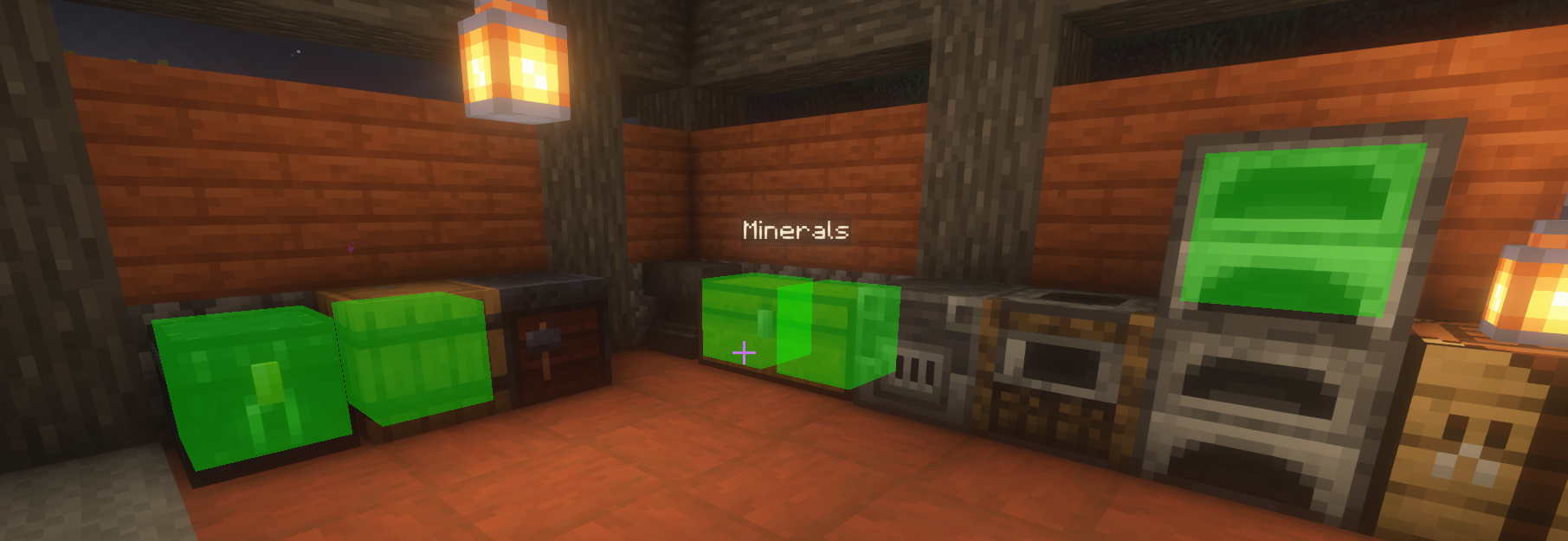 Where Is It highlighting results An example of a successful search, showing results for 4 containers including a named chest and the player's specific ender chest. Shaders: Iris 1.20-1.6.4/Sodium 1.20-0.4.10 with BSL 8.2.04
-
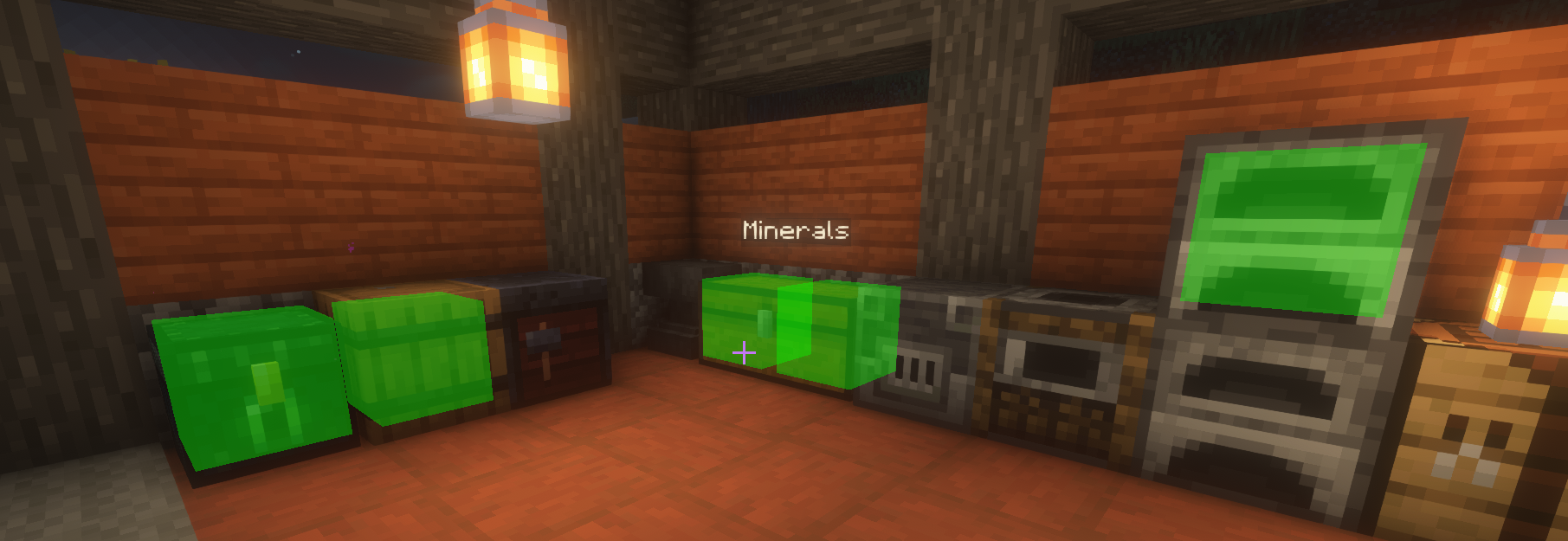 Where Is It highlighting results An example of a successful search, showing results for 4 containers including a named chest and the player's specific ender chest. Shaders: Iris 1.20-1.6.4/Sodium 1.20-0.4.10 with BSL 8.2.04
 -
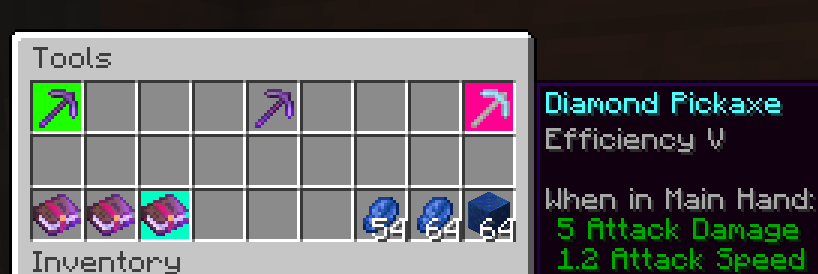 More Specific Searching Example of a search purely for the Efficiency V enchantment - you can do this in your favourite recipe viewer by searching for the given enchanted book, and by holding shift you can filter further for a level. Also supports specific potion effects!
 -
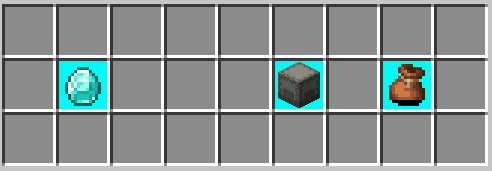 Nested Searching An example of searching within nested containers; currently this supports shulker boxes and bundles.
 -
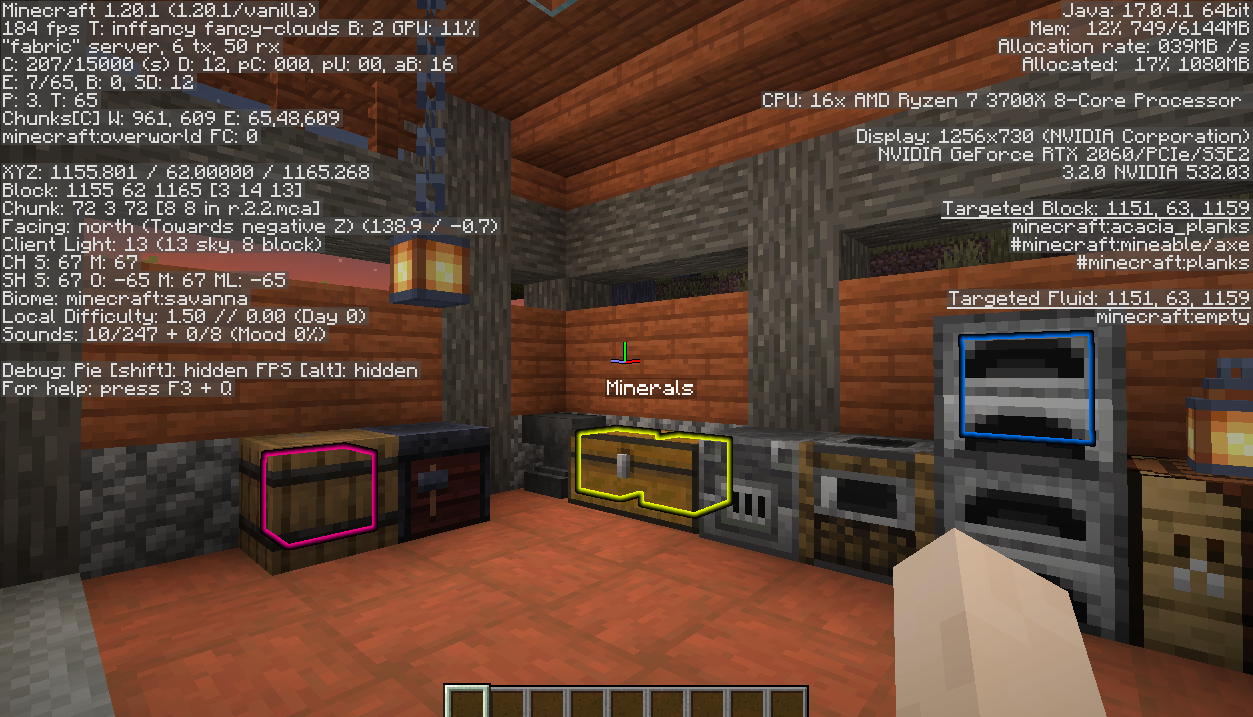 Server Side Mode Where Is It can function purely server-side; players including vanilla clients can use the `/whereis` command (default, changeable) to search by most criteria.
 -
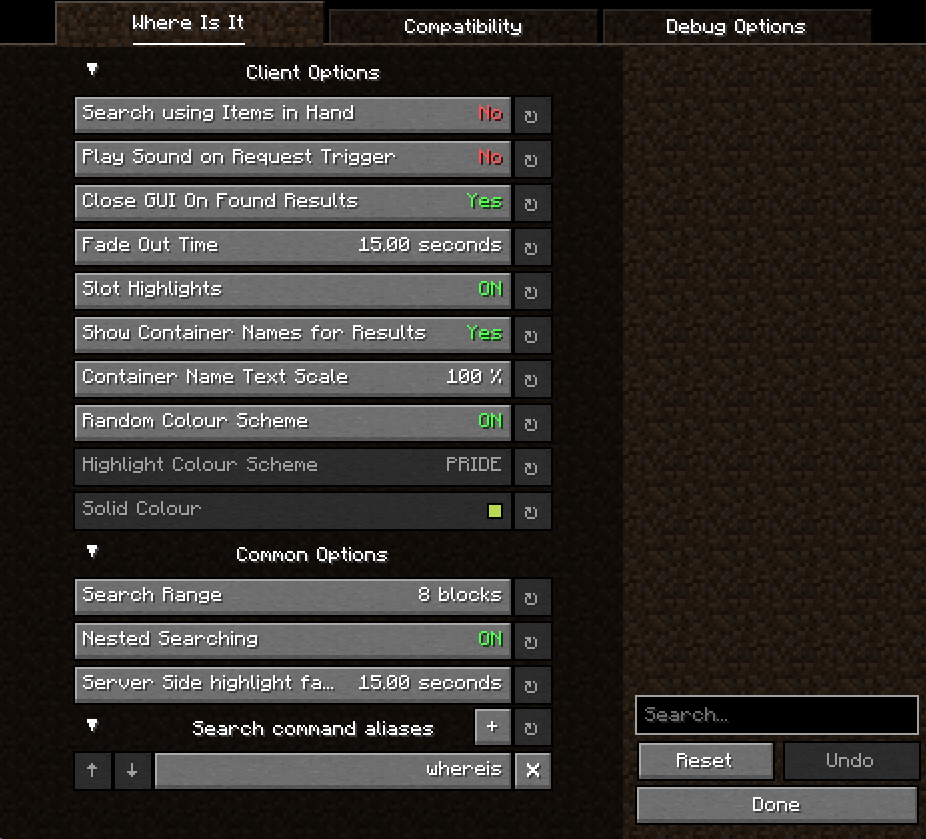 Extensive Config A screenshot of the config menu, with all the client and server options displayed.
Versions
Files
Relations
Project Relations
More like this
Similar Mods
Suggestions use data such as tags, dependencies, dependents, descriptions, titles, and more to rank how much they overlap with this mod.
On ModDex
Community snapshot
By the numbers
Statistics
Want to reach Minecraft players?
We're looking for a server hosting partner to feature here and other parts of the site. Interested? Send us a message!
Get in touchGet it on
Available Platforms
On ModDex
Community snapshot
By the numbers