Community listing page, reviews here may not be monitored by the author.
Wolf Helper

No reviews yet
Wolf Helper gives you a clean UI to manage all your tamed wolves in one place. See HP, names, and control them instantly — teleport, sit/stand individually or globally, and reassign ownership. Default key: V - Required on client + server.
Community voices
Reviews
No reviews yet. Be the first to review this project!
Get it on
Available Platforms
About
Project Details
For authors
Embed Badge
If you're the author of this project, you can embed a live badge anywhere that supports HTML or Markdown. It updates automatically whenever ratings change.
Use HTML for any page that supports it, or Markdown for README files and Markdown-based descriptions.
Identifiers
Platform IDs
Resources
External Links
About
Description
Wolf Helper — Minecraft Fabric Mod
Manage all your tamed wolves from a single, clean UI. No more running across your world hunting for sitting wolves — see them all in one panel and control every one with a click.
Required on both client and server.
Features
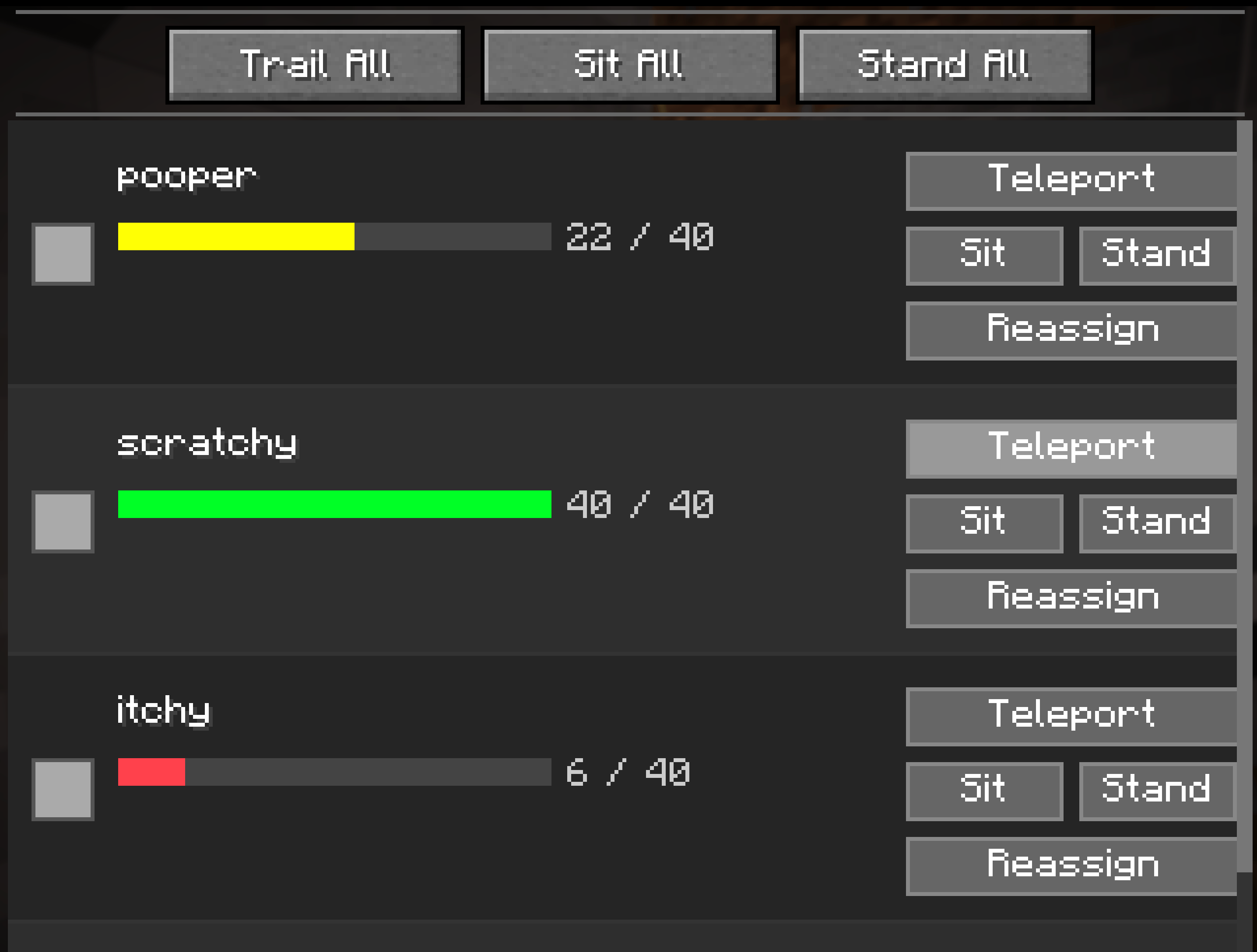
- Wolf list panel — all your tamed wolves in one place, with names, HP bars, and HP numbers
- Per-wolf actions — teleport, sit, or stand any individual wolf
- Global actions — command all wolves at once with a single click
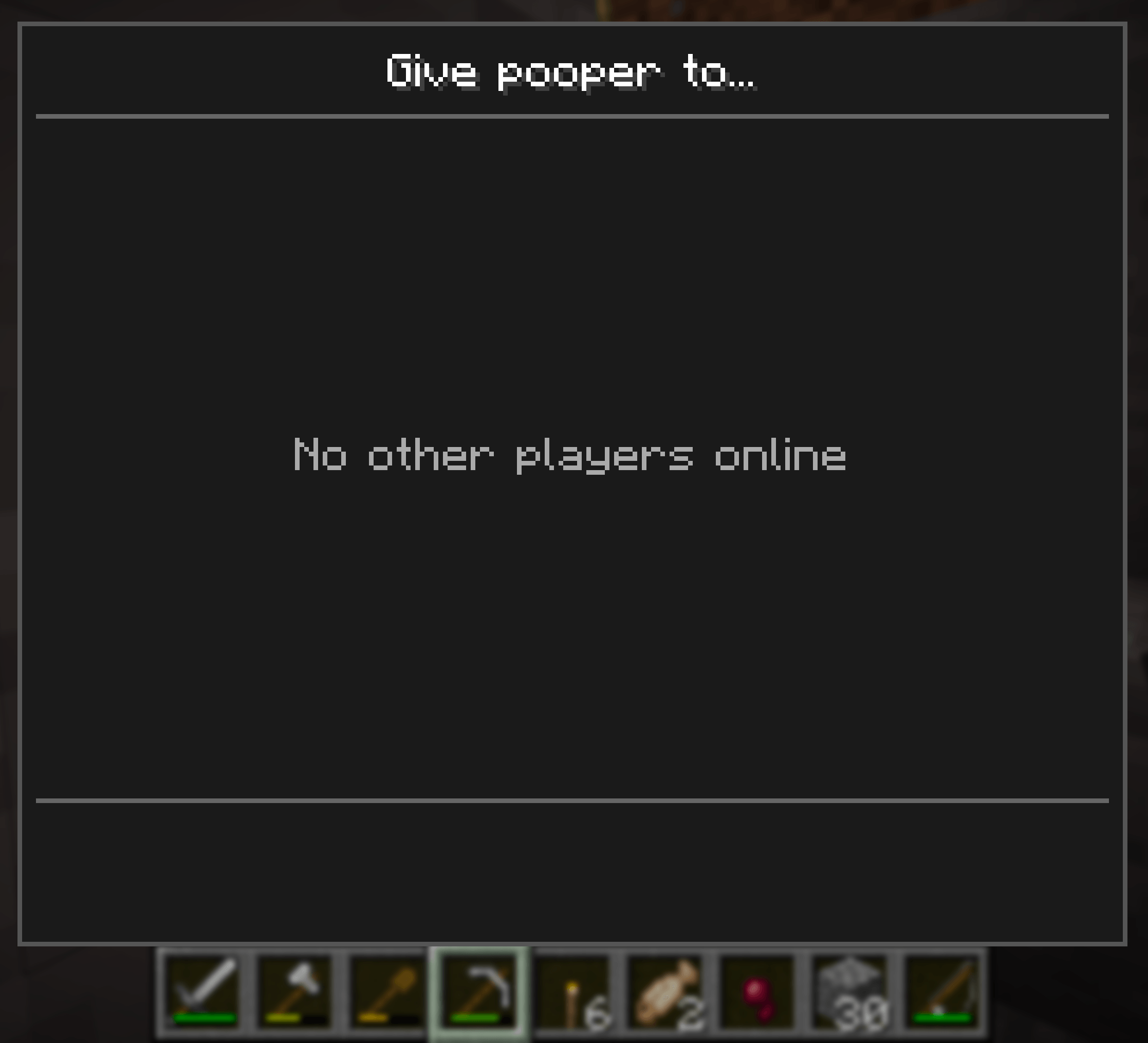
- Wolf reassignment — give ownership of a wolf to another online player
- Scrollable list — handles any number of wolves
- Configurable keybind — default
V, rebindable in Options → Controls → Wolf Helper
How to Use
- Press
Vto open the Wolf Manager (rebindable in Options → Controls) - Your tamed wolves in loaded chunks are listed automatically
- Use the global buttons at the top to command all wolves at once
- Use the per-wolf buttons next to each entry for individual control
- Click Reassign on any wolf to transfer ownership to another online player
Global Actions
| Button | Action |
|---|---|
| Trail All | All wolves follow you (un-sit) |
| Sit All | All wolves sit in place |
| Stand All | All wolves stand up |
Per-Wolf Actions
| Button | Action |
|---|---|
| Teleport | Teleports the wolf to your location |
| Sit | Commands this wolf to sit |
| Stand | Commands this wolf to stand (follow) |
| Reassign | Opens a player picker to transfer ownership |
Wolf Reassignment
Clicking Reassign on any wolf opens a player-picker panel listing all currently online players. Click a player's name to transfer ownership of that wolf to them. The wolf list refreshes automatically after reassignment.
UI Overview
┌────────────────────────────────────────────────────────┐
│                  Wolf Manager                           │
├────────────────────────────────────────────────────────┤
│    [ Trail All ]     [ Sit All ]    [ Stand All ]       │
├────────────────────────────────────────────────────────┤
│  [icon]  Fang    ████████░░  8/10   [ Teleport ]        │
│                                    [ Sit ] [ Stand ]    │
│                                    [ Reassign ]         │
├────────────────────────────────────────────────────────┤
│  [icon]  Shadow  █████░░░░░  5/10   [ Teleport ]        │
│                                    [ Sit ] [ Stand ]    │
│                                    [ Reassign ]         │
└────────────────────────────────────────────────────────┘
Important Limitations
- Loaded chunks only. Wolves in unloaded chunks will not appear in the list. This is a vanilla Minecraft constraint — entities outside loaded chunks are not in memory.
- Same dimension only. Wolves left in a different dimension will not appear.
- Requires mod on both sides. Must be installed on both the client and the server (or integrated singleplayer server). Client-only installs will not work.
Installation
- Install Fabric Loader and Fabric API
- Drop
wolf-helper-<version>.jarinto yourmods/folder on both client and server - Launch the game
Compatibility
| Component | Version |
|---|---|
| Minecraft | 26.1.2 |
| Mod loader | Fabric |
| Fabric API | 0.149.1+26.1.2 |
| Java | 25+ |
Planned
- [ ] Wolf icon — render actual wolf sprite (placeholder colored square currently)
- [ ] Wolf name editing from the UI
- [ ] Refresh button (currently fetches once on open)
- [ ] Multi-dimension wolf tracking
License
MIT — feel free to use, fork, and improve.
Screenshots
Gallery
-
 Screenshot 2026-05-29 at 8.15.34â¯AM.png Screenshot 2026-05-29 at 8.15.34â¯AM.png
 -
 Screenshot 2026-05-29 at 8.15.46â¯AM.png Screenshot 2026-05-29 at 8.15.46â¯AM.png
Versions
Files
Relations
Project Relations
More like this
Similar Mods
Suggestions use data such as tags, dependencies, dependents, descriptions, titles, and more to rank how much they overlap with this mod.
On ModDex
Community snapshot
By the numbers
Statistics
Want to reach Minecraft players?
We're looking for a server hosting partner to feature here and other parts of the site. Interested? Send us a message!
Get in touchGet it on
Available Platforms
On ModDex
Community snapshot
By the numbers
Statistics
Resources