
Community listing page, reviews may not be monitored by the author.
World Height Limit

No reviews yet
Expand world height while keeping the normal vanilla height limit for regular players.

Community voices
Reviews
No reviews yet. Be the first to review this project!
Get it on
Available Platforms
Compatibility
Supported Environments
Required on the server. Installing it on the client adds functionality.
About
Project Details
For authors
Embed Badge
If you're the author of this project, you can embed a live badge anywhere that supports HTML or Markdown. It updates automatically whenever ratings change.
Use HTML for any page that supports it, or Markdown for README files and Markdown-based descriptions.
Identifiers
Platform IDs
About
Description
World Height Limit
Increase Minecraft's build height with an automatically generated datapack. World Height Limit raises the top of the world and, on Bukkit-based servers, lets you decide who can build above the vanilla limit. The default target is Y=2031, and the height can be changed in the configuration.
The project includes a server plugin for Bukkit, Spigot, Paper, Purpur and Folia, plus separate Fabric and NeoForge beta mods for singleplayer worlds and dedicated servers.
Supported Minecraft versions
| Platform | Version ranges |
|---|---|
| Bukkit / Spigot / Paper / Purpur | 1.17.x, 1.18.x, 1.19.x, 1.20–1.20.4, 1.20.5–1.20.6, 1.21.x, 26.1–26.3 |
| Folia | 1.19.x, 1.20–1.20.4, 1.20.5–1.20.6, 1.21.x, 26.1–26.3 |
| Fabric beta | 1.19.x, 1.20–1.20.4, 1.20.5–1.20.6, 1.21.x |
| NeoForge beta | 1.20.2–1.20.4, 1.20.5–1.20.6, 1.21.x |
Choose the download that matches both your Minecraft version and platform. Minecraft 1.20.5–1.20.6 has a separate server plugin build; do not use a JAR from the neighboring version ranges. Fabric requires Fabric API.
What it does
- Generates a datapack in each world save using the format required by that Minecraft version.
- Lets you set a target height and configure the Overworld, Nether and End separately.
- Aligns the generated datapack height to Minecraft's 16-block sections. The server plugin enforces the configured build limit for players.
- Reports the effective generated height and provides commands to inspect world and datapack settings.
Server plugin features
- Permission-based building above the normal vanilla height limit.
- Separate controls for block placing, block breaking and bucket use.
- Configurable permissions, denial messages and notification modes: chat, action bar, title, both or off.
- Admin tools for filling areas and creating platforms.
- Debug commands for height-related diagnostics.
Fabric and NeoForge beta features
- World height expansion for singleplayer worlds and dedicated servers.
- Configuration in
config/world-height-limit.json. - Commands for checking the current height, inspecting worlds and changing the target height. Lowering the height requires confirmation.
Commands and permissions
The server plugin uses /worldheightlimit with these subcommands:
| Command | Purpose |
|---|---|
/worldheightlimit help |
Show available commands |
/worldheightlimit reload |
Reload restrictions and messages |
/worldheightlimit status |
Show plugin and world height status |
/worldheightlimit debug |
Show height and datapack diagnostics |
/worldheightlimit worlds |
List loaded worlds and their height ranges |
/worldheightlimit fill |
Fill an area |
/worldheightlimit platform |
Create a platform around the player |
The old /highbuildlimit command remains as an alias. Existing highbuildlimit.* permissions remain valid:
| Permission | Purpose |
|---|---|
highbuildlimit.bypass |
Build above the vanilla limit |
highbuildlimit.reload |
Reload the plugin configuration |
highbuildlimit.status |
Use status, debug and worlds |
highbuildlimit.fill |
Use fill and platform |
Fabric and NeoForge beta builds provide /worldheightlimit commands for help, reload, status, debug, worlds, config and setting the target height.
Installation and important notes
- Back up your world before changing its height.
- Install the file that matches your Minecraft version and platform. Put the server plugin JAR in
plugins/; install Fabric or NeoForge builds as mods. - Start the server or world once to generate the datapack. Then fully stop and start it again so Minecraft loads the new height.
A full restart is also required after changing the target height. Reloading the plugin can update restrictions and messages, but it cannot change the height of an already loaded world. Keep the generated datapack installed if you have built above the vanilla limit.
Stable beta mod builds limit the configurable top height to Y=2031. Higher values require a separate experimental build.
Server statistics
The server plugin uses bStats for anonymous usage statistics: view World Height Limit on bStats. Server owners can disable reporting in plugins/bStats/config.yml.
Screenshots
Gallery
-
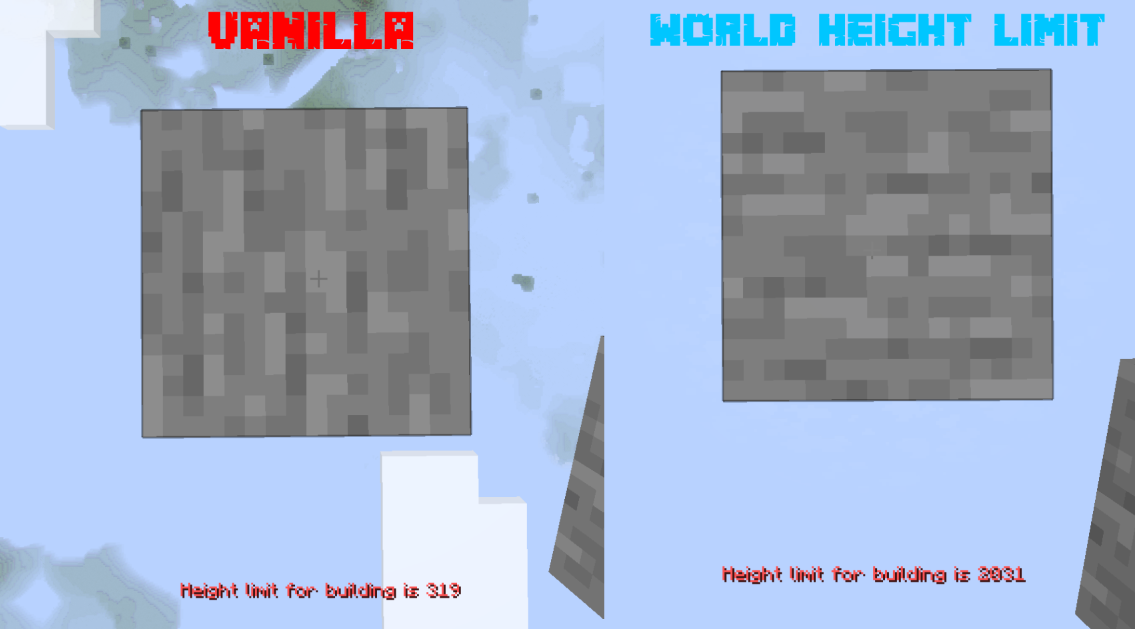 Build Height Comparison Comparison between the normal vanilla build limit and an expanded build height using World Height Limit
Versions
Files
Relations
Project Relations
More like this
Similar Mods
Suggestions use data such as tags, dependencies, dependents, descriptions, titles, and more to rank how much they overlap with this mod.
On ModDex
Community snapshot
By the numbers
Statistics


Get it on
Available Platforms
On ModDex
Community snapshot
By the numbers