
Community listing page, reviews here may not be monitored by the author.
WorldGen


No reviews yet
WorldGen is a mod for pre-generating Minecraft worlds, with a main focus on speed.
Community voices
Reviews
No reviews yet. Be the first to review this project!
Get it on
Available Platforms
Compatibility
Supported Environments
Runs entirely on the client. Works on vanilla servers.
About
Project Details
For authors
Embed Badge
If you're the author of this project, you can embed a live badge anywhere that supports HTML or Markdown. It updates automatically whenever ratings change.
Use HTML for any page that supports it, or Markdown for README files and Markdown-based descriptions.
Identifiers
Platform IDs
About
Description
WorldGen
WorldGen is a mod for pre-generating Minecraft worlds, with a main focus on speed.
Installation
Just download the latest WorldGen JAR file for your exact Minecraft version.
Additionally, always ensure that you are using the correct version for your modloader (Fabric/Forge).
Then save the downloaded jar to the mods folder of your Minecraft instance.
Finally, if you are on Fabric you also need to download the Fabric API.
Usage
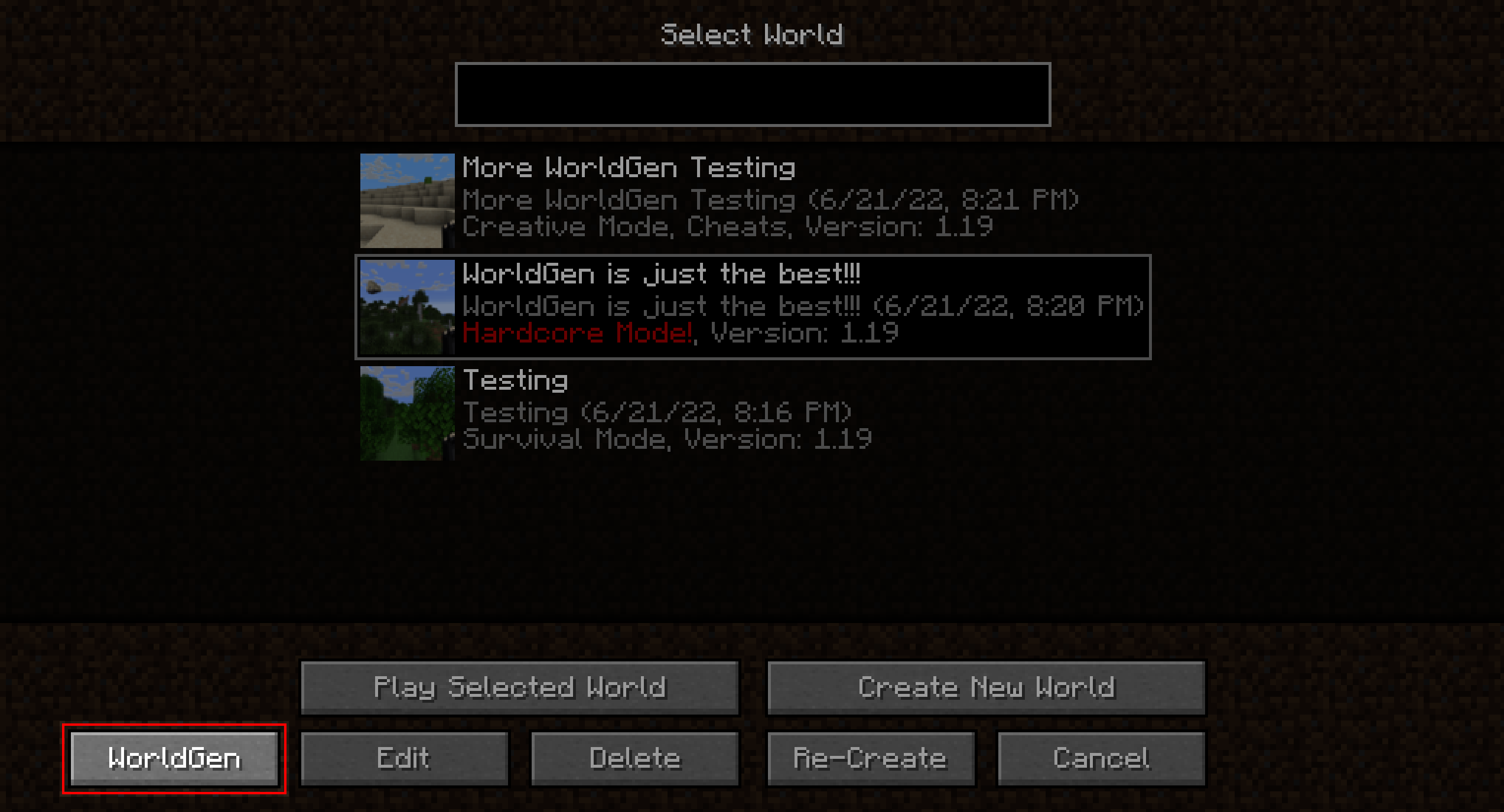
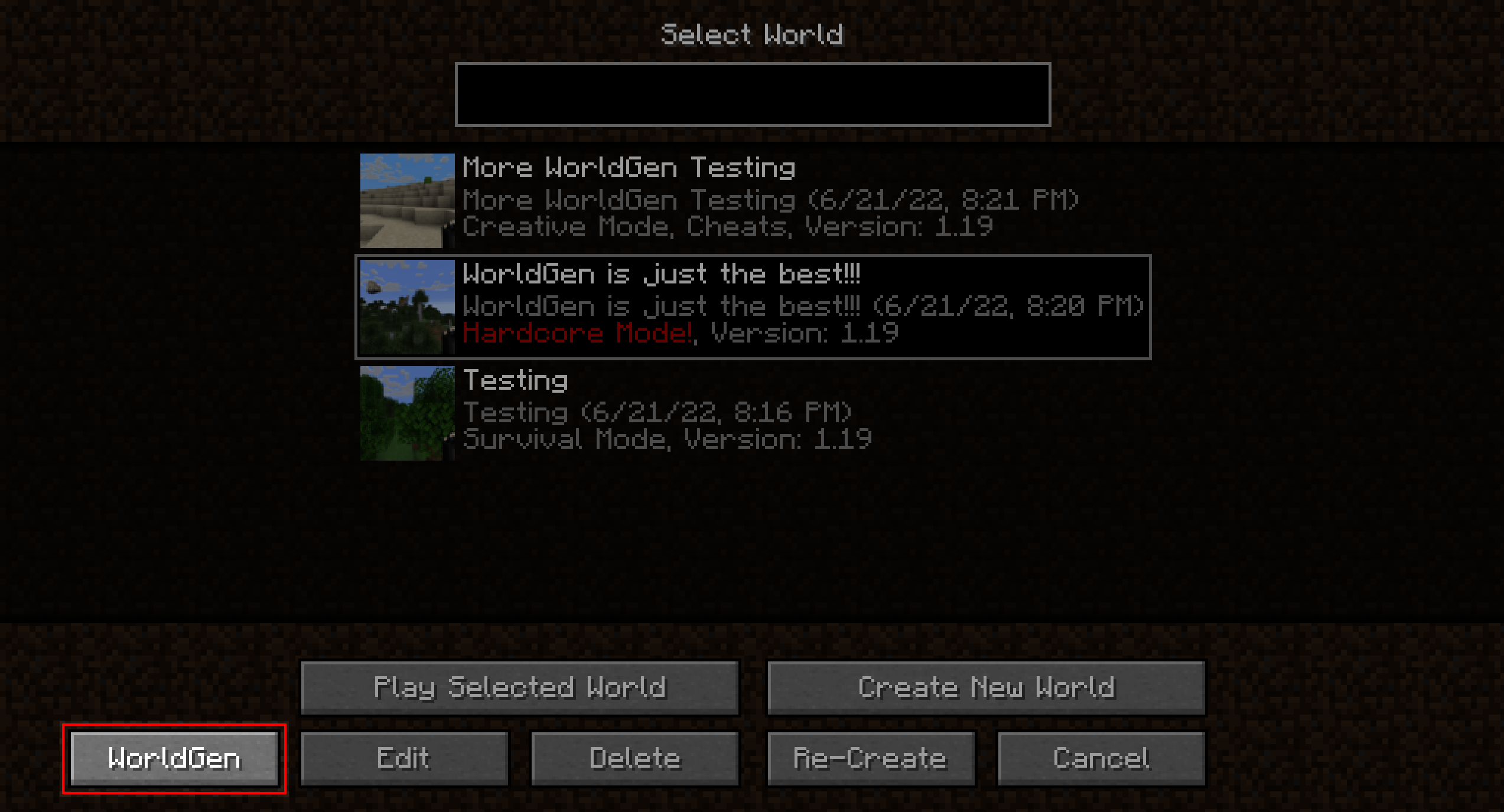
WorldGen can be used to generate more chunks for an existing World. Simply select the world you want to expand from the World Selection screen and press the "WorldGen" button as seen below:
By default, existing chunks will not be overwritten and only new ones will be generated.
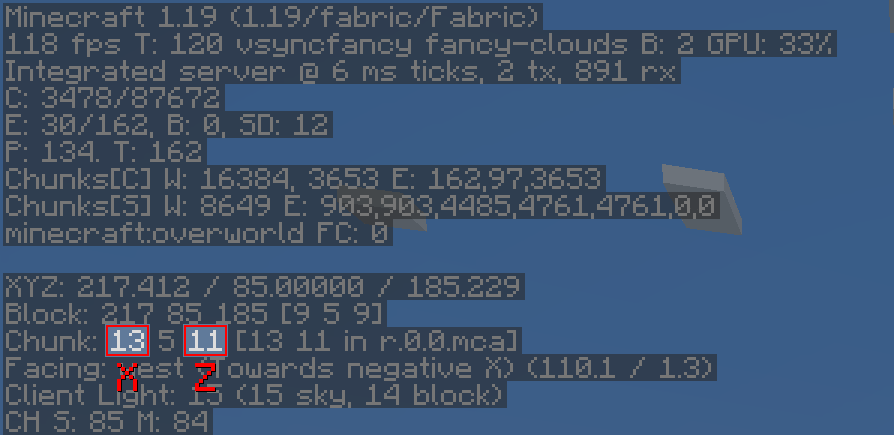
Also, please note that WorldGen uses chunk coordinates and not block coordinates! Since each Chunk
measures 16x16 blocks from a top-down view, you can easily convert between block and chunk coordinates by multiplying / dividing
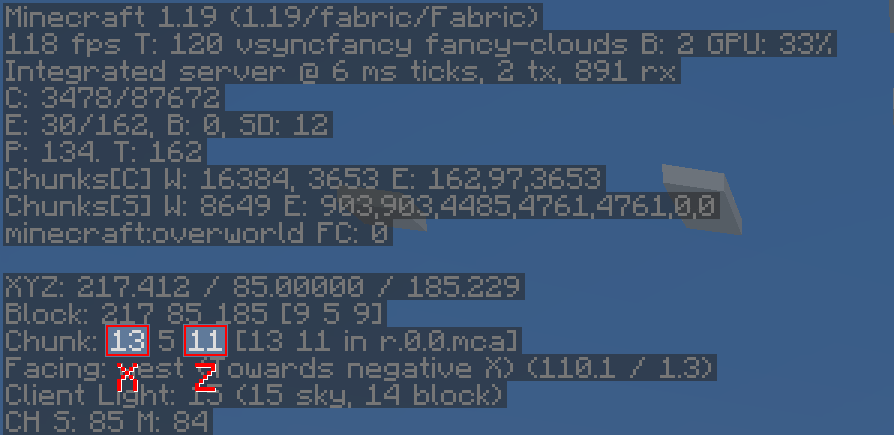
by 16. You can also find the current chunk position with the F3 debug menu:
It is currently not possible to use WorldGen directly from the "Create New World" screen. Instead, you have to first create the world normally, save and quit, and then open the world with WorldGen.
Furthermore, we recommend storing your world on an SSD (at least for running WorldGen). Using a hard drive can lead to scenarios where new chunks are generated faster than previously generated chunks can be saved. This can cause out-of-memory errors, since more and more chunks will accumulate in RAM as time goes on. Additionally, the performance of the generator itself may be negatively affected.
Although we consider WorldGen to be stable, it is recommended to back up your world before using this mod. We are not responsible if you lose your world because you ran into a bug!
Recommended settings
When using WorldGen, there is no real upper limit on how many chunks can be generated.
However, we do not recommend using a radius of more than 512 chunks (which would be 8192 blocks in each direction).
How it works
In contrast to other existing chunk pre-generation methods our mod does not require a full Minecraft server to be running. Instead, a lightweight internal server is used to generate the chunks efficiently.
This has the advantage of having a dedicated GUI and allows multithreading. On the downside, the world must be opened in a Minecraft client and cannot be loaded elsewhere while the chunks are being generated with WorldGen.
Supported version
This table shows the current support status for the Minecraft version.
1.20.x: Supported1.19.x: No future updates1.18.2: No future updates
Note: For both 1.19.1 and 1.19.2 Use the WorldGen 1.19.x version. However, for Minecraft 1.19.3 and above the specific WorldGen version for that specific Minecraft release is required!
FAQ
Q: The progress screen does not fit and is cut off!
A: Try reducing the GUI scale in the Minecraft video options until it fits
Q: How do I center the square / rectangle / circle around my current position?
A: Click on the square button on the right of the Center chunk selection row. This will automatically load the last position of the player.
Q: Will Minecraft versions before 1.18.2 be supported?
A: No.
Q: How do I reset chunks to their original state?
A: First of all: BACK UP YOUR WORLD! Afterwards: In the advanced WorldGen settings enable the "Please allow me to break my world!" checkbox, then enable "Override existing chunks". Also, we recommend using the "Mode: Coordinates" in the main menu to reduce the chance of resetting chunks you don't want to!
Q: How do I make a perimeter / replace all blocks in chunks with air?
A: First of all again: BACK UP YOUR WORLD! Afterwards: In the advanced WorldGen settings enable the "Please allow me to
break my world!" checkbox. Then, set "Max. chunk status" to structure_starts. Next, enable "Override
existing chunks". Finally, set "Fake chunk status" to full.
The generation will stop early and save the chunk as a fully generated one.
The "Max. chunk status" option allows stopping at different stages of generation, allowing for experimentation.
Mod incompatibilities
This mod should be compatible with most mods (including those adding new biomes and dimensions). However, mods that interfere with the Minecraft world generation process might pose a problem.
Currently known incompatible mods
- Starlight: Chunks generated with WorldGen will have no lighting
Acknowledgments
Many thanks to the following projects for supporting open source development:
- GitHub for free code hosting
- The Java profiler - JProfiler for providing a profiling tool

WorldGen
WorldGen is a mod for pre-generating Minecraft worlds, with a main focus on speed.
Installation
Just download the latest WorldGen JAR file for your exact Minecraft version.
Additionally, always ensure that you are using the correct version for your modloader (Fabric/Forge).
Then save the downloaded jar to the mods folder of your Minecraft instance.
Finally, if you are on Fabric you also need to download the Fabric API.
Usage
WorldGen can be used to generate more chunks for an existing World. Simply select the world you want to expand from the World Selection screen and press the "WorldGen" button as seen below:
By default, existing chunks will not be overwritten and only new ones will be generated.
Also, please note that WorldGen uses chunk coordinates and not block coordinates! Since each Chunk
measures 16x16 blocks from a top-down view, you can easily convert between block and chunk coordinates by multiplying / dividing
by 16. You can also find the current chunk position with the F3 debug menu:
It is currently not possible to use WorldGen directly from the "Create New World" screen. Instead, you have to first create the world normally, save and quit, and then open the world with WorldGen.
Furthermore, we recommend storing your world on an SSD (at least for running WorldGen). Using a hard drive can lead to scenarios where new chunks are generated faster than previously generated chunks can be saved. This can cause out-of-memory errors, since more and more chunks will accumulate in RAM as time goes on. Additionally, the performance of the generator itself may be negatively affected.
Although we consider WorldGen to be stable, it is recommended to back up your world before using this mod. We are not responsible if you lose your world because you ran into a bug!
Recommended settings
When using WorldGen, there is no real upper limit on how many chunks can be generated.
However, we do not recommend using a radius of more than 512 chunks (which would be 8192 blocks in each direction).
How it works
In contrast to other existing chunk pre-generation methods our mod does not require a full Minecraft server to be running. Instead, a lightweight internal server is used to generate the chunks efficiently.
This has the advantage of having a dedicated GUI and allows multithreading. On the downside, the world must be opened in a Minecraft client and cannot be loaded elsewhere while the chunks are being generated with WorldGen.
Supported version
This table shows the current support status for the Minecraft version.
| Minecraft Version | Status |
|---|---|
1.20.x |
Supported |
1.19.x |
No future updates |
1.18.2 |
No future updates |
Note: For both 1.19.1 and 1.19.2 Use the WorldGen 1.19.x version. However, for Minecraft 1.19.3 and above, the specific WorldGen version for the Minecraft release is required!
FAQ
Q: The progress screen does not fit and is cut off!
A: Try reducing the GUI scale in the Minecraft video options until it fits
Q: How do I center the square / rectangle / circle around my current position?
A: Click on the square button on the right of the Center chunk selection row. This will automatically load the last position of the player.
Q: Will Minecraft versions before 1.18.2 be supported?
A: No.
Q: How do I reset chunks to their original state?
A: First of all: BACK UP YOUR WORLD! Afterwards: In the advanced WorldGen settings enable the "Please allow me to break my world!" checkbox, then enable "Override existing chunks". Also, we recommend using the "Mode: Coordinates" in the main menu to reduce the chance of resetting chunks you don't want to!
Q: How do I make a perimeter / replace all blocks in chunks with air?
A: First of all again: BACK UP YOUR WORLD! Afterwards: In the advanced WorldGen settings enable the "Please allow me to
break my world!" checkbox. Then, set "Max. chunk status" to structure_starts. Next, enable "Override
existing chunks". Finally, set "Fake chunk status" to full.
The generation will stop early and save the chunk as a fully generated one.
The "Max. chunk status" option allows stopping at different stages of generation, allowing for experimentation.
Mod incompatibilities
This mod should be compatible with most mods (including those adding new biomes and dimensions). However, mods that interfere with the Minecraft world generation process might pose a problem.
Currently known incompatible mods
| Mod | Failure |
|---|---|
| Starlight | Chunks generated with WorldGen will have no lighting |
Acknowledgments
Many thanks to the following projects for supporting open source development:
- GitHub for free code hosting
- The Java profiler - JProfiler for providing a profiling tool

Screenshots
Gallery
-
 ChunkPos How to find a chunk position
 -
 Entrypoint Main entrypoint for the mod
-
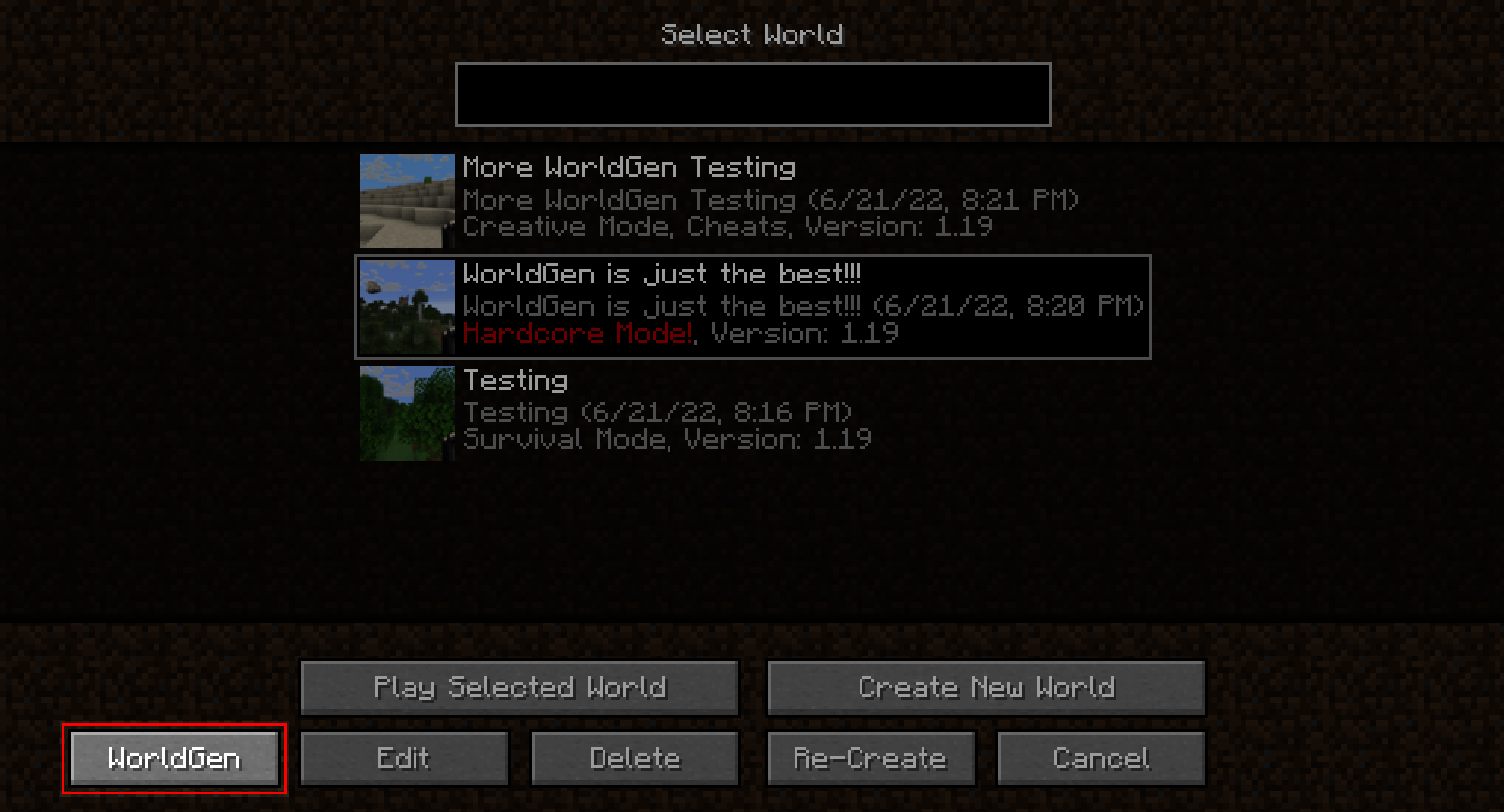 Entrypoint Main mod entry point
 -
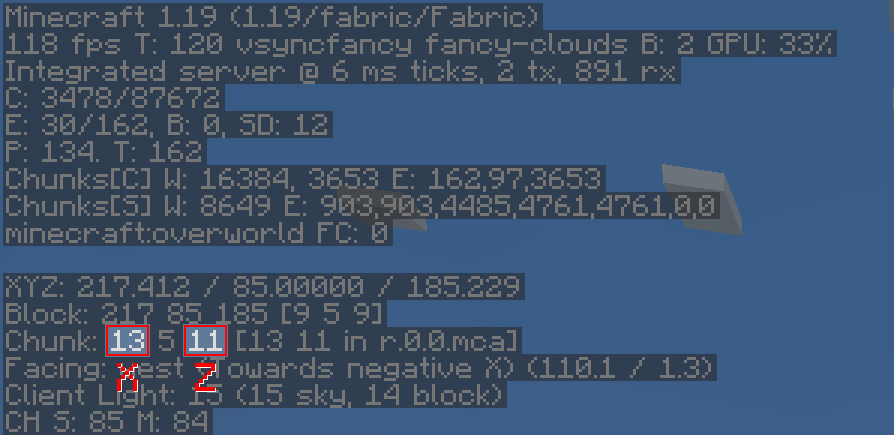 ChunkPos How to get a chunk position
Versions
Files
Relations
Project Relations
More like this
Similar Mods
Suggestions use data such as tags, dependencies, dependents, descriptions, titles, and more to rank how much they overlap with this mod.
On ModDex
Community snapshot
By the numbers
Statistics
Want to reach Minecraft players?
We're looking for a server hosting partner to feature here and other parts of the site. Interested? Send us a message!
Get in touchGet it on
Available Platforms
On ModDex
Community snapshot
By the numbers